more
See Options
Need help? Ask our experts.
Review Summary
2026-04-25T20:00:00
Printer works well. I'm really pleased. thanks.
pete110

2026-04-25T20:00:00
Best ever setup experience
Bob P.

2026-04-24T20:00:00
Poor color qualit of print. Very slow. Screen doesn't show print option on the menue. Mobile printing worked once and stopped working. Rather frustrating experience am sorry to say.
Sanny

2026-04-21T20:00:00
Prints ok but since installing it I am inundated with pop ups I cannot get rid of.
BSP1

2026-04-17T20:00:00
HP printer
h.r.baggerley

2026-04-17T20:00:00
Easy to set up, very fast, and looks very modern.
Lilibee

2026-04-15T20:00:00
Was really easy to set up and put into service. Prints some beitiful color images and with the HP Premium plus photo paper I've also acquired spectacular stand out photographs. First class home printer!
Alan H.

2026-04-14T20:00:00
Having three black and white printers in our house, I was continually frustrated that I couldn't print colour documents such as charts, maps and quilting patterns. The HP ENVY 6155e sits in our dining room, unobtrusive by its light colour and low profile. While its slower speed doesn't suit it for high volume printing, nor does it print high quality photos, but it is proving to be just what we needed - an occasional colour printer.
Juile R.

2026-04-14T20:00:00
I love it, so easy to use and convenient. No hassle at all. Quick to respond.
Ann B.

2026-04-14T20:00:00
Why would anyone want anything that did not have HP on it Terrific printer and longevity with the ink
Ken W.

2026-04-14T20:00:00
I ordered HP 6155e on line. /delivery was couple of days It is really a nice home office, printer/scanner --set up was simple and I am a senior ! print quality amazing --Just excellent value for the money
Mac

2026-04-14T20:00:00
This is a nice little printer. No problems with set up and all functions, printing, scanning, copy are easy to access and work fine. I like the instant ink feature, and of course, the three months of free ink is great. This is my third HP printer and highly recommend their products. So far, I have never had to use customer support, so that in itself is a high rating.
Barbe S.

2026-04-14T20:00:00
what is that drying thing
donald b.

2026-04-12T20:00:00
Do not buy this. It drops the WiFi connection constantly. I tried every single troubleshooting recommendation. Of course I couldn't get a human being on the phone to help out. I finally gave up and bought a USB port to connect to my computer and it lasted for about 10 days and it stopped printing completely. I'm throwing it in the trash and buying a Canon or Brother.
Elizabeth B.

2026-04-11T20:00:00
everything in one room perfect
sanquintin

2026-04-11T20:00:00
Nice looking, quiet and reliable!
April a.

2026-04-04T20:00:00
works well
mustangron

2026-04-04T20:00:00
Why is the power switch on the back of the machine?
Wretched G.

2026-04-03T20:00:00
Does it all. ALL IN ONE
Bevajane

2026-04-02T20:00:00
I've used the printer 5 times, already got a message that the ink was low. Ink was included with the new printer. And I'm suppose to get more free ink but I guess I have to get back in touch with HP!
Would r.

2026-03-31T20:00:00
This printer is so user friendly and quiet.
Wigfield

2026-03-28T20:00:00
Disappointed, it replaced my envy 5000series, the hook up was very difficult the copier is extremely slow and I really do not see quality and definition of copies like it should be
Linda C.

2026-03-27T20:00:00
The QR code is displayed to finish install. installing on a PC does not allow reading QR code like a iPhone. The SW from HP or Microsoft on PC should complete install with NO QR code link. I got it to work so I ignore the QR code display that comes up all the time. Also uses #68 ink cartridge...there are thousands of ink cart from HP why a NEW one for each new printer. Also new cart requires running alignment print out. There should be a cart centering sensor that aligns internal without alignment page being printed and scanned.
EdPaul

2026-03-27T20:00:00
This is my second HP Envy printer. Set up was easy although I had to switch to the mobile app from my laptop to finish the setup. The wifi was doing good but after 3 weeks, it was disconnecting. I had to do a reset and re-install the printer. Print quality is great and the instant ink is good.
Paul 0.

2026-03-25T20:00:00
The only reason I gave my HP Envy 6166e AllinOne! three stars is I have been unsuccessful with establishing my email address as a default, a send to, or an email. I have followed directions on how to set and apply this necessary feature but unfortunately it has not worked.
Jacqueline N.

2026-03-24T20:00:00
My old HP Envy printer lasted several years and I dreaded making any decisions for a new one. I called HP online and I received excellent advice and help. I was worried that I might be paying more than what a BIG BOX STORE might charge. I checked and the printer was right in the same ballpark as HP's costs. I was able to keep my Ink Program and the new cartridges arrived promptly. Thx, HP for your service.
Kathleen B.

2026-03-24T20:00:00
newly updated printer
TJ B.

2026-03-21T20:00:00
Love the upgrade. It was a very easy to set up. They instructions were well explained with visual and text. It prints a lot faster than my previous hp printer.
Lva33

2026-03-21T20:00:00
Easy printing
OSUMOM

2026-03-21T20:00:00
Printer Great Setup Nightmare
CPWebster

Accidents happen where life happens. Protect your favorite Adorama products and purchase a protection plan to stay covered from accidental damage, mechanical or electrical failure, and more.
If we can’t fix it, we’ll replace it at no additional cost.
Protect your product from drops, spills, and more.
Enjoy your gear without fear. We have you covered!
When regular use of your product over time results in mechanical or electrical failure.
We will never charge you a deductible after the purchase of a plan.
Our claims process is simple & easy and our customer service team is happy to help.
Adorama Protect powered by Extend is available for purchase to customers in the United States. Not available for purchase Internationally or in U.S. Territories.
Browse our FAQ
White
Print, copy, scan, mobile fax
Black (ISO, laser comparable): Up to 10 ppm
Color (ISO, laser comparable): Up to 7 ppm
Black: Up to 1200 x 1200 rendered dpi (when Printing from a computer)
Color: Up to 4800 x 1200 optimized dpi color (when printing from a computer on selected HP photo papers and 1200 input dpi)
Up to 1000 pages
100 to 400
HP Thermal Inkjet
2.4" (6.09cm) Diagonal Color Capacitive Touchscreen (320 x 240)
800 MHz
2x (1 each black, tri-color)
HP 68 Black Original Ink Cartridge (160 pages yield) (7FP21TN)
HP 68 Tri-Color Original Ink Cartridge (120 pages yield) (7FP20TN)
HP 68e EvoMore Black Original Ink Cartridge (320 pages yield) (7FP22TN)
Pigment-based (black)
Dye-based (color)
HP PCL 3 GUI
HP PCLm (HP Apps/UPD)
PJL (Printer Job Language)
URF (AirPrint)
No
1
1
HP app
Apple AirPrint
Chrome OS
HP Print Service Plugin (Android printing)
Mopria-certified
Mopria Print Service
1x Hi-Speed USB 2.0 (device)
1x Wi-Fi 802.11a/b/g/n/ac, dual band
Yes
256 MB DDR3
No
macOS 12 Monterey
macOS 13 Ventura
macOS 14 Sonoma
macOS 15 Sequoia
Microsoft Windows 11, 10: 32-bit or 64-bit, 2 GB available hard disk space, Internet connection, Microsoft Internet Explorer or Edge
Windows 11
Windows 10
macOS 12 Monterey
macOS 13 Ventura
macOS 14 Sonoma
macOS 15 Sequoia
Linux
Standard: Up to 100 sheets input tray
Standard: 25-sheet output tray
Automatic
Up to 10 envelopes
Yes, Up to 8.5 x 12" (216 x 305mm)
Letter: 3 x 5", 4 x 6", 5 x 7", 8 x 10"
No. 10 envelopes: 5 x 5", 4 x 12"
Simplex: 3 x 5" to 8.5 x 12"
Duplex: 3 x 5.5" to 8.5 x 11.7"
Plain Paper
HP Photo Papers
HP Matte Brochure or Professional Paper
HP Matte Presentation Paper
HP Glossy Brochure or Professional Paper
Other Photo Inkjet Papers
Other Matte Inkjet Papers
Other Glossy Inkjet Papers
Plain Paper, Light/Recycled
20 lbs
Plain paper: 16 to 24 lbs
HP envelopes: 20 to 24 lbs
HP cards: up to 53 lbs
HP photo paper: up to 80 lbs
Flatbed, ADF
JPG
Basic PDF
PNG
TIF
HEIF
Up to 1200 x 1200 dpi
Up to 1200 dpi
Maximum: 8.5 x 11.7"
Maximum: 8.5 x 14"
Standard, 35 sheets
Everyday scan (scan to PDF)
Scan to email
Scan to email (from software)
Scan to email (PDF, JPG)
Scan to email (via printer control app)
Scan to file (from software)
Scan to file (PDF, JPG)
Scan to PC
Scan to PC (PDF, JPG)
Scan to HP Cloud
PDF
JPG
TIF
Black Text: Up to 300 x 300 dpi
Color text and graphics: 300 x 300 dpi
Via HP app
Maximum: Up to 99 copies
Yes, mobile fax (send only)
Input voltage (WW): 100 to 240 VAC (+/- 10%), 50/60 Hz, 700mA
Input voltage (India): 200 to 240 VAC (+/- 10%), 50/60Hz (+/- 3Hz), 400mA
4.25 Watts (Ready)
1.90 Watts (Sleep)
0.175 Watts (Off)
IT ECO Declaration
EPEAT Gold registered
41 to 104 Degree F (5 to 40 Degree C)
25 to 75% RH
HP Printer Software
No, please purchase USB cable separately
Recyclable through HP Planet Partners
Forest First product with HP+
60% post-consumer recycled plastic
Dynamic security enabled printer
Yes, Built-in Wi-Fi 802.11a/b/g/n/ac
Thailand
17.05 x 14.21 x 6.73" (43.31 x 36.09 x 17.09cm)
Maximum: 17.05 x 20.19 x 7.05" (43.31 x 51.28 x 17.91cm)
13.5 lbs (6.12kg)
197029817617
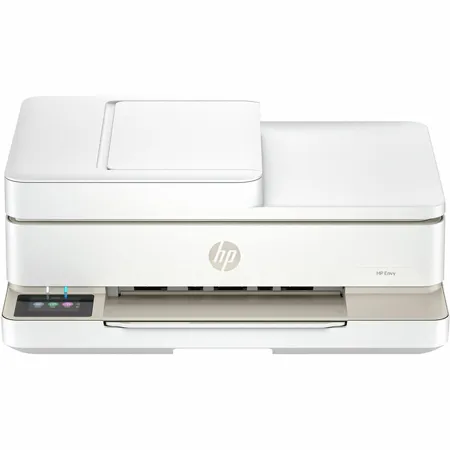
Elevate home printing with America's most trusted printer brand. HP's wireless all-in-one color photo printer, with automatic document feeder and the easiest-to-use print app, offers vivid scanning, copying, duplex printing, and borderless photos.
For home printing users seeking a wireless all in one color photo printer to print, scan and copy vibrant documents and borderless photos.
This printer is intended to work only with cartridges that have new or reused HP electronic circuitry, and it uses dynamic security measures to block cartridges using modified or non-HP circuitry. Periodic firmware updates will maintain the effectiveness of these measures and block cartridges that previously worked. Reused HP electronic circuitry enables the use of reused, remanufactured, and refilled cartridges.
This is an HP+ enabled printer. Choose HP+ at product setup to activate benefits. HP+ requires an HP account, ongoing connection to the internet, and exclusive use of Original HP Ink cartridges for the life of the printer.
High-quality documents and photos every time
Print documents and borderless photos that look like they do on your screen with HP's true-to-screen tech. Customize the backs of photos for personalized cards with HP's exclusive automatic 2-sided photo printing.
The easiest printing experience
Smoothly navigate printing with HP's most intuitive printer color touchscreen. Get Wi-Fi that actually works, automatically reconnecting if lost, with HP's dual-band, self-healing Wi-Fi. Effortlessly set up, print, scan and copy from your phone or laptop with the easiest-to-use print app. Work quickly and hands-free - the 35-page auto document feeder helps you easily scan and copy multiple pages.
Sleek sustainable design
Modernize your space with HP's sleek, compact printer, seamlessly complementing your workspace or living area. Choose an HP printer with a sustainable design, helping to reduce waste - made with 60% recycled plastic.
Perfect for home
High-quality everyday home printing
Household documents, homework, borderless photos
35-sheet auto document feeder
Print true-to-screen documents and photos
3 Months of Free Ink
Includes 3 months free subscription for Instant Ink delivery service
Ink delivered only when you need it
Shipping and recycling included
After 3 months, monthly fee charged automatically unless cancelled.
Perfectly formatted prints with HP AI
HP AI easily removes unwanted clutter from web pages like ads, logos so you get perfectly formatted prints, every time. Requires Windows 11.
Remove unwanted content
Instead of printing ink-wasting ads or odd layouts, you get just clean, perfectly formatted prints.
Reduce wasted pages
Cut 10 pages down to 2. HP AI formats web content to print only what you need and save paper.
Minimize ink usage
Print only what you need and save ink (or toner) for what matters next.
Features
Vivid color printing for all your document and photo needs
Print documents and photos that look like they do on your screen with HP's true-to-screen tech
Easily set up, print, scan and copy from your phone or laptop with the easiest-to-use print app
Customize the backs of photos for personalized cards with HP's automatic 2-sided photo printing
Stay connected with dual-band, self-healing Wi-Fi - automatic reconnecting - or via USB
Easy printing and navigation with HP's most intuitive printer color touchscreen






