Just Reduced

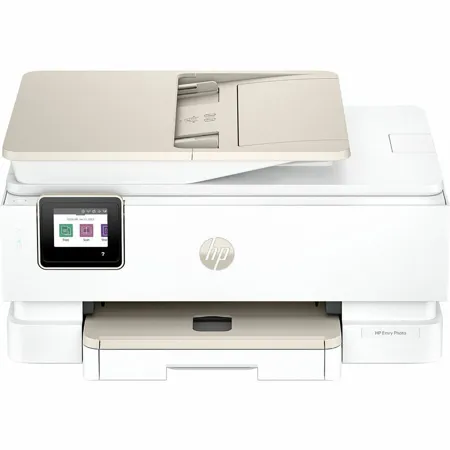
HP Envy Photo 7975 Wireless Duplex All-in-One Color Thermal Inkjet Printer

SKU: IHP7975 MFR: B63K3A
$159.99
$239.99
Save: $80 (33%)
Earn VIP Reward Points

Key Features

  • Effortlessly print, scan, and copy with this versatile HP Envy Photo all-in-one printer.
  • Enjoy vibrant, high-quality photo prints and crisp documents for all your creative projects.
  • Stay connected with seamless wireless printing from your devices using HP's advanced technology.
  • Boost productivity with automatic duplex printing, saving time and paper for busy users.
  • Manage tasks easily using the intuitive 2.7" color touchscreen display on this thermal inkjet printer.
  • Experience reliable performance and convenient mobile printing options for your home or office needs.
See More Product Details
Ships from Manufacturer?
Free Shipping

See Options

1

Need help? Ask our experts.

Overview
Compare
Specs
Protection

Reviews about this item

Review Summary

2026-04-26T20:00:00

Rated 5 out of 5

HP 7579

I like the printer, but I am having problems with some of the programs I am using with it.(Word and PDF Pro)

Kelly S.

2026-04-20T20:00:00

Rated 5 out of 5

A true winner for me!

It is smooth, quiet and efficient with quick response despite my WIFi itself not being very strong.

Cherie M.

2026-04-18T20:00:00

Rated 5 out of 5

Best printer I've ever owned

This is this is the best printer I've ever owned. I really like the document feeder and even though I don't have a fax machine I am able to fax through this printer. The print quality is excellent.

rbt55

2026-04-16T20:00:00

Rated 5 out of 5

HP ENVY Inspire 7975e

No problem getting it to work with my equipment even though they are older apple products. Quiet and fast. I haven't printed a photo yet so I can't comment on that. Definitely recommend it.

Ken S.

2026-04-05T20:00:00

Rated 4 out of 5

Not to hard to setup

Nice update to my old one

Do r.

2026-04-02T20:00:00

Rated 3 out of 5

Paper receiving tray

The paper receiving tray should automatically extend to receive the printed paper. You have to manually pull out the tray.

Stanley’s B.

2026-04-02T20:00:00

Rated 5 out of 5

Needs work

AI set-up worked great. Chat line was not so great. Needed better instructions, If you need to click a icon twice say so.

GeorgeB59

2026-03-31T20:00:00

Rated 1 out of 5

DISAPPOINTMENT PERSONIFIED!

I AM WORKING ON GENEALOGY AND THEREFORE PRINT A MULTITUDE AO PHOTOS! ACCORDING TO THE REVIEW I READ ON THIS PRINT; IT WAS SUPPOSED TO DO AN EXCELLENT JOB WHEN COPYING PHOTOS, BIGGEST PREFABRICATCATION I'VE READ IN YEARS!!! THE FIRST HP PRINTER I OWNED MORE THAN 12 YEARS AGO GAVE A BETTER QUALITY ON COPING PHOTOGRAPHS THAN DOES THIS 7975!!! WHAT A DISAPPOINTMENT!!!

SANDRA J.

2026-03-26T20:00:00

Rated 4 out of 5

Printer just okay

On my old printer I did not have to jump up to pull out the paper tray to catch the printed sheets and being able to insert my SDHC card from my camera to print to pictures.

GranFC

2026-03-24T20:00:00

Rated 1 out of 5

Former customer

HP support is horrible. I called several times and each time got hung up on. When i called back I told support that I was hung up on and asked to speak with management. I was told management didn't want to speak with me. I should just return the laptop and printer.

Former w.

2026-03-24T20:00:00

Rated 5 out of 5

Love it

Awesome printer. Great quality prints.

Allan J.

2026-03-19T20:00:00

Rated 5 out of 5

Out with the older "7645" and in with the new

I am looking forward to bringing my new printer online. I still have ink for my older 7645 that I am using up. I know this new printer will do everything and more that the older one has done for me for years. I plan to bring it online in the next 2 weeks. My order process was exceptional and the delivery time was very impressive. Thank you for great Customer Service! It is very hard to find these days.

Moments B.

2026-02-19T19:00:00

Rated 5 out of 5

Change is good !

New computer, new printer.

Derose4u2hold

2026-02-11T19:00:00

Rated 5 out of 5

Great printer

This printer is great for printing, scanning, and copying. You can even print pictures. Each page it prints is clear and easy to read.

Dave G.

2026-02-10T19:00:00

Rated 5 out of 5

new printer

HP printer are getting better

joe i.

2026-02-10T19:00:00

Rated 5 out of 5

Excellence

So far, it has been excellent!

Tommy C.

2026-02-10T19:00:00

Rated 1 out of 5

Not happy

I purchased the HP Envy Photo 7975 All-in-One printer and the ordering process seemed easy at first - but it turned out not to be as smooth as expected. During checkout, I selected the paper and ink plan, but it apparently did not activate properly. After setting up the printer, I printed my first job of about 50 pages and the ink was already depleted. I assumed the ink subscription plan had kicked in and that replacement cartridges would automatically be sent - but nothing arrived. I later discovered I had to log back in and manually select and confirm both the ink and paper plans again. Because of the ink running out so quickly and the delay with the subscription setup, I haven't even been able to print any photos yet. I was in the middle of creating a journal notebook project with photos included, and I couldn't complete it due to the ink issue. Now I'm stuck waiting even longer for supplies. Overall, the printer setup and subscription enrollment process needs to be clearer and more reliable. It caused delays and frustration right out of the gate.

AToni

2026-02-06T19:00:00

Rated 2 out of 5

Poor connection

Will not stay connected to the wifi evan with a satellite 8in. From it

Fireball35

2026-02-04T19:00:00

Rated 5 out of 5

Efficient printer

Great printer all in one printer. It's efficient at printing large images and graphics. I got more ink through the HP subscription. Through WiFi, it can detect ink or paper levels for automatic refills. It's large, so you need some extra space on a desk. It's easy to use; just navigate through the screen or print straight from a computer. Everything is straightforward on the HP Envy photo 7975.

purplerose20

2026-02-04T19:00:00

Rated 5 out of 5

Efficient inkjet printer

This is a very good inkjet printer. It's very efficient and was easy to install and connect to WiFi very easily. The quality of the printer is very good. We love it. It has been working very well for the last few months. I hope the ink does not dry up. If needed I will write another review after 6 months.

SujalaM

2026-02-02T19:00:00

Rated 5 out of 5

Printer HP Envy Photo 7975 AIO Printer

Love my new printer it prints amazing in color and also in black and white

Nallelys R.

2026-01-28T19:00:00

Rated 5 out of 5

Quality printing

I have been using the HP Envy Photo 7975 and I'm very impressed with how easy I set it p and printed my documents. Scanning was also very nitid and clear. It a big win that I set it up to my wifi.

Marjb3

2026-01-26T19:00:00

Rated 5 out of 5

Quality print

I purchased the HP Envy 7975 to upgrade my current printer for my craft business. I wanted a printer with a better print quality for colored pictures. I must admit, the quality is amazing! My pictures come out professionally done! I love how I can print transfers, photos, stickers, etc. This printer has really enhanced my business. I won't by another. I prints quietly and fast. I love the design and color. Setup was easy and took less than 15 minutes.

Deemark31

2026-01-20T19:00:00

Rated 5 out of 5

Color Output Is Terrific!

The printer prints high quality, beautifully-illustrated pages and works quickly, quietly and efficiently. I really love that I can print on both sides with no issues or hiccups. Had no trouble hooking it into my PC/wifi system. Hope it lasts a very long time.

WrenStar

2026-01-19T19:00:00

Rated 5 out of 5

Easy Breezey

Set up was a breeze and I love that I can print from my phone! I also, like the many templates available and can't wait to try them.

Ericka B.

2026-01-17T19:00:00

Rated 4 out of 5

Nice printer

Only have been using my new printer for a short while, but, so far so good. A few minor problems with paper jams, but that is to be expected. I have printed, scanned and copied a few things. Still learning and getting to know how it ticks.

Ed H.

2026-01-08T19:00:00

Rated 3 out of 5

I hope you don't need to scan anything

The print function worked fine, once set up. However the scan function cannot locate my computer, even though I just printed wirelessly from it. I even tried directly connecting and nothing, updated all drivers as well. I have had this issue before with HP computer and HP printer. You would think it would be plug and play....

Darryl2122

2026-01-06T19:00:00

Rated 3 out of 5

New vs old

My old HP printer 7800 work much better than the newer 7975 printer. On the 7800 printer the slide catcher for the printed paper would automatically open, the 7900 doesn't. The 123456-auto activation to print is slower than the 7800. At times the printer would print half a page, and it would stop.

Mary H.

2026-01-06T19:00:00

Rated 4 out of 5

My Envy 7975

So far so good with setup. Easy to use. Wish ink cartridges were larger. Black and white prints great. Have to do more color to judge it. Just did some prints for a friend's business. They are awesome!

chifrk

2026-01-05T19:00:00

Rated 1 out of 5

Envy Photo 7975

Absolutely worst copier I ever owned. Can't print thicker paper for calendars. Even on regular printing i run a few sheets and have to shut it off.

Waste t.

Select a plan in the Add Protection section above and purchase with this product by clicking “Add to Cart”.

image-protection

TRUSTED PROTECTION PLANS, EXCEPTIONAL SERVICE.

Invest In Your Gear and Peace Of Mind!

Accidents happen where life happens. Protect your favorite Adorama products and purchase a protection plan to stay covered from accidental damage, mechanical or electrical failure, and more.

Repair or Replacement

Repair or Replacement

If we can’t fix it, we’ll replace it at no additional cost.

Accidental Damage

Accidental Damage

Protect your product from drops, spills, and more.

Peace of Mind

Peace of Mind

Enjoy your gear without fear. We have you covered!

Malfunction Protection

Malfunction Protection

When regular use of your product over time results in mechanical or electrical failure.

Zero Deductible

Zero Deductible

We will never charge you a deductible after the purchase of a plan.

Customer-Focused Support

Customer-Focused Support

Our claims process is simple & easy and our customer service team is happy to help.

Adorama Protect powered by Extend is available for purchase to customers in the United States. Not available for purchase Internationally or in U.S. Territories.

HP Envy Photo 7975 Specifications

  • Color

    White

  • Functions

    Print, Scan, Copy, Photo

  • Print Speed

    Black (ISO, laser comparable): Up to 15 ppm
    Color (ISO, laser comparable): Up to 10 ppm

  • First page out

    Black (ready): As fast as 18 sec
    Color (ready): As fast as 20 sec

  • Resolution

    Black: Up to 1200 x 1200 rendered dpi
    Color: Up to 4800 x 1200 optimized dpi color (when printing from a computer and 1200 input dpi)

  • Monthly duty cycle

    Up to 1,000 pages

  • Recommended monthly page volume

    300 to 400

  • Print Technology

    HP Thermal Inkjet

  • Display

    2.7" (6.85cm) Diagonal Color Capacitive Touchscreen

  • Number of print cartridges

    2x (1 each black, tri-color)

  • Replacement cartridges

    HP 64 Black Original Ink Cartridge (200 pages yield) (N9J90AN)
    HP 64 Tri-color Original Ink Cartridge (165 pages yield) (N9J89AN)
    HP 64XL Black Original Ink Cartridge (600 pages yield) (N9J92AN)
    HP 64XL Tri-color Original Ink Cartridge (415 pages yield) (N9J91AN)

  • Print languages

    HP PCL 3 GUI

  • Paper trays

    Standard: 2 (Main and Photo Trays)

  • Mobile Printing Capability

    HP app
    Apple AirPrint
    Chrome OS
    Mopria Print Service
    Mopria-certified
    HP Print Service Plugin

  • Connectivity

    Standard:
    1x USB 2.0 client
    1x Wi-Fi 802.11a/b/g/n/ac, dual band
    Wi-Fi 2.4/5Hhz

  • Memory

    Standard: 256 MB DDR3

  • Minimum system requirements

    macOS 15 Sequoia, macOS 14 Sonoma, macOS 13 Ventura
    Internet required
    Windows 11, Windows 10 32 bit or 64 bit
    2GB available hard disk space, Microsoft Internet Explorer or Edge

  • Compatible operating systems

    Windows 11
    Windows 10
    macOS 13 Ventura
    macOS 14 Sonoma
    macOS 15 Sequoia
    Linux

  • Paper handling input

    Standard: 125-sheet input tray, 15 sheet photo tray, 35-sheet ADF

  • Paper handling output

    Standard: 60-sheet output tray

  • Duplex printing

    Automatic

  • Envelope input capacity

    Up to 5 envelopes

  • Borderless printing

    Yes, up to 8.5 x 11" (216 x 297mm)

  • Finished output handling

    Sheetfed

  • Finished output handling

    Sheetfed

  • Media sizes custom

    Main Tray: 3.85 x 8.5" to 5 x 14"
    Photo Tray: No custom sizes

  • Media types

    Plain Paper
    HP Photo Papers
    HP Matte Brochure or Professional Paper
    HP Matte Presentation Paper
    HP Glossy Brochure or Professional Paper
    Other Photo Inkjet Papers
    Other Matte Inkjet Papers
    Other Glossy Inkjet Papers, Plain Paper, Light/Recycled

  • Recommended media weight

    18 to 22 lbs

  • Supported media weight

    16 to 80 lbs

  • Scanner type

    ADF
    Flatbed

  • Scan file format

    JPG, BMP, TIFF, PDF, PNG

  • Scan resolution

    Hardware: Up to 1200 x 1200 dpi
    Optical: Up to 1200 dpi

  • Scan size (flatbed)

    Maximum: 8.5 x 11.7"

  • Scan size (ADF)

    Maximum: 8.5 x 14"

  • ADF Capacity

    Standard, 35 sheets

  • Digital sending features

    Scan to PC

  • Digital send file Formats

    PDF
    TIF
    JPG

  • Copy resolution

    Black text: Up to 600 dpi
    Color text and graphics: Up to 600 x 600 dpi

  • Copy reduce / enlarge settings

    25 to 400%

  • Copies

    Maximum: Up to 50 copies

  • Power

    2 wire (Class 2) internal, dual mode AC/DC power supply
    100-240Vac, 50/60Hz, 0.7A input
    32V/12V (sleep)
    469mA/166mA (sleep)
    15W/2W (sleep) output

  • Power consumption

    Up to 14W (printing), 4.9W (ready), 1.02W (sleep), 0.06W (manual off)

  • Energy efficiency

    IT ECO Declaration
    EPEAT Silver registered

  • Operating temperature range

    41 to 104 Degree F (5 to 40 Degree C)

  • Operating humidity range

    20 to 80% RH

  • Software included

    HP app (Download)

  • Cable included

    No, please purchase USB cable separately

  • Sustainability Impact

    Recyclable through HP Planet Partners
    60% post-consumer recycled plastic

  • Dynamic security

    Bring out the vivid details in all your photos. Seamlessly go from printing vibrant, high-quality photos and personalized creations to everyday documents

  • Wireless capability

    Yes, built-in self-healing dual band Wi-Fi 802.11a/b/g/n/ac

  • Country of Origin

    Thailand

  • Dimensions (W x D x H)

    18.11 x 15.08 x 9.17" (46.00 x 38.30 x 23.29cm)
    Maximum: 18.11 x 20.1 x 9.17" (46.00 x 51.05 x 23.29cm)

  • Weight

    17.9 lbs (8.12kg)

  • UPC Code

    198990280394

About HP Envy Photo 7975

Bring out the vivid details in all your photos. Seamlessly go from printing vibrant, high-quality photos and personalized creations to everyday documents. Plus, simplify your work with HP AI For home printing users seeking a wireless all in one color photo printer to print, scan and copy vibrant documents and borderless photos.

High-quality home photo printing
Print documents and borderless photos that look like they do on your screen with HP's true-to-screen tech. Customize the backs of photos for personalized cards with HP's exclusive automatic 2-sided photo printing. Turn memories into stunning, high-quality prints with photo-enhanced ink for richer, more vibrant colors.

Effortless prints, endless possibilities
Smoothly navigate printing with a large intuitive printer color touchscreen. With a dedicated photo tray, easily go from printing photos to everyday documents without switching paper. Effortlessly set up, print, scan and copy from your phone or laptop with HP's best and easiest-to-use Print App.

Perfectly formatted prints with HP AI
Optimize ink usage Remove unwanted content Reduce wasted pages.

Save up to 50% on ink and never run out.
With an Instant Ink subscription, you can get ink delivered directly to your door before you run out. Save up to 50% on ink. Enroll to get ink with an automatic delivery. Get peace of mind with the flexibility to change plans or cancel anytime at no cost.

Perfect for Home
• Home printing, scanning and copying
• Premium photos and high-quality documents
• Print web pages and emails just the way you want - HP AI easily removes unwanted content
• Print high-quality photos with photo-enhanced ink

3 Months Of Free Instant Ink
Get 2,100 pages and more, worth $95 in value. Activate free trial at printer setup.

Perfectly formatted prints with HP AI
HP AI easily removes unwanted clutter from web pages like ads, logos so you get perfectly formatted prints, every time. Requires Windows 11.

Remove unwanted content
Instead of printing ink-wasting ads or odd layouts, you get just clean, perfectly formatted prints.

Reduce wasted pages
Cut 10 pages down to 2. HP AI formats web content to print only what you need and save paper.

Minimize ink usage
Print only what you need and save ink (or toner) for what matters next.

Features
• Seamlessly go from printing vibrant, high-quality photos to everyday documents
• Easily go from printing photos to everyday documents without switching paper
• Print documents and photos that look like they do on your screen
• Customize backs of photos for personalized cards with HP's auto duplex printing
• HP's most reliable dual-band, self-healing Wi-Fi
• Easily scan and copy multiple pages with the 35-page auto document feeder

HP Envy Photo 7975 Features

  • Print, scan, copy; wireless; 35-sheet ADF
  • Perfectly formatted prints with HP AI
  • Customize the backs of photos for personalized cards with HP's exclusive automatic 2-sided photo printing
  • Bonus 3 Months of Instant Ink
  • Advanced photo features
  • Print up to 15 pages per minute black, 10 pages per minute color
  • Self-healing Wi-Fi and wireless printing
  • Auto document feeder
  • Auto 2-sided and borderless printing

Warranty Information

This product has a limited warranty of 12 months.

Key Features

  • Effortlessly print, scan, and copy with this versatile HP Envy Photo all-in-one printer.
  • Enjoy vibrant, high-quality photo prints and crisp documents for all your creative projects.
  • Stay connected with seamless wireless printing from your devices using HP's advanced technology.
  • Boost productivity with automatic duplex printing, saving time and paper for busy users.
  • Manage tasks easily using the intuitive 2.7" color touchscreen display on this thermal inkjet printer.
  • Experience reliable performance and convenient mobile printing options for your home or office needs.

What's in the box:

  • HP Envy Photo 7975 Wireless Duplex All-in-One Color Thermal Inkjet Printer
  • Power Cord
  • Setup Black Original Ink Cartridge
  • Setup Tri-Color Original Ink Cartridge
  • User Manual
  • HP 1 Year Limited Warranty