more
Need help? Ask our experts.
Review Summary
2026-06-08T20:00:00
Wow! I am so impressed with the HP OfficeJet Pro 8135!. The printer came well packed and ready to go. Once packing materials were removed, I plugged in the printer. At prompt, the ink cartridges (supplied) were installed. While the printer was preparing ink, I downloaded the HP app. Paper installed in paper tray, and WiFi easily connected. WiFi connection stays connected which is a relief as I am not too tech davy. I have used the printer many times, for a variety of projects including copying, faxing, printing photos and documents, and I am very pleased with the speed and quality of print. Colors are clear and bright, and ink dries quickly. HP delivers with the Pro OfficeJet 8135!
DMZ0209

2026-06-02T20:00:00
I like this HP Office Jet Pro printer, it is really a pro as it prints like a pro! The print quality is great! I love the additional features that will allow me to scan and fax from my printer right at home. The scan tray can take several papers at a time, and I like the tedious process of using a scan app on my phone, where I have to scan one page at a time. I haven't used the fax feature yet, but I am certain it will come in handy when the need for faxing arises, and in the same way as the scan, I can upload multiple papers at a time for faxing and not one at a time. The printer is very compact, yet it has features that we had with our big printers at work. The setup part would have been awesome if not for the page alignment part that took forever. I had to turn off the printer after almost an hour of waiting before I was able to finish the setup. So if you run into any challenges similar to mine, I recommend simply turning it off and back on.
38forever

2026-05-28T20:00:00
I received the HP8135 today! Unboxing was a breeze. The printer is lightweight and easily removed from packing. The box also contained cord and ink cartridges along with setup instructions. After powering on, you simply insert paper and ink cartridges. Next the alignment was performed and that's it! Automatically connected to Wifi. The HP app was installed and I am now printing from both my desktop snd mobile devices! HOP truly makes printer install stress free! Over the next few days I eill put the printer to the test and report back
Hiwy2u

Black/White
Print, copy, scan, fax
Yes
Letter: Up to 20 ppm
Black (ISO): Up to 20 ppm
Color (ISO): Up to 10 ppm
First page out black: As fast as 15 sec
First Page Out Color: As fast as 18 sec
Black (draft): Up to 29 ppm
Color (draft): Up to 25 ppm
Print speed Black Duplex: Up to 10 ipm
Print speed Color Duplex: Up to 6 ipm
Black (best): 1200 x 1200 rendered dpi
Color (best): Up to 4800 x 1200 optimized dpi on HP Advance Photo Paper 1200 x 1200 dpi input
HP Thermal Inkjet
4x (1 each black, cyan, magenta, yellow)
Yes, on Photo & brochure only (up to 8.5 x 11" US Letter, 210 x 297mm in A4)
HP PCL3 GUI
Color Mode: Color/Grayscale using black only/Grayscale using CMYK black; Two-sided Printing: None/Flip on Long Edge/Flip on Short Edge; Pages per Sheet: 1,2,4,6,9,16; Pages per Sheet Layout: Right, then Down/Down, then Right/Left, then Down/Down, then Left; Page Border: On/Off; Print Quality: Normal/Draft/Best/Maximum dpi; Copy count; Collate; Orientation: Portrait/Landscape; Paper Size; Paper Source; Media Type
Booklet Printing: Off/Left binding/Right binding; Watermarks; Page Order: Front to Back/Back to Front; HP EasyColor: Off/Conservative/Automatic; Borderless Printing: Off/On; Presets
Flatbed; One-sided ADF / Contact Image Sensor (CIS)
Hardware: Up to 1200 x 1200 dpi
Optical: Up to 1200 dpi
JPG, BMP, TIFF, PDF, RTF, TXT, PNG
Front-panel scan, copy, HP Software, EWS, Mobile apps
ADF: 8.5 x 14" (216 x 356mm)
Flatbed: 8.5 x 11.69" (216 x 297mm)
Up to 8 ppm (200 ppi, b&w), Up to 3.5 ppm (200 ppi, color)
Smart Tasks shortcuts: 1-click customizable scan to cloud destinations, email, and print; Smart Tasks destinations: Dropbox, Google Drive, OneDrive, email recipients, print
24-bit/256
Scan to Email; Scan to USB; Scan to Computer
Black (ISO): Up to 12 cpm
Color (ISO): Up to 6 cpm
Black (draft): Up to 25 cpm
Color (draft): Up to 17 cpm
Black (text and graphics): Up to 600 dpi; Up to 600 dpi
Color (text and graphics): Up to 600 dpi
Up to 99 copies
Number of Copies; Sided; Lighter/Darker; Resize; Quality; Paper Size; Paper Type; Collate
25 to 400%
Black (best): 300 x 300 dpi
Color (best): 200 x 200 dpi
Black (standard): 200 x 100 dpi
Color (standard): 200 x 200 dpi
4 sec per page
Fax and Digital Fax - Fax to PC is available with Windows
Fax memory Letter: Up to 100 pages
Fax memory A4:Up to 100 pages
Auto fax reduction supported: Yes
Auto-redialing: Yes
Fax delayed sending: Yes
Distinctive ring detection supported: Yes
Fax forwarding supported: Yes (black only)
Fax phone TAM interface supported: No
Fax polling supported: No
Fax telephone mode supported: No
Junk barrier supported: Yes
Maximum speed dialing numbers: Not Supported
PC interface supported: Yes, HP Software support provided
Remote retrieval capability supported: No
Telephone handset supported: No
1x Ethernet
1x Hi-Speed USB 2.0 (device)
1x Hi-Speed USB 2.0 (host)
1x Wi-Fi 802.11 a/b/g/n/ac (dual band)
2x RJ-11 Fax/Modem port/phone line
Yes, via built-in Ethernet; Wireless 802.11 a/b/g/n/ac
Yes, with built-in dual-band Wi-Fi 802.11 a/b/g/n/ac and a self-heal solution
Chrome OS; Apple AirPrint; Wi-Fi Direct Printing; Mopria Certified
Standard: 256 MB
Maximum: 512 MB DDR3 SDRAM
1.2 GHz/Hard disk: No
Monthly, letter: Up to 20,000 pages
Monthly, A4: Up to 20,000 pages
Up to 800 pages
Plain Paper, HP Photo Papers, HP Matte Brochure or Professional Paper, HP Matte Presentation Paper, HP Glossy Brochure or Professional Paper, Other Photo Inkjet Papers, Other Matte Inkjet Papers, Other Glossy Inkjet Papers, Thick Plain Paper, Light/Recycled Plain Paper, HP Tri-fold Brochure Paper, Glossy
Plain Paper: 16 to 28 lbs (7.26 to 12.7kg)
Photo: 60 to 75 lbs (27.22 to 34.02kg)
Envelope: 20 to 24 lbs (9.07 to 10.89kg)
Card: 90 to 110 lbs (40.82 to 49.9kg)
Letter; Legal; Government Legal; Executive; Statement; 4 x 6"; 5 x 5"; 5 x 7"; 13 x 18cm; 8 x 10"; 10 x 15cm; L; Photo 2L; Envelope( #10, Monarch, 5.5 bar); Card (4 x 6", 5 x 8")
Tray 1:
Minimum: 3 x 5" (7.62 x 12.7cm)
Maximum: 8.5 x 14" (21.59 x 35.56cm)
Input Capacities: Up to 225 sheets Standard; Up to 10 envelopes; Up to 60 sheets; Up to 225 sheets Legal
Auto Document Feeder: Standard, 35 sheets
Output Capacities: Up to 60 sheets Standard; Up to 10 envelopes; Up to 10 sheets; Up to 60 sheets Legal
Duplex Options: Automatic (standard)
Envelope feeder: No
Standard paper trays: 1
Approx. 255 pages black, Approx. 270 pages cyan, magenta, yellow composite
HP 923 Black Original Ink Cartridge (Approx. 500 pages) 4K0T3LN
HP 923 Cyan Original Ink Cartridge (Approx. 400 pages) 4K0T0LN
HP 923 Magenta Original Ink Cartridge (Approx. 400 pages) 4K0T1LN
HP 923 Yellow Original Ink Cartridge (Approx. 400 pages) 4K0T2LN. HP EvoMore planned to be available April 2024: HP 923e EvoMore Black Original Ink Cartridge (Approx. 1,000 pages) 4K0T7LN
HP 923e EvoMore Cyan Original Ink Cartridge (Approx. 800 pages) 4K0T4LN
HP 923e EvoMore Magenta Original Ink Cartridge (Approx. 800 pages) 4K0T5LN
HP 923e EvoMore Yellow Original Ink Cartridge (Approx. 800 pages) 4K0T6LN
Actual yield varies considerably based on content of printed pages and other factors
HP Instant Ink eligible
EPEAT registered
Yes
Contains ocean-bound recycled plastic; Recyclable through HP Planet Partners; FSC Certified Packaging
2.7" (6.86cm) touchscreen control panel with CGD (color graphic display); 3 buttons: (home, help, back)
HP Printer Software
Wolf Essential Security, scan to email, HP app
Windows 11; Windows 10; macOS 11 Big Sur; macOS 12 Monterey; macOS 13 Ventura; macOS 14 Sonoma; Linux; Chrome OS
Windows 11; Windows 10; Windows Server; macOS 11 Big Sur; macOS 12 Monterey; macOS 13 Ventura; macOS 14 Sonoma; Linux; Chrome OS
PC: Microsoft Windows 11, 10: 32-bit or 64-bit; 2 GB available hard disk space; Internet connection; Microsoft Internet Explorer or Edge
Mac: Apple macOS v11 Big Sur, macOS v12 Monterey, macOS v13 Ventura; 2 GB HD; Internet required
Power supply type: Internal (Built-in) Universal Power Supply
Power requirements: Input voltage: 100 to 240 VAC (+/- 10%), 50/60 Hz
Power consumption: 4.45 watts (ready), 1.15 watts (sleep), 0.12 watts (manual-off)
Acoustic power emissions: 6.6 B(A) (printing at 16ppm)
Acoustic pressure emissions: 60 dB(A) (printing at 16ppm)
Operating temperature range: 41 to 104 Degree F (5 to 40 Degree C)
Recommended operating temperature: 59 to 90 Degree F (15 to 32.22 Degree C)
Storage temperature range: -40 to 140 Degree F (-40 to 60 Degree C)
Operating humidity range: 20 to 80% RH
Recommended humidity operating range: 25 to 75% RH
Thailand
18.12 x 13.29 x 9.17" (460.3 x 337.5 x 233mm)
Maximum: 18.12 x 20.28 x 9.17" (460.3 x 515 x 233mm)
17.6 lbs (7.98kg)
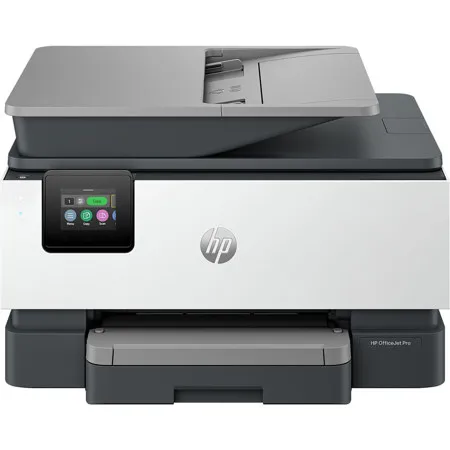
Bring professional-quality printing to your home office. HP OfficeJet Pro printers deliver consistent performance for everyday tasks, making them one of the most reliable printers around. That way, you can focus on your work-not your printer. For professionals who work from home and want a color inkjet printer that enhances their productivity, just like in the office.
This printer is intended to work only with cartridges that have a new or reused HP chip, and it uses dynamic security measures to block cartridges using a non-HP chip. Periodic firmware updates will maintain the effectiveness of these measures and block cartridges that previously worked. A reused HP chip enables the use of reused, remanufactured, and refilled cartridges
Boost daily productivity with time-saving features
Stay productive with print speeds up to 20 pages per minute (PPM). Quickly scan and copy multiple pages with the automatic document feeder. HP AI helps you simplify tasks, personalize experiences, and enhance productivity.
Professional quality, page after page
Print professional-looking documents with vibrant colors and sharp black text. Produce water-resistant, smear-resistant, and fade-resistant prints.
Save money, save time with Instant Ink
Never worry about running out of ink! With Instant Ink, you get ink delivered right to your door. Enjoy the freedom to choose a plan that fits your needs-with the flexibility to change, pause, or cancel anytime. Whether you print in full color or black & white-every page costs the same with Instant Ink.
The most reliable printers
Achieved zero jams, misfeeds, device errors, and machine malfunctions across thousands of test pages. Unlike competitors, optimized for recycled paper to boost device reliability.