38% Off

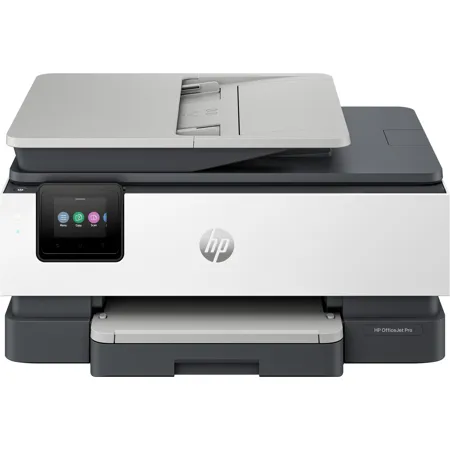
HP OfficeJet Pro 8135e Wireless Duplex All-In-One Color Thermal Inkjet Printer and HP+ 3 Months of Instant Ink

SKU: IHHPOJP8135E MFR: 40Q35A
$149.89
$239.89
Save: $90 (38%)
Earn VIP Reward Points

Key Features

  • Enjoy vibrant, professional-quality color prints with this HP OfficeJet Pro inkjet printer.
  • Boost your office productivity with fast printing speeds of up to 20 ppm for black prints.
  • Easily print from your mobile device using Apple AirPrint or the HP Smart app for convenience.
  • Reduce paper waste with automatic duplex printing, great for eco-conscious home offices.
  • This reliable all-in-one printer handles all your tasks: print, copy, scan, and even fax.
  • Save on ink costs with HP Instant Ink and get ink delivered when you're running low.
See More Product Details
Overview
Compare
Specs
Protection
Q&A

Questions & Answers

FAQ

Does the OfficeJet Pro 8135e printer support wireless printing?

Yes, the OfficeJet Pro 8135e printer supports wireless printing and is designed to work with the best print app, allowing you to print directly from your smartphone.

What kind of cartridges does this printer use?

The OfficeJet Pro 8135e printer is designed to work exclusively with cartridges that have a new or reused HP chip. It employs dynamic security measures to block the use of cartridges with a non-HP chip.

Does the printer have any eco-friendly features?

Yes, the OfficeJet Pro 8135e printer is made with at least 45% recycled plastic. Moreover, for every page you print, HP contributes to forest protection, restoration, and management. You can also recycle your Original HP ink cartridges for free through the HP Planet Partners program.

What is the Instant Ink subscription service?

The Instant Ink subscription service delivers ink right to your doorstep before you run out, saving you up to 50% on ink costs. With plans starting at just $1.49 a month, you can enjoy the convenience of automatic ink delivery and the flexibility to change or cancel your plan at any time.

Does the printer have any security features?

Yes, the OfficeJet Pro 8135e printer comes with HP Wolf Essential Security, which helps protect your home office from potential cyber threats.

Reviews about this item

Review Summary

2026-04-26T20:00:00

Rated 4 out of 5

Hp office jet8139e. printer

Works well .seems easy on ink.very clear clean printing. Find it difficult to use as an a copier as lid does not stay up unless fully opened. I found difficult to set up and when I asked for help it came from ( I realized later I think.??) 3rd party and they had me going in no time. They did insist that i down.load a whole bunch of security things and charged 200 for a year service. Note actually wanted far more ?(US $ ?) FOR 3 years. But I declined .not sure now what happens after year is up. Haven't done any pictures yet.or envelopes so can not comment. This my third HP printer.and have been more than happy with all i did sign up for ink program and i think it will work well although i do not print near as much any more

GRRonald

2026-04-25T20:00:00

Rated 3 out of 5

Respond time

The respond time for printer to start printing is longer than my HP 5660 printer.

JimmyDT

2026-04-25T20:00:00

Rated 1 out of 5

Terrible connectivity to Computer

I could never get your product set up. Was on the phone to your help line multiple times. Many hours consumeed. Had a Local computer repair company trying to get it set up and connected to computer and no luck. I had bought 2 of your printer scanners and neither worked. Bought an Epson yesterday and connected perfectly. 10 mins total

Andy W.

2026-04-23T20:00:00

Rated 3 out of 5

How do I get it set up to be wireless printer?

How do I get it to be a wireless printer?

Crazy g.

2026-04-21T20:00:00

Rated 1 out of 5

HP OfficeJet Pro 8139e

Your product doesn't work. I returned one and you sent me another instead of refunding my money. I spend over an hour on the phone with you on March 27 and no solution was provided. I want my money back.

Joe W.

2026-04-18T20:00:00

Rated 4 out of 5

Great Printer

When I was talking to tech support about my old printer, which we could not repair, the tech suggested this unit as a replacment. I told him I n eeded an AIO unit that duples printed, Duplex scanned and duples copied. The 8139e does two side print, but scan & copy are manual duplex.

allenm28

2026-04-16T20:00:00

Rated 4 out of 5

A Tale of frustration with a happy ending.

You're NOT gonna like this. First off I am an old man and I was advised by an HP rep that this printer would work with a Windows 7 laptop. I have used HP printers for 50 years and have never had such a miserable time setting one up. The problem was finding the correct drivers.The HP website was terrible with helping sort this out. I spent several hours and a couple of days with HP so called specialist technicians...no joy...I contacted an online Driver outfit...more frustration. I was about to return this printer...then in a quiet moment I pondered a thought that this particular HP printer was NOT that different than my last two HP printers....How much different can the software actually be ? So I searched out the closest model ... a HP Officejet Pro 8030 series and downloaded the drivers for that printer....And that did the trick...So this old retired industrial tradesman can still make things work. As a word of advice...there are a whole lot of us Win 7 holdouts out here...you might want to consider us as customers too. Newer is NOT always better !

Malco

2026-04-16T20:00:00

Rated 3 out of 5

Connection

Bad connection. Struggle to print. Happen all the time.

Jack7

2026-04-14T20:00:00

Rated 5 out of 5

HP All In One Colour Printer/Fax/ Copier

Fits in small space. One machine instead of three! Works great!

Bruce P.

2026-04-12T20:00:00

Rated 1 out of 5

Prints when it wants to

It doesnt compare to the Officejet 8630

EMDT

2026-04-10T20:00:00

Rated 1 out of 5

unsatisfied

one star , it works fine on 8.5 x 11 paper. thumbs down 1: It wont copy thumbs down 2: It wont print on both sides on 8.5 x 5.5 like the hp printer it replaced thumbs down 3: It wont scan. missing scan sw

sour p.

2026-04-10T20:00:00

Rated 3 out of 5

Not as good as my older one.

I thought this would be similar to the last one I owned, but I have had a few issues. The wifi does not connect as easily, when using the feeder the pages can be misaligned, and it seems like it is harder to get the pages to print properly. It's a good thing I don't have a lot of things to print or I would probably be returning it.

Teresa M.

2026-04-09T20:00:00

Rated 5 out of 5

Very good printer

This printer is working very well. It replaces a printer from another company that was constant trouble.

Jim O.

2026-04-08T20:00:00

Rated 5 out of 5

The best printer on the market

HP printer is quick, easy to use as everything is digital so you can't make a mistake because it tells you what to do all the time. The print quality is exquisite and the free ink for the year is definitely a bonus.

Deanietini

2026-04-03T20:00:00

Rated 2 out of 5

Set Up Challenging

Two stars ** for setup. We decided to replace our HP "ENVYPhoto 7855." The Pro 8139e looked like a good price option what with the HP Sale, plus "3 Months of Instant Ink for FREE." We had no idea of the challenge ahead of us in setting it up what with its 2"x11/2" screen using many new symbols which were mostly new to us. We had to depend on Google Search to finally complete the task. Compared to the ease of set up and operation of the 7855 the 8130e was a challenge. Also, the quality of the 8139e was not the quality of the sturdy 7855. Multiple entries needed to "modify" then print a #10 envelope. The HP7855 was much easier. Outside of this...every thing's alright.

Lottiero

2026-04-02T20:00:00

Rated 3 out of 5

Office Jet Pro 8135e

Much slower than my previous printer 5660.

MAHicks

2026-03-30T20:00:00

Rated 3 out of 5

HP computer doesn't connect wirelessly to this printer.

This printer only connects to a Wi-Fi 2.4 GHz network band. My HP Envy laptop computer only connects to a Wi-Fi 5 GHz network band. I have to use a printer cable to connect my HP computer to this printer

rmgsvw

2026-03-27T20:00:00

Rated 5 out of 5

quality

Great printer

artme

2026-03-26T20:00:00

Rated 4 out of 5

HP OfficeJet Pro Install Product HPSmart

My only big complaint would be for HP to disassociate HPSmart (Ink and Paper Promo) with the initial install of the printer.

CRE5

2026-03-25T20:00:00

Rated 3 out of 5

8139E

This printer can not compare to my old 8600, already had problems with driver and it seems as if the quality of this new printer does not live up to the quality of the 8600

Joe S.

2026-03-22T20:00:00

Rated 1 out of 5

Sadly it's not a good one!

I ordered this machine 2 times. One time didn't print and the second time didn't print color. I had the old model and worked amazing. I don't know what the problem is with the updated version. But sadly it's a terrible product.

Krys

2026-03-21T20:00:00

Rated 4 out of 5

Good Equipment poor setup

The printer is quieter than other models i had and it pronts and copies double sided which i love. The worst thing is the wireless setup and periodic loss of connection.

Caimito60

2026-03-21T20:00:00

Rated 5 out of 5

Effective little printer

Small but effective for small business printing

Otis A.

2026-03-20T20:00:00

Rated 5 out of 5

High Quality item, worth your time and money.

Nice and inexpensive for my needs. I'm not a professional and use this all-in-one unit for everything at home. I fully endorsed this company's products through my life and their units are now better than ever.

Nene P.

2026-03-19T20:00:00

Rated 5 out of 5

New Printer

Easy to set up and could use in minutes

Miss V.

2026-03-18T20:00:00

Rated 4 out of 5

like the printer so for but I had issue with the last printer not printing using Microsoft edge

this printer is very slow not sure why, once I hit print it takes 20 second or more to print why is that, need to print faster

Robert A.

2026-03-17T20:00:00

Rated 1 out of 5

Incorrect information.

I had been trying for days to return the printer, finally given customer service number. Called yesterday and was told the I could have the printer picked up at my address. Filled out all the documents and put all documents that was requested and put on my porch. Reason for pickup on my porch is due to my 84 and too heavy for me to take to Fedex and my being sick, lady was nice. Then I get an email to take to fedex, very unhappy. My printer and desktop are HP products.

Rosemarie R.

2026-03-16T20:00:00

Rated 2 out of 5

very hard to use!!!

very hard to use!!!

itzhak z.

2026-03-16T20:00:00

Rated 5 out of 5

Challenging

This is a great product, but I'm finding it challenging to learn how to do much more than print. I had to hire an IT tech to install it and help me through a few things that I'll probably. need to go over again.

Terry S.

2026-03-13T20:00:00

Rated 5 out of 5

super printer

Its realy a Pro 10

trickcie

Select a plan in the Add Protection section above and purchase with this product by clicking “Add to Cart”.

image-protection

TRUSTED PROTECTION PLANS, EXCEPTIONAL SERVICE.

Invest In Your Gear and Peace Of Mind!

Accidents happen where life happens. Protect your favorite Adorama products and purchase a protection plan to stay covered from accidental damage, mechanical or electrical failure, and more.

Repair or Replacement

Repair or Replacement

If we can’t fix it, we’ll replace it at no additional cost.

Accidental Damage

Accidental Damage

Protect your product from drops, spills, and more.

Peace of Mind

Peace of Mind

Enjoy your gear without fear. We have you covered!

Malfunction Protection

Malfunction Protection

When regular use of your product over time results in mechanical or electrical failure.

Zero Deductible

Zero Deductible

We will never charge you a deductible after the purchase of a plan.

Customer-Focused Support

Customer-Focused Support

Our claims process is simple & easy and our customer service team is happy to help.

Adorama Protect powered by Extend is available for purchase to customers in the United States. Not available for purchase Internationally or in U.S. Territories.

HP OfficeJet Pro 8135e Specifications

  • Functions

    Print, copy, scan, fax

  • Print Speed - Black

    Up to 20 ppm (ISO, laser comparable)

  • Print Speed - Color

    Up to 10 ppm (ISO, laser comparable)

  • Print Speed - Black (draft)

    Up to 29 ppm

  • Print Speed - Color (draft)

    Up to 25 ppm

  • Print Speed - Black (normal)

    Up to 20 ppm

  • Print speed - Color (normal)

    Up to 10 ppm

  • First page out (ready) black

    As fast as 15 sec

  • First page out (ready) color

    As fast as 18 sec

  • Resolution (black)

    1200 x 1200 rendered dpi

  • Resolution (color)

    Up to 4800 x 1200 optimized dpi on HP Advance Photo Paper 1200 x 1200 dpi input

  • Resolution technology

    HP Thermal Inkjet

  • Monthly duty cycle

    Up to 20,000 pagesDuty cycle is defined as the maximum number of pages per month of imaged output. This value provides a comparison of product robustness in relation to other HP Color InkJet devices.

  • Recommended monthly page volume

    Up to 800 pages

  • Print Technology

    HP Thermal Inkjet

  • Display

    2.7" (6.86cm) Capacitive Touchscreen CGD (Color Graphic Display)

  • Processor speed

    1.2 GHz

  • Number of print cartridges

    4 (1 each black, cyan, magenta, yellow)

  • Replacement cartridges

    HP 923 Black Original Ink Cartridge (500 pages) 4K0T3LN
    HP 923 Cyan Original Ink Cartridge (400 pages) 4K0T0LN
    HP 923 Magenta Original Ink Cartridge (400 pages) 4K0T1LN
    HP 923 Yellow Original Ink Cartridge (400 pages) 4K0T2LN

  • Compatible ink types

    Pigment-based (black and color)

  • Print languages

    HP PCL3 GUI

  • Automatic paper sensor

    No

  • Paper trays, standard

    1

  • Paper trays, maximum

    1

  • Mobile Printing Capability

    Chrome OS
    HP Smart app
    Apple AirPrint
    Wi-Fi Direct Printing
    Mopria Certified

  • Connectivity, standard

    1x Ethernet
    1x Hi-Speed USB 2.0 (device)
    1x Hi-Speed USB 2.0 (host)
    1x Wi-Fi 802.11 a/b/g/n/ac (dual band)
    2x RJ-11 Fax/Modem port/phone line

  • Security management

    SSL/TLS (HTTPS); IPP over TLS
    802.1x Authentication for Ethernet (PEAP and EAP-TLS)
    WPA2-Enterprise
    WPA3-Enterprise
    WPA2-Personal
    WPA3-Personal
    Certificates configuration
    Control panel lock
    Password protect EWS
    Unused protocol and service disablement
    Signed firmware
    Administrator settings

  • Memory, standard

    512MB

  • Minimum system requirements

    Apple macOS v11 Big Sur, macOS v12 Monterey, macOS v13 Ventura; 2 GB HD; Internet required, Microsoft Windows 11, 10: 32-bit or 64-bit; 2 GB available hard disk space; Internet connection; Microsoft Internet Explorer or Edge

  • Compatible operating systems

    Windows 11
    Windows 10
    macOS 11 Big Sur
    macOS 12 Monterey
    macOS 13 Ventura
    Linux
    Chrome OS

  • Supported network protocols

    Supported Network Protocols configurations (IPv4, IPv6); DHCPv4, DHCPv6; DHCP options: 81/RFC4702/RFC4704, 12-Hostname; 44; LLMNR; Bonjour/mDNS; LP/ APIPA (Auto IP); NetBIOS/WINS; Port9100; DNS Resolver; SNMPv1/v2; Web Services Discovery; Web Services Print; SSL/TLS (HTTPS); Password-protected network Embedded Web server; Enable/disable network ports & device features, 802.1x wireless authentication (EAP-TLS, LEAP, and PEAP) & 802.1x Wired

  • Paper handling input, standard

    225-sheet input tray
    35-sheet ADF

  • Paper handling output, standard

    60-sheet output tray

  • Duplex printing

    Automatic (standard)

  • Envelope input capacity

    Up to 10 envelopes

  • Borderless printing

    Yes, onPhoto& Brochure only(up to 8.5 x 11" USLetter, 210 x 297mminA4)

  • Finished output handling

    Sheet Feed

  • Media sizes supported

    Letter;Legal;Government Legal; Executive; Statement;4x6";5x5"; 5 x 7 "; 13 x 18cm; 8 x 10"; 10 x 15cm; L; Photo 2L; Envelope( #10, Monarch, 5.5 bar); Card (4x6",5x 8")

  • Media sizes, custom

    Tray 1: 3 x 5 to 8.5 x 14"

  • Media types

    Tray 1: Plain Paper, HP Photo Papers, HP Matte Brochure or Professional Paper, HP Matte Presentation Paper, HP Glossy Brochure or Professional Paper, Other Photo Inkjet Papers, Other Matte Inkjet Papers, Other Glossy Inkjet Papers, Thick Plain Paper, Light/Recycled Plain Paper, HP Tri-fold Brochure Paper, Glossy

  • Recommended media weight

    16 to 28 lbs (plain paper)
    60 to 75 lbs (photo)
    20 to 24 lbs (envelope)
    90 to 110 lbs (card)

  • Supported media weight

    16 to 28 lbs (plain paper)
    60 to 75 lbs (photo)
    20 to 24 lbs (envelope)
    90 to 110 lbs (card)

  • Scanner type

    Flatbed, 1-sided ADF

  • Scan file format

    JPG, BMP, TIFF, PDF, RTF, TXT, PNG

  • Scan resolution, hardware

    Up to 1200 x 1200 dpi

  • Scan resolution, optical

    Up to 1200 dpi

  • Scan size (flatbed), maximum

    8.5 x 11.7"

  • Scan size (ADF), maximum

    8.5 x 14"

  • ADF Capacity

    Standard, up to 35 sheets

  • Digital sending features

    Scan to Email
    Scan to USB
    Scan to Computer

  • Digital send file Formats

    PDF
    TIFF
    JPEG

  • Copy resolution (black text)

    Up to 600 dpi

  • Copy resolution

    Up to 600 dpi (color text and graphics)

  • Copy reduce / enlarge settings

    25 to 400%

  • Copies, maximum

    Up to 99 copies

  • Faxing

    Yes, color

  • Fax transmission speed

    4 sec per page

  • Fax memory

    Up to 100 pages

  • Fax resolution

    300 x 300 dpi

  • Speed dials, maximum number

    Not Supported

  • Broadcast locations

    20

  • Power

    Input voltage: 100 to 240 VAC (+/- 10%), 50/60 Hz

  • Power consumption

    4.45 watts (ready), 1.15 watts (sleep), 0.12 watts (manual-off)

  • Energy efficiency

    EPEAT registered

  • Operating temperature range

    41 to 104 Degree F (5 to 40 degree C)

  • Operating humidity range

    25 to 75% RH

  • Software included

    HP Printer Software

  • Sustainability Impact

    Forest First product with HP+; FSC Certified Packaging
    Contains ocean-bound recycled plastic
    45% post-consumer recycled plastic
    Recyclable through HP Planet Partners
    ENERGY STAR certified
    EPEAT registered

  • Dimensions (W x D x H)

    18.12 x 13.29 x 9.17" (46 x 33.7 x 23.2cm)
    18.12 x 20.28 x 9.17" (46 x 51.5 x 23.2cm) (Maximum)

  • Weight

    17.6 Ibs (7.98kg)

  • UPC Code

    196337163942

About HP OfficeJet Pro 8135e

How about elevating your home office setup with the OfficeJet Pro 8135e Wireless Duplex All-In-One Color Thermal Inkjet Printer This professional-grade printer, from America's most trusted printer brand, is designed to boost your productivity with its multifunctional capabilities, including printing, scanning, copying, and faxing.

This HP+ enabled printer is designed to work exclusively with cartridges that have a new or reused HP chip. It employs dynamic security measures to prevent the use of non-HP chip cartridges, ensuring optimal performance and quality. Regular firmware updates will reinforce these security measures and maintain the printer's effectiveness.

Experience seamless connectivity with the printer's dual-band, self-healing Wi-Fi that automatically reconnects, ensuring uninterrupted printing sessions. The printer also supports secure printing over VPN, making it an ideal choice for professionals working from home. With HP Wolf Essential Security, your home office is safeguarded from potential cyber threats, providing you with peace of mind.

The OfficeJet Pro 8135e is compatible with the best print app, allowing you to print, scan, copy, or fax directly from your smartphone. It also integrates with popular cloud storage platforms such as Google Drive, OneDrive, and Dropbox, making document management a breeze.

Never worry about running out of ink again with the Instant Ink subscription. This service delivers ink right to your doorstep before you run out, saving you up to 50% on ink costs. With plans starting at just $1.49 a month, you can enjoy the convenience of automatic ink delivery and the flexibility to change or cancel your plan at any time.

In line with HP's commitment to sustainability, the OfficeJet Pro 8135e is made with at least 45% recycled plastic. Additionally, for every page you print, HP contributes to forest protection, restoration, and management. You can also recycle your Original HP ink cartridges for free through the HP Planet Partners program.

Upgrade your home office with the OfficeJet Pro 8135e Wireless Duplex All-In-One Color Thermal Inkjet Printer and experience the perfect blend of productivity, convenience, and sustainability.

HP OfficeJet Pro 8135e Features

  • Supercharged performance for home office
  • Fast color print, copy, scan, fax, 2-sided prints, mobile/wireless/ethernet
  • Print up to 20 pages per minute
  • HP's most reliable Wi-Fi and HP Wolf Essential Security
  • Dynamic security enabled printer

Warranty Information

This product has a limited warranty of 12 months.

Key Features

  • Enjoy vibrant, professional-quality color prints with this HP OfficeJet Pro inkjet printer.
  • Boost your office productivity with fast printing speeds of up to 20 ppm for black prints.
  • Easily print from your mobile device using Apple AirPrint or the HP Smart app for convenience.
  • Reduce paper waste with automatic duplex printing, great for eco-conscious home offices.
  • This reliable all-in-one printer handles all your tasks: print, copy, scan, and even fax.
  • Save on ink costs with HP Instant Ink and get ink delivered when you're running low.

What's in the box:

  • HP OfficeJet Pro 8135e Wireless Duplex All-In-One Color Thermal Inkjet Printer
  • 923 Setup Black Ink Cartridge
  • 923 Setup Cyan Ink Cartridge
  • 923 Setup Magenta Ink Cartridge
  • 923 Setup Yellow Ink Cartridge
  • Power Cord
  • Setup Poster
  • User Manual
  • HP 1 Year Limited Warranty