


+1
more
more

Need help? Ask our experts.
Review Summary
2026-05-20T20:00:00
Seems to be a good printer although I haven't used it a lot yet
J W.

2026-03-02T19:00:00
easy setup
criprr56
2026-02-25T19:00:00
I was hesitant to buy this after my old reliable HP laser jet no longer had cartridges made. I thought I'd spill the ink bottles, I always dread instruction manuals written by techies, and I wanted my old printer back. But this is a jewel. Super easy to set up, wireless, and the bottles are spill- proof. I love how easy it is to run and forgiving when I can't get the paper in quick enough- it gives me time w/o a blaring blinking "you're out of time" light going on. I highly recommend.
KBrew
2026-01-10T19:00:00
Nice item with easy setup
K p.
2025-12-26T19:00:00
Setting up the printer to operate wirelessly was a bit of a problem amd the instructions could be improved. It would help if you realized some 82 yr old men still have to set up their own equipment and simple step by step directions are a God send. The printer prints color and black and white well and my wife is happy when I print her quilt patterns for her in color. Look forward to multi years without having to buy additional ink and change out cartridges. The next test will be printing out our 2025 income tax returns
Steelhead 0.
2025-12-15T19:00:00
when the rep sold it to me he failed to look at what i currently had and equal it or improve. it also cost me more with HP on sale than it would have at best buy.
wont a.
2025-10-03T20:00:00
I like the printer fine but the set-up with the HP teck was a nightmare
SSGRET
2025-08-15T20:00:00
Nice sized printer/scanner/copier. Love the idea of refill ink rather than buying cartridges. Set up was frustrating. It went fine for printing, however I had to eventually download a driver for the scanner to work. Produces good quality prints.
Srjmh
2025-08-05T20:00:00
This is an excellent printer BUT some of the paper I use is printer-compatible but 12" wide and it won't fit in the paper feeder. I wish I had realized this before I purchased it.
Susan1949
2025-02-15T19:00:00
Complete package, delivered quickly, quick set up
Crisco269
2024-09-03T20:00:00
Excellent printer easy install . Hp customer service is great ..
Montserrat W.
2024-07-23T20:00:00
I've been using our new HP Smart Tank 5103 printer for a month now. There are several features I love: 2 years worth of ink included. No need to constantly buy ink cartridges. Print quality is amazing; I've printed multiple photos already and they are definitely sharp and clear enough to use as art in my apartment. The unit is light and compact. It was very difficult to get it to connect wirelessly to my WiFi. I had to spend a lot of time over 3 days to get it to find the WiFi signal. I reset everything multiple times and finally on day 3 it found it. The printer is slow and very noisy. Since it's only me in the office, I can handle it but I really expected this high quality printer to be quieter. Overall I'm happy with the purchase; just wish a couple of things were better about it
Timluds
2024-07-22T20:00:00
HP knows! I was looking for good quality - low cost ink printer and I sure found it. The Smart Tank 5103 was the perfect addition to my home office, I can print documents from my phone and any device at home, with the same quality as any other printer, even better. The setup was very fast and easy and the use is even more. I recommend this printer to anyone who want to save money in ink cartridges.
katysky13
2024-07-11T20:00:00
I love this printer it was easy to set up. It prints fast and I love that I could print from my phone. I've been printing my kids upcoming school schedules and sports schedules. I love that I turn it on and hit print and don't have to worry about anything else. This printer is great for your money. It's not big I love the size.
ErickaL
2024-07-11T20:00:00
The main selling point or me on this was the tank system. So far it seems so much more cost effective to use the bottles and tanks rather than a cartridge. Everything else with this printer works flawlessly. Zero issues with up and it's a breeze to use from my phone to print photos or documents. I would definitely recommend this printer.
Sadeeb631
2024-07-11T20:00:00
I've never been happier with a printer, the HP Smart Tank 5103 is the best printer I've ever owned. This printer is so easy to set up and use, I can print with my phone photos and documents. The quality of the printer is superior, my photos never looked brighter, the colors of my documents also looks so real. I'm so glad I bought this printer
alexgonz1811
2024-07-07T20:00:00
My mom got this printer. This allowed me to continue my education through documents so much easier. The printer was quick and clean. Never have we had a problem with it and it still works as it's brand new which is hard to find. The printer allows me to be able to get the details that I need on the paper. The printer made it easy and efficient to print out what I was needing. It's a great printer and I would 100% recommend it to someone else.
cadencewill11
2024-07-02T20:00:00
I am very happy with my new printer, what I like the most is that I can print out any picture or document from my phone and I have never had any connectivity issues, in less than a minute my documents are printed. I also liked that the ink tanks are very easy to refill. Overall this printer is awesome to print or scan documents or pictures from any device at home.
Omar0493
2024-06-30T20:00:00
I am so blown away with how user friendly this printer is to use. I am not techy by any means and I was able to unbox ,set up and use this printer in minutes. First off, this printer comes well protected in the box so shipping is not an issue. Once you pull the printer out, all you have to do is fill the ink and put paper in, then download the app to your device/devices and you are ready to go. I have the app on multiple phones, tablets and computers. That way anyone in my family can print whenever they are inspired by a recipe etc. I have even printed from my phone while out of town. The ink is easy to fill and no mess, not even a little on my fingers. No streaks or smudging, no transfer of ink to other pages. The scanner works like a breeze as well. Just lift the top, set the documents on, place the lid down and scan. No shadows, burry or artifacts. I think any home or business would be enhanced by this printer. I am now brand loyal after using this printer. No matter your age or knowledge of tech can easily set up and use this.
brandisweet
2024-06-30T20:00:00
The HP Smart Tank 5103 printer is an exceptional choice for anyone seeking reliability and cost-effectiveness. Its standout feature is the refillable ink tank system, which allows for high-volume printing at a remarkably low cost per page. Setup was straightforward, thanks to the intuitive design and clear instructions provided. Print quality is impressive, delivering sharp text and vibrant colors consistently. Wireless connectivity makes it easy to print from any device, whether it's a computer or smartphone. The printer's compact size is also a plus, fitting comfortably into any workspace. Overall, the HP Smart Tank 5103 exceeds expectations with its efficiency, quality, and affordability.
Shannonadam
2024-06-30T20:00:00
I love this printer! It's so fast, quiet, and easy to use. I also love how efficient it is and that I can store so much ink in it. No more running out after just a few pages. All of my documents come out sharp. It also holds plenty of paper so no need to constantly load it. It was very easy to unbox and get set up. Connecting it was a breeze. I highly recommend it!
barschlep
2024-06-30T20:00:00
The HP Smart Tank 5103 printer can do it all. It makes great copies, scans, makes laser quality prints wirelessly via wifi or USB, and is simple to set up. Not only that, but due to the high capacity ink tanks, the cost per page is low. Very happy with the color prints especially the borderless photo printing option using glossy photo paper! I'm very happy with my new HP printer.
mthobe
2024-06-30T20:00:00
This printer is good for my home office. It was quick and easy to set up. I like that it has the wireless option to print. The printing is clear and a good quality. I would recommend this printer also because of the fact that there is less printer cartridges/ink that you will have to buy and throw away, which is good for my wallet and the environment.
Ckernehan
2024-06-23T20:00:00
Very easy to set up. So many ways to use it. I used it for some crafting and scrapbook stuff. Prints quickly. No bleeding, botches, lines, or anything. Vibrant, colors or black and white. Easy to use. Kid friendly.
Fairychik2577
2024-06-19T20:00:00
I have a love-hate relationship with printers. I love having the ability to print good quality documents and photos at home but I've had issues with most of the printers I have owned over the years. The ink cartridges drying up between uses, running out of ink during important print jobs, mediocre print quality and ink that costs more to replace than buying a new printer are some complaints my family has endured. The HP Smart Tank 5103 is poised to change all of that. The first thing I noticed when opening up the box was the ink comes in bottles, along with two cartridges that look very much like the printer ink I have grown accustomed to over the years. Instead of being vessels for the ink, however, these are print head cartridges. Since the ink isn't stored in them, apparently, they will not dry out or encrust on the nozzles the way other printer ink cartridges you have encountered might. There are two print head cartridges, one black and one Cyan-Magenta-Yellow. Accordingly, there are four bottles of ink for each of them and you use them to fill airtight ink containers that you can actually see the levels on right on the front of the printer. The way you fill the inkwells is very satisfying and feels very secure and vacuum-y: you up-end each ink bottle and attach it to the matching inkwell. There is no fuss or muss involved. Once the inkwells were filled, I attached the power cord and turned the printer on. Set-up was quick and easy, especially since I already had the HP Smart app on my phone. I just added the new printer to the app, connected to my home WiFi and got started! The app registered the printer for me, since I already had an HP account. Then the printer automatically printed out a calibration sheet that I popped on the scanning bed to register. Easy peasy. I printed from my laptop and phone, through the HP Smart app and directly from my photo library. My WiFi has been a little testy, so I had to restart it once or twice and turn the printer off and on but once it connected it printed very quickly. I printed on regular paper and on the 4x6 photo paper that came with the HP Smart Tank . The print quality on plain office paper is pretty impressive but the photographic printing is absolutely astonishing. I got out a magnifying glass and couldn't see the pixels at all! You can see how much more vivid the colors are on the photo printing in my third photo below. I am looking forward to trying more print projects on the HP Smart Tank 5103!
superdumb
2024-06-19T20:00:00
This printer is such a nice product to have in your house. You can print directly from your phone or any other device that you install the printer on. It comes with instructions and a QR code that walks you through downloading the app, setting up the printer and finally printing a picture. Everything was very straight forward and all the supplies needed came with the product so as long as you follow the directions that the app walks you through (step by step) you'll be all set up in no time. Starting from getting it out of the box, you have to be very careful obviously and then when you get it out, set it on a flat surface. Then you plug it in, hook it up to your WiFi (make sure your Bluetooth is turned on with your phone) and follow the steps. I did not have any 8x11 paper to print the line up page on so I just skipped that step. I still was able to print a picture easily and it came out great. If you prefer to manually set up the printer you also have that option. I did not do that because following the app was easier for me.
leeabby1983gmailcom
2024-06-13T20:00:00
I wanted to use this specifically for the features provided by the HP Smart app. I did not need to use a computer at any point during the setup process, and I'm able to print photos from my phone with no problems at all. Wireless setup was very easy, although I did need to turn off and on the printer and app a few times to get things to connect. My phone is a bit older, so this may not even be a concern for most, but I found that my note 9 was able to handle the app and setup easily.. Setup is very straightforward - the app guides you along every step of the way, including what tape to peel off, what cardboard to remove, and what parts to insert at what time. Following step by step did not leave me with any questions like "did I miss something", or "what do I do with xyz". They include a full color quick start guide as well for those who want to get an overview of the process first. The ink tank is the best part of this printer. The tanks are easy to access, but hidden from normal use with small windows to show a visual level of ink remaining. The ink is easy to fill and I had no spills or drips whatsoever during the fill process. You do need to push down a little harder than you might expect during the initial fill - there is a piece in the bottle that keeps the ink fresh in storage and that gets popped out internally when you fill for the first time. The caps go on securely, and there is more black ink for later! The printer does its own automatic head alignment with the scanner, so this is one step I'm glad not to do. Older printers used to make you look at a list, and try to pick the best one by eye. The automatic process yields perfect results. Make sure you have some paper handy for this - no paper suitable for this is included. Once everything is set and connected, the HP Smart app gives plenty of options for what you can do. You can print photos directly from your phone, and you can also scan and save to the phone as well. Document print quality is fantastic with crisp lines and sharp text, and photo quality is great enough for sharing with family and friends. The paper tray is set up in a way where it can be hidden during non-use, and easily supports letter size paper without any sagging of the pages. Overall, the HP SmartTank 5103 is a great device for those who are more mobile-centric users, and those that do not always want to use a PC to print. With a full featured app, and excellent printer
toridoki
2024-06-13T20:00:00
This printer is exceptional! it's so quiet and fast. I love that I can manually fill the ink from refill bottles, that way I can control how much ink I want so the ink will not dry by not using the specific color for long period of time. Based on my calculations this printer give me the best cost per page compare to every other printer I ever owned.
EverydayAllday1
2024-06-12T20:00:00
HP is such a great brand to own. I know that I can always count on their products to live up to my expectations, to be durable, reliable, and dependable. Not to mention the great customer service that comes from the company themselves. HP, once again, didn't fail to meet my expectations with their brand new printer. The HP Smart Tank 5103e printer, is by far my favorite! You really can't go wrong with this product because it does everything possible. It gives you the option of scanning, copying, faxing, printing, etc. It also allows glossy photos to be printed as well. The set-up and installation was easy to understand. The direction booklet was well written with pictures and step by step directions on what to do. It probably took me about 10 to 15 minutes to get the printer completely ready. This printer is unique in the fact that it takes 2 different kinds of inks. It has containers inside the printer that are filled with actual bottles of ink (Black, blue, pink, and yellow.) Those inks are used for when glossy photos are printed. It also takes black and multi colored ink cartridges for regular basic printing. I really appreciated the fact that the printer came with all the bottles of ink and Ink cartridges needed for a long time! It also came with 100 glossy photo papers for printing pictures. The printer has wifi capabilities and has to be connected to wifi in order to work. That could be a downfall for some people that don't have access to the internet. It also doesn't come with actual printing paper. Paper has to be bought right away if anyone is wanting to experience the printers abilities. The printer connects to a mobile application that is downloaded to a phone called HPsmart. It allows you to print pictures from your phone, send and print emails, copy and fax stuff, print documents or papers, literally anything could be printed that is stored on a mobile device. I felt like that mobile application was a great addition to the printer and really helped to allow it to show its true capabilities. The papers and documents that I printed came out nicely. I surprised my mother by printing a bunch of photos of family and such to give to her in an album. They came out beautifully, with such vivid colors and looked wonderful on the glossy photo paper. She loved them! Overall, this is a great printer with so many uses. You can't go wrong with it and I would recommend this HP product!
amh120387
2024-06-12T20:00:00
Honestly this printer exceeded my expectations, the design is pretty, It was easy to set it up, I'm happy to say I didn't need my husband's help, the instructions are pretty clear, it was also easy and satisfying to install the ink in the tanks and it was mess free. I was pleasantly surprised knowing my printer included ink for a year and a pack of photograph paper. I have printed some cute pictures and they came out great, the color is super saturated, I like that I can scan, print documents and photos in the same printer at low cost. Another thing I really like is the Hp smart app, it makes printing very easy and they have also cool printable stuff and you can easily print photos or document from your phone or any device.
alex2022rd
White
Print, copy, scan
No
Black (ISO): Up to 12 ppm
Color (ISO): Up to 5 ppm
Draft black (A4 Memo): Up to 30 ppm
Draft color (A4 Memo): Up to 24 ppm
Black (best): Up to 1200 x 1200 rendered dpi
Color (best): Up to 4800 x 1200 optimized dpi color (when printing from a computer and 1200 input dpi)
HP Thermal Inkjet
4x (1 each black bottle, set of 3 color bottles)
Yes, Up to 8.5 x 11" (210 x 297mm)
HP PCL 3 GUI; HP PCLm (HP Apps/UPD); URF (AirPrint)
Flatbed only / Contact Image Sensor (CIS)
Hardware: Up to 1200 x 1200 dpi
Optical: Up to 1200 dpi
JPG; PDF; PNG; TIFF; HEIF
Copy; HP Software; EWS
Flatbed 8.5 x 11.69" (216 x 297mm)
24-bit/256
Scan to File (from software); HP Smart Tasks
Black (ISO): Up to 10 cpm
Color (ISO): Up to 2 cpm
Black (text and graphics): Up to 600 dpi; Up to 600 dpi
Color (text and graphics): Up to 600 dpi
Up to 99 copies
Actual size; Binding Margin; Color; Black; ID Copy; Resize; Quality (Draft/Normal/Best); Enhancement; Lighter/Darker; Number of Copies
Via HP Smart app
Junk barrier supported: No
1x Hi-Speed USB 2.0 (device)
1x Wi-Fi 802.11b/g/n
1x Wi-Fi Direct
Yes (via Wi-Fi)
Yes, built-in Wi-Fi 2.4G, Wi-Fi Direct
HP Smart app; Apple AirPrint; Mopria Print Service; HP Print Service Plugin (Android printing); Wi-Fi Direct Printing
Standard: 64 MB Integrated DDR1
Maximum: 64MB
980 MHz/Hard disk: No
Monthly, letter: Up to 3,000 pages
Monthly, A4: Up to 3,000 pages
400 to 800
Plain paper, Matte Brochure Papers, Glossy Brochure Papers, Photo papers, Envelopes, Other specialty inkjet papers
Plain paper: 16 to 24 lbs (7.26 to 10.89kg)
Envelopes: 20 to 24 lbs (9.08 to 10.89kg)
Cards: up to 110 lbs (49.9kg)
Photo paper: up to 80 lbs (36.29kg)
Letter; legal; 4 x 6"; 5 x 7"; 8 x 10"; No. 10 envelopes
Minimum: 3.5 x 5" (8.89 x 12.7cm)
Maximum: 8.5 x 14" (21.59 x 35.56cm)
Input Capacities: Up to 100 sheets Standard; Up to 10 envelopes; Up to 30 cards; Up to 10 sheets Labels; Up to 100 sheets Legal
Output Capacities: Up to 30 sheets Standard; Up to 10 envelopes; Up to 30 cards; Up to 10 sheets Labels; Up to 30 sheets Legal
Duplex Options: Manual (driver support provided)
Envelope feeder: No
Standard paper trays: 1
HP 32XL 135-ml Black Original Ink Bottle (Approx. 6,000 pages) 1VV24AN
HP 31 Cyan Original Ink Bottle (Approx. 8,000 pages) 1VU26AN
HP 31 Magenta Original Ink Bottle (Approx. 8,000 pages) 1VU27AN
HP 31 Yellow Original Ink Bottle (Approx. 8,000 pages) 1VU28AN
Yes
45% post-consumer recycled plastic; ENERGY STAR certified; EPEAT registered
Power On/Off, Cancel, Resume, Color Copy, Black copy, ID copy, WI-FI and Info button
33 segments + 1.2" iCON LCD Display
HP Printer Software
Windows 11; Windows 10; macOS 10.15 Catalina; macOS 11 Big Sur; macOS 12 Monterey; macOS 13 Ventura; macOS 14 Sonoma
macOS 14 Sonoma; Windows 11; Windows 10; macOS 10.15 Catalina; macOS 11 Big Sur; macOS 12 Monterey; macOS 13 Ventura
PC: Microsoft Windows 11, 10; 2 GB available hard disk space, Internet connection, Microsoft Internet Explorer or Edge.
Mac: Apple macOS 10.15 Catalina, macOS 11 Big Sur, macOS 12 Monterey; 2 GB HD; Internet required, macOS 13 Ventura; macOS 14 Sonoma
Power supply type: Internal built in
Power requirements: Input voltage 100 to 240 VAC (+/-10%), 50/60 Hz (+/- 3 Hz). High voltage: Input voltage 200 to 240 VAC (+/- 10%), 50/60 Hz (+/- 3Hz)
Power consumption: 0.109 watts (manual-Off), 3.023 watts (ready), 1.096 watt (sleep)
Acoustic power emissions: 6.4 B(A); Acoustic pressure emissions: 56.8 dBA
Operating temperature range: 41 to 104 Degree F (5 to 40 Degree C)
Recommended operating temperature: 59 to 86 Degree F (15 to 30 Degree C)
Storage temperature range: -40 to 140 Degree F (-40 to 60 Degree C)
Non-operating humidity range: 5 to 90% RH (non-condensing)
Operating humidity range: 15 to 80% RH (non-condensing)
Recommended humidity operating range: 20 to 80% RH
Thailand
17.11 x 14.23 x 6.19" (434.66 x 361.53 x 157.26mm)
Maximum: 17.11 x 22.86 x 10.21" (434.66 x 580.65 x 259.37mm)
11.09 lbs (5.03kg)
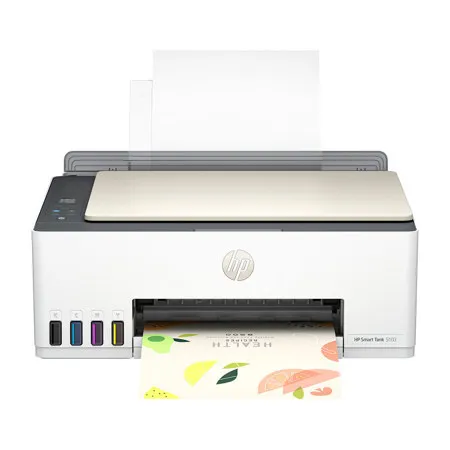
There are moments too precious to be tucked away in your phone. So, print the best ones out for all to enjoy. HP Smart Tank printers give you three years of easy, vibrant printing from America's most trusted printer brand.
Best for families or work from home professionals who print a lot everyday: Print color documents like business records and school projects.
Print on and on for you and your family
Three years of easy, vibrant printing to fill your home with one incredible moment after another. With three years of ink already included in the box, you get everyday, cost-efficient printing.
Vibrant quality plus 100 sheets of photo paper
Print your favorite memories in vibrant quality and true-to-life colors. Instantly print photos with 100-sheets of paper in the box to get you started.
The easiest-to-use tank printers
Quickly print pics and docs from home with the best print app. Enjoy fast setup and reliable Wi-Fi that keeps you more connected. Go from phone to frame with the easiest-to-use tank printers around.
Features
Mobile-guided, seamless setup
Use the guided, step-by-step animations to quickly set up your printer
Smart buttons
Easily manage tasks with smart buttons that illuminate and guide you through the printing process.
Low-on-ink sensors
Easily monitor and maintain ink levels with integrated ink sensors
Self-healing Wi-Fi
Get fast and reliable connections using self-healing Wi-Fi
HP Auto On/Auto Off technology
Turn your printer on when you need it and off when you don't.
Engineered for high-volume printing
Get up to 6000 color or black pages of ink bottles included.
