Review Summary
2022-02-18T19:00:00
This is the second time I have had to wait for a part. The first time my machine randomly went out and I had to get someone to come out. He said he already knew what the problem was but had to wait for the part. Recently, I have been DESPERATELY searching for a replacement toner collection unit for over a month. It is out of stock everywhere (and I mean EVERYWHERE, even random third party sites). HP has not been helpful at all with this issue. I understand shipping issues but I can't even get an estimate of when the item will be in stock again, if ever, and the lack of viable solutions is frustrating to say the least. I tried to clean my full unit to see if the printer would accept it with no luck. I know there is no way that it is still full but the machine won't take it. I don't know what to do at this point. I had just spent over $1,000 on replacement supplies right before it stopped working (that part wasn't in stock at the time but I thought I would have time to reorder before it stopped working). Now I'm reluctantly spending money weekly at print shops to meet my businesses' needs. This can't go on. There is no reason why a machine worth thousands of dollars should be down for over a month because of a $20 part. There should be an emergency override or something. Actually, this part should be reusable. With past machines, we were able to dump out the used toner and replace the unit. I was considering a second machine but honestly I'm feeling like I made a very expensive mistake in purchasing this printer and I don't want to do that again. As far as the performance, the copies come out pretty decent and I haven't experienced many issues with paper jams. I use glossy and heavyweight paper often. I've only had the unit for about 1 1/2 years.
Could b.

2022-01-18T19:00:00
We received this printer and used it for 4 months when it broke down last October2021. Until today HP says there is no part available even we are on Care Pack. Very bad service from HP and no updates until we follow up. I will never buy another HP enterprise product again
burak

2020-06-09T20:00:00
This printer is amazing! Fast Quiet Amazing print quality And 11x17 paper trays
NTHRICH

2020-04-05T20:00:00
For my work at home during the COVID-19 outbreak, I checked several HP Printer models and brought this one. It is quite expensive but I concluded that it was a good investment for long run. The printing quality and overall functions are just excellent.
Allen W.

Accidents happen where life happens. Protect your favorite Adorama products and purchase a protection plan to stay covered from accidental damage, mechanical or electrical failure, and more.
If we can’t fix it, we’ll replace it at no additional cost.
Protect your product from drops, spills, and more.
Enjoy your gear without fear. We have you covered!
When regular use of your product over time results in mechanical or electrical failure.
We will never charge you a deductible after the purchase of a plan.
Our claims process is simple & easy and our customer service team is happy to help.
Adorama Protect powered by Extend is available for purchase to customers in the United States. Not available for purchase Internationally or in U.S. Territories.
Browse our FAQ
Print, copy, scan and fax
Average black and color composite (C/M/Y) declared toner yields based on ISO/IEC 19798 and continuous printing. Actual yields vary considerably based on images printed and other factors
Black: As fast as 6.7 sec
Color: As fast as 7.1 sec
Black: Up to 1200 x 1200 dpi
Color: Up to 1200 x 1200 dpi
HP ImageREt 4800, Enhanced (600 x 600 dpi), Fine Lines (1200 x 1200 dpi), Quickview (300 x 300 dpi), Pantone Calibrated
Up to 200000 pages
Duty cycle is defined as the maximum number of pages per month of imaged output. This value provides a comparison of product robustness in relation to other HP LaserJet or HP Color LaserJet devices, and enables appropriate deployment of printers and MFPs to satisfy the demands of connected individuals or groups
Up to 40000 pages
Laser
9.0" functional touchscreen with 8.0" (20.3cm), (1024x768) LCD (color graphics), smooth gesture, enabled touchscreen
4 toner cartridges (1 each for black, cyan, magenta, yellow); 4 drum units (1 each for black, cyan, magenta, yellow)
W2010A HP 659A Black LaserJet Toner Cartridge (-16,000 pages)
W2011A HP 659A Cyan LaserJet Toner Cartridge (-13,000 pages)
W2012A HP 659A Yellow LaserJet Toner Cartridge (-13,000 pages)
W2013A HP 659A Magenta LaserJet Toner Cartridge (-13,000 pages)
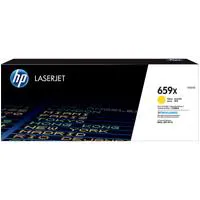
W2010X HP 659X Black LaserJet Toner Cartridge (-34,000 pages)
W2011X HP 659X Cyan LaserJet Toner Cartridge (-29,000 pages)
W2012X HP 659X Yellow LaserJet Toner Cartridge (-29,000 pages)
W2013X HP 659X Magenta LaserJet Toner Cartridge (-29,000 pages)
W2004A HP 660A Original LaserJet Imaging Drum (-65,000 pages, universal for all 4 colors)
HP PCL 6, HP PCL 5 (HP PCL 5 driver available from the Web only), HP postscript level 3 emulation, native PDF printing (v 1.7), Apple AirPrint ½½, Google Cloud Print
Yes
5
5
Apple AirPrint; Google Cloud Print; HP ePrint; Mopria Certified; Roam capable for easy printing
1 Hi-Speed Device USB 2.0; 2 Hi-Speed USB 2.0 rear host ports; 1 walkup USB 2.0 host port; 1 Gigabit/Fast Ethernet 10/100/1000 Base-TX network port; 1 Hardware Integration Pocket 2nd generation (HIP2), Wireless 802.11n/BLE
HP Jetdirect 2900nw Print Server J8031A
Management security: SNMPv3, Web Services over port 7627, SSL/TLS TLS 1.0/1.1/1.2, FIPS 140-2, Certificate Management, Embedded Web Server, WPA2-Enterprise, 802.1X authentication (EAP- PEAP, EAP-TLS), IPsec/Firewall with Certificate, Pre-Shared Key Authentication, and Kerberos Authentication; Support for WJA-10 IPsec Configuration using IPsec Plug-in
2 GB available hard drive space, Internet connection or USB port, OS hardware requirements see apple.com
2 GB available hard disk space, Internet connection, USB port, Internet browser. For additional OS hardware requirements see microsoft.com
Windows Client OS (32/64 bit): Win10, Win8.1, Win7 Starter Edition SP1, UPD Win7 Ultimate; Mobile OS: iOS, Android; Apple macOS High Sierra v10.13, Apple macOS Mojave v10.14, Mac: Apple macOS Catalina v10.15; Discrete PCL6 Printer Driver
Standard: 5.0 GB
Maximum: 7.0 GB
HP Device Toolbox; HP JetAdvantage Security Manager; HP Printer Assistant; HP SNMP Proxy Agent; HP Web JetAdmin Software; HP WS Pro Proxy Agent; Printer Administrator Resource Kit for HP Universal Print Driver: Driver Configuration Utility, Driver Deployment Utility, Managed Printing Administrator
Measured using ISO/IEC 24734 excludes first set of test documents. Exact speed varies depending on the system configuration software application driver and document complexity
Via built-in networking solution: TCP/IP, IPv4, IPv6; Print: TCP-IP port 9100 Direct Mode, LPD (raw queue support only), Web Services Printing, IPP 2.0, Apple AirPrint, HP ePrint, FTP Print, Google Cloud Print; Discovery: SLP, Bonjour, Web Services Discovery; IP Config: IPv4 (BootP, DHCP, AutoIP, Manual, TFTP Config, ARP-Ping)
IPv6 (Stateless Link-Local and via Router, Stateful via DHCPv6); Management: SNMPv2/v3, HTTP/HTTPs, Telnet, TFTP Config, Syslog; Security: SNMPv3, SSL Cert Management, IPSec/Firewall, ACL, 802.1x
Standard, 500 GB High-Performance SED Hard Disk (AES 256 hardware encryption or greater)
Input, Standard: 100-sheet multi-purpose tray, 1x 550 sheet paper tray, 2x550 sheet paper tray and stand
Output, Standard: 700 sheets: 500 sheet output tray and 200 sheet Inline 2 bin stapler/stacker (also includes convenience stapler)
Automatic (standard)
Up to 10 envelopes
Sheetfed; Stapling; Stacking; Offset
100-sheet multipurpose Tray 1: A3, A4, A4-R, A5, A6, RA3, SRA3, RA4, SRA4, B4 (JIS), B5 (JIS), B6 (JIS); Oficio 216x340, 8K (270 x 390), 8K (260 x 368), 8K (273 x 394), 16K (195 x 270), 16K (184 x 260), 16K (197 x 273); Postcard (JIS), Dpostcard (JIS), Envelopes: B5, C5, C6, DL; 550-sheet input Tray 2: A3, A4, A4-R, A5, RA4, SRA4, B4 (JIS), B5 (JIS)
Oficio 216x340, 8K (270 x 390), 8K (260 x 368), 8K (273 x 394), 16K (195 x 270), 16K (184 x 260), 16K (197 x 273); Dpostcard (JIS); 1x550 and 2x550 tray and stand: A3, A4, A4-R, A5, RA3, SRA3, RA4, SRA4, B4 (JIS), B5 (JIS); Oficio 216x340, 8K (270 x 390), 8K (260 x 368), 8K (273 x 394), 16K (195 x 270), 16K (184 x 260), 16K (197 x 273); Dpostcard (JIS)
100 -sheet multipurpose Tray 1: 2.5 x 5 to 12.6 x 18"
550-sheet input Tray 2: 5.8 x 5.8 to 11.7 x 17"
1x550 and 2x550 tray and stand: 5.8 x 5.8 to 12.6 x 18"
Paper (plain, heavy, extra heavy, glossy, light, recycle, tough), envelopes, labels, glossy film, cardstock, transparencies
100-sheet multipurpose Tray 1: 16 to 80 lbs
550-sheet input Tray 2: 16 to 68 lbs
1x550 and 2x550 tray and stand: 16 to 68 lbs
100-sheet multipurpose Tray 1: 60 to 300 g/sq. m
550-sheet input Tray 2: 60 to 256 g/sq. m
1x550 and 2x550 tray and stand: 60 to 256 g/sq. m
110-volt input voltage: 110 to 127 VAC (+/- 10%), 50 Hz (+/- 3 Hz), 60 Hz (+/- 3 Hz); 220-volt input voltage: 220 to 240 VAC (+/- 10%), 50 Hz (+/-3 Hz), 60 Hz (+/- 3 Hz)
Black (normal): Up to 45 ppm
Color (normal)Up to 45 ppm
900 watts (printing), 100 Watts (Ready), 0.8 Watts (Sleep), 0.8 Watts (HP Auto-Off/Auto On), 0.07 Watts (Auto-Off), 0.07 Watts (Off)
CECP; ENERGY STAR qualified; EPEAT Silver; EPEAT Gold
50 to 90.5 Degree F (10 - 32.5 Degree C)
30 to 70% RH
FCC Class A emissions - for use in commercial environments, not residential environments
Minimum: 27.76 x 28.03 x 45.47" (70.5 x 71.1 x 115.4cm)
Maximum: 45.28 x 35.51 x 45.47" (115 x 90.1 x 115.4cm)
289.2 lbs (131.1kg)

Beyond expectation with latest new technology!
By Allen W.
For my work at home during the COVID-19 outbreak, I checked several HP Printer models and brought this one. It is quite expensive but I concluded that it was a good investment for long run. The printing quality and overall functions are just excellent.
Best MFP EVER!
By NTHRICH
This printer is amazing! Fast Quiet Amazing print quality And 11x17 paper trays
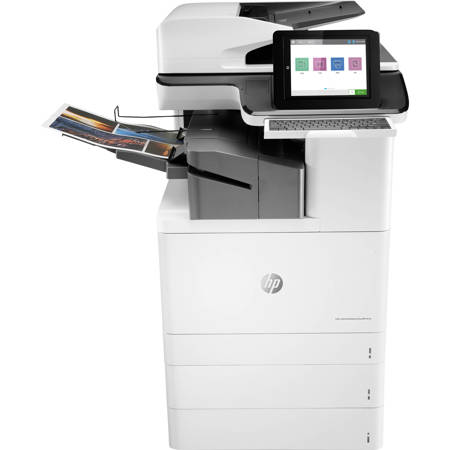
Expect brilliant color prints from advanced MFPs, equipped with JetIntelligence technology. Offering the world's most secure printing and a wide range of paper handling features, this is printing that helps save time and simplifies workflows. HP Office Laser Multifunction Printers are designed for SMBs and small workteams in larger companies, delivering enhanced productivity, simplified workflows and reduced costs.
FCC Class A emissions device for use in commercial environments, not residential environments. Dynamic security enabled printer. Only intended to be used with cartridges using an HP original chip. Cartridges using a non-HP chip may not work, and those that work today may not work in the future.
Work stands out with exceptional color performance
Special print mode for a wider color range and extra vividness for documents and marketing materials.Look professional with vibrant, high-quality color prints that can stand the test of timeGet professional quality and performance with Original HP Toner cartridges and drums with JetIntelligence.Produce full-bleed A3 marketing materials by printing on SRA 3 paper and trimming down to size.
The world's most secure printing
Each printer in your fleet checks its operating code and repairs itself from attacks.Your printer's outgoing network connections are inspected to stop suspicious requests and thwart malware.Memory activity is monitored to continually detect and stop attacksFirmware is automatically checked during startup to determine if it's authentic code-digitally signed by HP.
Simplify and speed up workflows
Help workgroups capture every page easily and detect potential errors or missed pages-every time. Enter data more quickly and accurately using the pull-out keyboard. Help ensure every scanned document is properly oriented, cropped to size, and grayscale-optimized. Load up to 200 pages into the automatic document feeder for fast, unattended scanning.
Minimal interruptions. Maximum productivity.