Orders placed during Passover Holiday (Wed 4/1 after 4PM ET – Thurs 4/9) will ship Fri 4/10. View our holiday shipping schedule.

Overview
Compare
Specs
Protection

Reviews about this item

Review Summary

2022-08-10T15:38:08

Rated 1 out of 5

Bad, really bad experience!

This equipment looks more like a prototype. I bought to connect a macbook pro but its operation is precarious. Data transmission fails a lot between an external hard drive and my laptop. Movies I can't watch, for example. Another important point: it consumes a lot of macbook battery when it is in sleep mode and it also doesn't support two usb devices connected at the same time. Anyway, useless, doesn't do what it says in the product description. I do not recommend. The manufacturer still needs to complete its work. This product is unfinished.

Rodrigo F.

Select a plan in the Add Protection section above and purchase with this product by clicking “Add to Cart”.

image-protection

TRUSTED PROTECTION PLANS, EXCEPTIONAL SERVICE.

Invest In Your Gear and Peace Of Mind!

Accidents happen where life happens. Protect your favorite Adorama products and purchase a protection plan to stay covered from accidental damage, mechanical or electrical failure, and more.

Repair or Replacement

Repair or Replacement

If we can’t fix it, we’ll replace it at no additional cost.

Accidental Damage

Accidental Damage

Protect your product from drops, spills, and more.

Peace of Mind

Peace of Mind

Enjoy your gear without fear. We have you covered!

Malfunction Protection

Malfunction Protection

When regular use of your product over time results in mechanical or electrical failure.

Zero Deductible

Zero Deductible

We will never charge you a deductible after the purchase of a plan.

Customer-Focused Support

Customer-Focused Support

Our claims process is simple & easy and our customer service team is happy to help.

Adorama Protect powered by Extend is available for purchase to customers in the United States. Not available for purchase Internationally or in U.S. Territories.

Hyper HyperDrive GEN2 Specifications

Connections

Connections

Jump to...
  • USB

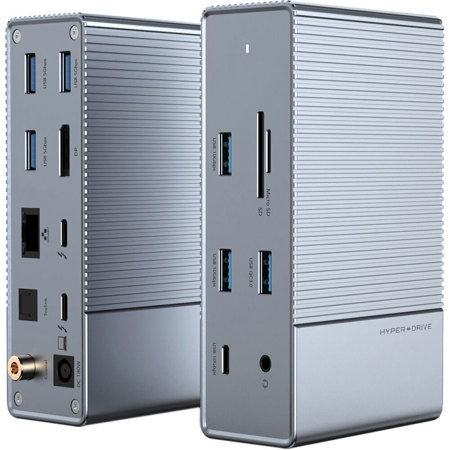
    1x USB 3.1 / USB 3.2 Gen 2 Type-A (18 W)
    2x USB 3.1 / USB 3.2 Gen 2 Type-A
    1x USB 3.1 / USB 3.2 Gen 2 Type-C
    3x USB 2.0 Type-A

  • Thunderbolt

    1x Thunderbolt 3
    1x Thunderbolt 3 (85 W)

  • Ethernet

    1x RJ45 (10/100/1000 Mb/s)

  • FireWire

    None

  • Display

    1x DisplayPort (Female)

  • Audio

    1x TOSLINK
    1x 1/8" / 3.5 mm Headphone/Microphone Combo
    1x Digital Coaxial

  • Memory Card Slots

    1x SD (Unspecified Type) (UHS-II (312 MB/s))
    1x microSD (Unspecified Type) (UHS-II (312 MB/s))

Host Connections

Jump to...
  • System Connection

    1x Thunderbolt 3 Female (Device Port)

  • Power Source

    Bus Powered

  • Power Port

    Barrel Connector (Unspecified Diameter) (Input)

  • UPC Code

    817110014533

About Hyper HyperDrive GEN2

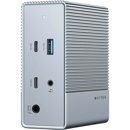
The HyperDrive GEN2 16-in-1 Thunderbolt 3 Dock is used to turn one Thunderbolt 3 port into sixteen different ports. Two USB 3.2 Gen 2 and three USB 2.0 Type-A ports are also present, with one of the Gen 2 ports supporting Quick Charge 3 technology and up to 18W of power delivery. Accessories can also be plugged in using a Thunderbolt 3 port supporting up to 40 Gb/s transfer speeds and DisplayPort connections, or a USB 3.2 Gen 2 Type-C port.

Hyper HyperDrive GEN2 Features

  • 16-in-1 Thunderbolt 3 Dock

Key Features

  • 16-in-1 Thunderbolt 3 Dock

What's in the box:

  • HyperDrive GEN2 16-in-1 Thunderbolt 3 Dock
  • Hyper 1 Year Limited Warranty