
This item is no longer available.
Yes, the imageCLASS MF275dw printer offers a seamless Wi-Fi setup process, allowing you to connect your device to a wireless network in six simple steps.
The imageCLASS MF275dw printer uses a 071 Black High Capacity Toner Cartridge, ensuring high-quality black-and-white printing.
Yes, the printer supports mobile printing with CANON PRINT Business, Apple AirPrint, and Mopria Print Service, allowing you to print documents and photos on-the-go from your smartphone or tablet.
The Smartphone Copy feature allows you to use the Canon PRINT app to scan, adjust, and print your documents and photos directly from your smartphone.
Yes, the printer includes a 35-sheet auto document feeder, making scanning of multi-page documents easy and efficient.
Review Summary
2025-12-10T19:00:00
I bought this printer because I have an 12 year old Canon Laser Printer, which has never had any problems, so I like the quality of Canon. Of course the new printer is quieter and faster, but there are three issues that I want to point out: 1. I see no reason why all cables connect to the back of the unit except the phone line for the fax comes out of the side. This makes set up awkward and sloppy. 2. This printer does not have a single sheet feed tray. So, if I want to print an address on just one envelope, I have to take out all of the paper; readjust the paper guides; insert my envelope and print it; then open up the paper guides; and finally put all of the paper back into the printer. To get a single sheet paper tray, one has to buy a significantly more expensive printer, which I don't think should be necessary. 3. I have a Macintosh computer. Ever since upgrading to the Tahoe operating system, when I try to make a color scan and specify Image Correction Manual, the scanner appears to scan, but the file that is generated is blank . . . no scan actually is made. So, scanning in color is only possible with Image Correction None. I don't think this is a problem with the scanner; the problem is with the Canon scanner driver. Maybe they will one day think about fixing it.
Bryan B.

2025-11-22T19:00:00
Got it to operate with a wired LAN finally, thanks to a helpful tech via their hard-to-find 800 # (which I wish was at my fingertips). Now having switched over to fiber, it won't print from my desktop. Forget about setting up wireless.
MXX
2025-01-12T19:00:00
I had a MF269dw which broke. I was led to believe the MF275dw was the correct upgrade and ordered that. It did not do everything the old machine did, so I had to return it and am trying to order a MF269dw II which will do what I need. The new printer is currently out of stock. The refund I expect has not yet been processed. I am not happy with the service I have received so far.
B B.
2024-11-26T19:00:00
Nice printer that prints very fast. Crisp print quality.
DaveW
2024-11-04T19:00:00
Overall, it's good. Minor quibbles: the receiving paper tray seems flimsy, the intake paper tray's cover is awkward to maneuver, and it has an annoying beep when it's completed its task. I also have a problem I haven't solved, which is the first print job of the day seems to hang in the job queue until I finally somehow manage to get it released -- have to call about that someday.
BlueIris
2024-03-27T20:00:00
Printer came in a HUGE box, but it was well packed and normal sized once unpacked. Printer was easy to set up and prints documents well in great quality
rhiannona6
2024-03-11T20:00:00
I'm a mental health therapist and always printing off materials for patients as well as other things for work. This printer was very easy to set up and connect to my laptops, desktop computer, and cell phone. The printing quality is very crisp and clear, and while in use, it is very quiet. It also prints very quickly! I love that there is an app to connect with the printer where you can also utilize to print things as well. This printer prints black ink only which thats all I need, but keep that in mind if you are in need of a printer that will print color. My husband and I love Canon products as they work great and last! Overall, I am super impressed ( I didn't expect anything different) with this printer and highly recommend it for home or business use. I received this printer from Influenster in exchange for my honest opinion.
autumnw62
2024-03-06T19:00:00
My home office is set up and completed with this Canon All-in-One printer. It was easy to set up and works so efficiently. I love it. Multipurpose machines are great. Nice size too. I definitely recommend this printer. Love it.
lawmaria
2024-03-05T19:00:00
I received this printer free from influenster in exchange for my honest review. This printer was easy to set up and easy to use. It's quick in every aspect. From printing from your phone, to scanning, to making copies. It is also quiet compared to other printers I've used in the past. It's bigger than a standard home printer I've used in the past, but I would totally recommend this printer for your home needs.
elizabethc546
2024-02-27T19:00:00
This was easy to setup. I love that I easily found it on my iPhone and sent it a document to print almost as soon as it came in the door. It was larger than I expected but it takes up more vertical space than horizontal.
kristind56
2024-02-22T19:00:00
It is wireless connection, so less cord-easy to set up. The intuitive touchscreen display makes navigation and operation straightforward. Its fast printing speeds, multifunctionality, and wireless connectivity make it a valuable asset for increasing productivity. Only small thing is only black and white for this printer. So if you do want color, i would get a printer to do both since the printer itself is big already.
tirawin
2024-02-18T19:00:00
What a great product. The set up was easy and now I am a happy owner of all in one laser printer, scanner and fax. The laser printer is super fast. My hubby asked me to print a 20 page document for him and it was done in no time. The scanning feature is also great. I was needing a scanner lately as my company is digitizing everything. At first I was concerned about the overall size of the unit but now sitting on my filing cabinet it doesn't take up a lot of room. Looking forward to using this printer for all my work and personal related projects.
arexudy
2024-02-17T19:00:00
This printer is amazing! It's so fast and super easy to connect to my iPhone. Most of the Bluetooth printers I've had in the past disconnect so easily but with this one you seriously hit print and select the printer and it's automatically starts printing
brittneya33d65912
2024-02-15T19:00:00
Fast print, high quality Canon toner, 150 sheets paper capacity and and 35-sheet automatic document feeder. Print using a variety of mobile apps, including the Canon PRINT Business app using your compatible mobile device. Beautifully designed for small offices and businesses, but I think if you are or have college students at home is good too. You can print a variety of media types and sizes, including envelopes. Easily connect and print through wirelessly from computers or mobile devices. I recommend this printer because is fast, versatile and easy to setup.
rose42
2024-02-12T19:00:00
I absolutely love this printer so much! It works super fast and the quality is impeccable! I definitely recommend to everybody looking for a new printer !
chloeh384
2024-02-12T19:00:00
I really like this printer so far! The only reason I'm not giving it 5 stars is because it was so difficult to install. So first of all I read everything then connected it and started to try to connect via a usb cable but could not get that to work, I then tried to connect wireless and again nothing. I tried for a few days until I hoped on YT and found a tutorial or sort of tutorial, that wasn't even in English ?? but I followed the steps and VOILA I was able to print? it's honestly easy but at the same time it's done in a very weird part of the menu that I would have never imagined. After I got it set up I've had no issues, prints nice and quick. Hoping the ink will last.
yuvizz
2024-02-11T19:00:00
I am so honored to be chosen to receive this amazing laser printer from canon and Influenster for honest feedback and review. This has made printing art projects, school work and documents a breeze. It is capable of handling small, medium and large projects. It scans and prints at a nice speed without any issues and the quality is amazing. This is a great all in one tool for any home based business to help all of your print, copy and scanning needs. Highly recommend if this is something you need to help with day to day processes. It is not compact but doesn't take up a huge amount of space either so will work for home or small business needs just fine.
desireeo15
2024-02-08T19:00:00
I recently got the Canon imageClass MF275dw printer for my home office, and I'm really happy with it. Setting it up was pretty easy, although I had to find the software online because my laptop doesn't have a CD drive. But once I got past that, everything else was smooth sailing. I'm super impressed with what this printer can do. It lets me scan, fax, and print, all in one machine, which is super convenient. Plus, it prints things way faster than my old printer ever did. So far, I'm very pleased with my choice. The Canon MF275dw has made my work from home life a lot easier, and the quality of the printouts is great.
olgvi3
2024-02-07T19:00:00
This printer has easy to follow instructions and simple set up. Within minutes, I was able to get printing! It's smooth, quiet, and never needs ink cartridges!
lisal316
2024-02-06T19:00:00
Having recently integrated the Canon imageCLASS MF275dw into my home office, I'm compelled to share my experiences compared to past printers I've owned. This all-in-one, wireless, duplex laser printer stands out for its seamless setup process, exceptional print quality, and swift output speeds. Setup and Connectivity: The setup was straightforward, with clear instructions. Its wireless capabilities, including Wi-Fi and potential for Bluetooth connectivity, allowed for easy integration with all my devices. Print Quality and Speed: The print quality is sharp and professional, suitable for both documents and graphics. Speed is another area where the MF275dw shines, significantly reducing wait times for both single and double-sided prints. Ink Efficiency: As a laser printer, it uses toner instead of ink, which I've found to be more cost-effective and longer-lasting, reducing the frequency of replacements. Unique Features: The duplex printing is effortlessly automatic, a feature that saves paper and is environmentally friendly. Another highlight is its multi-functional capability, seamlessly switching between printing, scanning, and copying without compromising performance. Comparison and Personal Experience: Compared to previous inkjet printers, the MF275dw is a significant upgrade in efficiency, quality, and functionality. The wireless connectivity has eliminated the clutter of cables, and the duplex feature has been a game-changer for document management. Areas for Improvement: While my overall experience has been positive, I believe the user interface could be more intuitive. Also, for those with limited space, the printer's footprint may be a consideration. In conclusion, the Canon imageCLASS MF275dw has exceeded my expectations in many ways, providing a reliable, high-quality printing solution that suits both home and small office environments. Its efficiency and robust features make it a standout choice, though potential buyers should weigh the size and interface against their specific needs. Received for free from Influenster in exchange for my honest opinion.
influenstervoxboxrev
2024-02-05T19:00:00
contains many functions, super easy to connect, works very well with larger quantities of prints! you can connect it to your telephone line and to Wi-Fi it has a USB port! Thank you, I loved upgrading my workshop
sarahb935
2024-02-04T19:00:00
Canon imageClass MF275dw is a very fast printer. This is the second Canon laser printer that I have ever owned. It can print, scan, copy and fax, all in one. It's crazy that it has touch screen function too. It's just like a big photocopy machine but in mini size. The old one I had was just a normal printer, print only. But this imageClass MF275dw is cool with all the functions. It's easy to set up also.
cindylou64
2024-02-04T19:00:00
The printer is working well. The letter and pictures printed nice and look great. Function are good and easy to navigate. The set up was easy. It's a bit heavy compared to my old printer but, not much. It's full size printer so, I need a bit space on computer table. Recommend to some of my friends and coworkers already.
anyaalee
2024-02-04T19:00:00
First thing I noticed was how heavy this printer is compared to the one I already have. It's a lot larger and takes up a lot more space. That's the only issue I have with this black and white printer. Aside from the size, it's such a great printer. It prints so much better than my other printer. The black is BLACK and it doesn't streak. Being a newer user of iPhone, I was able to print so much easier from my phone. I have a lot of documents that I have to copy, all of the time. I haven't had such a quiet printer before. It's way quicker than the other one I own. Aside from the size and weight, it's an amazing printer. I recommend. I'm hoping to purchase another canon printer that prints in color soon. I'll leave a review for that one when I buy it.
eeyoreissues215
2024-02-03T19:00:00
I received this free promotional item from Canon. I tested this printer at my office and I really like it, it prints very fast which makes my workday go fast as well, the quality of the printing is very good, I wish it came with color but black and white works just fine. I would recommend it for fast printing long documents.
jerrys3
2024-02-02T19:00:00
The Canon ImageClass all-in-one printer was so easy to set up and connect to my computer! Loved the ease of printing as well. And the document came out so fast and crisp, nice!
rubigirl
2024-02-02T19:00:00
This printer was one of the easiest ones I have set up. I loaded the paper in the paper tray and set my wifi connection up. It also asked if I want to instantly order cartridges. It also asked if I wanted to set up a pin number to print remotely. I I went to print from my computer and the printer was recognized and set up the driver for me. I was able to start printing wirelessly right away. It also lets me copy and scan documents. It has a document feeder and a scanner. This is good if I have to scan smaller items, such as cards. I can also print out envelopes. It holds a lot of paper at once so I don't have to worry about reloading. It prints documents fast. I can also print front and back. I thought this was going to be difficult to set up and get started and it took less time than one of the smaller personal printers. It also has a fax machine if someone wants to set it up. It hooks to a telephone line and then I would enter the number and details I can also print from my phone through the Canon Smart app or Apple Smart print app. It is also recognized by the rest of the computers through the wifi. I can print from anywhere in my house or remotely with the pin I created. This is a sturdy, user friendly computer that lets me get a lot more done in less time. It is fast and efficient.
carliew31
2024-02-01T19:00:00
Setting up our printer now - initial thoughts are it's large but has a ton of features. I'm excited to get it fully installed and use the scan feature.
madisonc6915
2024-01-31T19:00:00
This is a very feature heavy printer. May not be necessary for regular use like just printing, scanning, or faxing but its great for if you want to print professional pictures and such
duyn7

Accidents happen where life happens. Protect your favorite Adorama products and purchase a protection plan to stay covered from accidental damage, mechanical or electrical failure, and more.

If we can’t fix it, we’ll replace it at no additional cost.

Protect your product from drops, spills, and more.

Enjoy your gear without fear. We have you covered!

When regular use of your product over time results in mechanical or electrical failure.

We will never charge you a deductible after the purchase of a plan.

Our claims process is simple & easy and our customer service team is happy to help.
Adorama Protect powered by Extend is available for purchase to customers in the United States. Not available for purchase Internationally or in U.S. Territories.
Browse our FAQ
Print, Scan, Copy, Fax (All-In-One)
Up to 30 ppm (Letter)
Approx. 5.3 Seconds
Up to 2400 x 600 dpi
256 MB
64 MB
UFR II
IP address filtering, TLS encrypted communication 1.3, SNMPv3.0, IEEE802.1x authentication, Verify System at Startup
USB Device 2.0 High-Speed, 100Base-TX/10Base-T(IEEE 802.3 compliant), Wi-Fi (IEEE 802.11b/g/n), Wi-Fi Direct Connection
Windows 8.1/10/11, Windows Server 2012/2012 R2/2016/2019/2022, macOS v10.12 or later
150fSheet Standard Cassette
35-Sheet Simplex ADF
Standard cassette: Min. 3 x 5" to Max. 8.5 x 14"
6-Line LCD
200 to 2,000 RMPV (Recommended Monthly Print Volume)
Approx.: 1230 W (maximum), 5.8 W (Standby), 1 W (Energy Saver / Sleep Mode)
Yes
Silver
15.4 x 14.6 x 14.4" (39.11 x 37.08 x 36.57cm)
24.7 lbs (11.20kg)


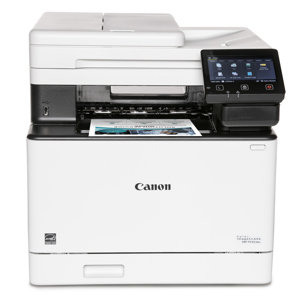
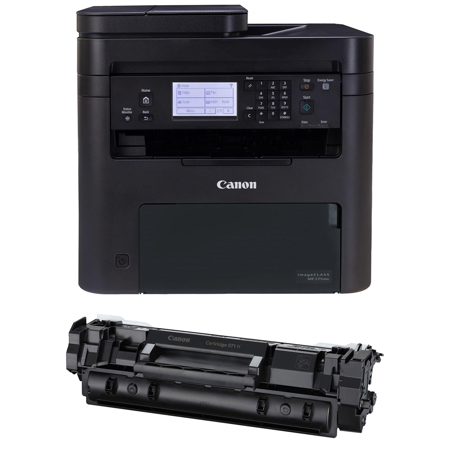
What sets the imageCLASS MF275dw All-In-One Wireless Duplex Monochrome Laser Printer apart is its multifunctional capability, specifically designed for small office environments where high productivity, user-friendly features, and large page volume capacity are essential. This model comes with a 071 Black High Capacity Toner Cartridge, ensuring consistent, high-quality black-and-white printing while minimizing the frequency of toner replacements.
This printer offers a seamless Wi-Fi setup process, enabling you to connect your device to a wireless network in six straightforward steps. From selecting the menu and preference to finalizing the network settings, the process is designed for simplicity and convenience.
The compact design of the imageCLASS MF275dw makes it an ideal fit for any workspace, while its adjustable, 6-line touchscreen LCD provides easy navigation through its various features. The printer also includes a 35-sheet auto document feeder, making scanning of multi-page documents a breeze.
Mobile connectivity is another standout feature of this printer. With the CANON PRINT Business, Apple AirPrint, and Mopria Print Service, you can print documents and photos on-the-go from your smartphone or tablet. The printer is compatible with Windows, Mac, and Chromebook, and its Wireless Connect button allows for quick and easy setup on your Apple or Android device.
The imageCLASS MF275dw also offers a unique Smartphone Copy feature. Using the Canon PRINT app, you can scan, adjust, and print your documents and photos directly from your smartphone. Moreover, with Apple AirPrint, you can wirelessly print documents and photos straight from your iPhone, iPad, or Mac without the need for additional apps. For Android users, the Mopria Print Service allows you to print your desired documents directly from your device.
800-652-2666