2025-12-30T19:00:00
Rated 2 out of 5
STOP!!! This is a 1 page at a time unit. What a joke.
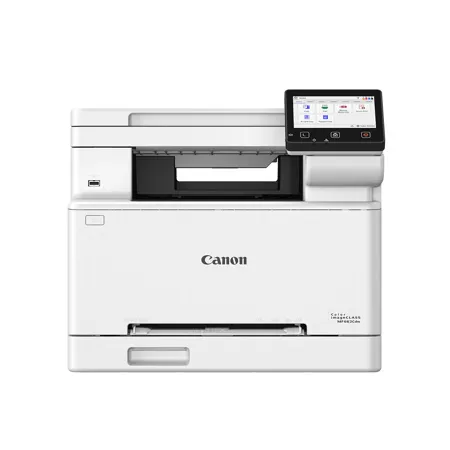
STOP!!!! This printer does NOT have a multi-sheet feeder tray for copies and scans. If you want to copy (or scan) anything, you literally have to lift the lid and insert you page manually, one at a time. What a joke! I've never owned a printer like this, and never will again. I just got it today, and will be sending it back ASAP. I actually feel like I've been duped. It prints well, all the functions are great, but seriously? 1 page at a time for copying? Get outta here!
AnUnhappyGuy
Originally posted at

2025-12-18T19:00:00
Rated 5 out of 5
Great speed and print quality
I received a complimentary unit of the Canon Color ImageClass MF753Cdw II in exchange for this review, and after a couple weeks of use for my home-office, I find it to be a strong, well-rounded performer. The overall design is sleek and thoughtfully constructed-the white exterior gives the machine a modern, almost luxurious feel. Its bold, well-lit touchscreen is intuitive and easy to navigate, making day-to-day tasks feel streamlined. In terms of performance, the printer delivers impressive results. While it is not the quietest model, its speed and print quality more than compensate. Colors appear vibrant and accurate, and black text prints with a deep, rich tone that enhances readability. Standard functions such as duplex printing, resizing, and everyday document production operate smoothly and reliably. Setup, however, was less straightforward. It took a couple of attempts to get the machine fully configured, and some users may find the initial installation less intuitive than expected. The scanner produces sharp and dependable results, though it would benefit from offering more detailed customization options for advanced scanning needs. One functional concern is Wi-Fi connectivity. When printing from a cellphone or other wireless devices in different rooms of an average-sized apartment, the signal can occasionally weaken or fail, which may inconvenience users who rely heavily on mobile printing. Overall, the Canon Color ImageClass MF753Cdw II is a high-quality, versatile all-in-one printer with excellent output and a refined design, though setup and wireless performance leave some room for improvement.
Yes, I recommend this product.
Tony M.
Originally posted at
2025-12-16T19:00:00
Rated 5 out of 5
Great Printing Options!
I received a free Canon Printer in exchange for a review. Overall, I have found this printer to be a great product! The only issues I experienced were during set up. The instructions were clear and easy to follow until I got to the section where you download the printer software to connect your computer to the printer. The QR code and link did not work to open the software download button. I then found a video to watch the setup process. The video was very informative and i was able to complete the setup, which did have slightly different instructions than the ones provided with the printer. Once I was able to use the printer, I was impressed with how quickly and efficiently it printed. I tested out the double sided printing feature and it worked great. I am very happy with the product!
abou12
Originally posted at
2025-12-15T19:00:00
Rated 5 out of 5
Great Machine for a home office or office in general.
I've had this printer for a few weeks. It's a great improvement compared to the previous one that I've had. It was relatively easy and straightforward to set up. The most manual labor i had to do was taking it out of the box. It is bigger than I thought it would be but it works so well. I managed to connect it to my network without any issues. I'm able to use the wireless printing function from my cell phone and tablet. It's done so quickly and seamlessly. The double-sided function is done so well as well. It's much faster than my previous printer. The print quality and speed is a huge improvement compared to my previous printer. This printer overall exceedingly meets my needs since I'm trying to start my own business and my wife is currently going back to school. This is great for my home office with its quality and reliability. I don't think i would be able to ever go back to my old brother 3in1 printer.
Antonio914
Originally posted at
2025-12-14T19:00:00
Rated 5 out of 5
Nice Machine
Canon MF660C Series Printer Review
Canon provided me this printer at no cost in exchange for my honest review. All opinions below are my own.
I've been using the Canon MF660C series printer for about a month now, and I'm actually impressed with how solid this machine is. I've had printers in the past that acted like they were doing me a favor every time I hit print. This one doesn't have that attitude at all it just works.
Setup was refreshingly straightforward. Canon's app walked me through step by step, and I had it on WIFI in just a few minutes. No wrestling, no disconnecting, no random errors. Printing from my phone, laptop, or even different apps has been smooth and quick.
The print quality hits exactly what I need: sharp text and surprisingly clean color prints. It's not a giant commercial printer, but it easily produces professional looking documents for business use. Scanning is fast, the feeder handles multiple pages without chewing them up, and the touchscreen controls are simple enough that I did not have to Google how to use them.
The machine itself isn't huge, but it still feels sturdy like something that is built to last. Noise is reasonable; it's not whisper silent, but it's not interrupting anything either. As for toner, Canon's toner isn't the cheapest on the planet, but the upside is it lasts. Way better than the inkjet money pit I escaped from.
Overall, even though Canon sent this printer for review, I'd be saying the same thing if I paid for it myself: the MF660C series is a reliable, no-drama workhorse. It handles everyday business tasks with ease, and I'd recommend it to anyone who wants a printer that doesn't waste their time.
Stranded
Originally posted at
2025-12-13T19:00:00
Rated 5 out of 5
Great Multi-Functional Canon Wireless Printer w/ Many Bonus Features!!
I received the Canon MF662Cdw Multi-function Printer for free to test its features and capabilities. It was very easy to setup and get started with wireless printing. The only slight difficulty was getting the paper try to slide back in after loading the paper. I had to mess with the slider piece above it that can be used for different paper sizes/envelope printing. I was able to easily connect my home network through the touchscreen menu on the printer and have the ability to print from my laptop or phone (using the Canon print app) within a matter of minutes. The technical setup process was quick and straightforward and took less time than the unboxing. I loved the ability to automatically print on both sides to help me save money on paper and time. I'm excited to try the other features on the touchscreen like the ability to customize it and a passport printing feature!
Nick81
Originally posted at
2025-12-11T19:00:00
Rated 5 out of 5
Versatile printer for a small business. Easy to set up, and reliable!
As someone running a small businesss from home and a freelance photographer on the side, I'm always looking for printer that handles both high-volume prints and images, and this checked all the boxes. I received a free printer for evaluation, and so far, I'm impressed.
The image quality is much better than I expected for a laser printer, and after picking up some glossy paper that was compatible, I was able to print 4x5 or 5x7 images that were worthy of handing out to clients. It prints images at rapid speeds, and the printer has been a blessing for that reason alone. It really shone when printing flyers, as we were able to print flyers in about 15 minutes that we would normally send to a print shop.
Setting up the printer was fast using WiFi. The touchscreen made entering the password easy, and once connected, I was able to find and print from my PCs without issue. Windows found the drivers automatically, and downloading the full software suite was a single install with minimal configuration. The Canon mobile app was also a quick install and could locate the printer easily, though we did have to change some power saving settings to keep it from showing "Offline" during the day.
The app could handle printing all file formats I needed, and it's convenient to start printing an e-mail attachment from the kitchen while making dinner. I also found some good use of the "Smartphone Copy" feature in the app, which is much like any document scanning app but with a one-step copy. It's not as clear as using the real scanner, but for multi-page text documents, it was actually a little faster than changing the page on the scanner bed.
That said, the built-in scanner was very clear, and even scanned full-color graphics well. I preferred using the mobile app to start scans, and my phone let me save directly to a cloud folder without any additional setup. My only regret on this printer was not having an automatic document feeder, though it was an option on similar models. If scanning long contracts or documents is important, definitely look into it.
For documents, it seems about average for a printer of this size. It warms up quickly, and while it's not the fastest laser printer if you're measuring, I never felt like I needed it to be faster. Printing a 50-page document took about two minutes, which honestly feels fast to me. Printing two-sided felt almost as fast, and I ended up setting it as the default, which has been great for saving both paper and file cabinet space.
If I could only have one printer, this would be it, as it is fast and has good print quality. The situations where I would choose another printer are very specialized, and this is a perfect general-purpose printer that excelled at everyday printing (quotes, contracts), small photo prints, flyers, and anything else I could throw at it.
MichaelW
Originally posted at
2025-12-11T19:00:00
Rated 4 out of 5
Solid printer with one significant flaw that might be user-fixable
I received this printer at no monetary cost, in exchange for agreeing to write a review. While I did receive the printer for "free", this review will be totally honest.
Packaging was excellent, as can be expected.
Setup was very easy. It took about 20 minutes to get it all unpacked, get connected to my phone, and start printing. The CANON printing app is a little fiddly, but I use an iPhone and it was able to connect to the printer through the iOS print function with no problem. I've been waiting on some specialty stock to come in, and once it does I'll try printing from my laptop. I don't anticipate any trouble connecting wired or wireless to the Windows machine.
Print quality is good. I printed several pictures on plain copy paper and they came out fine. I initially used a sort of off white stock and that messed with the colors a little, but the reasonably sized touch screen and relatively intuitive menus make changing settings less of a chore than with other printers I've used.
Print speed is fine too. Very good for a consumer grade machine. It doesn't take too long to heat up. Duplex mode in particular was very quick. I have to print repair/technical manuals sometimes, so having speedy duplex printing is nice.
One pretty critical downer for this printer is the toner use (I guess?). I've printed less than a hundred pages on this machine and the black toner cartridge is already down to 40%. Maybe I need to adjust the toner density. If I had purchased this printer at retail price and then had to spend another $50-ish on a replacement black cartridge after less than a ream of paper, I'd be really, really disappointed. As it stands, I'm just a little annoyed. I plan on using this to make toner transfer masks for electro-etching, which requires very dense prints, so we'll see if it ends up being a viable solution or if it will be cheaper to outsource it.
Overall it's a nice machine. The footprint isn't too huge, the quality and speed are good, and the user interface works well.
JackalopeCircuitry
Originally posted at
2025-12-10T19:00:00
Rated 5 out of 5
Versatile printer for home and small business
I've been a proponent of laser printers at home for years because of their print quality and ease of ownership. I love that laser toner cartridges last me years, they never dry out, and the printed documents look crisp and don't smudge. However, despite that, I've only ever owned a black and white laser printer. I was excited when I finally ordered my first color laser printer to use at home because it has all the benefits of the black and white version, but can now print color documents, too! I was provided this printer at no cost in exchange for an honest review.
I unboxed this printer, removed all the packing materials, and set it up in my office. It has options to connect using USB, a wired ethernet cable, or wifi, and because of the location in my room, I'm using it exclusively over wifi. When I first turned it on, there were several setup screens I needed to go through using the built-in touchscreen. I set the language, location, and timezone, and eventually scanned for available wifi networks, chose my network, typed the password in on the screen, and it connected successfully. It said a new firmware update was available, so I started the update and waited for a minute or two for it to finish.
Next, I did my first test print from my computer. My Mac found the printer automatically without me having to install anything, but I still installed the drivers from the Canon website in case doing so gives me any additional functionality. I printed a full-color document to see how it worked. I was surprised at how noisy the printer was when it started warming up to print. If you're used to a smaller printer, this might be something to get used to, but if you're familiar with larger office printers, it's normal.
The printer kicked out my double-sided test document in just a few seconds after I pressed print. It was satisfying to watch it print the first side, suck the paper back in, then print the second side automatically. It's definitely a nice-to-have feature compared to manually flipping the paper over and reinserting it, like I used to have to do with my old printer.
I also tried printing a document from my iPhone. The printer showed up automatically in the printers list. I selected it and all the same print options were available there: color, double-sided, quality, and more. In all tests, I found that I preferred the results when I selected Print Quality "Best" as it produced the sharpest and cleanest prints.
Finally, I did a copy and scan test using the built-in flatbed scanner. The single button for color copy or black and white copy makes it very easy to copy a document. I also set up the ability to scan to email and scan to a local network folder on my home network. The email settings took a bit of work to figure out Gmail's settings, but once I got that working, the scans arrived in my inbox almost immediately after scanning. Scanning to a network folder also took a few minutes to find the right path, username, and password, but it has been reliable ever since.
I appreciate that the web interface for this printer is very full-featured. I haven't found any settings that I can't make from my web browser. I just type in the printer's address and can adjust anything just like I can by using the printer's touch screen.
Ultimately, this printer seems like a solid choice for home or small business printing. It's larger in size than many compact laser printers, but it provides a lot of functionality in exchange. I expect not only the printer to last me many years of use, but each toner cartridge should also last a long time with my light office use.
fresh_tacos
Originally posted at
2025-12-09T19:00:00
Rated 5 out of 5
Easy connection
If a printer will connect to your phone with the default printing app without having to add an app or jump through hoops it deserves 5 stars. I've never had such pleasant experience with a printer setup. No cord, no going through loads of sales pages. I just connected my phone and sent a page print. Incredible!
I was given this printer to give my opinion and you are getting the the truth.
The print quality was very good. The same with copying. It was also fairly quick.
I really thought the touchscreen for input was laid out well and had large icons. It was easy to select what you needed. The screen is a good size.
I didn't find it to be noisy while printing so it would work well in a home office.
It does have a fairly large footprint so you will need a good sized table to place it.
mtomm
Originally posted at
2025-12-09T19:00:00
Rated 5 out of 5
Save Time On High Speed!
I received a free Canon Color Image Class MF662Cdw Printer in exchange for writing this review. First and foremost, this printer is absolutely adorable! Just had to say that! It's super compact and very quiet in comparison to my traditional use of HP branded printers. I absolutely love this printer! The setup couldn't be more simple. Very easy to use with a touchscreen LCD screen. Everything is pretty straightforward on this machine and I didn't have to reference the manual too often as a result. I have printed documents from an array of devices including my PC, Laptop, tablet and iPhone. Wireless printing to all my devices is very fast and I've been able to print items all the way from my driveway, which is a pretty good distance from my home office location. Print quality is awesome, even at the lowest quality setting to save ink. The speed of printing is an upgrade for me, especially concerning duplex 2-sided documents. I have been deprived of this amazing ability to print 2-sided documents outside of a Kinkos. Saving me the cost on paper just with that ability alone! This printer exceeds my needs as a homegrown eBay reseller that prints a lot of packing slips and postage labels at high speed.
Image C.
Originally posted at
2025-12-07T19:00:00
Rated 5 out of 5
Feels like one of the full size professional machines in many ways!
I recently received a Cannon MF662Cdw printer to try out and offer my thoughts in an honest review. This printer is a little intimidating at first. It looks like a slightly smaller version than a large office printer, but it arrived in a huge box. It would be ideal for someone with a home office or personal business because of the number of features it offers.
Set up was fairly simple and the machine really runs the set up for you, step by step. I had no issues at all with connecting it to my home wifi and then it immediately connected to my desktop computer. It also connected to my phone very easily and I've long wanted a printer that would print straight from my phone, wirelessly. This feature alone makes the printer worthwhile.
The printer laser printed clear and vivid images and documents. It also scanned easily and was very intuitive.
The touchscreen control pad on the printer is easy to use. It does go to sleep fairly quickly so I hope to adjust that. The printer also seems reluctant to wake up from sleep mode when I try to print from my phone. I'm optimistic that I can figure out how to adjust the timer and sensitivity.
I do wish it had a page feeder on the top so it could easily scan multiple pages. This seems like something that almost any multi feature printer would have and it's surprising not to see it on this otherwise amazing machine. On a machine that prints quickly, and even does amazing double sided pages, it's incredibly odd to leave off a document feeder so it could scan multi page documents easily.
GiraffeMSW
Originally posted at