2026-01-05T19:00:00
Rated 1 out of 5
Printer is ok but Windows 11 printer app not ok
The printer does not come with an app download link. They make the user run the Windows 11 printer app which has never worked well at anytime. Canon must supply the printer app that works with Canon printers just like in the past. Windows 11 printer app has always been incompetent and always will lousy. Pathetic!
Tomahawk
Originally posted at

2025-12-25T19:00:00
Rated 5 out of 5
Great printer
This printer quietly dies what it is designed to do; and perform in a flawless manor.
T S.
Originally posted at
2025-12-17T19:00:00
Rated 5 out of 5
Great printer!!!
I received this Canon printer for free in exchange for agreeing to write an honest review, and overall I've been very happy with my experience. The setup process was quick and straightforward; I had it connected to my Wi-Fi and ready to print within minutes. Wireless printing worked smoothly, and I was able to print easily from both my laptop and my phone without any issues, which was very convenient for everyday use. The print quality is sharp and clear for both documents and images, and the speed met my needs for home and small office tasks. I also appreciated the duplex (two-sided) printing feature, which helped save paper and time when printing longer documents. Overall, this Canon printer has been reliable, easy to use, and a great addition to my home workspace.
Busy 3.
Originally posted at
2025-12-15T19:00:00
Rated 4 out of 5
Printer review
After plugging in the printer, I had to wait about 3-5 minutes until the printer warmed up. Downloading the printer app on my android was not an issue at all. I had no issues with it connecting to my internet and that process took about 1 minute. I then removed the ink cartridges out of the package and placed them in the compartments they needed to go and the color cartridges connection was easier than black and white cartridge. The printer then asked me to place the paper in the tray. The issue was trying to pull open the tray but once I figured out that issue, I was able to place about 20 pages in the tray and reset the tray. The test print went pretty well and the printer was ready for use. I had to connect the printer to the phone, so I downloaded the app and after downloading the app, it was very easy to print from my phone. Downloading the app from my Ipad was bit of a challenge. I had to find the connection to the printer but after 5 minutes of trying to connect the printer, it became simple. I didn't have any expectations with the print quality, but I will say when it comes to printing, there were no issues. Printing the page was about 30 seconds. The print quality was really good. The colors were bright. I used the printer for some assignments and there were no issues with the ink running on the pages.
Sixfeet5in
Originally posted at
2025-12-14T19:00:00
Rated 5 out of 5
Love this printer
I recieved this product as a free gift for review.
This printer is exactly what my home office needed. I had no issues connecting to the wireless printing from my phone. It takes a minute or so for it connect so be patient.
It is the perfect size for a medium size desk or table. It came with everything you need to hookup and print within minutes. I was exceptionally pleased by the ease of connecting my phone and the printer together.
The set up was super simple. I didnt even need to read the instructions. Some might have to so they can find the ink cartridge holders but even that was easily noticeable.
The speed was pretty instant. There was no hesitation with printing. I primarily use it to print documents for personal use but I would not also mind having this printer for a small business either. This printer definitely met my needs and seems to be more reliable than my old one.
I used the printer for a few duplex prints and it was so easy and came out correct. It has been extremely helpful and has saved me time and money on paper being able to just print on the other side with no hassle.
Teestar
Originally posted at
2025-12-12T19:00:00
Rated 4 out of 5
Review via receiving a free printer
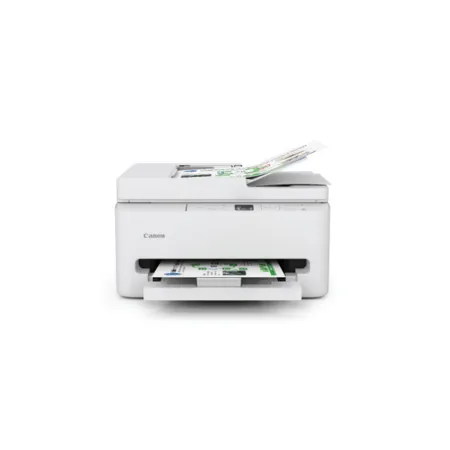
I received the Canon Pixma TR7120 Printer to test and write the following review. My setup process was clear, quick and straightforward. I utilized the printer via my mobile and laptop with no issues. Along with reasonable print speed and quality. I found the device to be a versatile, feature-rich, all-in-one (AIO) inkjet printer specifically designed for home offices who need more than just basic printing capabilities. This device is a Wifi connected mobile printer that has a 35 page document feeder and 100 sheet paper capacity . The print resolution and scan resolution, I found to be fast and accurate with no concerns, The size of the device was acceptable as well.
Jameson H.
Originally posted at
2025-12-11T19:00:00
Rated 5 out of 5
Easy to use
This printer was very easy to use and set up. It's wireless and it's very versatile. It has a scanner, it's able to print photos and it does double sided printing. It is also wireless and can connect to your phone very easily. It has a q r code that you can scan, or you can directly connect to it through your phone. I was also able to use it with the laptop. The instructions don't come included.It has a link which isn't such a bad thing.But in some ways it is.. if you aren't particularly tech savvy, this printer might be a little more difficult to use. I consider myself text savvy I had really no troubles figuring it out, but that's also another thing.I had to figure it out. It prints very nicely very seamlessly and very quickly. It's very compact if it's in my home. My home's a little smaller and cramped, but I was able to fit. And it goes great
In small quarters. I was able to print label stickers different pictures and different Letters that I needed . It looked professional when needed. I received this printer for free in exchange for my review.
Alexa06077
Originally posted at
2025-12-10T19:00:00
Rated 5 out of 5
Compact and Easy to Use Printer
I received a free sample of the TR7120 printer in exchange for an honest review.
Setting up the TR7120 was surprisingly easy. The wireless printing connected quickly, and I was able to print from both my laptop and my phone without any issues. The app recognized the printer right away, which made the whole process straightforward.
The overall setup took only a few minutes, and the instructions were clear and simple to follow. I didn't run into any confusing steps or technical problems.
The print quality has been great-texts are sharp and clear, and photos come out vibrant. The printing speed is also solid for everyday use. I've been using this mainly for home tasks such as documents, school forms, and occasional labels, and it has met all of my needs without any issues.
I also tried the duplex (2-sided) printing feature, and it has been incredibly helpful. It saves paper, prints cleanly on both sides, and works automatically without me having to flip anything manually. This has already helped me cut down on paper waste.
Overall, the TR7120 has been reliable, easy to use, and efficient for a home office environment.
Lulu123
Originally posted at
2025-12-08T19:00:00
Rated 5 out of 5
Great printer
I received this printer for free: The experience setting up the printer for home use was as easy as plug and play. It was very quick and easy to connect to my computer and wirelessly to my phone and laptop. The printer responded very quickly to my request to print from my phone and tablet. The printing was very fast and the quality was top notch. I printed both documents and photos and they were of high quality. I tried the 2 sided printing which was also fast and saved me paper. Great printer.
kmroth20
Originally posted at
2025-12-07T19:00:00
Rated 5 out of 5
Great for home use
I've been using the same inexpensive printer I bought from a big-box store years ago, so getting the chance to try something newer was a real eye-opener. I did receive this product for free, but I'm going to keep it 100 with you-my thoughts are honest.
Setup was incredibly quick. There was no hunting for drivers; I just clicked the link, downloaded the software, and was printing within five minutes of opening the box. I ran a few test pages, and both the print quality and speed were impressive.
A few features stood out right away: the fast printing, automatic double-sided printing (no manual flipping), and the hidden paper tray that lets you load it once and forget about it. The size is also just right-not bulky, but it still feels like a premium device. I mostly print sheet music at home, and it handles that perfectly.
Another big plus is the Wi-Fi connectivity. No cables running from my computer, and I can even print from my phone, which is super convenient.
The only drawback I noticed is that there aren't as many ink cartridge options online as I'd hoped, and the ones available seem slightly more expensive than what I'm used to-but only by a few dollars.
Overall, I'm genuinely impressed and glad I had the chance to try it.
robob27
Originally posted at
2025-12-07T19:00:00
Rated 5 out of 5
Great printer!
*I received this printer in exchange for agreeing to write a review.*
The setup process for this printer was quick, straightforward, and very easy. Wireless printing works very well - I tried it from both my phone and my laptop. The print quality and speed are both phenomenal, this printer absolutely meets our family's needs. I used it for both personal and professional (home office) purposes. I really love that it allows for two sided printing as well. It's nice that it prints on both sides automatically and you don't have to manually turn the paper. That has been great for saving time and paper.
kaitlynb5
Originally posted at
2025-12-07T19:00:00
Rated 5 out of 5
Great quality and easy set-up.
I received a free printer in exchange for my honest review. To start, the printer was easy to set up. I found the enclosed instructions straightforward to follow for connecting to my home network wirelessly. The printer connected to my wi-fi network quickly and easily. Once I set up the printer, I was able to print from my phone, laptop, desktop, and tablet, as the devices recognized it seamlessly. The print quality was excellent, producing professional documents in both black and white and color. I found that the documents were easy to view, whether it was printing out an email or a more visual document, such as a more formal report in color. The speed at which each page was printed was fast. Once the document I wanted was in the print queue, each page printed in seconds, saving me time. I used this for both my small-office business needs and personal use. I liked that the cartridges were easy to install, and that one was for black-and-white and the other for color printing. I did not have to worry about changing multiple cartridges for my color printing needs; I just needed one cartridge for color and one for black and white. This provides value in using the printer. Overall, the printer produced high-quality prints and was easy to use. The printer was also space-saving, so it would not take up much room on a desk or in a cabinet. I highly recommend this printer for all your small business, personal, and school printing needs.
glorim
Originally posted at
2025-11-30T19:00:00
Good printer. Easy to use and set up using wireless or connected straight to the computer..
Dale I.
Originally posted at
2025-11-25T19:00:00
Rated 4 out of 5
Great Printer, but horrible shpping experience!!
The printer is great but I recommend that you NOT order directly from Canon!! Canon's shipping forms and department are a complete mess. They screwed up both the payment and shipping address with absolutely no way to contact them or correct them on-line. To this day I am not sure where that printer went and I had to just eat the cost. Ordered the exact same printer (after this fiasco) on Amazon with no muss, no fuss and a little bit cheaper! Amazon was hands down a much better experience.
smartin807
Originally posted at