2025-12-29T19:00:00
Rated 4 out of 5
The title is a good description of the product.
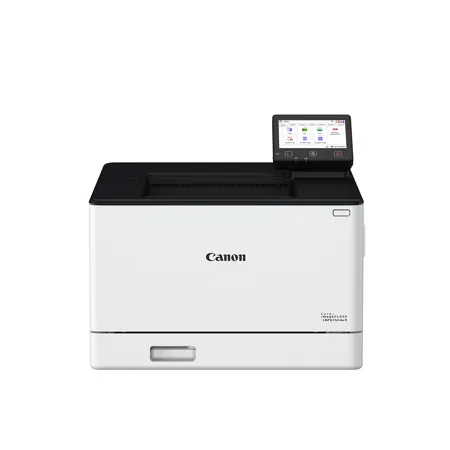
I received a free Canon Printer in exchange for writing this review about the product. The model number is: LBP674CdwII. It is an ink cartridge printer. I used this product for both personal printing and in for business when working from my home office. I was able to print from my laptop computer and from my phone without any issue. My children printed from their laptops, tablets, and phones. The setup was very quick and easy to follow, apart from having to search the internet for instructions on how to set it up. I would much prefer a booklet or sheet of instructions to follow along to as I am not the most tech-savvy person. The print quality and speed of the documents were very good. I do think the colors could be bolder or brighter when things were printed in color. They appeared a little dull to me. I did use the duplex feature which was very nice and it printed very quickly. It saved on the use of paper which was very helpful and resourceful. One thing that I did not care for while using the printer was the beeping sound that the printer made after the completion of the printed document. I found this a bit annoying when having to print multiple things and especially when I would be working at night while family members were sleeping. Another thing that was disappointing to me was that I could not photocopy things on this machine. Thank you for this opportunity and I would recommend this printer to others when looking to purchase a color printer, if photocopying was not a requirement.
Deb821
Originally posted at

2025-12-22T19:00:00
Rated 5 out of 5
Perfect for our busy WFH and SCHOOL household
We received the LBP674 as part of a trial program in exchange for writing a review. Our household is made up of two "work from home" adults and a busy high school student who is constantly working on projects, papers, etc. We are a very Apple centric house, and we were pleasantly surprised with how easy the set up was for the ImageCLASS. All of our MACs, iPhones and iPads automatically found the printer on our network. Printing has been easy including two sided printing (automated). What really blew me away was just the quality of both photos and text. Very, very sharp printing with rich colors. The photos look amazing, and text is crisp and clear. The speed was also a pleasant surprise. This cranks out multiple, high quality pages at a very fast pace. This is definitely a great household printer.
MichaelM_SF
Originally posted at
2025-12-17T19:00:00
Rated 5 out of 5
High Quality Printer!
I was excited about the opportunity to receive a printer (based on my personal preferences) for free in exchange for the feedback I provide. I was seeking a printer for personal use at home - with a particular interest in the laser printer. The Canon Printer was extremely easy to setup in my home and comprehend the printer features. Manual instructions in the box were simple and just a few steps to set up. As of now, I have only connected to the Canon Laser Color printer wirelessly through my phone. It was made much easier with the download of the Canon PRINT app on my personal phone to finish setting up the wireless connection with the printer. The WIFI connection was strong and I could easily connect to various Cloud Services on my phone to print various documents - PDFs, JPEG, and other Word Docs. I was able to pull various documents from Google Drive and One Drive. The time between submitting a print request and the page(s) printing was remarkably fast. The pixel quality of photo prints (from personal photos, to flyers, and other informational materials) was incredible. I did use the duplex (double-sided feature) and it was a huge time-saver without having to flip the page myself. Again, I mainly printed for personal use, but some for work (such as informational documents, written reports, and flyers). Of course, there is always room for improvement. So I do have a couple of suggestions. If I am printing multiple pictures on a page, the dimensions of the photos will change - especially if printing a mix of 'Landscape' and 'Portrait' photos. Also, the physical screen on the printer goes dark too quickly and I couldn't figure out how to adjust it. Overall, I would say the biggest selling point of this printer is that it provides high-level printing quality (especially for images of color). Other black and white images, this printer was able to capture both shading and fine lines. If you are looking to print high quality personal photos, art prints, or marketing/promotional materials - this printer is for you!
jharrell1
Originally posted at
2025-12-17T19:00:00
Rated 5 out of 5
Fast speed with Excellent print quality for home or small business use
I received a free Canon Color ImageClass Product LBP674Cdw 11 in exchange for agreeing to write a review. My experience with this Canon printer has been fantastic, and i love the features that it offers. This Canon printer has been a reliable and high-performing printer for both home and business use. The initial setup was very easy, and the directions were so clear and transparent. My experience with printing from my phone, laptop, and tablet was so easy and quick, which was a big difference from my past printer. The print quality on the printer was excellent. Text documents would come out crisp, sharp, and easy to read, even at smaller font sizes. This made it ideal for my professional reports and presentations. The color prints were sharp and accurate, with images looking clean with well-balanced tones. I was really impressed with the speed of this printer. All Black and white documents print quickly with minimal warm-up time, and color pages follow almost as fast. I rarely found myself waiting for more than a minute while printing 20 to 30-page documents, which helped boost productivity, which was a big change from my last printer. One of my favorite features is the duplex (two-sided) printing. This has been incredibly helpful in reducing unnecessary waste and will help cut down on printing costs. Instead of manually flipping pages or printing one side at a time, this printer handles it automatically and smoothly. For multi-page documents like reports or handouts, this feature saves a significant amount of paper, which also means fewer toner changes and less overall maintenance. I love this feature for anyone who is working in a busy office environment or just working at home. This printer offers a great balance of professional results and user-friendly features.I highly recommend the Canon LBP674Cdw 11 for anyone who needs fast performance and professional results. I highly recommend this product!
slc22
Originally posted at
2025-12-16T19:00:00
Rated 5 out of 5
Awesome Printer!!
I recently received my Canon Image Class printer in exchange for providing my honest review. So here it goes, after a few weeks of using it, I can say I'm quite impressed with its overall performance. From the moment I unboxed it, the setup process was smooth and straightforward. The instructions were clear, and within about 10-15 minutes, I had it connected to my Wi-Fi network and ready to print. The Canon app made wireless setup even easier, and I was pleasantly surprised by how seamlessly it connected to all my devices. I tested wireless printing from my phone, laptop, and tablet, and everything worked flawlessly. Printing directly from my phone was especially convenient - I could send a document or a photo to print in just a few taps without needing to be right next to the printer. This saved me a lot of time, particularly when working from different rooms in my house. In terms of print quality, this Canon model really delivered. The text came out crisp and dark, and color photos had rich, vibrant tones without looking oversaturated. The speed was decent for a home office printer, fast enough for my typical tasks like reports, invoices, and the occasional photo print. I used it mainly for home office work and personal projects, and it met all my needs comfortably. The duplex (2-sided) printing function was another highlight - it worked efficiently, saving both paper and time. I appreciated how the printer did all the work automatically without any manual page flipping. Overall, I'd definitely recommend this Canon printer for anyone who needs a reliable, easy-to-use printer that combines quality, convenience, and strong wireless features.
Angeles1371
Originally posted at
2025-12-09T19:00:00
Rated 5 out of 5
Great Printer!
I received this printer for free in exchange for writing a review.
My experience was great using this printer. The setup was extremely easy, it only took about 10 minutes after getting it all unwrapped. The print quality was great! It was comparable to the quality on my work printer. I printed from my phone first which was amazing! Then I printed from my laptop and it was the same, quick and good quality. I only printed one sided papers, so I don't know yet how the duplex would be. This printer definitely met my needs and would work well for a home office.
Robbins
Originally posted at
2025-12-09T19:00:00
Rated 5 out of 5
Excellent printer
I've been using our Canon Color imageClass LBP674Cdw II - Wireless, Duplex Laser Printer for several weeks now, which I received free in exchange for writing a review. It was super-quick to set up-very intuitive and we did it in under 10 minutes. The color touchscreen makes it simple. From the start, the speed blew away our previous printer-it spits out printouts (whether you're using a desktop computer or phone app) and makes copies in seconds. The quality is also really great, and I appreciate that you can load up to 250 sheets of paper at once.
Sweetwriter
Originally posted at
2025-12-08T19:00:00
Rated 5 out of 5
Great printer! High quality! Easy to setup! Cost saving!
Wow!! That is an understatement as to how my experience has been with my FREE Cannon printer. The wireless printing was amazing. I used multiple devices such as: phone, laptop, desktop as well as my Cricut machine. The setup was fairly easy. It was very easy to read the instructions which were in the box; easy to locate. The print quality is amazing. I printed regular documents on standard printer paper which was not included. I also printed pictures using iron on photo paper specifically for laser printers. The designs and precision were amazing. The whole experience met my needs. I used it for only home purposes. But I have no doubt this printer would be substantially effective within an office setting. The double sided feature was very helpful and budget friendly not having to waste on so much paper. Overall, this is one of the best printers I have ever used. Highly recommend. 10/10
JBPrinting
Originally posted at