2025-12-16T19:00:00
Rated 5 out of 5
Highly recommend!!
I received a Canon printer to review, and my experience has been great. I use it for my home office, and one of the features I appreciate is wireless printing. The setup was seamless, and I was able to print easily from both my laptop and my phone without any Bluetooth connectivity issues.
The setup process was quick and straightforward. Having used other printers before, I appreciated how easy this one was to get up and running. The instructions were clear, and it didn't take much time or effort. The print quality has been solid, and the ink prints consistently without streaking or fading. I also really like the double-sided printing feature since it helps save paper, but the ink doesn't bleed through the paper. I would recommend it to anyone looking for easy wireless printing and good print quality across devices!!
laracroft
Originally posted at

2025-12-16T19:00:00
Rated 1 out of 5
Not pleased
was excited at the opportunity to get a free Canon printer in exchange for writing this review. It is laser and I was looking forward to faster printing and not having to constantly buy ink cartridges. That part is true. BUT set up alone was a nightmare. Could never get to print from Alexa devices despite following all instructions on line. The link it sent me to was in 404 dead link hell. Once I finally figured out ipad and phone I was forced to constantly restart the printer between jobs. Yes it prints fast and 2 sided. But the stability of the ink itself smears over everything. So good luck if you try to print double sided. I wasted so much time printing random emails to figure out how to use it I thought I would use those sheets as scrap paper. BIG MISTAKE. When you write on the blank side the ink of the back side goes all over everything. Planner. Other pieces of paper. My dining room table. HORRIBLE EXPERIENCE.
Carrolld
Originally posted at
2025-12-15T19:00:00
Rated 5 out of 5
Excellent BW printer!! Highly recommend
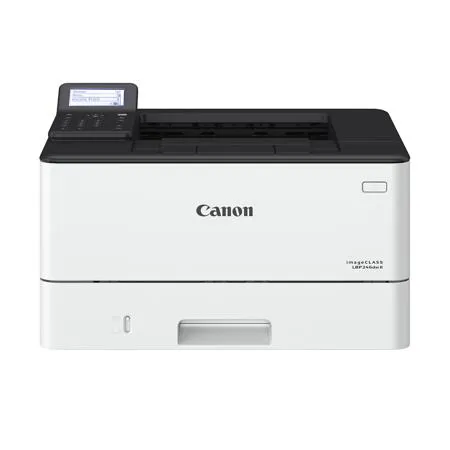
I got this Cannon LBP246dw II Black and White printer in exchange for a review and here is what I found:
Very easy to setup and connect via Bluetooth for you phone or Laptop. Once setup, you will need to load the driver on your laptop.
Once loaded, found the printer on my wifi quickly and was ready to print. Did a test print from an Excel spreadsheet from my phone and worked no problem.
The printer is REALLY fast...it print the sheet so much fast that my ink jet printer! Never going back to it. Print quality was Excellent! I used for home office and printing shipping labels so it met my needs!
Did not test 2 side printing but based on everything performing excellent I see no issues why it wouldn't.
I highly recommend this printer!!!
FrankK
Originally posted at
2025-12-15T19:00:00
Rated 5 out of 5
Great and Fast Printer
I received this printer to review and I am impressed so far. The set-up is usually confusing for me, but this one was so easy. I downloaded the app on my phone, connected it to my wifi and was able to print immediately. I was really impressed by the speed. Overall, I tested it with three pages and the printing took seconds. It was so fast. I've never had a printer print that fast. I also love that it prints on both sides, which I love to use to save on paper. I am really excited to keep using this for work and my kid's fun activities.
chd555
Originally posted at
2025-12-15T19:00:00
Rated 5 out of 5
Great for home office
Canon ImageClass LBP246dw II - Unbiased Review I received the Canon ImageClass LBP246dw II printer for free in exchange for my unbiased review. ? Extremely easy to set up with a clutter?free app. ? Seamlessly integrated into my home systems and Wi?Fi network. ? Works flawlessly across multiple devices: cell phone, PC, Mac, iPad. ? Print quality is top?notch, crisp, and professional. ? Speed matches the specifications - fast and reliable. ? Handles both portrait and landscape double?sided printing without issues. ? Currently connected to three work systems and two cell phones in my home office. ? Two?sided printing saves both paper and time. ? Quality remains consistent on both sides of the page. --- The Canon ImageClass LBP246dw II has proven to be a dependable, high?quality printer for my home office. Its seamless connectivity, fast performance, and excellent print quality make it a strong choice for anyone needing reliable everyday printing.
SabyV
Originally posted at
2025-12-14T19:00:00
Rated 5 out of 5
Super Fast High Quality Printer
LOVE this wireless printer. So easy to use. Download of the app on my iPhone was easy and connected immediately. Set-up was quick and seamless. The printer is super fast and powerful. Way faster than my other printer. Quality is perfect and user for small office was great. Loved the duplex (2 sided) option. So helpful for paper. The only small item was I had some initial troubles finding the on button. It's under a little plastic cover. It's printed in the directions. I was sent a free sample to use for this review.
mahoot111
Originally posted at
2025-12-12T19:00:00
I tried printing from a laptop. I ran into trouble with the setup for wireless printing. However, I was successful printing by connecting a USB cable to the printer and my laptop. The print quality and speed has been good and met my needs. I used the printer as part of my home office setup.
CR7
Originally posted at
2025-12-11T19:00:00
Rated 4 out of 5
Can fulfill basic tasks
I received this printer for free in exchange for a review. Setup was quick and easy. Menu is intuitive to navigate. You have to connect a keyboard to it if you have to type in a wifi password. Printing quality is decent for basic needs. The only issue I have is occasionally it will spit out 5-10 pages that are blank except for one line of gibberish and I am not sure why. Also I had to print a UPS label and it kept making it the size of a whole sheet and I have not found a way to shrink the image. Overall, it meets my needs and the cost of ink is way lower than my older printer.
Jaye
Originally posted at
2025-12-11T19:00:00
Rated 5 out of 5
Excellent Wireless Printer for Home and Small Office Use
I should mention upfront that I received this printer as a free sample in exchange for writing an honest review. That said, I'm genuinely impressed with what this printer offers, and my feedback reflects my actual experience using it over the past few weeks.
The wireless printing capability has been a game-changer for my household. I've successfully printed from my iPhone, laptop, and iPad without any connectivity issues. The ability to send documents from anywhere in my home-whether I'm working at my desk or relaxing on the couch-has made printing so much more convenient than dealing with cables and USB connections.
Setup was surprisingly straightforward. I had the printer connected to my Wi-Fi network within ten minutes of unboxing it. The instructions were clear, and the accompanying app walked me through each step without any confusion. Even as someone who isn't particularly tech-savvy, I found the process intuitive and hassle-free.
Print quality has exceeded my expectations for both documents and photos. Text comes out crisp and professional-looking, which is essential since I use this printer for both personal projects and occasional work-from-home needs. The printing speed is quite respectable-I never find myself waiting long for multi-page documents to finish.
The duplex printing feature has become one of my favorite aspects of this printer. It's saved me considerable time and paper, especially when printing longer reports or presentations. Instead of manually flipping pages, the automatic two-sided printing handles everything seamlessly. I estimate I've reduced my paper usage by nearly half since I started using this feature regularly.
Overall, this printer has proven to be reliable, efficient, and perfect for my small home office setup. I'd confidently recommend it to anyone seeking a dependable wireless printing solution.
LJ8811
Originally posted at
2025-12-09T19:00:00
Rated 5 out of 5
Great quality and usability.
I recently received the Canon imageCLASS LBP246dw II printer to try out as a free sample to leave a review. Overall, I would say it's a great printer.
The set-up process was very straightforward. It guides you step by step through every detail. I unfortunately was not able to get the printer connected to my wifi immediately (may have been a network issue) but once I tried through the mobile app, it worked perfectly. I then tested out printing through my phone/the mobile app with both documents and images and they worked flawlessly. The quality was great, too. I tried the same wirelessly from my laptop and the results were similar; quick print speed and great quality. The interface on the physical printer itself is also very clear and easy to use. While I haven't used the duplex printing yet, I'm very excited to finally have a printer that has that feature.
If I were to give one minor complaint, it's that the printer did not come with a physical usb cable that could hook up directly to my computer. I was able to grab one from an old computer but it would be nice to have, in case the wireless connection was not working. All in all, a great all-around printer.
AJordan
Originally posted at
2025-12-09T19:00:00
Rated 5 out of 5
Great printer
Excellent printer. I did receive a free sample for testing purposes. The lcd panel is easy to use and set up. Much easier setup than my old Brother laser printer. I tried printing from my ipad and chromebook and it works well. It's compatible with chromebook and airprint, Very fast printing and high quality. Duplex printing worked well. The only con is a lack of a scanner and copier which would be nice. Overall great printer.
caloo
Originally posted at
2025-12-08T19:00:00
Rated 5 out of 5
Works Great
received a Canon LBP246dw II laser printer to review and overall I think this is a great printer. The wireless printer works great from my phone and PC, as soon as you hit print the paper seconds later is coming out of the printer unlike the inkjet printer i have that seems to take forever to respond to print. I first set this printer up on my phone which was simple, click a link, follow the instructions and you're done. I had some problems though when i set it up on my pc, did a search for the printer and it came up saying i dont have the drivers. I used google to find them on the Canon website then had to remove the printer and re-find the printer in my printer settings to get it to work. Had another issue where the printer wasn"t recognizing that there was paper in the paper drawer when it was full. Tried removing the drawer and powering it on and off a bunch of times to end up with the same problem. I finally opened the front cover to see if there was a paper jam, there wasn't and when I closed it the problem went away. This is the first time I have had a printer that would do two sided printing without you having to manually flip the page, it is a great feature and will definitely save me a lot of paper!!! The print quality and speed of this printer are awesome if all you're doing is black ink, I would recommend this over an inkjet printer any day.
Jess90
Originally posted at