2026-03-11T20:00:00
Rated 1 out of 5
Looking to fix my LJ4
Spent 15 minutes unpacking, and Dead on Arrival. Looking for a replacement.
CanonPOOP
Originally posted at

2025-12-30T19:00:00
Rated 5 out of 5
Great printer
My experience with my printer was very pleasing. I really appreciate this printer sent to me I printed several sheets of paper from my canon printer. I tried my printer with my s25 ultra android phone. I found the process to be easy and fast once I read the instructions. It was quick, as easy as pie. The quality of the print was great nice and black on my a4 paper it printed as soon as I pressed the button nice and fast. Yes it definitely met my needs in what I wanted for a printer to do. I used it in my home office and I only printed it single sided. I definitely recommend people to purchase this for home or work as it prints good and fast. Thanks again for this good quality printer five star rating
Esteban713
Originally posted at
2025-12-22T19:00:00
Rated 5 out of 5
Super fast, super easy set up. A+
So far, I'm really enjoying this printer. Set up was extremely easy. It's far away from my internet router downstairs, but with the wireless printing, that wasn't a problem. It's also extremely fast at printing at printing double sided contracts, and also much more quiet than my other printer. Pretty much does everything you can ask for, scanning, faxing, etc. I have it in my second office, but i'm thinking about switching it to my main one instead.
I was incentivized for this review
chrissymm99
Originally posted at
2025-12-16T19:00:00
Rated 4 out of 5
Great office printer
I received this printer to review it from Sago.
The setup process was relatively easy I don't remember having any problems setting it up. I have had problems with wireless printing every time I try to print something wirelessly it seems like the printer is offline or non-responsive and we should take me a few seconds to print usually takes me 30 minutes or more. The prank quality is amazing everything's very crystal clear and prints off the sheets very quickly like a normal copy machine would Happy birthday exceeded what my office needs.. I never tried the duplex printing but look forward to trying it soon overall for a black and white printer I would say this is well worth its money
Ryan Q.
Originally posted at
2025-12-15T19:00:00
Rated 5 out of 5
Amazing Printer!
I recently received a free sample of this printer, and it has been an excellent upgrade from our old printer. The first thing that immediately stood out was the speed. It prints incredibly fast, and my husband was genuinely surprised at how quickly pages come out compared to what we were used to before. For anyone who prints frequently, this alone is a huge time saver.
The wireless printing works flawlessly. I have been able to print easily from both my phone and my laptop without any issues, which is extremely convenient, especially when I'm multitasking. Setup was quick and straightforward, even for someone who doesn't want to spend hours troubleshooting or reading manuals. Within a short time, we were up and running.
I run a small business, and this printer has been a great fit for my needs. It handles documents efficiently and produces consistently high-quality prints with sharp text and clean lines, which is important for professional-looking paperwork. The duplex (double-sided) printing feature is especially helpful, as it saves paper and keeps documents more compact and organized.
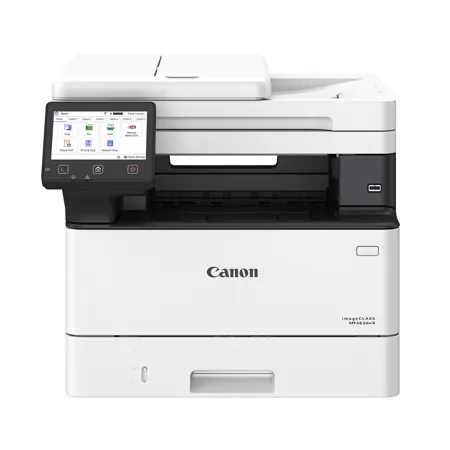
The MF462dw is a larger printer, but that size makes sense given its performance and features. It feels solid and well-built, making it ideal for an office or small business environment. Overall, this printer has exceeded my expectations in speed, quality, and ease of use, and I would highly recommend it to anyone looking for a reliable, high-performing office printer.
Hilaire
Originally posted at
2025-12-14T19:00:00
Rated 5 out of 5
Great Features Fast printing
The Canon Image Class MF462dw II is a great wireless printer. Setup was very simple and was easy to follow the prompts. I was provided this sample to review. The setup instructions must be followed to the end including the remote password. Do not skip that part as that is what allows all of your wireless connections to show up. The scan function works and will send to either of all setup devices. I was able to setup a desktop, a laptop, a phone and a tablet. I am able to scan to all devices and print from all devices. It really easy to use and prints fast and clear. The duplex double sided printing function works like a dream and is a function I have only seen in professional printers at work. It also has a fax function that I have not had a chance to test yet. The printed documents are clear and sharp without blurred lines or shadows. It also prints very fast and large documents are not a problem.
Gis01
Originally posted at
2025-12-09T19:00:00
Rated 5 out of 5
Easy Setup and Reliable Wireless Printing
I received a free Canon printer in exchange for agreeing to write this review, and overall, I have been very pleased with my experience. The wireless printing feature worked well for me I was able to print from both my laptop and my phone without any issues. I did not need a tablet, but it was nice knowing the option was available.
The setup process was quick and straightforward. The instructions were easy to follow, and I had the printer connected to Wi-Fi and ready to use in just a few minutes. The print quality is sharp and clear for both documents and everyday printing, and the speed was fast enough to meet my needs. I mainly use it for home and light office tasks, and it has handled everything smoothly.
I also used the duplex (2-sided) printing feature, which was very helpful for saving paper and keeping documents organized. Overall, this Canon printer met my expectations and has been a reliable addition to my home setup.
Home U.
Originally posted at
2025-12-09T19:00:00
Rated 4 out of 5
Great Printer, With Mild Drawbacks
Note: this review is in exchange for the printer. That said, I have opinions, both good and (relatively) bad.
Coming from a multi-use, Brother inkjet, this was an odd switch. The bad; B&W doesn't lend to printing pics. Which I tried. And failed. Because you need specialized laser paper for them. And as expensive as inkjet cartridges are, those needed for laser are quite a bit more. So, even though I do print MOSTLY B&W, there are times (maybe 10%) I absolutely want full-color.
It's also HUGE. For a single-tone, dedicated printer, it takes up a LOT of space.
Now, the good; setup was fast and smooth. But I'm admittedly a tech geek, so I was able to breeze through it - even pairing it to our WiFi. Easy peasy.
As for that WiFi, I only tried it from my laptop, but it worked - which is all I need. I have no doubt the phone app would have been just as efficient and clean.
It's also fast. Much faster than my inkjet...especially for double-sided printing.
The bottom line? Great, fast (presumably) reliable printer, with limited capability (does anyone even use fax, scanning, or copying anymore?), and a fairly large footprint.
All that said, I really don't know about its longevity, but reviews seem to be positive. And LaserJets are notoriously finicky, and expensive. So do your research before jumping.
SAGO M.
Originally posted at
2025-12-09T19:00:00
Rated 4 out of 5
Nice printer
Overall, I would recommend this printer to anyone that needs to print a large volume of documents or has fairly regular printing needs. I was sent a free sample for this review and overall found it quick and efficient to print lots of documents. The initial setup was easy as one two three, though I had some trouble setting up the scanning function directly to an email address. Wireless printing from my phone and laptop were a breeze. The print quality was nice and quick, and I loved how quiet it was. The two sided printing was just as efficient. Also, the scanning resolution was very high. Just a note that this is just a black and white printer -- would have loved this to print in color.
bartg
Originally posted at
2025-12-08T19:00:00
Rated 5 out of 5
Great printer
Here's a more natural, casual version:
---
I received a free Canon printer in exchange for writing a review, and it's honestly been great so far. Setup was super easy and I had it printing from my phone and laptop within minutes. The print quality and speed are much better than my old printer, and it's been perfect for my home office. I've also used the 2-sided printing a bunch and it's a nice way to save paper. The screen is easy to read and the printer itself looks clean and modern. My only gripe is I wish it were a little more compact, but overall it's a solid printer that does everything I need.
bduffey
Originally posted at
2025-12-08T19:00:00
Rated 5 out of 5
Nice, easy, printer!
I received a free sample of this printer to test out for a review. Overall, it's a solid win for my home office setup. I use it for both personal projects and work-from-home tasks. I've printed both one-sided and two-sided pages without any issues, and the quality is consistently great. I also really appreciate the built-in scanner; before this, I was just taking pictures of documents with my phone, so having a real scanner makes creating digital copies much easier and cleaner.
The setup was actually very easy, though I ran into one small hiccup: the link to download the Canon app didn't work. It turns out, I didn't even need it! My iPhone and MacBook found the printer instantly without the extra software. Wireless printing has been flawless since then.
JohnAW
Originally posted at
2025-12-08T19:00:00
Rated 5 out of 5
does it all
I received this unit as a free sample in exchange for a detailed review. I was excited when the opportunity to review this product came about. I have had a few Canon laser printers before and thought very highly of them. I print a good bit on days that I work from home.
Setup: The setup was not seamless. The easy setup did not work, however I was able to set up using the backup method This may be to the security on my home Wi-Fi. Once it was setup. I was able to print from apple and android devices and well as my laptop.
Printing: The output is to spec. It meets my standards. The printing was fast even in duplex. By the time I got to the printer all but the longest multipage documents were done and there waiting for me. I love the speed and clarity of a laser printer, there is no inkjet that can match it. I experimented with some greyscale images and the printer also did an awesome job on these.
Other points: The unit also scans and will function as a copier. I did not use these features extensively other than to check their functioning. I will say that it makes copies quickly and the scanning speed is faster than the multifunction it replaces but still does not compare to the performance of my high-speed scanner but I think this would be useful for that purpose. I am looking forward to using this printer for a very long time as it more than meets my expectations.
Maveric
Originally posted at
2025-12-07T19:00:00
Rated 5 out of 5
Easy set up and excellent quality!
I received this printer for free in exchange for a review. It was really easy to set up. I got it done rather quickly, and I connected my phone and my laptop to it and was able to print right away. It was very fast compared to my old printer and the print quality is amazing. I printed out a few documents, shipping labels, and Photos to see how they printed and I was very impressed.
On some of the documents, I did use the double-sided printing and it worked great. I'm super impressed and happy with this printer.
spark1duh
Originally posted at
2025-12-07T19:00:00
Rated 5 out of 5
Easy setup
I received a free Canon printer to test and review, and overall I've been very pleased with the experience. Setup was surprisingly quick and straightforward-within a few minutes I had it connected to Wi-Fi and printing from multiple devices. I tested it with my phone, a MacBook, and a Windows laptop, and each one connected smoothly without any troubleshooting. Wireless printing worked consistently, and sending documents directly from my phone was especially convenient.
The print quality is sharp and clean, whether printing text or images, and the speed is more than sufficient for home or small office use. I also appreciated the automatic duplex (2-sided) printing, which saved both time and paper, especially for longer documents. So far, it's been reliable, easy to use, and a solid addition to my home workspace.
Kris S.
Originally posted at
2025-12-07T19:00:00
Rated 5 out of 5
Positive Experience!
I received a free printer in exchange for agreeing to write this review on the Canon MF462 printer. I had a very smooth and reliable experience with wireless printing. I tested it across multiple devices, my phone, laptop, and desktop, and each one connected easily without needing any complicated steps. The mobile printing feature was especially convenient, letting me print documents and photos directly from apps with just a couple of taps.
The setup process was quick and very user-friendly. The printer found my Wi-Fi network right away, and the instructions were clear enough that I had everything installed and ready to use in just a few minutes. Print quality was impressive, with crisp text; however, I did not locate the color option for printing in color. The printing speed was consistent and easily met my day-to-day needs. I mainly used the printer for both home and work office tasks, and it handled everything from basic documents to multi-page reports without slowing down.
I also made good use of the duplex (2-sided) printing feature. It worked smoothly and definitely helped reduce paper use while also saving time when printing larger documents. Overall, I had a positive experience exploring this printer.
Marty C.
Originally posted at