
This item is no longer available.
Review Summary
2018-04-13T09:05:08
This scanner is very reliable and very easy to use. Plug in and download the software and away you go! It took several years for the rollers to wear out. This is the third scanner of this model that I have purchased for our office. This is a great machine.
KRISTIN D.
2018-01-07T19:00:00
Our company purchased this model to replace an old scanner. We use it for retaining records of product. Trace-ability and legibility are huge concerns, unfortunately, we are not getting what we need from this scanner. There are times when the scan will be so pixilated that you cannot read the date time stamp or the signatures. This is a major downfall for us.
AMK

2017-10-04T08:50:08
This scanner has worked perfectly for my needs. It scans several sheets at a time, front and back, and the quality of the scan is great. It has a small footprint, so I can leave it on my desk right next to my computer and printer. However, the paper comes out of the bottom of the scanner, so move anything that might be in the way. I elevated mine just a couple of inches for that reason.
Wanda G.
2017-09-24T20:00:00
Have been using this product since 2012, now just need to replace the exchange roller to keep it going hopefully for another 5 years...
Stockpicker

2017-04-13T20:00:00
Bought this in order to digitize our old files and clear up room. Works great as a single page scan at a time, but if you want to do anything more than one sheet at once look somewhere else.
az2ca

2017-03-02T19:00:00
I have had two of these scanners for three months now. Widows 10. No problems whatsoever. Never had to uninstall software. It is not too loud. Pages have not stuck together. The software is pretty easy to set up, but getting to the advanced options requires you to checkmark a box in order to have those options displayed. I had to call customer service who helped me figure this out. More affordable than the Fujitsu, so that was important in my decision to buy the first one. Another lady in our office has no tech knowledge whatsoever, and she uses the second one I bought. Yes, I set up the scanner and destination folder for her new scanner, but she uses it by herself now. I have already told a friend at church he should buy this model.
olopc

2017-02-04T07:57:14
great product from Canon , works fine
YI J.
2016-11-27T19:00:00
This is a problem scanner if you have Windows 10. Canon does not give a warning and says that it is compatible. As long as Windows 10 never does an update (which is automatic, this is true. Windows 10 updates will disconnect the scanner for each update. The solution is to uninstall the driver, shutdown your computer and reinstall each time a Windows 10 update occurs. This can be several times a week. Huge time waster. Canon says that they are working with Microsoft to correct the problem and this situation can happen when new operating systems are introduced. Canon says this is a problem with all the Image Formula scanners. I usually like Canon products.
jasa

2016-11-17T19:00:00
BEWARE: I bought this scanner thinking I would get the Nuance/PaperPort OCR software; well, that is true if your new laptop comes with a DVD drive, but my new laptop does not come with a disc drive, so I must rely on downloads to obtain new software. Canon does not provide any of the third-party software from Nuance for OCR capabilities by download, which is very disappointing since I rely on OCR for my business. I don't wish to order OCR software from third-parties like Nuance or ABBYY and spend another $120 for software that I thought came with the scanner by download. It would be helpful if Canon disclosed the software omission on its websites and shared this important info with reviewers so consumers can make an informed purchasing decision prior to purchasing and then setting-up the machine with their computer. While I'm at it, Canon's online instructions on what and how to download drivers and software are sorely inadequate. Canon...please take the guesswork and frustration out of the download process. Not all of us are "geeks" out here.
LLee

2015-07-07T20:00:00
We have been using Fujitsu for years until I spotted this Canon scanner at my Doctor's office. The software is much easier to install and update. The end users find these easy to use and the return on investment makes it a hands down choice over anything from Fujitsu.
Skills I.

Better than Fujitsu
By Skills I.
We have been using Fujitsu for years until I spotted this Canon scanner at my Doctor's office. The software is much easier to install and update. The end users find these easy to use and the return on investment makes it a hands down choice over anything from Fujitsu.
Worked so well I bought a second one
By olopc
I have had two of these scanners for three months now. Widows 10. No problems whatsoever. Never had to uninstall software. It is not too loud. Pages have not stuck together. The software is pretty easy to set up, but getting to the advanced options requires you to checkmark a box in order to have those options displayed. I had to call customer service who helped me figure this out. More affordable than the Fujitsu, so that was important in my decision to buy the first one. Another lady in ...
View full Review
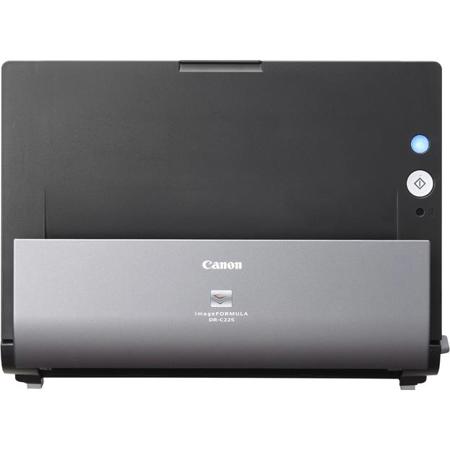
The Canon imageFORMULA DR-C225 Document Scanner is innovative, space saving design makes it a standout in any office environment for improving information accessibility, management and collaboration. Its flexibility and high image quality are only surpassed by its easy use, making it ideal for converting and capturing paper-based documents to digital format.
imageFORMULA DR-C225 Office Document Scanner
The DR-C225 scanner is ideal for general purpose distributed scanning of a variety of document types. In corporate or remote offices, this scanner is well suited for use by individuals or small workgroups to modernize paper-based processes, helping to increase efficiency and productivity. Many areas, such as legal, financial, healthcare and government, can benefit from its small size and ease of use. When combined with the bundled software, the DR-C225 scanner can be used for converting documents into editable electronic files; scanning business cards and organizing contacts; file archiving, retrieval and sharing; PDF creation; and much more.
Space-Saving Design
With top feeding and default top eject, the DR-C225 scanner has a very small operational footprint. This slim, narrow scanner's unique upright design is ideal for environments where desk space is at a premium.
Easy Use
By default, the DR-C225 scanner features intuitive front-side forward, top-up item feeding. It also includes a mode through which a single click can adjust multiple feature settings to easily deliver an optimal scanned image. This scanner is bundled with Windows and Mac drivers for easy integration with third-party scanning software. The bundled Canon Capture On-touch software enables users to configure routine scan jobs for quick and easy, one-touch access and can also route scanned images directly to cloud applications, such as Evernote, Microsoft SharePoint and Drop box
Flexibility
Scanning at up to 25 ppm, both sides of an item at the same time, the DR-C225 scanner can reliably handle a wide variety of document types, such as thick or thin documents and plastic or embossed cards. The DR-C225 scanner also includes features to handle long documents up to 118" in length or oversize documents up to 11" x 17" and double-feed detection to help ensure no data is lost in the event that one occurs.
High Image Quality
For maximum image quality, the DR-C225 scanner includes features to help improve character legibility, as well as to straighten and remove shadows from scanned images. Another setting is useful for scanning mixed batches of documents and photographs, automatically adjusting the output resolution to help improve image quality while reducing image file size. The DR-C225 scanner can even detect color documents automatically, helping to reduce batch preparation time.
Environment in Mind
The DR-C225 scanner meets ENERGY STAR guidelines for energy efficiency and complies with the ERP Lot 6 directive for energy consumption and with the EU RoHS and WEEE directives for the reduction of hazardous substances and waste products.
