
This item is no longer available.
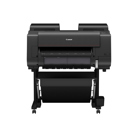
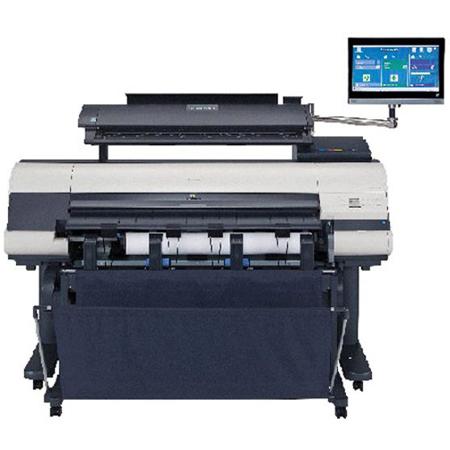
The Canon imagePROGRAF iPF MFP M40 systems are multicomponent, multifunction solutions for architects, engineers, construction, GIS and other professionals who need to scan, edit, save, share and print large-format documents easily and efficiently.
• M40 Scanner with SingleSensor Technology Assembly delivers incredibly fast and accurate scan speeds.
• SmartWorks MFP is a scan-to-print/file/share software that includes custom presets, image enhancements and cloud integration.
• Direct Print Share is Canon's Cloud Portal software for file sharing-now with Drag Drop printing capabilities.
• Customizable System lets you choose between 36" and 44" printers for maximum versatility.
• All-in-one Computer and Stand are all included in the system
Canon Technology
Unique 5-Color Reactive Ink System
• High resolution: up to 2400 x 1200 dpi output
• A double set of Matte Black ink channels in the print head maximizes monochrome print speed
• Economy print mode helps cut down ink costs for draft prints
• 15,360-nozzle print-head with FINE technology
More Than Just Drawings
Canon's imagePROGRAF 5-color line of printers has what you need to help simplify, strengthen and complete your workflow. For poster creation made simple, Canon's Poster Artist Lite software gives you the tools you need to produce an eye-popping banner or display in just a few easy steps. Also included are a Print Plug-in for Microsoft Office and Accounting Manager software to help you keep track of ink, media and total job costs.
M40 Scanner
The M40 scanner, with SingleSensor Technology Assembly, brings the MFP solution to a whole new level. Users have the ability to scan documents at incredible speeds and, with the included USB 3 connection, experience data transfer speeds of up to 10 times faster than on previous MFP models! The intuitive control panel embedded on the scanner helps make operation of the device incredibly easy and its compact design helps space become a non-issue when using and storing the device.
• Optical resolution of 1200 dpi
• Scan speeds of 13 inches per second monochrome and 3 inches per second color
• Capability to accept media of different thicknesses (up to 2 mm)
• Ability to scan up to a 26-foot (8 m) document to PDF or JPEG and up to a 50-foot (15.2 m) document to a TIFF file
Smart works MFP Software
The included SmartWorks MFP scan-to-print/file/edit/ share software includes: • A simple-to-use interface for easy navigation
• The ability to add custom presets with one-touch retrieval for those often-used settings
• Image enhancements for white point adjust, black point adjust, sharpen, mirror, invert and autocrop
• Full integration with Canon's Direct Print Share Cloud Portal software
• Remove scan fringing with the Fine Detail Scan function
System Experience the vast customization options that come with your iPF MFP M40 system. Designed to be a complete scan-to-print, file and share cloud solution, the iPF MFP M40 system includes a select imagePROGRAF iPF large-format printer, M40 large-format scanner, MFP stand, All-in-one, HD Multi-Touch PC and SmartWorks MFP software. This solution provides a fast and effective system for printing, copying, archiving and distributing maps, drawings, renderings, site and facilities management plans, design and layout proofs, posters and more.
The iPF785 MFP M40 and iPF780 MFP M40 are designed to fit seamlessly in any work environment. The user can mount the stand onto the printer for a true all-in-one solution or keep them separated for easy maneuverability. The iPF MFP M40 Swing Arm allows the user to position the HD Multi-Touch PC in a variety of positions for optimal functionality and comfort. Users can adjust the M40 Scanner so documents can be scanned straight through the back of the device or guided to the front for easy retrieval. Customization is truly brought to a whole new level with the iPF MFP M40 system.
• Fully operational all-in-one PC for vast customization and creativity
• Integrated stand for structural customization (iPF785 and iPF780 printers only)
Markets
The iPF MFP M40 system is designed with you in mind. Bring a fully operational work solution with you out in the field that can help enhance productivity when printing your technical documents. Choose the right printing solution to meet your workflow needs, whether you have a high-volume architecture firm or an enterprise environment. See how the MFP solution can help bring your business to the next level.
Workflow and Creative Solutions in the box
imagePROGRAF iPF MFP M40 systems include a variety of software programs to help you manage your printing process as well as expand your creative capabilities.
Enhanced Direct Print Share
Sharing ideas has never been easier with Canon's Direct Print Share software. Direct Print and Share is a cloud portal and batch printing solution that helps you to expand your printing workflow1. Available as a free download, this software allows you to upload documents to your account using any WebDAV compliant1cloud service and have these documents printed from almost anywhere. Easily share and/or print .cpfx PosterArtist, PDF, TIFF, JPEG and HP-GL/2 files, through the user-friendly interface. In addition, you can set-up hot folders on your desktop by clicking the Shortcut Print feature, then simply drag and drop the files you wish to print into these folders and the job will start automatically. You can even set up multiple folders, each with their own customized settings, allowing for multiple jobs to be run with ease.
imagePROGRAF Print Utility
imagePROGRAF Print Utility is Canon's mobile app for wireless printing via an Apple iPad to an imagePROGRAF printer2. Through use of the app, users have the ability to preview their PDF,JPEG and PNG file, utilize some of the great basic settings seen in their Canon Printer Driver such as selecting the paper size, number of copies, orientation and quality and then send their print to one of the imagePROGRAF 5-Color Printers sharing the same network. imagePROGRAF Print Utility is available for download free of charge through the iTunes App Store.
All This with each Printer
• PosterArtist Lite - Poster creation software
• Print Plug-in for Microsoft Office (PC only)
• Print directly from Office applications
• Accounting Manager (PC only)
• Track printing costs
• Remote User Interface
• Check printer status remotely
• Optimized Driver for AutoCAD
Optional Smartworks MFP Plus
Users who purchase this optional software will have the ability to scan to PDF/A, multipage PDFs and a variety of JPEG file formats. The can also perform RGB color corrections and automatically crop borders on files using the preview mode and copy collated sets. With the option to add up to 18 user accounts, businesses can have individual logins for each employee and monitor user activity through scan logs. C