
Overview
Compare
Specs
Protection

Reviews about this item

Review Summary

2021-07-31T20:00:00

Rated 5 out of 5

Long Term Review

I have had this printer for a few years now. When I need it, It's always ready to go. Better print quality (sharper and far faster than my previous HP. Additionally, it's less expensive. I really like the simplicity of it. No pretenses of being a scanner. For myself, Canon printers have proven themselves to be the best brand. I highly recommend this device if you want a reliable, simple, yet very capable monochrome reliable printer. Yes, I have recommended it to friends and clients.

Mountain

2020-07-15T20:00:00

Rated 5 out of 5

I love this printer!

I’ve had my Canon LBP151dw printer for almost two years. In that time, I’ve run through about 16 reams of paper. I’m not a power user, but I do need high-quality laser copies and printing. I like the speed compared to my old laser printer (an HP 50o Series; it is faster, and the quality is better. My old printer lasted around 15 years, and my only problem was a paper feed issue. I hope this printer can last as long. So far, it has done everything I think a home-office printer should do. I am happy and would recommend this printer to others. The only drawback is that it is not a native Apple AirPrint printer. However, Canon has software that allows it to print from my iPhone, too.

Grad S.

2019-01-25T19:00:00

Rated 5 out of 5

Great on toner

I bought this in July and do a lot of printing. Today (January 26, 2019 is the first time I've had to change the toner and it works fine with a knock off toner brand. The first week it didn't feed documents well, kept not grabbing a blank sheet. Since the first week it's worked fantastic. I couldn't be happier with the quality and the cost of printing is a fraction of what it is with my inkjet which I now only use when I need color.

tom230

2018-01-30T19:00:00

Rated 1 out of 5

Set-up Trouble

I brought printer because old printer had died and needed a new one urgently. Four days later still cant get printer to communicate with internet!

Former U.

2017-12-17T19:00:00

Rated 1 out of 5

Bummed

Ok so I just got this printer to use thinking it would work with my MAC as well as print from my iPad and iPhone. So it works with the iPad and iPhone thru Canon Business Print App but you cannot adjust any of the images as related to size. Everything prints in 8x10. But my biggest frustration is that the "software" is not found on my laptop after downloading from the canon website. I am very frustrated and have wasted much of my Saturday trying to figure it out. I guess I will be returning it as it does not have a cord, nor support manual and I cannot get it to print from my laptop. Super bummed out. It sounded great!!!

K17

2017-12-11T19:00:00

Rated 1 out of 5

Old fashioned and not user friendly

I purchased this printer after reading fairly decent reviews. The printer is extremely difficult to set up. Canon does not provide adequate instructions, nor a USB cord which is needed to set up the printer (despite what it says on the website. It comes with a set up DVD, even though most computers these days do not have DVD drives. Their customer service hours are not great and after waiting on hold for over 40 minutes for assistance, I'm now trying to figure out how to return this purchase.

Nat

2017-04-13T08:51:30

Rated 5 out of 5

Just as ordered

Once again, Adorama has exceeded my expectations. That's why I keep coming back for more. This is an excellent printer. Handles paper including duplex accurately and gently. Quick start-up and print speed. I love Canon printers and Adorama.

WARREN R.

2017-01-17T19:00:00

Rated 1 out of 5

64 bit drivers don't work on 64 bit Debian 8

The 64 bit drivers do not work on 64 bit Debian 8 due to a dependency on a 32 bit libbeecrypt7 library. 64 bit Debian 8 doesn't allow the 32 bit and 64 bit libbeecrypt7 libraries to co-exist. Bummer. I now have an expensive paperweight.

dlksy

2016-12-29T19:00:00

Rated 5 out of 5

Works Well on several OSs

We have Windows 7 and 10, Android and Linux; it works well with all. Love the compact footprint.

jwkhead

2016-11-21T19:00:00

Rated 5 out of 5

Awsome Printer, Met All My Expectations - 5 Stars

I bought this printer 3 months ago for my small business, and I dedicated it to printing business mail envelopes. We print 10+ daily, 7 days a week, and it has worked flawlessly. This is the second Canon Laser printer we have purchased in the last year, and I am completely sold on their quality and ease of use. I have been in business 9+ years, and I am all through with the mess and inconvenience/poor performance of HP laserjets. Both this and my Canon imageCLASS MF6160dw I bought at fantastic prices, and considering the value, I would have been satisfied paying twice the price!!

Shively S.

2016-09-24T20:00:00

Rated 1 out of 5

Absolute junk!

Does not work with any iPhone or iPad. You have to install a lousy Canon app and print thru the app. Then it prints so light it can't be read. The app does not allow for any adjustments so it basically only works with a PC.

PhotoJim

2016-06-24T08:29:32

Rated 5 out of 5

Great Product

recommended to others

DAVID S.

Canon LBP141w Specifications

About Canon LBP141w

FEATURED REVIEWS

Awsome Printer, Met All My Expectations - 5 Stars

By Shively S.

I bought this printer 3 months ago for my small business, and I dedicated it to printing business mail envelopes. We print 10+ daily, 7 days a week, and it has worked flawlessly. This is the second Canon Laser printer we have purchased in the last year, and I am completely sold on their quality and ease of use. I have been in business 9+ years, and I am all through with the mess and inconvenience/poor performance of HP laserjets. Both this and my Canon imageCLASS MF6160dw I bought at fantasti...

View full Review

Works Well on several OSs

By jwkhead

We have Windows 7 and 10, Android and Linux; it works well with all. Love the compact footprint.

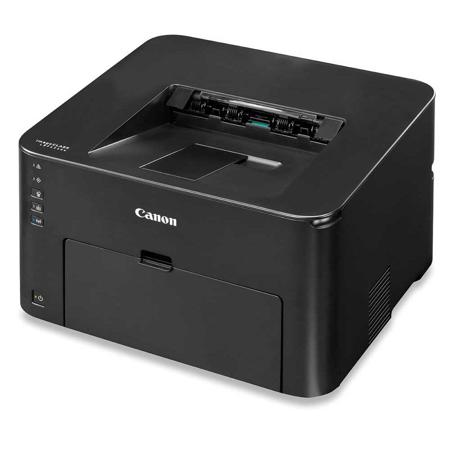
The Canon imageCLASS LBP151dw is an easy to use, wireless, single function laser printer that is an ideal solution for a home office environment. The compact, space saving design delivers professional quality output in one small footprint.

• Compact, space-saving printer delivers professional quality output in a small footprint
• Print from almost anywhere in your office with Wireless Connectivity
• Fast print speeds of up to 28 pages per minute, with your first print in your hands in 8 seconds or less
• Print on-the-go with Canon PRINT Business, Mopria Print Service and Google Cloud Print
• Eco-friendly printer features two-sided printing right out of the box, saving paper and related costs
• Low energy consumption; uses just 1.7 W in wireless Energy Saver mode
• Supports host-based UFR II LT and PCL 6 languages to provide printing versatility

Professional Laser Output
The LBP151dw delivers exceptional black and white laser output at speeds of up to 28 pages-per-minute, with your first print in your hands in 8 seconds or less. The device supports PCL 6 and UFR II LT printer languages, allowing versatility for your printing needs.

Wireless and Mobile
Wireless connectivity allows you to print from almost anywhere in your home or office. Print-on-the-go with various mobile features using your compatible mobile device such as Mopria Print Service and Google Cloud Print. The Canon PRINT Business app allows you to print to the LBP151dw from compatible iOS or Android devices.

Paper Handling
The Canon imageCLASS LBP151dw offers paper handling of up to 250 sheets in the front loading cassette and 1 sheet in the multipurpose tray.

Eco Friendly Features
The Canon imageCLASS LBP151dw is part of Canon U.S.A's Generation Green Program, which highlights the company's commitment to sustainability. The device is eco-friendly, using less than 2 watts in Energy Saver mode and is set to automatic duplexing right out of the box which helps you save on paper and related costs.

GENUINE Canon Toner
The Genuine Canon Toner is designed to help improve image processing and precise character printing as well as overall image quality. The Single Cartridge System combines the toner and drum into the same unit which means you only have one consumable to replace. Canon GENUINE supplies are designed by Canon engineers and manufactured in Canon facilities. They are developed utilizing precise specifications, so you can be confident that your Canon device will produce high-quality results, time and time again. This printer uses Canon Genuine Toner, Cartridge 137 Black.
What's in the box:

  • Canon LBP151w Monochrome Wireless Laser Printer
  • Starter Cartridge 137 Black (1700 Page Yield)
  • Power Cord
  • (USB Cable not Included)
  • Starter Guide
  • User Software DVD
  • Canon 1 Year Exchange/Carry-in Limited Warranty