+1
more
more

This item is no longer available.
Review Summary
2018-11-27T19:00:00
I bought this printer after a long search for a perfect printer. I had a Canon for 10 years so I figured I should go back to the brand I've had for so long. This printer is FAST. It efficiently prints double sided if needed. It's just so well built. Def. not flimsy. Best part---- it has a separate tray built into the area where it says Canon for envelopes. I don't even need to purchase a separate tray or keep taking paper out of the first tray, re-positioning the sides then putting paper back in. I am so glad I went back to canon. Their customer service is excellent too.
masocal

2018-05-03T20:00:00
received this product in exchange for my unbiased opinion. The Canon LBP215 Printer I received couldn't have come at a better time as my other brand printer died on me two weeks before. I hadn't had good luck with the other printer anyway so was curious to see if the Canon would fare better. Couldn't have been simpler to set up, so that was a good start. I didn't even really need the instructions as it was so intuitive. I also don't do a lot of color printing so just wanted something simple, fast and reliable. So far the Canon hasn't disappointed. It doesn't take up a lot of room on my desk and although as noisy as other printers, it is quick to print. I can't think of any way to improve upon it; it's still early days but so far it's thumbs up. I could see buying this for my child when they head off to college as a good basic printer. All things considered I am very impressed and think this makes a great home printer for people who just want something that will work and do what it says it will do.
ClaireC
2018-05-01T20:00:00
Item: Canon Printer - imageCLASS LBP214dw I received this product in exchange for my unbiased opinion. SIZE: I received this product in exchange for my unbiased opinion. The printer is a little large for the space I have available but I think it`s a standard size. SETUP: Overall, it was very easy to setup. I was easily able to install the app on my phone to allow me to print wirelessly from my phone. My laptop also saw it almost immediately on our network. I really love the ability to print wirelessly from my laptop and from my phone. Everything just worked seamlessly. PROBLEMS: I had almost no problems setting up the printer. It`s a little bulky but I think that`s to be expected. The instructions were very clear regarding how to take it out of the box and how to plug it in. I wasn`t using any other plugs to attach other equipment, just did everything wirelessly. I wish it had a real instruction manual though. I had some difficulty navigating the help section of the screen. PRICE: I do not know the price of this printer as it was provided to me in order to review it. I also don`t know the price of the ink or how often it will need to be replaced. PRINT QUALITY: The print quality is fine. It printed relatively quickly which is always good. I printed on cardstock and regular paper and both looked good with no streaks or shakes in the printing.
briarch
2018-04-18T20:00:00
I received this product in exchange for my unbiased opinion. This black-and-white laser printer is great addition to my home office, but could easily support a small office as well. It has a small footprint, and the large LCD makes setup and any device interaction super easy. I`ve vowed never to buy a printer without a LCD screen again, troubleshooting a printer problem with only 2 buttons and 3 LEDs is a nightmare! Setup was quick and easy. The printer was well packaged, and like most printers doesn`t come with any cabling except power. There was documentation and a driver CD included as well. The printer has a USB and ethernet port, as well as wireless connectivity. I went for the wifi option, I didn`t want to run another ethernet cable from the router into the room. Short of a quick initial hiccup, I was able to connect to the wifi and set it up in just a few minutes. My favorite feature is how fast it prints - from sleep to completed single page print = 5 seconds! Holy cow. The print quality is good, and it also supports duplex printing. But by far that`s what I like best, it`s amazingly fast. Compared to other printers in the same price range this is unparalleled printing speed without sacrificing quality. The build quality is good, which I would expect from Canon. I didn`t need to install any drivers on my Mac, which recognized the printer immediately and auto setup took a minute or two. Overall I think this is a great printer and fits my needs perfectly. I don`t do any scanning or faxing, so it`s nice to have a smaller footprint device that does the one task I need quickly and well - printing out documents.
JamesD
2018-04-15T20:00:00
I received this product in exchange for my unbiased opinion. Setup: After unboxing the printer, I followed the steps in the provided setup guide. The printer comes with the toner cartridge already installed and initiated which saves a step. After removing the packing tape and adjusting the paper tray, I was ready to begin the intranet setup. Registering the printer with my computer system and making it available for all devices on the intranet was easy and straightforward. The entire process, from unboxing to test printing, took about 30 minutes. Design: The Canon LBP215 laser printer is targeted towards small workgroups in a business environment. It has a compact footprint, connects to the local intranet easily and has a fast startup routine. The printer can handle paper up to legal-size and has available extra paper trays which can boost the paper reserve from about 250 up to 900 sheets. The print speed of 40 PPM and a first-print-out time of 5 seconds are both excellent. The 5-inch adjustable color touchscreen on the top left side of the printer offers a simple and intuitive set of options allowing the user to customize operation, manage intranet access and security and generate usage reports. An added bonus is a set of pre-programmed “macro” options referred to as an Application Library which offers one-button creation of three key functions: Print template, Standby slide and Consumables information. The physical printer has a small, rectangular footprint which lets it fit easily into small spaces and allows it to share limited countertop space with other work devices without dominating the area like larger printers can. All cables and access ports are on the back as is the door for the straight paper path. The front has the power button and paper supply indicator. Changing out the toner cartridge, adding paper or clearing a paper jam are also done from the front so no need to move the machine once it is placed and plugged in. Usability: No issues were found with either Windows 7 or Windows 10 devices and Mac OS 10 and above devices found the printer and easily connected. The printer can also print documents from the onboard USB port which eliminates the need to have a laptop or desktop device driving the print process. The printer recognizes that a USB drive has been inserted and the user can scroll through available documents to print via the touchscreen. The printer also allows mobile printing and setup is made very easy by the printer having a QR Code display which a mobile phone can use to set up the connection. Both this function and the USB print function can be disabled or require a security access to work to provide better data security. Security: The printer has several built-in security features. All prints are stored only in the short-term memory and access to the printer or any of its main functions can be managed by the administrator via the Remote UI. The intranet connection can be encrypted as well for an added layer of security against signal theft. To make changes to preferences or access requires admin privileges and attempts to change these settings without logging in will send an alert to the system administrator. These features make the printer a good choice for small and medium-sized businesses which have strong data security concerns like a doctors office or legal firm.
David J.
2018-04-15T20:00:00
I received this product in exchange for my unbiased opinion. My office is always looking for new products that will help with our everyday tasks. This printer hits the mark. It has been great. I tend to print multi-page documents and with this printer, it is fast and easy. With my old printer, it was difficult to print on both sides of the paper. With the Cannon LBP215dw it was extremely easy. I think this is the feature I have been enjoying the most. The set up was easy to complete. I use a laptop so once the box was open and the printer was on the desk all I had to do is run the disk to configure the printer with the computer. Best of all the toner was included, so no trips to the store to purchase some. No need to wait. I started printing within the next 15 minutes. The instructions were clear with very little to assemble. The quality seems great. I have loaded the paper tray with letter size paper and no issues with the paper jamming.The one drawback is that this printer does not have the ability to print on legal size paper. Maybe there is another option for a second tray for that purpose. So far so good. I'm looking forward to using the printer for the unforeseeable future.
LianneD
2018-04-12T20:00:00
I received this product in exchange for my unbiased opinion. I`ve never owned a Canon printer or a laser printer, luckily this is both and I was excited to try it out. The adjustable, color touchpad made set up very easy. It walked me through the entire process, I didn`t reference the instructions in manual but looked at them and also seem easy to follow. This printer `wakes up` from `sleep` mode quickly and is ready to print. There is an option to print double sided, which I really like. The USB port is another great feature, it allows my family to bring school work home, edit & update and quickly print at home. The wireless option to print from a smart phone, PC or tablet has little to no delay. You are also able to link your Google Cloud account to this printer using an app. and you can link your smartphone to the printer and use it as a remote control. I`ve never had a printer that offer the option to automatically set a specific day/time to turn the printer off, another power saving feature I really like. I`m happy with the esthetics of this Canon printer. I like that it is white and doesn`t have a bright light indicating it is on, like other printers I`ve had. The small illuminated moon isn`t obvious, annoying or distracting (our printer is close to the TV, we`ve had problems with a blue glare from the printer on the TV in the past. There are so many updated features/options on this printer, it`s amazing! I`ve only been using this printer for a short time and there is a lot to learn, but I`m happy with everything I`ve learned so far. The only option I would want to add to this printer is the ability to print in color.
NicoleR
2018-04-09T20:00:00
I received this product in exchange for my unbiased opinion. The Canon LBP214dw is a great printer. The print quality is amazing. All text, graphics, and photos look great. The printer also prints really fast. My favorite feature is the wireless printing. It is so convenient especially when using the Canon Print Business App. I can print text, graphics, and photos instantly. The product instructions were very clear and user friendly. The product assembly was simple I was able to assemble the printer very quickly. This printer is better than others I have used in the past because the print quality is much better and the touch LCD panel is more user friendly than others I have used. The printer exceeds quality expectations because of the features and performance. I think the printer is a great product. I am so impressed with the quality of the printing and how user friendly the printer is. This is a wonderful printer with some amazing and impressive features. It is a great size and fits very well on my desk in my office.
CrystalC
2018-04-08T20:00:00
I received this product in exchange for my unbiased opinion and that is what you will get. This was the easiest printer I have ever known to set up. Quick,painless and easy. As for print quality the first print I printed was so light I could barely see it then I realized it was because I did not have the settings correct and I was trying to print a colored image with the black-and-white printer. The printer is very responsive, very quick, the images are so sharp and the letters are so tight. I will use this every day to print, business cards, postcards, invoices and receipts. I love the touch screen. It did have a small learning curve to it but once I got used to it , it became very intuitive to use. I would kindly recommend this printer. Only drawback is that it doesn’t print color.
Luvpepe
2018-04-08T20:00:00
I received this product in exchange for my unbiased opinion. I print frequently for my job on a daily basis and need a fast printing machine that is reliable and sturdy. The nice thing about the setup is there is no installing the ink, the ink is already ready to go. The printer is able to complete black and white jobs fairly quickly. I like that this printer can be stacked onto another paper tray to make it so that you can print different sized paper without changing out the paper every time. I love the touch screen on the device with the large print which is easy to see the print. The screen is easy to use and sensitive to the touch. The setup is not easy on this printer. The directions are very hard to read as the booklet changes languages throughout the directions and the pictures are unclear. Finding the tape and setting up the printer took me over and hour trying to figure out what the directions were telling me. Not only is the setup difficult, but this printer requires a USB cord to operate but the printer does not come with a USB drive. The CD in the package only works for Windows computers so I had to go to the Cannon website in order to run the proper install to use the printer on my Mac Computer. The machine only prints black and white which is a bummer for the few jobs I like to have in color. This printer is not able to complete my daily tasks as I need and I find it very difficult to use on large jobs as the paper keeps getting stuck in the printer. For one page black and white jobs this printer will work great. Similar printers like this one normally have Wi-Fi capabilities and this printer does not. I would highly recommend that this printer get the ability to print using Wi-Fi as standard USB cords are not reliable anymore.
Dabbott
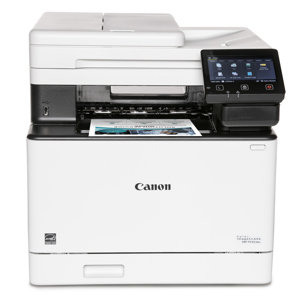
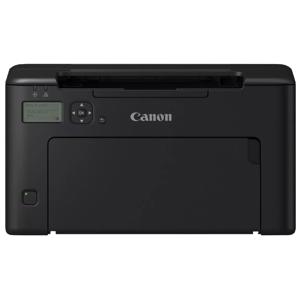
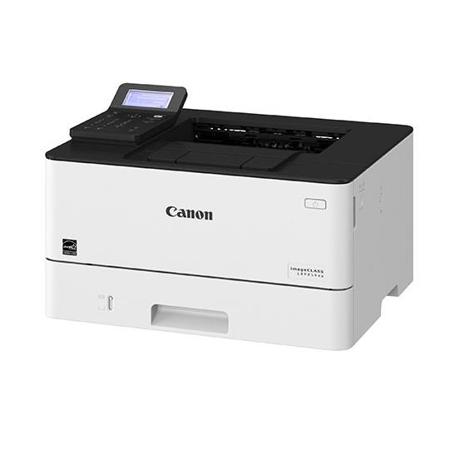
Designed for small businesses, the imageCLASS LBP214dw balances speedy performance, minimal maintenance and the ability to add an extra paper tray. The imageCLASS LPB214dw uses Canon GENUINE Toner 052 Black (yields 3,100 Pages) and 052 High Capacity Black (yields 9,200 Pages), ISO/IEC standard.
• Print up to 40 ppm
• Print up to 8-1/2" x 14"
• 900-sheet maximum paper capacity
• Standard one-year warranty
Workflow Efficiency
• Supports various mobile printing solutions
• Designed for smaller print jobs with first print-out time of just six seconds
User Experience
• High-capacity, all-in-one cartridge helps reduce overall supply costs
• Canon's signature reliability and engine technologies keep productivity high and minimize the impact on support resources
Sustainability
• A combination of fusing technologies and low-melting-point toner minimizes power requirements and helps achieve low-energy consumption
• Encourage environmentally conscious work practices by enabling settings that can help save paper and energy
• ENERGY STAR certified and rated EPEAT Silver