2020-05-12T20:00:00
Rated 4 out of 5
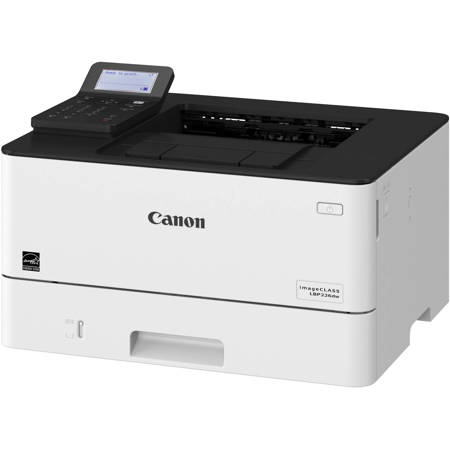
imageCLASS LBP226dw Review
I just started using the imageCLASS LBP226dw. I am pleased with the quality of the printing and the size of the keyboard and LCD screen used to operate the printer. If I could make an improvement to the unit, I would have the printer automatically detect that the multi-purpose tray has been lowered and print to that tray as opposed to having to change the paper path via the computer manually and then print from the multi-purpose tray.
You I.
Originally posted at

2020-02-14T07:49:45
Rated 3 out of 5
Slow wake up
Prints great but seems to go too deep into sleep mode. Many times does not wake up before my iPad says no available air printers. Search again and it finds it.
Emily M.
2019-12-20T11:20:48
Rated 5 out of 5
Tricky setup but well worth it!
Absolutely love it! Almost did a four star because setup was a pain in the butt. Especially to get it to feed from the paper tray. Once we got all that sorted out it works great and is super quick. Glad we went with this printer!
Thomas C.
2019-11-07T19:00:00
Rated 4 out of 5
Easy to set up and use!
I received this product in exchange for my unbiased opinion.
The speed and quality of print is excellent with this printer.
My favorite feature is the wireless printing. It is wonderful to be able to print from another room.
The instructions were clear and easy to follow. Set up was very easy; Load paper and step by step to connect to my wireless network and go. I was printing in under 10 minutes.
The paper tray drawer is a little flimsy and doesn’t slide in and out easily though.
Assembly- The product just needed the electrical cord plugged in and paper added to be physically ready to print. The starter cartridge was already installed which made assembly even easier.
This laser printer compared to other ones I have used is it’s a little quieter and faster with printing. I also noticed a bit less odor than my previous printer. It does double sided and stacks the finished copies nicely.
Quality of the print was excellent for a canon product I was a little disappointed in the ability for my paper drawer to easily move. The ease of setting up refill cartridges was nice as I don’t have to worry about not being able to print if I forgot to order the replacement cartridge again.
Things that could use improvement- A paper drawer that slides easier. The marks on the side of the drawer was there brand new out of package. Place the electrical plug off of the corner so that I can put it flush to the back wall or a side wall depending on my desk placement.
Overall I am very happy with this printer. In the first week I have already printed over 300 pages with no jams. I even used some older paper I had in a drawer for the last 90 pages. front and back printing went smoothly as well. Canon makes a solid product.
EileenV
Originally posted at
2019-11-06T19:00:00
Rated 5 out of 5
Great work printer!
I received this product in exchange for my unbiased opinion.
We plugged in this printer immediately after receiving it, in my husband`s work office. He does quite a bit of printing from there. The printer seems to receive information from the computer at a very fast rate and then prints the pages out even faster. We love the speed! The price is great considering the frequent use of the printer in the work environment. The print comes out clean and crisp. The writing shows up nice and dark and visible. We loved how easy it was to set up this printer, allowing us to use it right away. It is able to be hooked up wirelessly or via a cord. At the moment we have it hooked up using a cord. We have not had any issues with this printed up to this point and have printed over a hundred pages in our week with it in use.
JessicaS
Originally posted at
2019-11-06T19:00:00
Rated 5 out of 5
Awesome printer
I received my printer yesterday. It's a professional equipment but my 11 year old daughter was able to hook it up and get it going in our home office. The setup was a breeze. I love the wireless printing option. We are able to print from anywhere in the house. It's great for my home office and personal use. Overall I give this product 2 thumbs up.
Tyrone77
Originally posted at
2019-11-05T19:00:00
Rated 4 out of 5
Great Printer after setup
I received this produce in exchange for my unbiased opinion. I really like this product. I use my printer constantly and replaced it with this one for the last week. It has kept up with all of my printing needs and I love the fact that it can print on both sides automatically without me having to reinsert the sheets. The original tray holds 250 sheets and the printing is fast. The wireless capability is great as it allows multiple users freedom to work around the office and have a central printing station. I also like the ability to print from my phone.
Assembly: This is a wider unit, so make sure you have space for it. It’s pretty much plug and play, but make sure you use the CD to install the drivers. I installed the software on 2 laptops so far. The first took about 10 minutes as I started to read the directions for the first install, but found them confusing; so I put them down and just used the cd. The second took about 5 minutes. The instructions on the printer itself are very user friendly and clear.
Overall, I really like this printer and all of the features. It’s a great addition to my office.
GregC
Originally posted at
2019-11-05T19:00:00
Rated 2 out of 5
Setup difficulties made for a poor experience
I received this product in exchange for my unbiased opinion.
SETUP:
After removing the printer from the package and looking through the setup directions, I moved it into my office for setup. For the most part, setup was easy, however I do this often. I think someone not familiar with all of the `lingo` might have had a more difficult time with some of the setting options. For instance SSID for the wireless setup, and PKA key options. These are not words always on most routers/modems. The other issue that I had was getting my PC laptop to pick up the new printer. Because I don`t have a CD/DVD drive, this is again a step that might confuse many people. Finally, once the connection was made to the printer, I had to restart my computer in order for the printer to be recognized by any Print request.
PRINTER USE:
After the initial setup difficulties, I sat down to get busy trying out the features of this printer. However, I once again began to have problems with my laptop being able to access the printer. I ended up having to uninstall, reboot my laptop and reinstall the driver multiple times. Finally, after digging through many of the options in the menu of the printer, I found that there were updates to the firmware that needed to be done. Once the updates were done, the printer installed with no issue on my laptop.
PRINTER FEATURES:
I found that the features in the Menu of the printer were difficult to manage. I walked through every listing and tried each of the options but even given my tech background, I found many of the features assumed that the user knew what the listings were.
After printing multiple pages, I finally figured out how to change the settings so that the ink was darker and more defined. Then the pictures and text were clear and sharp.
OVERALL:
In the end, I found this printer is nice and prints fast and effortlessly, however, the hassle of the setup and how long it took me to be actually able to print, I`m not sure I could recommend this printer to anyone without a tech background.
TLG62
Originally posted at
2019-11-04T19:00:00
Rated 4 out of 5
Super Fast!
I received this product in exchange for my unbiased opinion.
I was overall very pleased with the printer. It is very large and somewhat heavy. If you don`t have a lot of space available, you may need a more compact printer. It prints EXTREMELY fast with very nice quality. It isn`t too loud.
The most challenging part of this was by far installing everything and finding a place for the printer. It takes up a lot of room.
krispinator
Originally posted at
2019-11-04T19:00:00
Rated 4 out of 5
Quick Printing, Easy to Use
I received this product in exchange for my unbiased opinion.
Item: Canon LBP226dw ImageCLASS Laser Printer
Installation: This was very simple to install on my computer. I was able to get it installed on both my husband and my own computer in under ten minutes. I`m not very technologically savvy, so the easy to follow instructions were appreciated.
Physical item: It`s a nice, compact printer that we fit easily on a small side table in our study. I also like that it has an energy saver feature as we only use it during the weekdays. It also is pretty light so easy to move.
Printing capability: It seemed like it came out of energy saver mode quickly, and reacts quickly to the computer sending it over too. I didn`t have any issues with it jamming or printing double sided.
Print time: I was impressed at how quickly it printed, especially when doing a large, double sided job. It prints quicker than my work computer which is triple the size and used much more frequently. It also seemed like it connected with my computer much quicker and that I could hit print, close the pdf, turn around and it would be done printing.
Noise level: I did think it was a little loud the first time I printed, but quickly got used to it as I`m used to it with my office printer.
Price: Good price for how quick it prints and how low maintenance and little space it takes up. It seems like it would do a good job handling small jobs quickly, and no issues with handling printing a large quantity of pages at the same time.
margaret1124
Originally posted at
2019-11-03T19:00:00
Rated 5 out of 5
Amazing and Efficient!
1. The printer is really efficient. It prints pages out a lot faster than the prior printer I had. I also like that it does not make so much noise when completing a print job.
2. My favorite feature would be the speed that it prints at. It also has a very sleek design which does not take up much space at my home desk.
3. The product instructions were very clear. I had some issue connecting it to the Wireless Lan connection but I am not sure if that is due to the printer or my internet connection having issues.
4. The product was very easy to assemble. It came with the toner inside the printer already, all I had to do was plug it into an outlet.
5. The product is definitely a lot better than the previous printer I had. I would also say it is one of the best printers I have used in any home setting. I do have a more commercial printer at work but this one prints just as efficient if not the same.
6. This product definitely meets my quality expectations and I would highly recommend it to consumers.
7. As I said, the only issue I experienced was connecting to my wireless router but not sure if that is an issue with the printer itself.
8. My overall impression of the product is that it is well worth the cost.
Ed H.
Originally posted at
2019-10-31T20:00:00
Rated 5 out of 5
A Fantastic Printer
Assembly: First let me start out by saying that this printer comes packed safely and efficiently, upon opening the box you can see it comes packed ready to pull out and connect I recommend that after you open it you lay the box down and pull the protective fabric in comes encased in and pull it towards you gently to release it out of the box. Doing this step will assure you that nothing gets damaged during your initial setup.
Space Required: This printer is a little taller then the usual office printer I currently use but that’s because this printer uses a two tier paper tray which makes it a little taller. You will have to find a nice sturdy place to keep it on as is it a bit heavier then similar printers. I placed mine an on sturdy office desk that was just wide enough to accommodate the item.
Ease of Use: When I first tried setting this machine up it looked quite complicated but after taking a look at the instruction booklet included with the printer I quickly found myself navigating and adapting the printer configurations to my personal needs. I highly encourage that you do the same as to not get overwhelmed with all the the printers features.
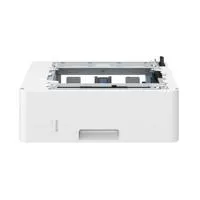
Features: This was my favorite part trying out the multiple printing options. It’s very efficient when printing out all your documents it’s automatically set to print on both sides of the paper as to not waste so much of it. A very welcome feature that will help you reduce cost and save you money in the long run by not wasting so much paper in the office. You can also set it to print on only one side if you wish to do that with ease by pushing a button. As I mentioned above this printer has two drawers that you can fill with paper and let me tell you it holds a ton of paper. I was able to fill the main drawer with 250 sheets of paper and then fill the additional drawer with about 100 more for a total of 350 pages of paper. This was perfect for my small office as it meant less trips to refill the machine saving me valuable time. You are able to stack about 65 printed pages on the output bed before having to pull them off.
Internet Connectivity: You aré able to connect the printer via the standard office ethernet port or you can set it up using a direct WiFi connection. It also has added security pin encryption that lets your share personal documents for print with the people who you want to give access to only by setting a four digit encryption code that must be keyed in on the printer in order for the document to print. You can also pair this printer to work together with the most current popular cloud services.
Quality: Overall I’m very pleased with the high quality build material that was used for this printer which does not feel flimsy. It`s also energy star compliant which is a plus as it’s not going to leave a big energy print on the earth and on your wallet. It operates efficiently and quietly and does it very well. I highly recommend this printer to those of you looking to upgrade the old tired office printer with this particular model.
Complaints: The only thing I wish is that this type of office printers came in a variety of different colors to match my current decor but hey it does what it’s supposed to do and does it very very well.
Final Thoughts: It prints great, it prints fast and it’s energy compliant please give this printer a try if your looking for something more efficient and more modern. This printer will save you money by not having so much paper waste and time by printing fast and efficient without all those constant trips to reload the paper in your current one.
JorgeF
Originally posted at