2023-02-19T19:00:00
Rated 1 out of 5
GOOD EXAMPLE OF A BAD PRODUCT AND COMPANY!
I purchased this about 3 years ago to scan directly to my laptop, for ease of use, and for support. I have had nothing but. I never could get the scanner to work. The printer constantly disconnects from the network info and have to reenter the info. The latest issue is trying to use it with a new laptop with an updated driver for the unit. This driver does not work. Canon has failed to provide any support.
canon c.
Originally posted at

2021-10-18T20:00:00
Rated 1 out of 5
Spent hours trying to make it work
If you like to fix broken stuff, this is your choice. My husband spent couple hours trying to install all software for it. Finally it started to print something if you hardwire it. It can print stuff throu the network if you put it out of sleep mode, so basically if you are staying next to the printer. Well, next day I was trying to print something and driver was down, so I spent couple more hours to reinstalling driver and so on. Next day was same. At this point we didn't even try to connect it to the network, hardwire only, like in 1990's.
NoneOfYourBussines
Originally posted at
2021-10-10T20:00:00
Rated 1 out of 5
Usually takes 1/2 hour to a day to print
I have this printer in the same room as my modem so that is not the issue. Once it prints, it will continue with other printing, However, it takes at least 1/2 hour for that first print. Sometimes, I don't find my document in the printer until the next day. I do not recommend this printer.
ask
Originally posted at
2021-09-22T20:00:00
Rated 2 out of 5
Avoid this for anything but basic document printing
Its fairly cheap, fast, and does a average job for document printing. For anything else though its very poor. Photos look like something out of the 90s with missing lines, grainy images etc. The settings are a complete maze of obscure named items, where the help description says the same things as the actual setting. When you look for any online help the manual that comes up shows things that are not even on the machine, making self help overly difficult.
mob
Originally posted at
2021-09-17T20:00:00
This is a miserable printer. A complete fail. I am getting rid of it. Its useless.
frd622
Originally posted at
2021-08-09T20:00:00
This thing is a pain. Every other time I use it it looses WiFi & its a nightmare to reset. There is no customer service support to speak of their refer me here to no help! Price if junk
Pain
Originally posted at
2021-08-05T20:00:00
Rated 1 out of 5
Buyer beware!
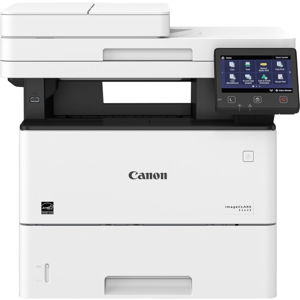
This is a horrible entry level laser printer. I want/need scanning capabilities. So, I decided to go with the Canon imageCLASS MF264dw. The scanner is where this printer fell horribly short of expectations! This particular model ONLY allows you to scan to a computer that is connected via USB. WHY?!!? The features to scan to email or scan to network drive are not available!! This does not work for me...and why they would disallow this feature on a printer that allows wireless configuration is beyond me. Furthermore, there is NOTHING documented anywhere to say which Canon printers specifically support this capability. So, packing it up and sending it back. I will not be looking at the Canon line of printers any longer.
Otterbee
Originally posted at
2021-07-20T20:00:00
Rated 5 out of 5
Things that work as intended.
We love products that just work all the time and reasonable price, this one is.
Quality
Originally posted at
2021-06-16T20:00:00
Rated 1 out of 5
Does Not Fax
It is only when you read the manual that you see the *, fax depends on the model. get a real Multi Func
bretsharon
Originally posted at
2021-06-14T20:00:00
Rated 2 out of 5
WiFi = NoFi
As a long time fan and user of the large Canon copy systems, I had expected the same level of quality and user experience, when I tried a Canon consumer level printer. I was astounded by the bad experience. The printer itself did a fine job, but it was the connectivity that was an issue. The WiFi absolutely would not work, going so far as taking down my stable network each time I tried to connect it. Additionally, it's drivers are generic and the mobile interface is rudimentary. HP, in this class of products, still makes a better machine, therefore, I will go back to HP for my office printers.
BFNastali
Originally posted at
2021-06-09T20:00:00
Rated 1 out of 5
Malfunctioning Printer
I have had this printer for over two years. This printer jams non stop, no matter duplex or single sided. The LED screen goes into a hibernate freeze mode and would not come out no matter what. I have tried resetting the settings and the problem persists even though I have the latest's firmware updates.
AdvancedUser
Originally posted at
2021-05-26T20:00:00
Rated 1 out of 5
Worst printer I've ever owned
Forget using wireless with this thing. The drivers and utilities won't maintain connection with the printer. Chromebooks won't connect - especially now that Google Cloud Print is a thing of the past. I hate this thing - and I'm an IT support person. Ready to dump it and buy something else.
bbycrts
Originally posted at
2021-05-09T20:00:00
Rated 5 out of 5
Great All-in-one for Small Business
Simple to set up. Works well. A little large in size but still a great all-in-one for small business.
SGBTN
Originally posted at
2021-04-29T20:00:00
Rated 1 out of 5
Will not buy Canon again
I purchased because of good price point and features, but when it takes more time, energy and effort to print (the device always errors. Requires unplugging. Inconsistently connects, and it just a PITA to print a document. It should not be this difficult. Menu nav sucks. I'd rather pay more for something that just works.
BRox
Originally posted at
2021-04-01T09:04:04
Rated 5 out of 5
Perfect mono laser printing
clean perfect printing every time
easy to install & maintain
HENRY L.
2021-03-08T19:00:00
Rated 1 out of 5
Copying is frustrating.
I like to copy 2-sided to save paper, and this MF264DW makes it unnecessarily difficult to do that. I go through the menu and select 2-sided, and then when I try to actually copy, it reverts to single-sided. The online manual does not explain well what buttons to push to save the setting.
NH R.
Originally posted at
2021-03-07T19:00:00
Rated 1 out of 5
It keeps dropping the wireless connection
I bought this last year after having great results with other Canons and I am sorry that I did. About half the time I try to print, the printer can't be located. I have to turn the printer off and on again and then maybe it works. The most puzzling thing is that I will print something and a few minutes later I try to print the same thing or from the same application (Word for example, the printer can't be located.
RuthMc
Originally posted at
2021-03-01T19:00:00
Rated 4 out of 5
Good value all in one
Purchashed for a home office. Typical Canon quality. Set up was easy - read the instructions first! Was tired of purchasing ink all the time. Only time will tell if toner turns out to be better. Only knock is the print quality isnt great. It's good, not outstanding. More than good enough to print out documents and make copies.
TimboSlice
Originally posted at
2021-02-21T19:00:00
Rated 4 out of 5
Nice printer for home or small office.
Setup was fairly easy; wireless connection language could have been easier to understand...all I needed was my WIFI password. Printer works well. Copies are a little more grainy than I expected.
RLW
Originally posted at
2021-02-12T07:43:47
Rated 5 out of 5
Great product and pricing for your hard earned dollars!
Machine works flawlessly and is super easy to set up. My purchase of this model was based on high reviews from 2020 Consumer Reports Buying Guide for this model. It rated good for Graphic Quality which is rare in their comparison of other black and white all in one laser printers. Most importantly it has U.S. Based customer support from Canon. Will take a fair amount of a foot print in your office space but the trade-off is a very capable all in one office laser printer.,
Pasquale C.
2021-01-26T19:00:00
Rated 3 out of 5
Quick print but keeps dropping wifi
Frustrating printer. When it works it prints quickly but if we don’t use it for a couple weeks, the power saving mode seems to drop the WiFi connection and won’t show up in s happens to us every couple of months. Then trying to figure out reconnecting the WiFi is miserable. We just wanted a simple printer.
Dlb333
Originally posted at
2021-01-10T19:00:00
Rated 5 out of 5
Job Well Done
Canon build great printers and this multi-function was a great value. Great product and prompt shipping....well done...
Alan B.
Originally posted at
2021-01-01T19:00:00
Rated 4 out of 5
Canon - imageCLASS MF264dw
Apart from some delays in delivery, the product seem to be working fine so far. Hope it stands the test of time.
Manjeet K.
Originally posted at
2020-10-31T20:00:00
Rated 3 out of 5
Love the printer BUT!
Print, scan and fax work great! It prints documents super fast. It works flawlessly through WiFi. What truly annoys me is that
printed pages do not come far enough out or exit the machine completely and you have to reach in and grab them. It would be great if this machine had an exit tray that slides out for printed documents, then slides back when done. The other annoyance is the display lights that come on and every few minutes for no reason. It would be nice if when you hit the night button these lights stayed off. It’s ridiculous that I need to turn off this machine every night to avoid the bright lights.
Another great feature of this machine is the keypad flips down!! Overall I do love this printer, but it does have some quirks that can be easily fixed or resolved.
Image e.
Originally posted at
2020-10-03T20:00:00
Rated 1 out of 5
Falls short of plug and play.
I have to turn this machine "off" then "on" from the "energy save" to print a document. I'm sure there is a setting for this someplace but I can not find it. That's "Cheap".
My scan turns out under developed. So instead i photo and email with phone file and send. What a pain in the....
. Coming from a give away throw in "All in One" that performed these tasks without consideration I expected these simple features.
Kenjon
Originally posted at
2020-05-31T20:00:00
Rated 4 out of 5
Great scanner and printer
so far so good! Working from home I use this printer and scanner multiple times every day. I get very good results with the scanner and like the app that controls the type and quality of the scans. The printer is really quick, I can print a document out while on the phone with the clients to make notes without having to delay of ask for them to "hold on while I print this out".
The only issue with the printer is that about once every 2 weeks there is a error message on the screen first thing in the morning, I have to turn it off and back on, then I am good for about 2 weeks before doing this routine again, not a deal breaker by any means - just odd
J K.
Originally posted at
2020-04-25T20:00:00
Rated 5 out of 5
MF264dw replaces my 9 year old MF4450
Brought as a future replacement for a Canon MF4450 which i brought in 2011. It still works fine but makes funny noises sometimes and I was afraid it might fail when I really needed it. I set up the MF264dw made sure I can use every thing that it does it is excellent even has more functionality than the MF4450. It is currently off and on standby waiting in the wings for when I need it.
BobG2020
Originally posted at
2020-04-15T20:00:00
Rated 3 out of 5
Tray that holds printed pages is awkward.
I love Canon products and this printer is fast! My only complaint is that the tray that holds the printed pages when they come out is awkward and seems like it would get backed up if you printed more than a few pages. Maybe I haven’t got it opened all the way, but I don’t think so!
Firefly
Originally posted at
2020-04-11T20:00:00
thumbs up FA SHO i received it fast, it was priced cheaply but fair and works well
jenalynn
Originally posted at
2020-04-11T20:00:00
Rated 4 out of 5
Iffy wireless.
Print quality is 1st rate. My problem(s has been with wireless. First problem is corrected, as it was too far from the router. My current problem, although I haven't called tech support yet (Easter weekend) is that the printer will not wake up from sleep when called upon to print.
As soon as I iron out the 'iffy' wireless, my rating would be 5 stars.
Odd, by the way, that this is called 'Mobile Ready'. It's quite large and heavy!
Steve G.
Originally posted at