2021-03-11T19:00:00
Rated 3 out of 5
Not User-Friendly: Can be a good device if you have some expertise.
Purchased about 2-3 years ago for our small real estate business. Good device for a few people. It is advertised as an intuitive user experience but it's not. A layperson will not figure out how to set up this printer straight out of the box. I have spent several hours trying to troubleshoot this device. I had to watch many Google & search YouTube videos to set up the scan-to-email feature, specifically for Gmail. I also had to read through the manuals several times to understand them because the manuals are also not very user-friendly. Be careful if you lose power, because you may have to set up some features on the printer again (which is not good if you're also trying to run a business. If you have a tech whiz in the office that can address the errors & issues, that will help you out a lot.
All of this said, however, once I got it up and running it is a great device for what we use it for. We only need black & white since we're mostly dealing with documents that have text. The quality of the scans & prints is good. It scans multiple pages to print, copy or email fairly quickly. It can load up a lot of paper and the laser ink lasts a long time. We're still not sure how to scan docs to multiple emails without something going wrong so we currently only have it set up to scan to one email address. Being able to print through WI-FI is a great feature and very convenient. I would like to give the device 4-5 stars if just rating the printing, scanning, copying features but that is only a portion of what makes a good device. If the user interface was truly simple & easy for any person to understand (or at the very minimum, an easy-to-follow manual) I think this could be a go-to device for most households. I hope some of these user-intuitive issues have been/are resolved in future models.
VRE
Originally posted at

2019-10-01T20:00:00
Rated 2 out of 5
Every Microsoft update makes it stop working
I have to redownload or find a way to make this thing work at least once every two months. Shut down. Delete the driver. Reinstall. Repeat. Repeat. Repeat. Calls to Canon. Waiting time. Told to delete and reinstall drive. Did that. Repeat. Download a different driver and maybe it will work. Arrghhh!
The print quality has gotten worse and worse over time. Not sure what to do about it.
Disappoint
Originally posted at
2019-06-27T13:53:20
Rated 5 out of 5
first-rate multi-function; very good software interface
Does just what it is supposed to do, well. Copies, prints, scans. Excellent software interface for those functions.
DANIEL D.
2019-06-25T07:43:10
Rated 4 out of 5
Great Copier
This is the second generation of the copier/fax/printer I have owned. It is versatile, easy to operate, and economical.
I would recommend it to anyone who has a need for this type of copier.
STANLEY A.
2019-06-24T20:00:00
Great for simple B&W. Prints fast. Still learning the equipment and various features. Disappointed that it did not come with a through User's Guide. The Quick Setup/Quick Operation Guide is not very helpful. Very generic and not much details.
Glendon P.
Originally posted at
2019-03-10T20:00:00
Rated 2 out of 5
Place the originals in the feeder.
When using the MF Scan Utility, an error pops up saying "Place the originals in the feeder." I am able to scan from the Platen Glass and have tried changing the settings to both auto mode and scan from feeder. The firmware is up to date on the printer and so are the drivers.
The only fix to the problem is to manually reinstall the driver every time I restart windows. The previous drivers have the same problem.
Windows 7 Professional
Service Pack 1
32bit
lwhit
Originally posted at
2019-01-02T10:06:55
Rated 5 out of 5
A Great Printer for a Home Office
I have had this printer before and was so glad that I could get the new model. This is a multifunction machine, and while I don’t FAX, I use the print, scan and copy features in my home office. It prints professional quality documents. It works seamlessly with my Mac laptop. I did have someone come in to professionally install it as it is a bit too heavy for me to lift.
KAREN M.
2018-12-23T19:00:00
Rated 5 out of 5
Perfecty Excellent.
I just wished I’d bought the color version.
Something like MFD xxxx color or MFD xxxx black/white
MicroMike
Originally posted at
2018-12-09T19:00:00
Rated 1 out of 5
Great hardware, Horrific Software
I have used HP for the last decade. Easy to use, but so so quality. The Canon hardware and image quality was perfect. Unfortunately it was not easy to use and install. Horrific. I can use an HP seemlesly in under 5 minutes. I am still trying to figure out the Canon. I still cannot scan to PDF. I am not even given the option. Only .TIF . Worse it the app in the Windows Store. It only redirects me to the Canon store. A worthless app. Why was it even developed and released? Great hardware, but making it a chore to use makes it an extreme negative in my book.
bushidobryan
Originally posted at
2018-12-08T19:00:00
Rated 5 out of 5
Great printer at a great price
I owned a Canon multi-functional printer before and I liked it. Unfortunately I had to give it away when I moved to East coast. This one is even better, faster and wireless!
lafango
Originally posted at
2018-12-02T19:00:00
Rated 5 out of 5
Great So Far
Purchased as early Christmas gift for daughter, son-in-law and grandsons. They love it so far, especially the print from mobile device feature. Handles everything they want it to do including all school work for my grandsons from grade school to high school.
Sken52
Originally posted at
2018-10-25T16:33:26
Rated 5 out of 5
GREAT PRODUCT AT THIS PRICE
EXCELLENT PRODUCA AT THIS PRICE
Shailesh D.
2018-06-13T12:27:22
Rated 5 out of 5
Would buy again
Very good printer. Easy to setup and use
John R.
2018-05-06T20:00:00
Rated 4 out of 5
Good printer
I received this product in exchange for my unbiased opinion, the printer was fairly easy to set up. It didn`t take much time at all. The functions of the spinner are pretty cool, scanning faxing copying all work well. The quality of it seems pretty good. It`s not noisy and seems to be pretty efficient for the time that I have been using it. I definitely recommend buying this product. The wireless connectivity is an awesome feature. I literally print from my phone
Feras A.
Originally posted at
2018-04-22T20:00:00
Rated 4 out of 5
great b/w printer
After the product arrived i had it un-boxed and set up within 15 minutes. Very easy and straight forward. i was however a little disappointed that it could only be set up wired or wireless. But setting up wired caused no issues with other computers finding and installing it.
It worked great from the very first print. And talk about fast, 10x faster then my old printer. I just wish it had color printing as well.
My biggest complaint comes from needing to fax a 7 double sided page document. Don't get me wrong, this printer prints out double sided pages faster then most can print single sided. But try to find info on how to fax a double sided doc....no where to be found. i spent a good hour searching before i just started clicking in the menu and found one property for dbl sided under the fax settings changed it to yes and it worked. was just very frustrated i couldn't find any help for it.
Overall i give it a 9 out of 10 and would highly recommend it as a B/W printing solution for small businesses.
nitekchris
Originally posted at
2018-04-15T20:00:00
Rated 5 out of 5
Fine Printer, Worthy of Canon Name
I received this product in exchange for my unbiased opinion.
The image class MF424dw is a workhorse printer which builds upon previous solid Canon laser printers with a number of improvements. I had an older model for many years (the MF4690and this is a fine upgrade.
Excellent speed and print quality. Mostly easy to use instructions. Very good scanning capabilities, a marked improvement from my previous model.
I am not particularly tech savvy but I was able to make the wireless connection and it worked out fine.
It is a bit on the bulky side so if you are just a home office this may be too big. Very good for my small business needs, however.
Should be a good long-term value when you factor in toner costs over time.
Overall, a fine machine, worthy of the Canon name.
Jondyriver
Originally posted at
2018-04-14T20:00:00
Rated 4 out of 5
Fast and Efficient
Product:
Canon imageCLASS MF424dw
Packaging:
I received this product in exchange for my unbiased opinion. The printer comes packaged in an innovative large box with built-in side handles for easy lifting and carrying. The box is thick and sturdy. It is more than suitable for shipping. The printer is tightly packed and protected.
Unboxing:
Removing the printer from the box is an easy task with step-by-step instructions printed on a flap of the package. The outer box slides up and off of an inner box by utilizing handles on two flaps of the box. Although it may not be intuitive at first you will realize how ingenious it is once you have done it. (Note: the outer box is bottomless which is why this may not be intuitive when you begin.) Once the outer box is removed you can then easily begin removing all of the packaging that protects the printer. Very simple.
Setup:
Once you have removed all of the tape and foam protection, the printer is ready for setup. Load the printer with paper and install the power cord. Plug it in and power it on. This is an easy process and is outlined completely in the user guide.
Configuration:
This printer is good to go out of the box for those not interested in customizations and feature selection. But it is also loaded with options, features, and customizations for those that need a dynamic workhorse. I have plenty experience with printers and found these features to be useful and welcomed. Those who are not experienced with multifunctioned laser printers with such options may find this product somewhat intimidating. The user guide and online support do not elaborate enough on these features for a novice user. If you are a novice you will neeed to do some research.
Connection:
Wireless, Ethernet, and USB. I've used all three and each one works well. My main setup is on a wireless network. The connection is strong and stable. I have experienced no connectivity issues. This product is suited for a networked environment and I suggest you use it as such. If your intentions are to only use this device connected to only one computer via a usb port then this printer is overkill for you.
Compatibility
My environment is comprised of a wide variety of devices and users. We have Windows laptops and desktops, Apple desktops and laptops, iPhones, iPads, and Android smartphones. All of these devices have worked well with this printer. Each one was able to locate and identify the printer with no issues.
Print
I have printed envelopes, labels, cardstock paper, letter sized and legal sized paper. I have not experienced jamming or misprints. I many times use the dual sided printed option which saves paper and is fast. The print is crisp and bright. I would be comfortable presenting professional documents in any setting produced on this device.
Scan
The scan clarity is very good. The ability to zoom, cut, crop and pan scans is a nice feature. Scanning from the physical printer or from a computer is easy. The scan rate is quite fast. It is perfect for scanning invoices and receipts. The flatbed apparatus is made in such a way that it is easy to make scan directly from the pages of books if necessary.
Copy
This device makes for an excellent copy machine. Copies are crisp and are made very fast.
AutoFeed
I have been pleased with this feature. The feeder is smooth and recognizes documents instantly. The documents stay straight and feed one at a time up to a 50 sheet stack. It will also scan both sides of a document in a single pass which makes it one of my favorite features.
Fax
I do not have a need to fax as much as I did in years past but still have the need. The fax features of this device have been flawless. I have faxed from my desktop and from the physical unit itself. The ability to customize fax documents, save, sort, or email them outstanding. Receiving fax documents via a landline has functioned as needed.
Paper Tray Cartridge
The paper tray is durable and easy to load. I like the fact that it holds up to 250 sheets. It also adjusts to legal sized paper which is a necessity for me.
Touch Screen Display
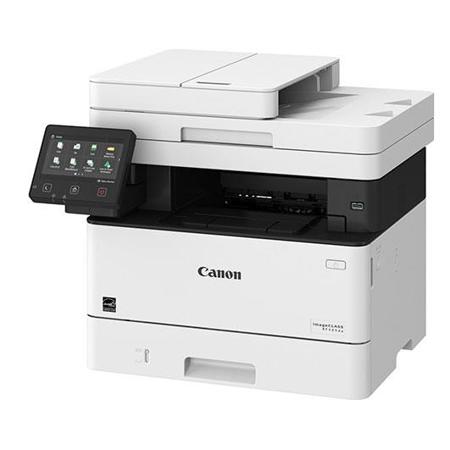
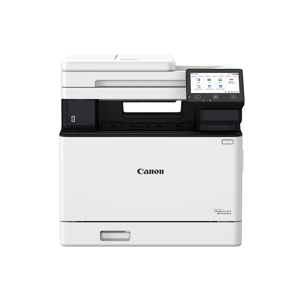
The screen is big and clear. It has a finish that practically eliminates all glare. It is angle adjustable. The touch feature is responsive. I have customized the apps displayed on the screen with my laptop to show only those apps we need.
Administration
The printer can be locked down to only users you approve. You can also lock the settings and assign someone to manage those settings. These administration features are not intuitive and are not detailed very well in the user guide nor are they online.
Aesthetics
It is a fine looking piece of equipment. Professional, well built and durable. The design is efficient. No wasted space or parts. It has a smaller footprint than many other similarly featured multifunction laser printer.
Pros
Fast, double sided printing, Low maintenance, dependable, flatbed and autofeed (single scan and duplexing) scanning and copying, fax, mobile friendly, wi-fi and ethernet, large paper tray, big touch screen, extensive customizations.
Cons
Advanced features are not intuitive, website support for those advanced features is not very good, some may need to educate themselves about PCL, UFR II, and PS protocols and drivers, can be needlessly intimating to novice users.
Overall
Very fast laser printer with quality print that makes great documents, copies, and scans. Well built and durable workhorse. Easy to unbox and physically setup. It has a distinctive professional look to it and is pleasing to the eye.
BillM
Originally posted at
2018-04-13T20:00:00
Rated 5 out of 5
Great printer, user friendly, and well made
STORAGE: I received this product in exchange for my unbiased opinion. The product is larger than I expected but I made room for it in my home office. It is a heavy printer so I would suggest a strong table or desk to put it on. I needed help from another person to get it out of the box due to its heavy weight.
ASSEMBLY: The printer instructions included in the box, made for very easy setup. They walk you through step by step and a teenager could even easily set up the printer. Very user friendly instructions.
STABILITY: The printer is very sturdy and made well. Due to its heavy weight, I`d suggest planning where one would set it up before taking out of the box. Not an item you want to move from place to place frequently.
PROBLEMS: I experience no problem with the printer after testing it for 10 days.
PRICE: The price point, is what I would expect for an office printer of this size and durability. I`ve seen other printers that are very small and flimsy, but with the Canon MF424DW you have a strong quality product and the higher price point is understandable.
MikeyM
Originally posted at
2018-04-11T20:00:00
Rated 4 out of 5
Great All In One
I received this product in exchange for my unbiased opinion.
This All in One came packaged really well and had clear assembly instructions. You just have to be careful to read the instructions as there are two different ways to install the printer, depending on if you`re using wifi(wireless) or usb(wired).
The software installs pretty easily, though most people will have to download it, as it came on a cd.
I will say that this thing is HUGE....make sure you take time to pick a place, as it is heavy to move. It needs space around it as well(4 inches).
It scans quickly and fairly well. It has several features to choose from when scanning.
Printing it does FAST....Fax...well I don`t have a landline, so I can`t speak on that.
I would say that they should make it a bit smaller and lighter if possible and add color printing...who doesn`t want color printing in 2018??? However, compared to other laser all in ones I`ve used this is just as good and faster when printing.
Overall this is a great all in one. I would recommend it.
DavidF
Originally posted at
2018-04-09T20:00:00
Rated 4 out of 5
Excellent MFP for the price!
I received this product in exchange for my unbiased opinion.
The MF424dw ImageClass printer is a well designed, sleek printer which performs well in a small or home office. It combines black and white printing, scanning, faxing, copying into one form factor machine. Its relatively small form factor and abundance of input and output options make it a versatile unit.
Installation of the system is EXTREMELY easy. The unit arrived without any type of physical assembly whatsoever. Other than taking off the packaging tape and styrofoam there were no other pieces to assemble.
You do not need to be technically savvy to setup the printer via either wired or wireless connection. In fact, whereas some other manufacturers make setting up wireless printing to be a nightmare, this was just the opposite. The front display touch panel was seamless to navigate and found my WiFi SSID immediately. I entered my security credentials and was quickly connected to my network. Next, I loaded the included software onto my laptop and was off and running in about 5 minutes flat.
I would consider the printing quality from the Canon MF424dw as very good. Text was clear and crisp. I found the unit to print faster than most others in it`s category and was exceptionally quiet during processing. Photo printing was a bit grainy but should be acceptable for this type of unit.
Scanning was quick and easy to use via the included software. There are multiple options for output including, PDF, email, JPG, network, etc. My only real negative with the unit was the OCR scanning engine. While the OCR was quick to process, I felt the error rate was higher than it should be for a text document.
Overall, this unit functioned well during testing. Installation, form factor, printing & scanning quality and speed was above average. Anyone looking for an inexpensive, high quality MFP should consider this device.
Gary F.
Originally posted at
2018-04-08T20:00:00
Rated 5 out of 5
Nice office All in one!
I received this product in exchange for my unbiased opinion.
Printing: It prints fast and clear without smudges. Overall it was very efficient.
The only con was that it is black and white and not able to print in color.
The wifi connectivity was fast and great response and had no issue.
Able to scan and save which was good.
Being energy star rated is a plus!
Overall there were no issues with the machine, worked as stated and would purchase for the office.
JohnF
Originally posted at