2012-03-25T20:00:00
Rated 3 out of 5
Very Expensive to Own
I bought this printer full well knowing that it consumed a lot of ink. I thought I was prepared. Nothing will prepare you for just how much ink this printer consumes. Perhaps it's the fact that the ink cartridges are small, but this thing costs hundreds of dollars per year just in the cost of ink. Granted it's highly engineered ink that's supposed to last forever, so maybe you can cut back on costs by substituting lower quality ink.
Everything else about this printer is very high quality. The pictures it prints are amazing, and it's got good software and an intuitive interface.
My only other complaint would be that it doesn't scan or print 11"x17" paper. It would be amazing if Canon would finally release a home printer that did this; I don't think it would be an issue since 11"x17" scanners are the same size as this printer.
Jack
Originally posted at

2012-03-12T20:00:00
Rated 1 out of 5
CANON PIXMA MG8120 BAD PHOTO PRINTER!
I have to be honest, I have been using this printer for over a year and as far as I am concerned, it is a HORRIBLE Photo printer. I constantly get washed out low chroma color prints, the ink runs out very quickly and it is always the one cartridge I DON'T have...Black and white, hey its great! But I am sorely disappointed in its Color prints. I have run every diagnostic, used brand new ink cartridges, pushed the vibrance in Photoshop to the top and still...it prints LOUSY! I get better prints using jpgs printed to PDF files then to the hard copy!
smo310
Originally posted at
2012-02-18T19:00:00
Rated 3 out of 5
a bit disappointed
I gather this printer is great if you're about photos, but I bought it to be our printer in a home office and to scan old slides. Set it up wireless and it works great, except when I tried to scan the computer said the printer didn't exist. Have yet to solve that issue. As for printing, it takes a long time to warm up when first turned on. A real pain for two sided printing. When printing something off the internet, it starts with the last page first, which is annoying if you don't even want what's on the last page. For two sided you put only one sheet of paper in the tray, print one page, then turn it over to print the next one. You have to fool it into thinking it's out of paper in order to do this. The print quality is otherwise very good.
DAK
Originally posted at
2012-02-04T19:00:00
Rated 2 out of 5
For starters, it cannot air print
Doesn't air print and no software upgrade available at this time.
Scanner is very difficult to figure out, not the least bit intuitive. MP Navigator program is difficult to bipass. In general, the software design is very poor. This will be my last Canon Printer.
Louise
Originally posted at
2011-11-24T19:00:00
Rated 2 out of 5
Avoid at all costs..
I have nothing but cons for this unit..
It uses ink at an insanely high rate, and the ink is very expensive to replace.
It will not scan if you are out of ink! This has got to be the dumbest issue I have ever seen in a multi function device. If you run out of ink it completely locks the device until you purchase more.
If Cannon were to fix/change that one issue, I would totally reverse my opinion of this product, however as of right now I will avoid all Cannon multi devices int he future.
Dissident
Originally posted at
2011-10-31T20:00:00
Rated 3 out of 5
Multifunction?
This is a great printer, don't get me wrong. I had a MP980 before this and I loved it, so when it came time to replace it, I went for another Canon Pixma. This printer prints amazing photos. However, unlike my last printer, there is a bug with the scanning function and it freezes every program, including the MP Navigator (which I have been using for years with no problems as soon as I try to scan. It will make great copies, so I know the scanner works, but try to scan from the MP Navigator, Acrobat Pro, Fireworks, etc. the printer stops at 8% of the scan and the program freezes. How many hours have I poured into finding a fix for this, I don't even want to calculate, but if the scanner worked as it should, I'd be inclined to give a much higher rating of satisfaction. As is, I'm miffed because my previous 2 Pixmas worked perfectly.
Marisa
Originally posted at
2011-10-26T20:00:00
Rated 4 out of 5
Good Printer - Ink Hog
Received this printer/scanner/copier recently and immediately set it up to work with my wireless network on my coffee table before moving it to a more remote location (my goal). Connection to the network was a piece of cake using the "easy" method (as long as you know your network SSID and passphrase). What took longer was scanning a document and sending it to my computer. Turns out McAfee was preventing the printer from finding the laptop. That was easily fixed and everything is working superbly. Scanning (color PDF), photo printing, color copying, are all perfect and easily accomplished. Colors on photo printing are superb and accurate. The supplied application software allows many more features and settings than I will probably ever use, but I will enjoy exploring. The machine is really cool looking with many touch buttons hidden beneath black plastic until needed. the pop-up screen is great and the on-screen alphanumeric entry system is wonderful. I like that the output tray can stay closed and will open automatically when you copy or print something. I would say the only tricky part of setup was loading the ink cartridge holder and the cartridges. Canon makes it sound scary, but once you get to it, it is easy. The "success" lights are really great. Also, the on-line manuals (loaded with the Canon software package) have complicated-sounding procedures that are really simple when you try them. Ink consumption is an issue as noted by orther reviewers, the only reason It did not get 5 stars across the board from me. Great machine - so far!
PS - for netbook installation, I copied the installation CD to a USB memory stick and it worked like a charm installing everything to my netbook.
Jay
Originally posted at
2011-10-22T20:00:00
Rated 5 out of 5
Sharpest Printer Out There!
I've used this printer for several months now and the Canon MG8120 is still working great. I use the printer on my home network, and have had no problems. The printer setup was easy, and the quality of my prints and documents are great.
ChrisH
Originally posted at
2011-10-21T20:00:00
Rated 4 out of 5
Nice printer
Works well for the price.
Slow to start up.
Some parts are made pretty flimsy.
No CD/DVD print tray
RL
Originally posted at
2011-10-17T21:00:00
I use it to print manuals for my small business. Some of them have graphics and photographs. All of them print out beautifully.
Installation was a snap: I hard wired it to an XP desktop and a wireless connection to a Windows 7 laptop. Scanning is quick and easy. I have not tried it as a fax yet, but after using for the other functions, I am anticipating no problems.
Ohoko
2011-10-14T21:00:00
Rated 4 out of 5
fast, quieter than most, good printer
*can be set for very quiet operation, and it is.
*print quality easily adjusted.
*ink usage so far is reasonable.
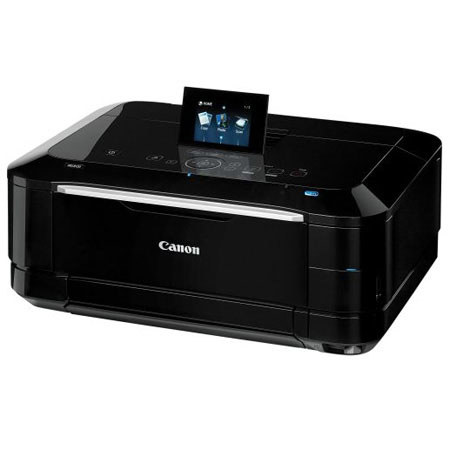
*measure your space, it is 19"w by 16"front to back by 8"h-and you need room to lift the cover.
*easy to set up.
*esthetically pleasing.
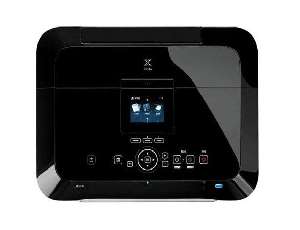
*sleek design and good LCD display.
dumpy p.
2011-10-12T20:00:00
Rated 5 out of 5
Third Canon --just as good
This replaced a 980 pixma which replaced an earlier Canon which was not compatable with a new computer. The 980 died in just 2 years.
All of them worked well. I especially like the quality of text and photos. They are sharp and clear, and the photos are almost as good looking as photos made on high end photo printers.
Both the 8120 and the 980 have/had a peculiar problem of switching paper sources and demanding more paper in the new source even after just filling the other source. Annoying, but tolerable.
Another annoying characterisitic is that the printers prime all the colors of ink whenever you change just one cartridge. Therefore they waste ink. And the printers will not oprate with one empty ink cartridge, so even if there is more than enough black to print text, if blue or red or yellow or gray is empty, the printer will not function. (Many office supply stores do not stock the gray ink.
Despite these characteristics, my Canon printers have far surpassed other brand printers I have owned in quality. And I keep getting Canons when I need new printrs.
Kittydrew
Originally posted at
2011-10-09T21:00:00
Rated 5 out of 5
Very Impressive
Highest rated color printer from consumer Reports, and it is easy to see why. Amazing colors, fast, easy to use, with lots of cool options for printing photos. You will not be disappointed!
RedStar R.
2011-09-12T20:00:00
Rated 1 out of 5
poor excuse for a MFP
No fax modem, no ADF, and ink cartridges that are 30% less than previous model.
How can you have a MFP with no fax or ADF? These are 2 of my most used functions.
Also, ink cartridges are now 9ml. My previous Canon they were 13ml. That is approximately 30% less. The 13ml cartridges were used up pretty quickly. Now with them being 9ml you get even less use.
No USB cable? Do you really need to save the dollar it would cost to include it?
I would not recommend this printer. Have you looked at the price of replacement ink cartridges lately?
home u.
Originally posted at
2011-09-06T21:00:00
Rated 4 out of 5
good photo printer
I have only used this unit as a Photo printer. I have done a lot of research on printers and I have concluded that I will only use branded ink and papers. Being as both are not exorbitantly priced, I chose this printer. This printer uses Dye ink and has a detachable print head, both of these are the primary reason I bought this printer. I have not even emptied one of the original ink tanks, but so far I am very pleased. I will probably sell prints made by this printer, that is how good they are. The black tanks are more full at this time so they will not need to be replaced as often as the 4 color tanks
MARK P.
2011-09-03T21:00:00
Rated 5 out of 5
Best Printer for the Price
The wireless part is the best part. I can be in another room and print documents. I have a home office, so very thankful of this printer. Frequently use scanner and print photos. Very good photo quality. Haven't found anything bad about it.
M'O I.
2011-09-01T20:00:00
Rated 5 out of 5
Excllent copy-easy set-up
I am an averagely skilled computer user and usually need help setting up new equipment. This printer was easy set-up and could have been done by someone that never used a computer---essentially set its self up and alerts me in a clear manner if I need to make adjustmnent for the document I am printing. Output is clear, color exceptional and quality equal to the large corporate color printer I use at work. Highly recommend this printer to all.
Mary
Originally posted at
2011-08-27T20:00:00
Rated 5 out of 5
Best printer ever!
MG8120 Best ever! Good price! easy set-up. Nice speed and ok ink consumption. Very good quality!
bear3232
Originally posted at
2011-08-26T20:00:00
Rated 5 out of 5
Quality Product
Was very impressed with the companys fast delivery (less than 48 hrs w/o extra charges). Set up directions were clear and concise. Easily accomplished (I was a bit worried by other reviews as I'm not a technician). The instructions for the entire setup were clear and easy to follow and setup took no time at all.
The quality of the printing, both text and photos, is very professional looking.
The only 'little annouyance' is it's just a bit slow to start actually printing ~ not a big thing.
Price was excellent. Much cheaper than my local big box store!
Quite happy with my purchase and my new Canon MG8120 printer!
fjordrider
Originally posted at
2011-08-18T20:00:00
Rated 4 out of 5
Excellent Quality Product
Previous Canon product owner, including Pixma ip4000 printer, and a video camera. Currently own Power Shot A75 camera. Took several weeks reviewing similar printers by other manufacturers, concluding that Canon had the features I wanted at the best price. The only real problem is the high ink consumption. I have printed 4 4x6 photos plus numerous articles and already need to replace several of the tanks. Have used the scanner for several projects, including the the film strip with no problems. Overall the printer has lived up tp my expectations except for the poor ink usage, and the cost to replace the tanks.
timtam
Originally posted at
2011-07-27T20:00:00
Rated 5 out of 5
Best Printer I Have Owned Yet
Great looks , print quality excellent, ink consumption is a little high but the print quality helps to offset this. Overall I am very pleased with my printer.
Airdale
Originally posted at
2011-06-25T20:00:00
Rated 5 out of 5
DEFINATELY A QUALITY PRODUCT
THE PIXMA MG8120 WAS SO EASY TO SET UP. THANKS CANON FOR THE SETUP BOOKLET. PRINTING PICTURES WAS SIMPLE AND THE PICTURES CAME OUT SO PROFESSIONAL LOOKING. VERY EASY TO USE. I ABSOLUTELY LOVE EVERTHING ABOUT THE 8120 PRINTER!!!
BARBIE
Originally posted at
2011-06-17T20:00:00
While the quality of the photos it produces is excellent< the cost comparison over time is horrible. I’m extremely careful to select gray scale printing where possible, but even though I print very low quantities of photos, my ink costs are through the roof. Do not buy this printer unless you have stock in an ink company. Ink speed during the print cycle is good, but warm up time inbetween standby periods make the printer experience drag on for 3 - 5 minutes or so.
Bob
Originally posted at
2011-06-11T20:00:00
Rated 4 out of 5
Just Unpacked
I just purchased and unpacked this printer, and the USB connection fell apart every time I moved the printer. The connection is two small holes in the left rear and the connection is not very secure at all. Also, why the buyer has to put in the print head instead of it comming already firmly part of the original product escapes me. It seem that every time you want to print or copy you have to press 40 buttons to get one sheet of paper out. I hope that after I get used to it I'll love it, but not yet.
New B.
Originally posted at
2011-05-15T20:00:00
Rated 5 out of 5
Good all in one for our family of 6
We bought this all in one printer several months ago. After several weeks of research, this is the one had everything we were looking for. I am happy with the speed, the quality of printed pages, and the ease of use. It is networked with 2 PC's and Mac. The printer is much more user friendly on the PC's. The Mac print menu is seen and utilized through a series of drop down menus that are a bit cumbersome and take some time to learn and understand. I have also scanned many negatives and photographs and forms. I am very very happy with all of those functions! Scanning negatives takes some time, but the results are worth it. I'd buy it again for sure.
Biggest issue (not a deal breaker) for me is the ink level guide. It has been telling me I am low on ink for almost a month now. And yet it continues to print as well as ever. You can check the ink level on the printer itself and it seems more reliable than the pop-up warning.
Javalogical
Originally posted at
2011-03-14T20:00:00
Rated 5 out of 5
Top quality photos
This is sweet. I purchased a new printer mainly for photos,but I also wanted a copier and scanner. The picture quality could not be nicer.I've printed appx 30 4x6
and appx 25 8.5 x 11. still have ink. Software is a bit tuff for a novice like myself, but I did get it set up and wireless.
Buy it, you will love it. Ps: it also prints great on all photo papers. I've used three differant brands and matte, satin and glossy. All great, this printer does not care. also useing this with windows 7. Oh yea, the scanner scans pictures perfect.
BUDDY
Originally posted at
2011-03-13T20:00:00
Rated 5 out of 5
Exactly what I wanted!
This printer is so easy to use, even I can do it! I wanted something that could print quality photos, but still be economical to use. Set up was a breeze, even for those of us who tend toward technically challenged. Directions were clear and concise. Touch screen options are easy to understand and use. Prints quickly and quietly, and the ink it uses is very economical. I couldn't be happier!
Jeanne G.
Originally posted at
2011-03-04T19:00:00
Rated 5 out of 5
One Great Product
I purchashed the bronze version of this printer and it is the best looking printer I have seen. I set it up on a wireless network. It was easy to do and works perfectly. The print matches my screen almost perfectly. I have another printer made by another well known company and the print does not match my screen. nearly as well. I would recommend this printer to anyone looking for a quality product and a really good looking machine.
Dodgerfan
Originally posted at
2011-02-26T19:00:00
Rated 5 out of 5
Best PIXMA yet
This unit was a replacement for a dying 5 year old PIXMA IP6600 and an 8 year old bulky scanner. I've had it for 2 months now and have printed over 100 photos on it using Photo Paper Pro glossy (primarily) and a slew of plain paper, as well as using the scanning function. The prints are awesome - as I expected from the use of my old PIXMA - and the scanning is genuinely _smart_. Setup - even Bluetooth setup with the optional BU-30 unit was a breeze and took only minutes. The only unusual thing I've noticed is that, in printing photos, the gray ink cartridge is the first to run out - I was expecting black, as with my old PIXMA. I've had two PIXMAs now, but this one combines excellent print quality and scanning in one exceptional, well-designed and full-featured package. My best PIXMA yet!
CBD
Originally posted at
2011-02-11T19:00:00
Rated 5 out of 5
New Canon Fan
I bought this unit because I needed a new scanner and I got a lot more for my money with this all in one.
However, I did not expect to get SO MUCH MORE for my money.
Great product with great function. Love the wireless function and it was very easy to set up!
Jimst
Originally posted at