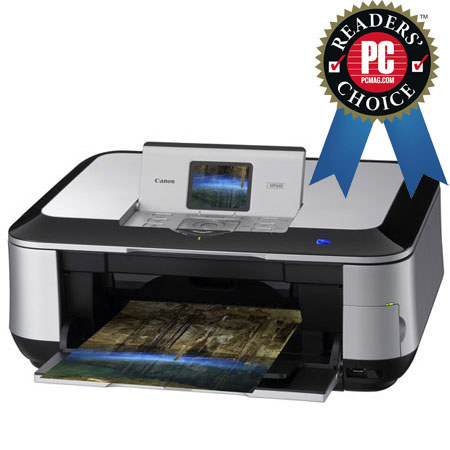
Canon Pixma MP640, Wireless All-in-One Photo Inkjet Printer with USB Interface, 9600 x 2400 dpi Resolution, for Mac & Windows
SKU: ICAMP640
This item is no longer available.
Share:
Overview
Compare
Learn
Specs
Protection
Reviews about this item
Review Summary
2019-11-19T19:00:00
Rated 5 out of 5
Great Copier/Scanner/Printer
I am very happy with mine. It is a great printer/scanner/copier for a home use.
Bob H.
Originally posted at
2017-09-13T20:00:00
Rated 5 out of 5
Love this printer!
I print multiple photos on Canon paper for contests and even state fair. The colors are sharp and vibrant. Ease of use is great. I would not replace it if I could--though it looks like I may have to due to a computer upgrade and lack of drivers. I have used the printer since 2010 with no issues. I don't understand the negative reviews.
Fussbunny
Originally posted at
2016-03-20T20:00:00
Rated 1 out of 5
godawful
Runs out of ink constantly. get better value by burning your wallet
wjacobson
Originally posted at
2013-12-28T19:00:00
Rated 2 out of 5
wifi never flies with this unit
won't hook up to my older net gear nor to my brand new linksys routers.
superskier
Originally posted at
2012-12-28T19:00:00
Rated 2 out of 5
not good
bottom paper feed broke bottom drawer panel broke and wouldn't close all ink cartridges have to be working, won't print just black finally turned itself, off no power, can't get it to turn on again. and of course we had just put in new ink
walkie
Originally posted at
2012-07-05T20:00:00
Rated 1 out of 5
Don't Even Think About This One
I've had this printer for over 2 years. In that time I have come to loath it. It will not hold the WiFi connection with any regularity and will not print from the USB cable. I would NOT BUY THIS PRINTER AGAIN IF THEY GAVE IT TO ME!!!
PrintPro
Originally posted at
2011-11-04T20:00:00
Rated 3 out of 5
Wastes Ink
While this printer has excellent functionality, it is incapable of printing in pure black and white (i.e. using ONLY the black cartridge. Using color for more intricate greyscale is fine, but I most often do not need this detail and find that constantly buying colored ink that I thought I was conserving is highly frustrating. Additionally, the printer does some kind of maintenance after most every print run, which-in my opinion-is unnecessary and overly time consuming, especially when wanting to print more than one document in succession.
camborlingo
Originally posted at
2011-07-26T20:00:00
Rated 2 out of 5
Great until issues - Second machine...
I have purchased two of these machines because of the beautiful prints and ease of use. The second one has now broken as well with a different issue and I am very dissapointed.
Printing G.
Originally posted at
2011-07-21T20:00:00
Rated 1 out of 5
Worst Printer Created
This is the worst printer that has ever been in my household. It has caused me so much stress, caused me so much hair-pulling-out-of-my-head, and oh so so much cursing and swearing. Do not buy this!
howdy03
Originally posted at
2011-07-18T20:00:00
Rated 5 out of 5
Excellent printer!!!
This printer is great! It makes all my pictures look sharp and beautiful. It is also very easy to use and uses very little ink. I love the little screen it so cute:
Mely
Originally posted at
2011-06-09T20:00:00
Rated 1 out of 5
Do Not Buy!
Poor software. Only works if ink tanks are full. Therefore, if you run out of ink in one of the five cartridges, it renders the machine useless (including scanning capabilities which do not employ the ink tanks!!!). DO NOT PURCHASE unless you have a steady supply of replacement cartridges.
Fed U.
Originally posted at
2011-03-22T20:00:00
Rated 5 out of 5
Love this printer
Great wireless printer for my documents and photos. It is a terrific replacement for my last Canon which had finally worn out after many years of use. I love the multiple ink cartridges - always has been a plus. The colors are bold bright and beautiful. I am very pleased with my purchase.
ay
Originally posted at
2011-02-08T19:00:00
Rated 5 out of 5
Excellent Printer
I use this printer for text documents and graphs, and the results are excellent. I have not printed any pictures.
Heff
Originally posted at
2011-02-01T19:00:00
Rated 5 out of 5
Yahh Hooo
I love this one. I just wish it was a lttle dummy savey to set up. When computer crashes, I have to start all over again.
Prisss
Originally posted at
2010-12-13T19:00:00
Rated 5 out of 5
What a great printer! I wish I had written sooner.I am very glad that I got away from that other brand.It sometimes seems a bit slow from a cold start. Never a problem. The picture quality is excellent even in the Standard mode. Photo editing really works....Built in features--scanning directly to email is a good short cut. TIP FOR ALL USERS---Get away from those borderless prints and the ink cartridges will seem to last and last along time.I can't say enough good things about this printer in the space allowed . What a score. My family bought two Canon printers on my recommendation.
Papa B.
Originally posted at
2010-12-03T19:00:00
Rated 5 out of 5
Great Quality Photos!
I am extremely pleased with this printer. It was super easy to set up the wireless feature following the instruction manual and I hate reading manuals! I can't get over the high quality of the photos. You can't tell a difference between these and ones you pay for from a photo retailer. No issues with printing different sizes, easy to adjust and the printer does the rest. Haven't had it that long, so not real sure how long the ink will last. Only drawback is that the paper cartridge is kind of small and doesn't hold a lot of paper. I think this printer was well worth the money.
Esther
Originally posted at
2010-11-26T19:00:00
Rated 1 out of 5
Worst Printer I ever purchased
I see all the high reviews for this product and had to triple check that we were talking about the same printer. So I went for the "premium" product thinking that the much higher cost would translate into a better product. First off the wifi connection consistently does not communicate with computers on the same network - and the menu screens to get there are ridiculous (especially the password input interface which takes forever). Secondly it just doesn't sync up well with my Mac - constantly having data communication problems. Lastly the paper loader has died and I have no idea how to get it fixed without sending it back to Canon. Oh well - last one I buy.
Unsatisfied
Originally posted at
2010-11-24T19:00:00
Rated 5 out of 5
Good Stuff
Being in the IT world I see many different products and some work well in limited situations and others perform well all around. This printer has served well. It does what it needs to do quietly and quickly. It has been 100% reliable and more importantly predictable. Many people of all skill levels use this printer without issue so it gets heavy use. I was so impressed by it that I bought one for home use. The Wireless function is GREAT!
WHyMe
Originally posted at
2010-11-22T19:00:00
Rated 5 out of 5
fantastic picture quality
I purchased a PIXMA MP640 printer a month ago and I am truly impressed with the outstanding quality of the photos it has printed. I have also used it to scan and print off other materials, as well as pictures, and have found the quality to be excellent. I frequently had problems with my last all in one printer made by another manufacturer, the other printer continuously had problems loading photo papers and non-standard papers. My Canon handles papers of varying size and thickness with ease. The PIXMA MP640 is a great product.
JLO
Originally posted at
2010-09-09T20:00:00
Rated 2 out of 5
Copy color rendition
I first bought a mp560 and was delighted with the features. I then tried to copy a color object and was disappointed with the color integrity of the copy. I tried to use the manual color setup to adjust the colors and basically nothing happened. I took the printer back to Staples and they were great. They gave me credit toward a MP640, which I now have. Unfortunately, the 640 is demonstrating the same color problems as the 560. Nothing I do seems to change the integrity of the color copy (or a color scan). I'm stuck. I love the features, but need to find some way to get true color copy renditions.
Craig
Originally posted at
2010-09-03T20:00:00
Rated 2 out of 5
I purchased the Canon MP640 Inkjet printer June, 2010. I wanted to print photos and it does print good photos. But my main reason was to be able to print a book about my family printed on both sides and including pictures in the book. I have been unsuccessful in printing my book on both sides. This printer just is not for me and the uses I intended to use it for. Frankly I'm upset with it. I went to Staples to see about returning it and was told they couldn't take it back after 14 days. So I think I will be trying to sell it so I can buy another more useful printer.
Suzy
Originally posted at
2010-08-10T20:00:00
Rated 4 out of 5
First Multi-Function Printer
This is my first multi-function printer and so far I have been impressed. Owned now for about a month it is performing all the advertised tasks with little difficulty. I needed duplex printing and copying and it does quite well at that except I can't figure out how to copy a two sided original to a two sided copy. I don't think it will do that. It is fast enough for my needs. It's easy to print on non standard paper (letterhead, envelopes, etc.) just place them in the rear feeder. Can't comment on photo printing as I don't use it for that. Also, don't know about how good or bad it consumes ink as I have not had to replace any cartridges yet.
Old D.
Originally posted at
2010-08-10T20:00:00
Rated 4 out of 5
First Duplex Printer I Owned
CON:The only problem I have had with this printer is that when doing 2-sided printing, the reverse side is upside down. I re-installed the driver and corrected this. PRO: This printer is very economical to run, the ink cartridge lasts longer than my last printer and this printer's features are very easy to use.
Fleas10
Originally posted at
2010-08-04T20:00:00
Rated 5 out of 5
Delighted with PIXMA MP640!
I have a new iMac OSX Version 10.6.4 and was looking for a new printer that would work well with it since my old printer would not print borderless photos with iPhoto. The PIXMA MP640 does everything I had hoped for and more! I am a 70 year old grandmother and I was able to install the printer by myself following the directions in the box and the onscreen directions with the DVD. I hooked it to my computer with a USB cord so cannot comment on how it would work wirelessly. It prints, scans, copies and makes beautiful borderless photos in seconds. I am delighted with this printer and would recommend it highly!
Grammy
Originally posted at
2010-08-02T20:00:00
Rated 5 out of 5
excellent choice
I received this printer and a new I MAC computer from my husband for valentines day and they work great together,Iam writing this now several months later because I wanted to test it before given an opinion, and all so was on the canon site looking at ink when I read the description for this printer it does not state compatible with Mac and it works very well with my wireless I MAC this wireless printer is a great selection
carolinagirl
Originally posted at
2010-07-26T20:00:00
Rated 4 out of 5
pleasantly surprised
Set up was a breeze, even going wireless. Big surprise since I spent three days on the phone and still need wires for recently purchased another brand laser printer (I use for text alone and for quantity, cheaper drafts). So far (day three of use) it is really responsive, although the direct photo to photopaper scan was lacking a touch of resolution compared to the all-in-one (another brand) it replaced. Maybe delving into adjustments will help. Or scanning at 600 dpi onto my Mac and then printing. I have not wasted a single sheet of expensive paper (or drop of ink) on my experiments so far - it prints beautifully, no surprises or mistakes, NO color management problems w/Photoshop which plagued me in the past.
McTwirly
Originally posted at
2010-07-25T20:00:00
Rated 5 out of 5
Fantastic Photos
I have been using this printer for about a month and am very happy with the results thus far. I use it exclusively for printing photos, and use another printer for all documents and office uses. It took about an hour to set up, and unfortunately needed to be much closer to my wireless router than I had hoped (I wanted it on a lower floor and had to put it in the same room as the router). Not sure if this is a problem with the printer or with my home wireless network, but it took away some of the advantage to this being a "wireless" printer if I still need to have it within 10 feet of my wireless router. Otherwise set up was fairly simple. I have printed about 60 4x6 photos and several 8x10 photos. I tried using both the Glossy II Plus and the Platinum Pro papers and did not find there to be much of a difference between the two. I think I will use the slightly less expensive Glossy Plus papers in the future. I'd say the prints are just as good as any I would expect from my local drugstore, and the ink levels are still high. Printing speed is very quick. I can't speak to the software that comes with this printer, as I have primarily used Adobe Photoshop for all my image printing and editing.
stina
Originally posted at
2010-07-03T20:00:00
Rated 5 out of 5
I would give it six stars
The moment I used the 640 I knew I'd have it for a long, long time. So far it is close to flawless in every category. Canon, thank you very much
Rob
Originally posted at
2010-07-02T20:00:00
Rated 5 out of 5
Great setup
I have had this printer for 2 months now and I am completly satified with this product. Love the way it can scan a two sided dock, and print it the same way as original,on both sides of copy automaticly only have to turn original scan copy.Auto Duplex printing is the best. photo quality is outstanding even up to 8x10's. Just make sure you use quality camera,10 megapix or better,and quality paper like canons photo II or better. Prints just as good as my dye sub unit with half the cost. Sometimes start up is slow but thats the only miss I can find. wireless has never failed and very easy to set up. If you have it Zoombrowser works the best besides Photo Shop. Buy it over the compitition in this class for sure.
Workit
Originally posted at
2010-06-23T20:00:00
Rated 4 out of 5
very impressed
I have never owned a canon printer before in my life and never had considered owning one. I was sold on this printer after watching a brief demo @ Best Buy. I'm glad i did. the ease of setting it up and integrating it into my wireless network was a lot easier then my own laptop!! im very impressed with the speed with which i can print from anywhere in my house. Not to mention the ease of duplex printing i wasn't expecting the printer to flip the pages for me. I'm completely sold on this printer and when it comes to my electronics i'm very tough to please!!!!!!
new2canonprinters
Originally posted at
Canon Pixma 3748B002 Wireless All-in-One Inkjet Printer Specifications
Related Articles & Videos
About Canon Pixma 3748B002 Wireless All-in-One Inkjet Printer
The Canon Pixma MP640 is the premium, wireless All-in-One printer you need. This fantastic imaging experience begins from the moment you start using the product. Built-in Wi-Fi capability lets you print wirelessly from anywhere around the house. You can also create a wired network if you choose via built-in Ethernet. Keep it green with built-in Auto Duplex Printing by automatically printing on both sides of the paper, which can help reduce your paper cost by 50%.
Enjoy superior maximum resolution of 9600 x 2400 dpi with five individual ink tanks for amazing detail and beautiful photos. Easily preview and edit your images on the 3.0" Color LCD while you also quickly select the features you want with Easy Scroll Wheel.
This product's versatility continues with Auto Photo Fix II, to automatically correct your photos, Auto Scan Mode, to automatically detect the type of original you are scanning and Quick Start, to allow for faster printer operation once the printer has been turned on. Plus, computer-free printing is available through compatible USB Flash Drives, Memory Cards, IrDA and optional Bluetooth devices. All of this with a stunning borderless 4" x 6" photo that prints in approx. 20 seconds.
Join VIP PRO
Earn 2X Points + Exclusive Perks!
Request a Callback
Chat one-on-one with an expert
Sell or Trade your Gear
Get started in 3 easy steps
What's in the box:
- Canon Pixma MP640 Wireless Inkjet Photo All In One Printer
- Cross Sell Sheet
- Getting Started
- Important Information Sheet
- Network Troubleshooting Guide
- Safety Environment Information
- Setup Software & User's Guide CD-ROM
- Warranty Card
- PGI-220 Pigment Black
- CLI-221 Cyan
- CLI-221 Magenta
- CLI-221 Yellow
- CLI-221 Black
- Power Cord
- Print Head
- Canon 1 Year Limited Warranty