


This item is no longer available.
Review Summary
2013-01-05T19:00:00
Printer is ok. It prints nicely and does not shake the house when it is printing. The black ink tank began to leak and unfortunately Canon no longer services the unit. The clear ink really didn't add much clarity and is not useful when printing on photo paper. It is a bit on the large size, but expected for full duplex units. It is annoying that the menu options don't let you directly select between tray and the rear paper feed. It is done for you by paper type.
jreader

2012-03-31T20:00:00
We have had our MX7600 for over 3 years. The reason to get this printer is for the wide color gamut that an inkjet can offer together with high quality images. The LCD display is a nice touch. For a good quick color or B&W copy, it works fine. The output looks much better than that of a typical cheap printer with medium quality images that smear. The ink cartridges do empty fairly rapidly, but the problem is that the ink tanks do not hold much. Since the cartridges are inexpensive, the cost of ink is not particularly high.
Gray R.
2012-03-24T20:00:00
Was given this printer as a gift and I feel the gifter wasted her money. This was a very expensive printer and up keep (inks are even worse. I am on my second one, first broke and warranty issued a new one. I use it only for the fax and that is hardly available because it is ALWAYS out of ink and will not work if one of the colors is out. I had to buy another printer for everyday use. I am currently shopping for a new all in one to replace this. DO NOT WASTE YOUR MONEY, IT IS NOT WORTH IT!!!!!!!!
jjjj
2012-03-16T20:00:00
This printer takes a very long time for the first print, and is very unpredictable. Sometimes the first print comes out in only 30 seconds. Other times it takes many minutes. Ink consumption is MUCH higher than any other printer we own. This printer often will put itself into some type of cleaning cycle, and then permanently pause until you walk over to the printer and tell it that yes, you want it to continue. This is after you send a print job to the printer. I have never had a printer before that occasionally makes you walk over to the printer to confirm that yes, I really do want it to print (again, unpredictable, sometimes it just works, other times it decides to stop and ask if you want to continue). Overall, I am very dissatisfied with this printer.
John
2012-02-18T19:00:00
The first print takes so long that you can get up and have coffee before it comes out. After it prints even one page, it goes into an endless cleaning cycle. I'm not sure where the ink goes, but I use at least 4 times as much ink in this printer as we do in our others, and we print more with our other printers. The final quality is very good, but be ready to pay the price (and wait forever). This is not a good choice for someone who prints a lot of text and other general purpose documents, and there are many better options for a dedicated photo printer. The one thing that impresses me about this printer is that you can feed odd sized paper (e.g. 4x6 index cards) 50+ at a time, and it never jams.
J A.
2012-02-18T19:00:00
Have owned MX7600 for 2+ yrs, would not purchase again. Ink Pig and only semi-user friendly. Canon can (and should) do better.
JAG
2011-12-15T19:00:00
Doing constant checks that, I believe, waste expensive ink and electricity. Slow. Needs to be repaired after low-moderate use.
wish
2011-10-13T20:00:00
I have had this printer for over a year at my home office. It eats up ink faster than average. Ink is difficult to get as you have to order it online as office supply stores do not carry refill cartridges. Online shops often have refills on backorder. Do not use generic cartridges as these fail. You have a lot of tweaking to do to get it to fly with your system. I've been having fax issues lately with long distance but not locally so don't know if this is a printer or line problem. I would have liked a wireless version but these are not available. I would look at a laser printer before I consider another ink jet. I like the 2-sided printing capability but it seems cumbersome for the unit. Great unit for a home office with low demands. Not recommended for a larger home office or network. Price is too high for this unit, get a color laser for the extra few dollars.
Manny
2011-08-09T20:00:00
After extensive research, I purchased the MX7600. The print quality and photo quality is very good. The problem I have is the amount of noise it makes and the gyrations it goes through before and after printing. Our other office printer will print the same thing in about the 1/4 of the time. Had this beast for 2 years and I hate it. If you put the printer in a closet and you don't care how long it takes to print..go for it, but if it's in the same room with you, ugh!!!!!
Bebe
2011-05-23T20:00:00
The printer will not allow you to print using plain paper settings from the rear loader. If you want to print on card stock, you cannot use the rear loader because it prints too light (intended for photo printing, according to tech support. If you print cardstock from the cassette the stock is too stiff and gets mangled in the printer. Evidently this has to do with the clear-ink cartridge. The clear-ink that is used to make the colors intense on plain paper is not used for rear loading printing. I think this is a serious design flaw. I will not buy another Canon printer until they fix this. How am I, as the consumer to know this when I am selecting a printer to purchase?
DWarch
2011-05-08T20:00:00
The MX 7600 does all I expected, but some "quirks" make it miss the mark for "outstanding". First, I have only been able to find ink cartridges at one big box computer store and not at office supply places. Second, it has had repeated service issues, i.e. a black stripe down back of documents, more than I would expect. My wife uses it for church related purposes and we put 500+ sheets through a month, so I may expect too much. Fax & copy are 1st class, but scanning could use better software. Not sure color photo print quality is as good as my old IP4000r now relegated to backup/overflow service. And why no wireless? It is big and heavy, especially depth.
zoomar
2011-04-21T20:00:00
As silly as it sounds I actually bought this printer for everything but printing. I have been very happy with the scanning and faxing capabilities. My primary is a color laser printer, which I would highly recommend, so that I don't have to replace ink as often. As others have noted the ink replacements aren't sold in stores because it requires a microchip in the cartrige. What little I have used it to print, it seems you can never "clean" it good enough and using 1/3 of your ink cartrige to get a decent printout is ridiculous. It's too bad they don't make multifunction devices with laser printing!
Nightrun
2011-04-15T20:00:00
Very user unfriendly and broke down after the third refill of cartridges.
PU
2011-01-13T19:00:00
Less than two years old. Broken. Need more than $300 to repair.
ws
2010-11-06T20:00:00
This Pixma MX7600 All-in-One is the best thing when it works as I'm a PR consultant & like to show camera ready color proofs to clients. But the printer totally quit working four times in two years(!) Canon was great about replacing it. But I'm self-employed and this is my only printer. So it puts me out of work while waiting for the replaced reworked computer to arrive. Then there's the headache of going through all that, having the lug the thing to UPS each time. & only being able to buy the expensive ink cartridges from Canon online. Then having to wait for them to arrive.
Peggy
2010-08-30T20:00:00
The printer works beautifully, it is simply a shame there is such a limited or in real terms nonexistent support for the printer, most importantly the "ink support" or lack. Once you get over that part, all is well!
Pete
2010-07-21T20:00:00
I was a little hesitant to to buy such an expensive machine but I did so because I needed something in the office that could do both high-density color and press-quality letter. This machine did both so I bit the bullet and bought it. I knew the photo quality would be great -- and it was -- but I was astounded by the letter quality. Better than advertised, IMO. The inks are expensive but I knew that going in; I use the laser printer for the bulk of my printing anyway. It took a while to get used to the fax settings. My old fax had a completely different setting tree. Once it was set right, it worked fine. Scanning images was a little different also; i could start the scan directly from the machine. I recommend it for the right users.
Bob
2010-07-11T20:00:00
This printer has been a royal pain in my office. It is too finicky to have in a busy office and the ink cartridges are only available online for added inconvenience. I am very disappointed with this expensive printer.
Owner
2010-04-19T20:00:00
Everything about this printer seems to be more hassle than it is worth. I print lots of photo quality images for flyers, brochures, CD inserts, and more, very rarely using plain paper. Many reviews have complained that plain paper cannot be used in the back tray. I am flipping the card to complain that ONLY plain paper can be used in the main tray, making it impossible for me to load up a lot of glossy paper, start printing and walk away to do other things. Next, there seems to be no such thing as a "vibrant" color from this printer. All colors come out dark and drab... not even coming close to matching the colors on the screen. Repeated complaint from other users... the printer is completely useless if even one cartridge becomes empty. Not just printing... All functions are locked until that cartridge is replaced. All settings and adjustments for the printer are tedious and confusing to navigate, and usually takes several test runs to finally get the page to print correctly. I tried a firmware update, and it would never complete. Because of this, I am not sure if any of the issues have been addressed. The other features... faxing, scanning, copying, duplexing, etc are all just as tedious to operate. Very confusing, and I am an office professional with experience with many printers, copiers, etc. The unit takes a long time to start printing the first page of a job. Don't ever sit down and think "I'm just gonna print something real quick." It just doesn't happen. At the start and end of each new job, the unit does an annoying and LONG series of clicks and clacks and clunks that is more irritating than a 72 hour Biz Markie marathon. The unit has paper jams all the time... again requiring me to "baby-sit" print jobs when I should be free to multitask other things and let the printer do its thing. As everyone else says... the ink is IMPOSSIBLE to find in a store. Granted, Canon website has been one of the cheapest place to find the overpriced cartridges that have very low yield, but have no other option than online ordering is a real pain when one cartridge runs out and all work stops for days because you can't get the ink. I guess the only good thing I can say about this printer is that it looks good sitting on the desk. This has been my first and last Canon printer experience.
DC
2010-04-11T20:00:00
Ink cartridges are unavailable at ANY major office supply chain. Expensive ink, especially if youhave to overnight it from Canon. Printer WILL NOT PRINT AT ALL if ANY ink cartridge is empty, even if a color ink has run dry but you're only printing B&W. Absolutey horrible decision by Canon to use an exotic, unavailable ink cartridge, and to make plain B&W printing dependent on ALL cartridges being full. I bought it based on good reviews, but I guess those reviews were written before the user ran out of ink! No ink means downtime, which is NOT good. This would otherwise be a pretty nice multifunction printer, but without ink it's a useless piece of junk. Solve the inexcusable ink problem, and it would be fine. Other notes: A bit noisy, and very slow to start up for first prints. Lots of seemingly unending clicks and clunks after printing is done.
LJonL
2010-04-10T20:00:00
* Difficult to set up * Uses ink up seemingy when not in use. Ink goes VERY fast. * Requires special setup for simple tasks such as envelopes, business cards, printing on letterhead. VERY hard to use (and I am a software engineer). * I have owned and used many printers home and office. This is the most annoying, aggravating and overpriced printer I have ever used. * Refuses to print Black and white if one color is out. * That being said, prints beautiful photos. Would be ok as a photo printer but fails miserably as office all-in-one. * I AM VERY UNHAPPY AND WOULD TAKE THIS BACK IF I COULD!!!
Rusty
2010-04-09T20:00:00
I wind up cursing at this printer on a daily basis. Having to go in and change printer settings to print a simple envelope after printing a letter. Having to reboot when switching applications to get it to print from an envelope in word to a check in peachtree for example. Jams quite a bit it is extremely slow. It also makes random noises all day long sounding like it's going to print (a bit disconcerting if you have checks in the printer at the time) It does print nice clear photos
Rosie
2010-03-01T19:00:00
I purchased an MX7600 thinking that both the rear feed paper source and the cassette can be used in situations where checks are loaded in rear and plain paper in cassette. (Like the less expensive MX850) We now find that we can not use the rear feed for 8.5 x 11 printing of any kind since the print utility interface restricts plain paper printing from the rear feed. In fact the rear feed only is active when printing artwork or photographs. Less than pleasant in an office environment.
Bill
2010-02-24T19:00:00
If one expensive, very inconvenient to obtain ink cartridge goes out the printer becomes useless. If the magenta cartridge goes out (like what I am experiencing right now) you cant print anything and I mean you cant print in black, blue, whatever to get through that last important document. You can't even scan a document when a single cartridge is out. I go through a scanner/printer about every two and a half, to three years and while I like Canon, if this issue in particular is not resolved I will not be buying another.
malts
2010-02-11T19:00:00
Very unreliable. I had an MP780 for several years and it was a real workhorse. I had hoped this one would be even better, but I've had nothing but problems with it -- usually from cartridges either being defective or clogging up (both with Canon and generic). I can't seem to print more than 50 pages without running out of ink in one of the cartridges, so I can't do a print job and leave the room. I'm also having to clean the printheads a lot more frequently than I've had to do on any other printer. Unavailability of cartridges is a major irritant. I ran out in the middle of doing my annual Christmas letter (due to two defective cartridges) and ended up completing the job at Kinko's. Now it has quit completely and Canon is replacing it, but I'd really rather have something much more reliable than this one has turned out to be.
catslave
2010-02-01T19:00:00
This is a great machine, unless you run out of ink and need to pick some up locally. When out of ink, the whole system automatically disables itself. One cannot even fax with ink out. And, if you don't have a local supplier of ink, you need to buy it online and wait...while the machine remains useless. Bought mine at Office Depot and neither they nor Staples nor anyone else local carries the ink. So, I either pay for overnight delivery or wait (or stash up with lots of ink.) Perhaps they'll fix this with a firmware update? By the way, the temporary override of this condition by pressing the Stop/Reset button doesn't work.
SS
2009-12-28T19:00:00
First, I love Canon products in general and own many Canon cameras and printers. I wanted to love this printer, I had an MX860 which performed perfectly, super HIGH Gloss photos, all network functions (e.g. scanning printing...) worked flawlessly just a little slow so I gave it to my Sister and purchased this MX7600 hoping for the same perfect performance, just faster, WRONG. At twice the price I was sorely disapointed. 1 - Speed, well yes, it's much faster +1 2 - Photos, sadly the pigments are dull on glossy paper -1 3 - Plain Paper, the Clear Ink coats the entire surface of the paper giving a "damp" feel to each page. I don't see much advantage to this technology and forsee higher maint costs (gummy rollers etc.) let alone higher supplies cost -1 4 - Ink cost, cartridges are about 20-30% more expensive than the MX860 because they have more "tech" on them like status LEDs where the MX860's LEDs are on the printer carrage, this saves in the cart costs -1 5 - Not huge, but the color display screen is smaller than the MX860's -1 Game over, although I wanted to love the MX7600 for it's sleek look and faster speed, I'm really disapointed at the overall output both plan paper and photo. I've just returned the MX7600 and bought another MX860. Hopefully there will be something like a "MX8600" with the speed and looks of the MX7600 Plus the Photo and Plain paper quality and lower cost supplies of the MX860.
Reme
2009-12-26T19:00:00
I brought this printer for my wife on Feb 16 for light use. It has been in service less than year as it is now Dec 26. The printer jams continuosly and there is no way to reset the ink sensor which has caused her to replaced several brand new canon branded ink cartridges. I am overseas and I do not like having spent so much money on a printer that has had so many problems in such a short period of time.
teddyg007
2009-12-21T19:00:00
As usual Canon has produced a great product. It perfoms well each and every time its needed. Fast and simple to get up and running.
Bill
2009-12-17T19:00:00
This printer is the worst one I have ever used. Printing photos is horrible, scanning is not clear, ink is very hard to find except on the cannon web site, and extremely expensive.
lewman
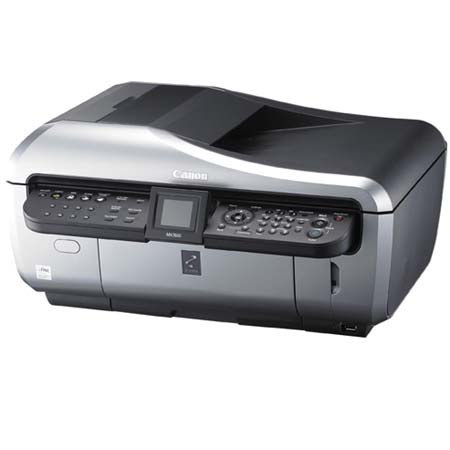
Premium Office All-in-One Featuring Superior Photo Quality and Crisp Text on Plain Paper
The PIxMA Mx7600 All-in-One features high-performance versatility and exceptional reproduction. Thanks to its patented print head technology and 5-color ink system, you can produce superb photos with 4800 x 1200 color dpi1 resolution (max.), and fast, too: A 4" x 6" borderless print takes only about 43 seconds.
Canon's new PgR ink system uses a higher-intensity black pigment ink along with a clear ink and specially formulated color pigment inks. You'll see superior results on photos and graphics even when using plain paper, along with laser-quality text - perfect for business use.
It's networkable via an Ethernet connection, and allows you to print from memory cards, digital cameras, and even camera phones. Copies will be remarkably true to the originals, and when scanning photos you'll produce impressive 4800 dpi results.
The built-in automatic document feeder (ADF) holds up to 35 originals and enables automatic duplexing so you don't have to wait, then manually turns over your 2-sided original.
Join VIP PRO
Earn 2X Points + Exclusive Perks!
Request a Callback
Chat one-on-one with an expert
Sell or Trade your Gear
Get started in 3 easy steps