
This item is no longer available.
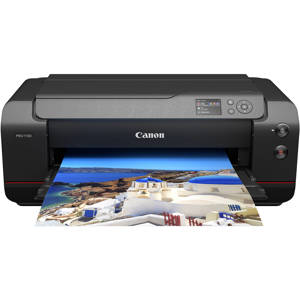
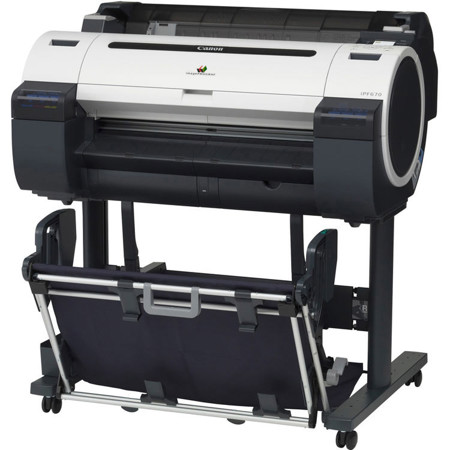
The Canon imagePROGRAF iPF670 MFP L24, large format imaging system is an affordable scan-to-copy/file system for low volume and entry-level users. With a 24 inch scanner, this MFP is designed for architects, engineers, consulting firms, small offices and K-12 schools that require a minimal learning curve when it comes to new equipment. Suitable for K-12 schools, this low cost model makes it possible for schools to purchase an MFP that was once at a higher price point. Schools can now create and print professional posters quickly and easily at a fraction of what it would cost to outsource.
This is the ideal system for those who do not require the advanced functionality of the MFP M40 imaging system. The new L-Series complements the current MFP M40 product line by providing a product that offers basic scan-to-copy capabilities at an affordable price. Not just offering scan-to-copy, this imaging system also gives you the ability to scan to USB, scan to your PC as well as reduce and enlarge images. With three different quality modes available, you can choose Draft, Standard or Best mode based on the scan/print you are making.
Scan-to-Copy/File Solution
The iPF670 MFP L24 is an affordable solution for providing easy-to-use scan-to-copy/file capabilities for the entry-level user. Designed for simple operation, this MFP has intuitive hardware and software making the learning curve minimal for those new to large format scanning. A versatile system built for the way you work, the imagePROGRAF iPF670 MFP L24 includes:
• L24 Scanner
• iPF670 24-inch Printer
The iPF670 system comes available with user-friendly software solutions ready to meet your printing needs. Direct Print & Share, Canon's cloud portal solution and batch printing software, is available as a download and allows for files to be uploaded, downloaded, shared and printed from almost anywhere in the world! Also downloadable is a mobile printing app, imagePROGRAF Print Utility, which allows for PDFs as well as JPEGs and PNGs to be printed through use of an Apple iPad.
The Accounting Manager software (PC only) allows you to track job costs, while the Print Plug-in for Microsoft Office enables for documents created with Word, Excel or PowerPoint to be easily printed in large format. Creating custom signage has never been easier with Canon's included PosterArtist Lite poster creation software, this easy-to-use software will have you creating professional large format prints quickly in just four easy to follow steps.
L24 Scanner
The L24 scanner incorporates a SingleSensor Technology Assembly, which helps provide consistent and better color accuracy with more detail in the shadows and highlights than a staggered CIS array scanner.
• 600 dpi optical resolution
• Image scanning of up to 24" wide, fits documents 26" wide
• Scanning speed of up to 3 inches per second monochrome, 1 inch per second color
• 3 Quality Modes: Draft, Standard and Best
• Scan documents up to .5 mm thick
• Face up / Rear exit
• Straight paper path
The L24 scanner contains a single component image sensor that is the full width of the scanner and has long life LED Bi-directional illumination. Full width image capture, as opposed to time delayed scanning of separate sections, means less risk of misalignment of scan data. LED's require virtually no warm up time and provide a wide and consistent color gamut, with low power consumption and less potential for shadowing at creases or folds.
iPF670 Large Format Printer
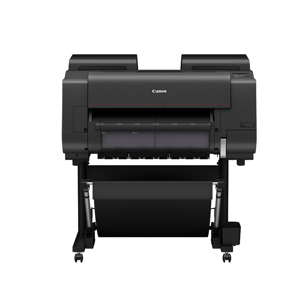
The Canon imagePROGRAF iPF670 24-inch large format printer is an affordable model for entry-level users. The iPF670 is the printer for your poster and signage needs. The optimal color profile and latest magenta ink will create the vivid and impactful image you need. Canon understands speed is important, that is why the iPF670 printer is capable of producing an A1 (23.4" x 33.1") print in up to 28 seconds using Economy Mode! The included Sub-Ink Tank system allows you to use all of the ink in the tank before replacing it, as well as replacing the ink tanks on-the-fly without stopping a job mid-print and sacrificing print quality.
Direct Print & Share
Sharing ideas has never been easier with Canon's Direct Print & Share software. Direct Print and Share is a cloud portal and batch printing solution that helps you expand your printing workflow. Available with the printer, this software allows you to upload documents to your account using any WebDAV compliant cloud service and have these documents printed from almost anywhere. Easily share and/or print .cpfx PosterArtist, PDFs, TIFFs, JPEGs and HP-GL/2 files. In addition, you can set-up hot folders on your desktop by clicking the Shortcut Print feature, then simply drag and drop the files you wish to print into these folders and the job will start automatically. You can even set up multiple folders, each with their own customized settings, allowing for multiple jobs to be run with ease.
imagePROGRAF Print Utility
imagePROGRAF Print Utility is Canon's mobile app for wireless printing via an Apple iPad to an imagePROGRAF printer. Through use of the app, users have the ability to preview their PDF, JPEG and PNG file, utilize some of the great basic settings seen in their Canon Printer Driver such as selecting the number of copies, orientation and quality and then send their print to one of the imagePROGRAF 5-Color Printers sharing the same network. imagePROGRAF Print Utility is available for download free of charge through the iTunes App Store.
Canon Printer Driver
These Windows and Macintosh drivers incorporate simplified page setup options, one-touch borderless printing, expanded color settings and much more into a printer driver that is intuitive and easy-to-operate. The Real Preview feature allows you to check the print setting and the layout on the roll paper by providing a real time preview, giving you the option to change the print setting even after clicking "print". The Free Layout feature enables nesting and custom layouts of images or files of nearly any type (available for both Windows and Apple driver). The imageRUNNER Enlargement Copy feature built-in to the printer driver lets you transfer data from their Color imageRUNNER device with Universal Send to the imagePROGRAF printer - all with the touch of a button - allowing you to easily create posters from hard copy documents.
At a Glance
• Easy-to-use preset document profiles (examples are Poster, CAD, Photo)
• Automatic print quality options dependent on print application and media
• Real Preview that allows you to change the document and printer settings after clicking "print"
• Page nesting feature with Free Layout for Windows and Mac
• imageRUNNER Enlargement Copy feature - with a hot folder solution to print Color imageRUNNER PDFs directly without opening in a PDF viewer
• Economy Print Mode
• Borderless printing
• Easy setting/Advanced setting
Status Monitor
The imagePROGRAF Status Monitor display will check the printer's status in real time, allowing you to manage print jobs, media and monitor ink levels. Status Monitor includes an Ink Purchase Notification Function that will notify you when the ink is low and provides you with a link to a website where the tank can be purchased or the contact information to a trusted supplier. What appears exactly can be selected depending on your preference.
Accounting Manager (PC Only)
Canon imagePROGRAF Accounting Manager tracks how much ink and media is being consumed while printing. Costs can be assigned to ink and paper to determine expenses based on "Cost of goods". You can also input a variable cost that will be added to the total of the cost per print. The data is exportable to a .csv format for Microsoft Excel, from there the data can be used for billing purposes.
PosterArtist Lite
Canon's included PosterArtist Lite poster creation software gives you the ability to quickly and easily create professional large format prints. The program includes royalty-free photos, backgrounds and clip art, as well as pre-designed templates to get you started creating your own posters. You simply follow the programs four (4) easy steps to create posters that can be used in applications such as Office Presentations, Trade Shows, Retail Signage and much, much more.
PosterArtist
For those with more demanding poster creation needs, Canon's optional PosterArtist offers advanced features such as Auto Design, Variable Data and in-application image editing features, as well as additional templates, royalty-free photos and clip art. The built-in weblink feature in PosterArtist Lite links you directly to the PosterArtist website for useful hints and tips and for even more free content for download.
Enhanced features include:
• Direct Print & Share cloud portal support
• File format to allow for easy sharing of poster files
Print Plug-in for Microsoft Office
This utility makes it easy to print large-format documents created in Microsoft Word, Excel or PowerPoint. The Print Plug-in appears in a tool bar inside the Microsoft application and has an easy-to-follow "Wizard". The plug-in will bypass the printer driver to simplify the printing process. In a few simple steps convert your 8.5" x 11" office document to poster size.
Optimized Module for AutoCAD
This specialized driver is compatible with a variety of AutoCAD software products and helps enable optimal printing productivity and reliability from the AutoCAD software. The module also has a user-friendly interface that includes familiar features such