
This item is no longer available.
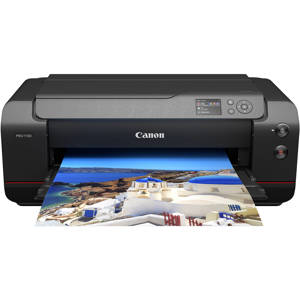
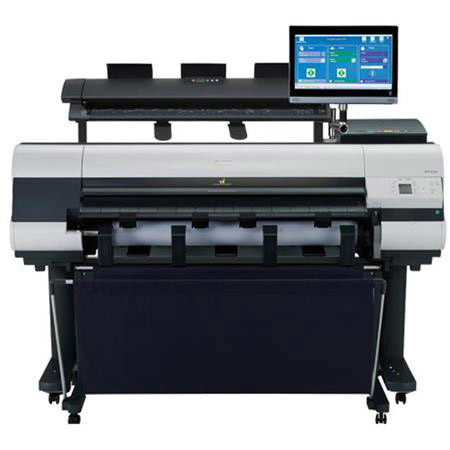
The Canon imagePROGRAF iPF830 MFP M40 44" large format imaging system is designed to meet the speed and precision requirements for AEC, CAD, MCAD and ECAD, with outstanding ease-of-operation to handle all-purpose, office projects. The iPF830 MFP M40 provides a fast and effective system for copying, archiving and distributing maps, drawings, renderings, site and facilities management plans, design and layout proofs, posters and more.
This Multi-Function Product's advanced M40 scanner adds versatility to the product capabilities with the ability to scan documents up to 2mm thick. The scanner has the ability to scan documents up to 315" in length as a PDF or JPEG file, and up to 590" in length as a TIFF file. The SmartWorks MFP software simplifies the entire Scan-to-Print, File, and Share process for users of all experience levels. The iPF830 MFP M40 also offers Canon's Direct Print & Share software, a cloud-portal software solution that enables the viewing, sharing and printing of files from virtually anywhere in the world, a Shortcut Print button for drag and drop printing through hot folder technology, and is compatible with almost any cloud server that's WebDAV compliant. The solution is also equipped for mobile printing through use of the imagePROGRAF Print Utility app for iPad, available as a free download on the App Store.
With true 600dpi optical resolution, CIS scanning technology for incredible line definition and accuracy, and room for documents up to 41" wide (40" image width) by any length, the iPF830 MFP M40 is a versatile imaging solution. And with dynamic preview and a large, simple-to-use touch-screen interface, one-click scanning/copying has never been easier and comes standard with the ability to scan to PDF, JPEG and TIFF file formats. The iPF830 MFP M40 provides the versatility and flexibility needed to be used in a wide variety of industries and applications, all in one captivating package.
Scan-to-/File/Share Cloud Solution
The iPF830 MFP M40 is an affordable solution for providing fast, high-quality, large format image capture-to-output. Designed to be more than just its parts, it is the versatility of the product that makes it stand out. This multi-component system gives the user the opportunity to be more productive. The open architecture of the computer can be used to load additional programs, among other things. The printer's ability to print on a wide variety of media lends itself to uses in many departments and applications as well.
A versatile system built for the way you work, the imagePROGRAF iPF830 MFP M40 includes:
• M40 Scanner
• iPF830 44-inch printer
• One-media roll system
• SmartWorks MFP software
• Touch screen monitor
• MFP stand
M40 Scanner
The M40 scanner incorporates a SingleSensor assembly technology, which helps provide consistent and better color accuracy with more detail in the shadows and highlights than a staggered CIS array scanner.
Features:
• 1200 dpi optical resolution, 9600 dpi maximum resolution
• Image scanning of up to 40" wide, fits documents 42" wide
• Scanning speed of up to 13 inches per second monochrome, 3 inches per second color
• USB 3.0 interface, 75 Mbytes / sec transfer rate
• Scan documents up to 2.0mm thick
• Face up / Front load / Rear exit
• Straight paper path
The M40 scanner contains a single component image sensor that is the full width of the scanner and has long life LED Bi-directional illumination. Full width image capture, as opposed to time delayed scanning of separate sections, means less risk of misalignment of scan data. LED's require virtually no warm up time and provide a wide and consistent color gamut, with low power consumption and there is less potential for shadowing at creases or folds. A single driven hold up roller provides even pressure across the scan width which means originals are less susceptible to folds or creases.
SmartWorks MFP Software
SmartWorks MFP gives you the tools you'll need to quickly and easily scan to print / file / share large format technical documents. With a simple to use interface and unique scan-it-once ability, SmartWorks MFP allows for efficient batch scanning and helps create quality scanned images that are produced in a short amount of time. Scan to PDF, TIFF and JPEG file formats. SmartWorks MFP software is now more efficient than ever before.
• Scan lengths of up to 315" (26 ft) for PDF and JPG files, and up to 590" (49 ft) for TIFF files
• Ability to add custom presets with one-touch retrieval for those often-used settings
• Image enhancements for white point adjust, black point adjust, sharpen, mirror, and invert
• Full integration with Canon Digital Print & Share cloud software
Users have more control over their workflow with access to editing functions such as invert, mirror, and black and white point adjustments. Custom presets help users control the scanner and increase control over printer settings.
Direct Print & Share Cloud Portal Software
Canon's Direct Print & Share software is a cloud portal solution that helps users to expand their printing workflow. Users are given the ability to upload documents to their own account using any WebDAV compliant cloud service, and have those documents printed from almost anywhere. This software allows users to easily share a variety of file types and print PDF, TIFF, JPEG, and HP-GL/2 files through the user-friendly interface, and even have the ability to do batch printing! In addition to these features, users can set-up hot folders on their desktop for easy shortcut printing, by being able to simply drag and drop the files they wish to print into these folders and see the job spool automatically. Users can set up multiple folders each with their own customized settings, allowing for multiple jobs to be run with ease.
imagePROGRAF Print Utility
imagePROGRAF Print Utility is Canon's mobile app for wireless printing via an Apple iPad to an imagePROGRAF printer. Through use of the app, users have the ability to preview their PDF, JPEG and PNG file, utilize some of the great basic settings seen in their Canon Printer Driver such as selecting the paper size, number of copies, orientation, and quality, and then send their print to one of the imagePROGRAF 5-Color Printers sharing the same network. imagePROGRAF Print Utility is available for download free of charge through the iTunes App Stores.
Direct Print & Share
Sharing ideas has never been easier with Canon's Direct Print & Share software. Direct Print and Share is a cloud portal and batch printing solution that helps you to expand your printing workflow. Available as a free download, this software allows you to upload documents to your account using any WebDAV compliant cloud service, and have these documents printed from almost anywhere. Easily share and/or print .cpfx PosterArtist, PDF, TIFF, JPEG, and HP-GL/2 files, through the user-friendly interface. In addition, you can set-up hot folders on your desktop by clicking the Shortcut Print feature, then simply drag and drop the files you wish to print into these folders and the job will start automatically. You can even set up multiple folders, each with their own customized settings, allowing for multiple jobs to be run with ease.
iPF830 44" Large-format Printer
Designed for technical and office applications, Canon's 5-color dye/pigment Reactive Ink technology utilizes four highly colorfast dye inks for producing bold, expressive color, plus two channels of black ink for printing precise lines, smooth curves, and small text on technical and office documents. A High Chroma Magenta ink helps produce crisp and vibrant red lines and texts, while also widening the color gamut in the red and orange spectrums. The iPF830 printer is capable of producing an A0 print in approximately 42 seconds! Help reduce total ink consumption by utilizing the Economy Print Mode for producing draft prints on select media, which regulates the use of all inks to produce quick check plots while minimizing the cost per print. The iPF830 printer has the capability of accommodating 330ml and 700ml ink tanks, geared towards lowering the cost per print. The iPF830 printer comes with a portable media basket, the basket is capable to handling up to twenty 24" x 36" plain paper prints.
PosterArtist Lite
Canon's included PosterArtist Lite poster creation software helps users quickly and easily create professional large format posters. Users simply follow the program's four (4) easy steps to create posters that can be used in applications such as office presentations, trade shows, retail signage, and much, much more. The program includes pre-designed templates suited for a wide variety of markets, as well as royalty free images and clip art. The PosterArtist QuickCopy feature provides an easy solution for a CanoScan desktop scanner to be used as a copier, making letter-size flyers and documents into full-size posters with a touch of a button.