


This item is no longer available.
Review Summary
2013-06-22T20:00:00
Great Product, I use this printer when I have t print small copy's of information for school. I have never had a problem with the printer. It hold up really well, an make beautiful pictures.
Yellarue

2012-04-01T21:00:00
in my business i print photos at motocross tracks it's dusty and can get wet.this thing gets bounced around in my trailer going from track to track. alot of miles bouncing around,yet it prints top nocth photos day after day even with dirt and dust on it and in it.
mark e.
2011-12-27T19:00:00
My husband and I are serious (hobby gone wild) photographers who shoot circa 30,000 photos a year. Mainly wildlife and scenics. Love this printer, it keeps up with all our demands. We donate photos to charitable organizations and have had no complaints.
BARBARA C.
2010-06-29T20:00:00
This otherwise excellent printer is utterly useless for Linux users. There is no driver, and support for its use in Linux.
Elvis
2010-05-18T20:00:00
I've been using the Pixma Pro9000 for a little over a year. I bought it used from someone that upgraded to a larger printer. The Pro9000 did have some off brand ink (from OfficeMax that didn't give the greatest output and the colors faded quickly. However, once I replaced the ink with a complete set of the Canon inks the color and B&W images have been fantastic. I have used a variety of media and have never had an issue feeding the paper. My current favorite is the Fine Art Premium Matte as the images pop of the pages without the glossy glare. The Photo Paper Pro II is also outstanding for images that come to life. I still need to try out the Platinum Pro Paper and some of the other high end papers. Others have complained of the operating costs, and I also wish they were a little lower on the ink and paper, but I also believe that you get what you pay for in regards to this printer. Don't use the off brand ink or cheap paper and you will be very happy with the output and longevity of the prints.
Falcon
2010-01-21T19:00:00
I have had this printer for 18 months now and have kept detailed ink usage records. 13" x19" prints Green 120+, Red 200+, PM 30+, BK 50+, PC 30+, Cyan 36+, Mag 30+, Y 30+. Ink usage is excellent. Also I only use it once or twice a month and have never had to run a cleaning cycle. Print quality is also excellent.I have never had a paper jam. Highly recommend as a photo quality printer.
LousyShooter
2009-12-21T19:00:00
Wow! I love this printer. I have been useing this new printer for about a month. It is everything I could want. Bright,correct colors, Fast and dependable. I'm a retired professional photographer, Lately I have been working on 100+ yr. old photos. I scan them, fix if needed then print on my Cannon 9000 pro. The colors and quality are great.
Timberman
2009-10-24T20:00:00
Great performance and color saturation. Great slim profile so that it's not too bulky. Consistent without ever needing a head cleaning, even after not using for a week.
zap-photo
2009-09-25T20:00:00
My previous printer was a Canon i960. It was a heavy duty work horse until I wore out the head (it took about 3 years). As much as I liked the i960 for brilliant colors, the Pro 9000 is that much better! The facial colors are right on! This printer does produce outstanding pictures. But unfortunately, that is where it ends. The ink cartridges run out of ink quickly, so I am doing mostly 4X6 pictures. I will keep this printer for about 3 years and hope that Canon will produce a printer that uses less ink and still maintain the highest quality prints.
Andy
2009-08-05T20:00:00
For the price not the best printer ever. I 've owned for several months and I'm constantly having issues with the print. Paper jams are too common and the print quality isn't as crisp as expected. Not to mention ink runs out after only a few short prints. Would not purchase again.
Kel
2009-05-26T21:00:00
This is a fantastic printer. It you are upgrading to a larger format printer, this is worth considering. It is easy to set up and has been very reliable. I use this printer solely for photo printing, and my Pixma 600 for scanning and copying. Both are connected to my IMac. I downloaded several Ilford paper profiles and the resulting prints are outstanding. I know folks who print on Epsons and they regret not purchasing a Canon. Yes, their prints may last 200 years compared to my 100 years, but I'm not too concerned.
A.J
2009-05-26T21:00:00
Cost effective large format printer. I use it for pictures and have recommended it to clients in the building trade to print home designs.
Tom
2009-05-26T21:00:00
I was a little nervous when I read the comments before I bought. But, this printer uses less ink then my 6700D.....
Bindy
2009-05-21T20:00:00
This printer gives you the best quality at a budget investment. Easy to use from your very first print . Setup was a snap, as the printer sets itself up. You just go along and give it, what the instructions ask for. Sorry, I didn't purchase it sooner.
Printer D.
2009-03-29T21:00:00
Just got this printer and I can't say enough good things about it! Easy to set up & use. Have printed all sizes of prints all the way from 4X6 to 12X16! The large print was done on museum quality paper and came out beautiful. Can't speak about ink consumption as I haven't done more than a total of 20 prints, but the large one had to use some ink on that paper. Too bad Canon is superseding this unit. I'm glad I bought this one for the price I did!
KD
2009-03-26T20:00:00
The Pixma Pro9000 provides excellent color prints and I can print directly from my Canon 30D. I have used Canon printers before but this one has excellent drivers and great application software.
Photoshooter427
2009-02-20T19:00:00
arrived quickly, easy set up, quality prints, as good or better than the pro labs I've used.
big k.
2009-02-19T19:00:00
I use it for large (8x10 to 13x19) photo prints for wall decor....GREAT and a real upgrade from my Epson 2200, which was good...or, so I thought until I got the 9000.
Harry
2009-02-19T19:00:00
This product is expensive but good and worth the money, if needs a quality printer. I am also very pleased with the contact with Adorama---actually someone I could talk to and get great results!
none
2009-02-15T19:00:00
I have owned several different photo printer,but nothing compares to the 9000.I now get professional pictures at home.My 1st prints blew me away,my friend can't believe I didn't do them in a studio.Simple to set up,but quite large,very fast.This is a great addition to my CANON 50d and 3 l lenses.Canon rocks -high quality products.
photogh
2009-02-14T19:00:00
handles everything from 4 X 6 postcards to 13 X 19 canvas. The cartridges are pricey but not way out of line with the competition. i use it exclusively for photos and, as someone else mentioned, if you want to print something outside of what Canon provides use a third-party program
pshop48
2009-02-14T19:00:00
This is a good solid printer. The directions included are well written so that people not very knowledgeable with computers can set it up. The progams in the printer are easy to use making it a pleasure to use without readind a book . Only fault is small ink cartridges.
dulcimer4
2009-02-13T19:00:00
Produces excellent prints on canon paper. Was not as impressed with other papers but being able to select the type of canon paper seems to make a big difference. Seems to use a lot of ink but have not calculated this yet. Large footprint but well built and solid - something you would expect for a large print size quality printer. Software is easy to work with. Would have liked to have a printed manual. I am getting better prints than when I was using my own color darkroom.
whatever
2009-02-13T19:00:00
This printer has produced extremely high quality output from my Raw and JPG files, consistently and as needed. In using it with my Mac system, I found no problems in set up or output to the printer. My two biggest issues are the small quantity ink cartridges, ultimately driving up the average cost/print, unless I stick with small size prints, less than satisfying for a photographer who prefers medium to large output. All cartridge colors are not easily available in local stores that carry Canon products. If this system offered larger quantity cartridges at more reasonable prices, this would truly be my ultimate printer.
Davey
2009-02-12T19:00:00
I acquired this unit after my previous printer (a Canon i9900 died and could not be repaired. The company offerred me a super deal on the Pro9000 and even replaced all my spare ink cartridges for the old printer- teo full sets! The prints are beautiful and the dye based inks that this printer uses have an excellent rating for long life although not quite as long as that for pigment based inks. But unless you are planning to live for 200 years, this probably is not an issue. But dye based inks tend to be more vibrant and are less likely to clog. Another big plus is the speed at which this printer produces its large prints. In summary, this is a great printer that produces exceptional prints quickly. And, I found Canon to be an excellent company that backs up customers who have purchased its products.
Richard B.
2009-02-12T19:00:00
I found it very easy to install and use. And the quality of my prints are better than the professional photo lab I had been using.
Shorty
2009-02-10T19:00:00
I read the reviews on the 9000 as well as the 9500 and decided to go with the 9000. I cannot believe the quality of the prints coming out of this machine!! Superb. Very professional quality. The installation and set up of this printer was very easy even with my Vista 64 bit OS. I have had a rough time with other types of products due to the 64 bit OS but not with the Canon 9000. Works like a charm. I higly recommend this unit/model to anyone who appreciates good quality prints. Especially right at your own fingertips and control.
Shutter B.
2009-02-06T19:00:00
This printer was a xmas gift from my husband. I had just completed a photo 100 class and wanter to print larger prints. The setup was easy and the prints are amazing. My only concern was how big the printer actually was maybe in the future it could be made a little smaller or lighter....Thanks Canon for another great product........
ssblackprints
2009-02-05T19:00:00
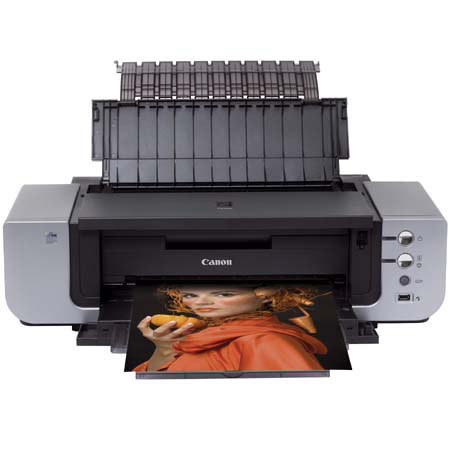
This is a "Canon" PIXMA Pro 9000. It simply doesn't get any better than this! My only "complaint": ink is too expensive!
Big A.
2009-02-05T19:00:00
I'm a serious amateur photographer. This printer produces top notch color with fine detail and virtually no banding. For Black & white it is not the best. It is difficult to eliminate "tinting" It is bulky and consumes ink but all in all this is a fine printer and can't be beat for the price.
ROSS B.

With the PIXMA Pro9000, you'll discover just how good a photographer you really are. The 8-color ink system opens up your color palette, and advanced software fine tunes your output. Ready to move up to 13" x 19", or print on fine art papers? This professionalgrade printer will take you to the next level.
The PIXMA Pro9000's ChromaLife100 system combines the benefits of dye-based ink,Canon photo paper and FINE print head technology to produce long-lasting, beautiful prints. With an 8-color dye ink system, the Pro9000 produces a wide color gamut to achieve vivid coloration and high glossiness.
Join VIP PRO
Earn 2X Points + Exclusive Perks!
Request a Callback
Chat one-on-one with an expert
Sell or Trade your Gear
Get started in 3 easy steps