2018-07-27T13:00:33
Rated 4 out of 5
NAllumPhoto. Professional photographer for over 40 years.
Overall printer works like a charm. Prints were true to the images on my calibrated computer.
I would caution new buyers not to use the included cd that comes with the printer but go on the cannon’s website and download and install the latest drivers and software.
Make sure you buy extra inks and paper because you would be very please with your printed work.
My only wish is that the printer comes with larger ink tanks other than that I would highly recommend this printer for the advance hobbiest or professional photographer who makes only small print runs.
NOEL A.
2018-06-08T08:46:36
Rated 5 out of 5
Heavy, but worth it
I have to start by saying Wow! This printer is much heavier than I would have thought. I'm glad I didn't go out and buy a cheap printer stand before it arrived.
As for printing, I'm really impressed with the quality. My only issue is minor - you have to make sure the paper being fed in is pushed forward at bottom to catch in the rollers. First attempt to print wouldn't feed the paper, but looking at it I noticed it was flat against back and not getting pulled by feed rollers. Simple enough, and not really worth a ding on rating.
Michael O.
2017-07-21T09:51:33
Rated 4 out of 5
Love it
Love it
Good quality and save ink
Vinh T.
2017-03-28T10:02:30
Rated 5 out of 5
Great Printer
A great printer. The quality is outstanding and the printer handles several paper sizes. You can print directly from your phone, iPad, computer etc.
BENJAMIN S.
2016-09-13T09:37:26
Rated 5 out of 5
this is my third canon pro printer in the last 10 years I've been very happy with all
this is my third canon pro printer in the last 10 years I've been very happy with all and I've printed thousands of prints rebates are great they are highly dependable thats why i stay with canon
BRUCE T.
2016-08-31T15:20:09
Rated 5 out of 5
Great printer
Setup was a little more than anticipated but color from first print was very accurate.
DAVID H.
2016-06-30T12:10:31
Rated 5 out of 5
Great printer
Really love this printer. Set up was very easy. Print quality is superb. Some reviews say this uses excess ink. I have not found that to be true. I am very pleased with the amount of printing I am able to do.
Alexander M.
2016-06-07T16:47:10
Rated 5 out of 5
PRO-10 Bundle a Great Deal
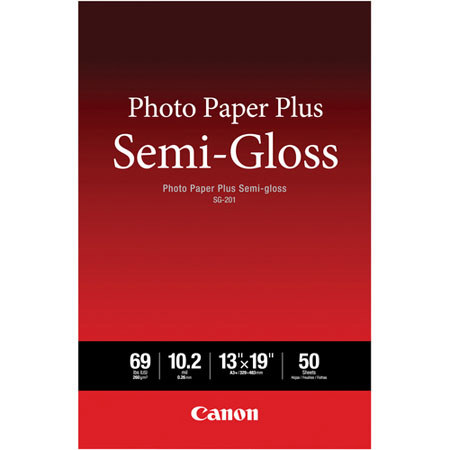
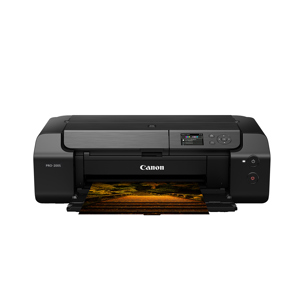
The Canon Pixma PRO-10 has been a great printer so far. I was expecting somewhat less vibrancy in colors compared to dye ink photo printers, but that hasn't been the case. Colors are true and blacks are really rich. Love the printer so far, and the bundle with the ink color pack was a very good deal. Canon Photo Paper Plus Semi-Gloss (50 sheets 13"x19") was also included in the deal. This is my favorite paper. Not as glossy as Pro Platinum, but less texture than Pro Luster.
JOHN A.
2016-05-08T06:44:47
Rated 5 out of 5
Wonderful performance
Wonderful performance
MAUDE B.
2016-02-15T05:45:18
Rated 5 out of 5
Great Upgrade for Professional Quality Color Printing
I love the ability to have control off all aspects of the art of photography from composition of the image to digital capture with a professional DSLR to post-processing using PS-CC to generating a beautiful color or B&W print which faithfully represents the scene or event as I remembered it in real time. I am very particular about my color management, always using calibrated color profiles specific for my monitor and prinnter/inkset/paper. For 10 years I had used a Canon i9900 printer with Canon Photo Paper Pro Platinum (PPPP) using a custom color profile generated with a Datacolor SpyderPrint 3 colorimeter with superb results. To my dismay, when I upgraded my MacPro and MacBook Pro to El Capitan, my i9900 was no longer supported and Canon has decided not to update the i9900 drivers.
After careful review of all printer options, I decided to purchase the Canon Pro-10 with PGI-72 inkset. The initial setup was straightforward and the printer worked in either USB connected or wireless W-Fi connected modes. During my initial setup, I printed out test color prints using the USB connection. I printed from PS-CC using Photoshop color management with the Canon icc color profile for PPPP/PGI-72 installed with the Canon driver and was impressed with the accuracy of the color reproduction including skin tones. I then generated a custom icc color profile for my Pro-10/PGI-72 + PPPP using my SpyderPrint 3 colorimeter and software. Using PS-CC softpoofing and color management, the resulting color prints were spectacular. All colors are spot-on for landscapes, portraits, and still lifes. It is amazing how the addition of 3 black shades enhances the contract and depth of the color print. I haven't had a chance to print in B&W yet, but I would anticipate that the results will be equally impressive.
The printer is definitely slower than the i9900 due to the high resolution and addition of the clear coating to equalize ink height on the photo paper. The only downside is that the Pro-10 wireless Wi-Fi connection to my router seems to be unstable. Several times the connection has failed, resulting in a partial print. Using the USB connection is not a problem for me, since I usually do all of my photo printing from my main MacPro workstation. My other computers connect wirelessly to my MacPro via my home network. No problem accessing the Pro-10 when using my MacPro as the Wi-Fi connection to my router. Others may find the unstable WI-Fi to be a problem if they want the Pro-10 to serve as an independent wireless network printer.
This printer certainly meets my goal to produce professional quality prints.
RICHARD G.
2015-12-12T10:42:33
Rated 5 out of 5
A definite buy
This printer is a pleasure to use. It handles files whether raw, psd, tif or jpeg with equal results. It is one I highly recommend for anyone looking for a printer in this size range. The degree of control through the software is also significant in obtaining the results one wants.
JAMES L.