This item is no longer available.
Review Summary
2022-05-23T20:00:00
What genius puts together a printer that can print on 8 x 11, but somehow forgets that from time to time the person buying the machine might prefer, or be required, to put a form on 8 x 14? This was really left off on purpose?
TMoore

2022-04-02T20:00:00
I bought it to connect to my iPhone to print. Sometimes it prints most of the time we fight. It chokes on the paper, you have to realign the paper a half dozen time. It doesn?t connect to the phone. You turn off the machine, you disconnect the Wi-Fi and start again. And a half hour later I give up. Every time my spouse says ?so we?re gonna fight tonight? That?s what we?re gonna do?? I know it?s cause one of needs a document printed
Piece c.

2021-11-09T19:00:00
Ever since i bought it just jams each time i print! Would not recommend and never buy again!
Wendina

2021-07-07T20:00:00
I bought this 3 months ago....sorry ever since, will discard rather than play silly INK games
unhappy c.

2021-03-01T19:00:00
I bought this printer from Best Buy shortly after Christmas. It takes a little while to set it up and get it communicating with wireless devices, but once we got it set up correctly it has worked like a champion. The only issue we have had with the device is a total lack of availability of replacement ink cartridges. Only a few sources have been found and none have any in stock. To add to the inconvenience, those that DO list the cartridges only sell them in a package containing Black and the Tri-Color cartridges. Best Buy does not even mention the PG260/261 cartridges. Unless or until Canon makes replacement cartridges available, I would not recommend this printer.
Bud K.

2021-02-11T19:00:00
Printer setup is not easy, most of the times I need to restart the printer and it takes time. Print quality is really slow and print/scan speed is dead slow. It takes for ever to print or transfer document to PC or phone. Also ink usage really high and refill are expensive.
satish

2021-02-10T19:00:00
I?ll be honest - I bought this mostly for the color. :P That being said, it?s still a great printer and has a lot of functionality for my basic needs. I don?t do a lot of printing, just a few pages here and there and work documents. Pages print clearly and quickly, and copying is a breeze. There is also rear-loading capability, if you prefer to feed your copies into the machine, rather than use the scanner. Copying is a little slower, compared to printing, especially if you?re doing a double-sided copy. It?s still great for basic needs. You?ll probably want to go to your office or local library if you need to do a bigger job (<20 pages. It also seems to use quite a bit of ink. I?ve had the printer about six months and have printed like 50 pages altogether. I?m not sure if that?s a lot, but I?m already low on black ink. Something to keep in mind. My last gripe is that there is no USB port. If this had one (and maybe also a better LED screen), then this would truly be an all-in-one machine (minus faxing, lol). Heads up: you need to down the mobile app in order to scan documents. You scan them using the printer and make the settings and adjustments on your phone, through the app. So while there?s no USB port, this is a nice workaround. You can also copy and print from the app, as well as Bluetooth/WiFi print from any device. Best thing about that is you don?t have to turn it on before printing! Just hit ?Print? and the machine will wake up and start going! Overall, I?m very happy with this purchase! Ink isn?t too expensive, and I feel confident that it will last me a long time! :)
Sommydelight

2020-12-23T19:00:00
Simple set up. Even for a nontech guy like me. Does everything I want.
Q20

2020-12-07T19:00:00
good machine for individual not fast enough for business work
michael l.

2020-11-29T19:00:00
Just set up my new printer today with my Mac desktop. Easy, fairly short setup. And, I am NOT tech savvy AT ALL.
G20

2020-11-27T19:00:00
My first experience with a Canon product and I'm kicking myself that I ever used another printer -- ever!
Peggy G.

2020-11-19T19:00:00
Love it! It?s simple to set up and easy to use I haven?t printed any pics but I have printed documents from my mobile phone and it works perfectly
Miss M.

2020-11-14T19:00:00
Fast set up, quick text prints, sharp color and reliable Airprint and WiFi printing. Paired with good power saving options, and this is a great low-cost multifunction printer.
SCJohnG

2020-11-08T19:00:00
I bought this printer in May and from the beginning I had trouble with it. whenever I tried to print I would get an error message indicating that paper had to be placed in the tray and aligned. I had to remove the paper and replace it several times in order for it to print. at least 7 times out of 10 I had to repeat the process only to find paper jam and then have several blank pages spit out. I called many times with the same problem. it would only work on occasion. This last time I looked and found that the left side of the paper tray appears bowed out.
mm12

2020-11-01T19:00:00
It’s a smaller size and I like that for my desk. It prints fast and makes good copies. My husband had a little tussle getting it set up but it’s fine. I’m happy with it.
Yellow R.

2020-10-25T20:00:00
My last Canon printer I really enjoyed and used it for years. It finally died and I bought this one cause it printed both sides without me taking the paper out and putting it back in. But, this printer uses to much ink. I replaced both color and black ink before starting to print out a 60 page black and white pdf. The color ink was gone by the end of the page 60. I could have asked a print place to do it for me for less than what another color cartridge costs.
coffeedrinker

2020-10-01T20:00:00
Instructions for wireless router were non existent. Scanner download and instructions were difficult to operate and understand.
srv

2020-09-26T20:00:00
I've had this for 2 months. Printer scan features are very limited. Single sheet scanning only. I could not find a printer utility tool that allows easy access to all functions. Printer has auto shutdown after a period of time and has to be restarted. This is not a printer for someone who has to scan multiple pages.
gary11x2

2020-09-23T20:00:00
Bought this from target at the start of the school year. It scans well from the phone but still don't know how to scan from the computer, it has another port that doesn't have a cable. Printing my school's pdfs for notes come out horrible as the words themselves are fuzzy and very pixelated. This has occurred for all the printings that I have tried. Prints like my old 30$ printer for the price of 60$ when I bought it.
Wuda

2020-09-18T20:00:00
Today I went to four different stores for buy ink for this printer. I called for support and was given the names of the places I wet to. None of them had the ink. I needed the ink refill this weekend but had to send away for it. This information should been included when the printer is purchased
mjm

2020-09-03T20:00:00
I purchased this 4 months ago at Target, it was on sale for 50% off so I figured I had nothing to lose. What a deal this is, and now that I know, I wouldn't hesitate to purchase at the full price (which would also be a bargain)! No connectivity issues, mine came with everything I needed (someone else mentioned no cables in the box??) and I can easily print from a couple of rooms away.
BostonGirl

2020-08-29T22:46:53
Easy installation. Almost every feature for home usage. Pretty good so far
CHAITANYA G.
2020-08-29T20:00:00
The printer has been working great since I purchased it. The print quality is perfect and there has been no paper jams.
Steve T.

2020-08-29T20:00:00
love how it's colorful so cute!). It works well. It prints a bit slow but it's affordable and does its job. Overall, I'm happy with the purchase
Megumi

2020-08-22T20:00:00
the print heads on my previous Canon printer crashed and I needed to get a new printer. Unfortunately, printers seemed to bein short supply and my choices were limited. I wanted a more advanced all-in-one, but the TS5320 was the best one available, without spending $300-$400. It was fairly easy to set up, despite the simplistic, limited documentation available. I had one problem with trying to scan documents. My previous Canon printer/scanner had the functions on the printer itself. I had to go online and go through the online help to find out that I had to access scan from software on my computer. The information was not easy to find quickly. Canon needs to provide better documentation with the printer. Also, one of the reasons that I like Canon printers is that it used individual color ink tanks, so that you only have to replace one color when it runs out, instead of throwing out a cartridge that still contains the other color inks. The online description of this printer does not make clear that the color inks are all in one cartridge for this printer, so it will waste ink every time you replace the color cartridge.
acpatrick

2020-08-19T20:00:00
I bought this on target, and I love it so much! The double side print feature is so useful and the print quality is great! Prints slower than my old printer, a Brother HL-L23000, but has color, so I don't regret the purchase at all
yan

2020-08-18T20:00:00
I love Canon products! Thanks for the promptness getting my printer to me!
Carmen55

2020-08-15T20:00:00
First of all, the ease of shopping and ordering this Unit, was as easy as 1-2-3.
Nogo

2020-08-10T16:23:19
I have not used it but i love the color. Need to organize my space. Im excited to use really soon.
IRIS M.
2020-08-07T20:00:00
Very good printer. I'm very satisfied with my canon printer ts 5320
Mamerto

quick and quiet
By Bianca Y.
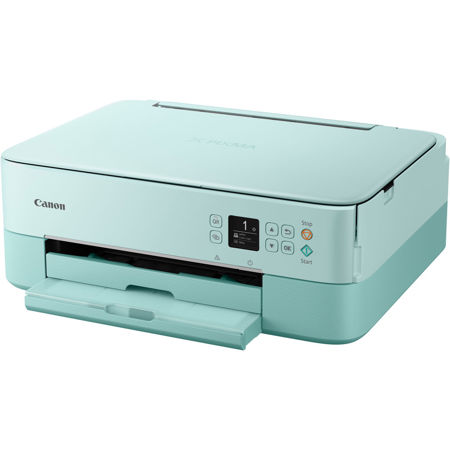
Got it due to my 2 elementary kids distance learning situation. It's bigger than expected but it blends with our white Ikea drawers so it's not an eye sore. The Canon Print app takes a while to connect from my phone and I can't edit the printing format from the app but it gets the basic job done
My New Canon Printer *****
By Katie D.
Great printer for the price Easy to install WiFi prints from all laptops in my house and our phones. Extremely happy with my purchase. Already recommended it to friends
THE WIRELESS ALL-IN-ONE PRINTER THAT FITS YOUR STYLE
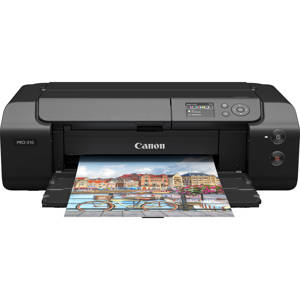
Meet the PIXMA TS5320, a colorful and compact multi-function printer that is easy to setup and even easier to use. The PIXMA TS5320 is great for printing documents and photos - including square images - especially from your smartphone. Setup your printer in minutes thanks to Wireless Connect and use the Canon PRINT app to get printing right away. The PIXMA TS5320 is fun & functional, with a 2-Cartridge FINE Hybrid Ink System for simple ink replacement and a new design featuring a 1.44" OLED screen and built-in Status Bar to check what's happening with your printer with a glance, without having to drop what you're doing. The PIXMA Wireless3 TS5320 is an effortless All-In-One Printer that fits your diverse printing needs