



Orders placed during Passover Holiday (Wed 4/1 after 4PM ET – Thurs 4/9) will ship Fri 4/10. View our holiday shipping schedule.
This item is no longer available.
Review Summary
2021-10-30T20:00:00
Comparing to my old MG6320 Canon printer, regardless of settings this printer doesn't scan and print as well as the old one. It works but not up to the quality prints I used to have with my old printer. The Copy function works really well, looks like software is optimized for this function only. Besides that, the setup works well, it prints wirelessly from my computers, laptop and android phones without a problem. The build is a bit flimsy comparing to the MG series, which is unavailable anywhere to buy.
Upset1

2021-09-19T20:00:00
I've owned this printer since January and it's a great printer. I use it in a home office and it has all the features I need, including printing on both sides of the paper. It scans documents and I can print beautiful photos.
Christinebbd

2021-09-17T20:00:00
Received as a gift from daughter within a week it needed ink. Put new ink in and hasn?t worked since so I am without printer.
grams M.

2021-09-17T20:00:00
Received as a gift from daughter within a week it needed ink. Put new ink in and hasn?t worked since so I am without printer.
Grams

2021-02-17T19:00:00
Extremely easy setup. A small printer that packs a great punch. Picture quality is picture perfect. Add Canon's excellent service and you have a winner!
PCDIPI

2021-02-11T19:00:00
Bought this last month once setup this is a beautiful time and paper saver with the duplex printing. Also does a lot of things I might use in the future.
Dunk

2021-01-24T16:05:47
I am very pleased so far. The quality of the print is excellent. It is just what I wanted and received. Based on how difficult it is to find anything in the stores these days, ordering from Adorama was a joy!! I use copy and print often. So, it was frustrating to not find one in any of the 5 stores I went to. Delivery was notified and it was easy to set up. With help for this 86 year old woman. Many thanks to Adorama.
GLORIA B.
2021-01-24T07:36:26
My old canon finally stopped working after 8-9 years and wanted a basic replacement. This was it. Great, fast, super intuitive. It is a bit loud when it prints. Not a deal breaker for me at all, given price was a key factor for me. (I print maybe 20 pages a month). Very happy with my purchase.
Rachel M.
2021-01-12T19:00:00
It works great. The setup was easy and it prints great.
Mark B.

2021-01-10T19:00:00
I am not a fan of this printer. The error messages pop up constantly, I only need it to print minimal documents and it still jams frequently which is difficult to remove. Very disappointed.
Liv2

2021-01-02T19:00:00
It has 5 ink cartridges , which I prefer . Has 2 sided option , pleased with performance so far .
Sparhawk

2021-01-01T19:00:00
The only issue with it is that you can only scan 1 side of a page at a time with the flatbed, which is relatively inefficient. Otherwise, the printer works great. And I really appreciate that it's lightweight.
Johnny B.

2020-11-12T19:00:00
Tech help was great solved my set up problems am now up and running
Rmb

2020-11-12T19:00:00
Nice printer. Easy setup. The only confusion is that the setup disk goes to a setup webpage instead of running from the CD drive.
Mike K.

2020-11-11T19:00:00
still haven't got is set up, wireless is a nightmare
rmb

2020-10-25T20:00:00
Purchased 6 months ago, only print 20 - 30 pages and ink runs out. Installed new cartridges from Canon and ink registers as empty. Spent 5 hours trying to get support and cut off....Robots just keep repeating same message and have to continually repeat dialing.
rornar

2020-10-13T20:00:00
Relatively quiet operation as a printer, and very quiet operation as a scanner. Nice to have wireless network capability, to print from any PC on the network
Wilton

2020-09-24T20:00:00
Set up was easy using the step-by-step instructions. I was able to print from my iPad and laptop. Have not yet printed photos but I don't need this printer for that purpose. I've only been using it a few days. So far it has met my expectations.
EandP

2020-09-20T20:00:00
GOOD PRODUCT WITH FEW MINOR ISSUES. RECEIVED ON A TIMELY BASIS
GOLFSHOTS

2020-09-20T20:00:00
I bought this printer for summer vacation home - use with my laptop. I have been happy with it so far, good print quality. I had a paper jam & the online manual/instructions were good to take care of the paper jam
Golfgnut77

2020-09-04T20:00:00
Easy wifi set up. All 3 of my computers can access it wireless. Still learning features, but overall very satisfied.
Sparky 2.

2020-09-03T20:00:00
It makes an odd whirring or clicking noise after each print job. I have not been able to determine if I can scan a document. I bought it unseen as a replacement for my mx2720 (recommendation by Canon). It falls way short of my previous printer!!!
Bill C.

2020-08-31T20:00:00
I like it! It doesnt waste soo much ink as previous models like 6120 I used to have
Agv_gelatinas_treats

2020-08-31T20:00:00
It's all good, nothing to complain about. Compact, easy to set up, prints as we have always expected from a Canon.
RichK

2020-08-31T20:00:00
Great little printer. Convenient that output paper tray opens automatically.
Countrybluesman

2020-08-26T20:00:00
I was so excited to get my printer but I haven’t received it. It’s been a week or two and still haven’t gotten emails about it coming.
NC5

2020-08-25T20:00:00
I love the quality but the printer is not good about connecting to Wireless Laptop or Apps.
Tech W.

2020-08-19T20:00:00
I bought this printer to replace a Pixma MG7520. The TS6320 does not seem to be quite as solidly built. I hope it lasts as long as my old printer did. I like the rear paper feed on the TS6320. I print an occasional #10 Envelope. It is great to not have to remove my regular paper to feed just one envelope. The TS6320 goes through some cycle about a minute after printing. Perhaps a cleaning cycle. It gets pretty noisy for about 20 seconds. It's a whiny gears/rollers type of noise. You wouldn't want to have a conversation in the same room. I'll definitely buy another TS6320 when my wife's Pixma MG7520 finally dies.
CV1

2020-06-29T20:00:00
I give up. I've tried working with this printer to just do simple things like print from my laptop, but it's just too frustrating. Getting it to see the laptop was the first challenge, then just getting it to print a page without it coming out the wrong size has been my second challenge. Now, it just doesn't want to work with my laptop anymore. I'm done. Luckily this thing was cheap...
AnneSoCal

2020-06-17T08:27:11
It's a great printer and scanner! It blows through ink pretty quickly, or maybe that's just me, but overall it works perfectly!
JACKSON C.
Great printer for home, my family loves it and use it all the time...
By QueenReddz
Best small printer I've came across yet, i use it all the time.
Canon 6320
By Mikec10
Replaced my Epson with this lower priced Canon. Very happy with price and quality. It handles all my needs.
The Sleek & Sophisticated Wireless All-in-One Printer
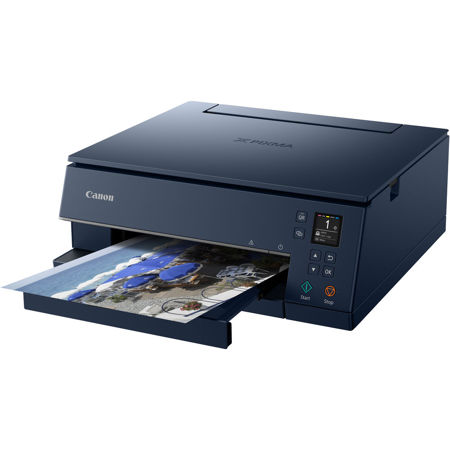
Smart. Sleek. Sophisticated. The PIXMA TS6320 Wireless Inkjet All-in-One Printer is designed for smooth, hassle-free printing, with an easy-to-read 1.44" OLED Screen and an intuitive LED Status Bar that helps you navigate and view printer status quickly and easily. Stay connected to all of your favorite devices with Wi-Fi, Bluetooth, AirPrint and Mopria Print Service - and even to smart home devices such as Google Assistant and Amazon Alexa - for wireless convenience from just about anywhere.
Print high-quality documents and borderless photos with the 5-Color Individual Ink System, plus switch between document and photo printing easily using the front and rear paper trays. For a printer that boosts efficiency in a modern, stylish design, look no further than the PIXMA TS6320.
Simple Setup & Operation
Easily navigate and view printer status with the PIXMA TS6320's 1.44" OLED Screen and LED Status Bar for printing that's fast, simple and intuitive. Plus, troubleshoot any issues, straight from your mobile device, with built-in QR Code Support.
5-Color Individual Ink System
Bright colors. Sharp black text. Expect nothing less than high-quality with the PIXMA TS6320's 5-Color Individual Ink System for crisp documents and vibrant borderless photos.
Hands-Free, Voice-Activated Printing
The PIXMA TS6320 easily adapts to your smart home. Simply use your voice to activate your Google Assistant or Amazon Alexa-compatible device for fast, hands-free printing.
Front & Rear Paper Tray Support
Front and Rear Paper Trays make it possible to store plain and photo paper simultaneously, so you'll always be ready to print. You can even use your smartphone or tablet to power on the Auto Expandable Output Tray from the palm of your hand.