
This item is no longer available.
Review Summary
2012-01-08T19:00:00
Useless 1960's Soviet poor technology !! Does not work with Mac!
redscorpion
2011-11-27T19:00:00
I have taken this device with me to China twice. Saves on taking a lot of memory cards with me. This device just plain works very consistently and is well worth the purchase.
LAUREN W.
2011-09-03T21:00:00
I have taken this on travels several times. I can always count on it working. While I always take more than one memory card when I travel, this permits me to continue without worry. Firmware upgrades are also easy for this device.
LAUREN W.
2010-06-30T21:00:00
After looking at all of the photo backup devices I could find, I picked this one for the ability to use it as a USB host and connect an external HD or thumb drive to make an extra secondary copy of my files. The idea was to completely eliminate carrying a laptop or even netbook on trips, while still maintaining redundant copies.This thing works great for copying flash cards, and especially for doing incremental copies so that a backup can be done multiple times without copying the same photos over and over again. Unfortunately that is all that it does well.To keep this short, in no particular order: The display is useless to judge whether or not to delete a photo, you might guess at composition or exposure, but forget about checking focus without pressing keys over and over and over again, and even then you're guessing if it's a good shot. The keys feel flimsy. The keys work one way sometimes and another way at other times. The whole thing looks and feels like a piece of 1960's Soviet technology. The device was not delivered with the current ROM version, and that is about 6 months old, what about support for new cameras? The user interface is the worst I have ever seen on any device, plan on spending hour after hour learning what does what. The manual is useless, if it was printed on soft paper it would at least be good for one thing. There seems to be a communication gap with their support person, no real answers, just a closed ticket. The device will not even power a little Kingston Traveller thumb drive without being connected to AC. It is slow, a few seconds between viewing pictures. Thumbs are displayed with both a 'R' for RAW and 'J' for JPEG in one thumb, and nothing in it's counterpart. Shortcut was misspelled 'shotcut' on all of the screens, if something so obvious was missed what does that say for the quality of the firmware? The blinding wallpaper can be changed, I guess, from the menu entry to do that, but it doesn't work, I'd guess it needs a specific file type and size, but that's not mentioned anywhere. The USB converter from male to female is only available from them as a package for [$]There are more problems, but that's the general idea. I have been able to find a way to copy the internal hard drive's folders to an external drive, with no thanks to Sanho. Turns out that they assume you would want to copy FROM the external drive TO the internal one, and this only works with flash drives, not hard drives, regardless of the power supply.In retrospect maybe I should have just bought a netbook for less money, we'll see.If you didn't 'grow up' using MS-DOS and CP/M command lines using this will be difficult. It will do what I want, sort of. If you don't mind putting in some time, this is the only device that I think will let you (in a round about way) copy to 2 other places. However, with all the problems with the firmware, I'm not taking any chances, I've started stocking up on CF cards so that I don't have to reuse them in the field.UPDATE: I ended up getting a netbook and installing LR on it. I took this and the Sanho on a 3 week trip. The Sanho was useless compared to the netbook.
Milosh K.
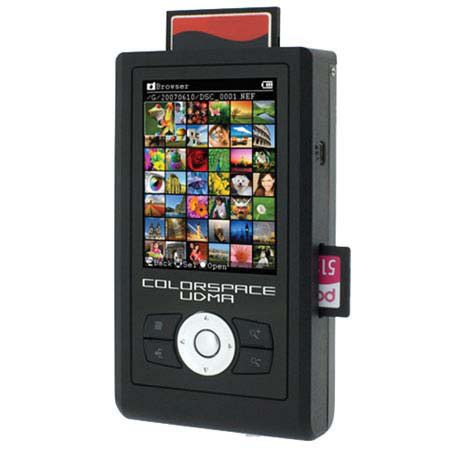
The Sanho HyperDrive ColorSpace UDMA 250 GB Photo Backup Storage & Viewer has 40MB/s backup speed and backup and verify at 2GB/min speed. It has incremental backup support, backup only new data on card, skip previously saved data. Realtime CRC data verification during backup process with no overhead on copy speed/time. The file format independent, it backups all kinds of files from 14 different card types.
It doesn't require card adapters. The USB OTG allows backup to/from any USB device/drive. It displays full screen image, thumbnails or slideshows. The advanced file manager allows exploring contents of internal hard drive or any memory card. Preview images in the background without entering folders. Perform advanced file and folder operations like copy, cut, paste, delete, rename, create new folder, sort file directory by name/date/type, format hard drive, erase card etc. Selectively copy single or multiple files/folders between memory card and internal hard drive. Search for images on internal hard drive or any memory card by EXIF date.
Image previews automatically when you highlight the date. Rotate and zoom image in stages up to 100% pixel level to confirm image focus and fine detail. It's detailed EXIF data displays more information about your photo. It supports any 2.5" SATA hard drive (120~500GB & beyond). The S.M.A.R.T. (Self-Monitoring, Analysis and Reporting Technology) monitors internal hard drive for potential problems.