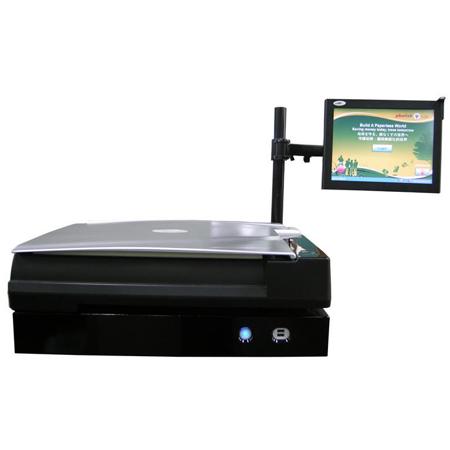

Plustek Library Kiosk Book Scanning Solution with OpticBook A300 Scanner

SKU: ICEZBOOK

This item is no longer available.

Overview
Compare
Specs
Protection
Q&A

Questions & Answers

FAQ

What is the SEE technology in the OpticBook A300 scanner?

SEE (Shadow Elimination Element) Technology is a patent-pending feature from Plustek that eliminates the spine shadow and page distortions typically seen when scanning books with conventional scanners. This technology ensures that pages scanned with the OpticBook A300 are clear and crisp.

What size of documents can the OpticBook A300 scanner handle?

The OpticBook A300 supports large format scanning and can handle documents up to A3 size. This makes it ideal for scanning large books and documents.

What is the Scan-and-Go feature in the OpticBook A300 scanner?

The Scan-and-Go feature in the OpticBook A300 scanner allows users to directly scan books to USB drives, emails, or the cloud. This feature saves paper and toner and provides a faster and more efficient alternative to traditional copying.

What imaging applications is the OpticBook A300 scanner compatible with?

The OpticBook A300 scanner is compatible with most imaging applications. It supports industry-standard TWAIN and WIA drivers along with TIFF, JPG, PDF, and Microsoft Office file formats.

What software comes with the OpticBook A300 scanner?

The OpticBook A300 scanner comes with I.R.I.S Readiris software. This software allows you to easily create and manage searchable PDFs.

Reviews about this item

Review Summary

Select a plan in the Add Protection section above and purchase with this product by clicking “Add to Cart”.

image-protection

TRUSTED PROTECTION PLANS, EXCEPTIONAL SERVICE.

Invest In Your Gear and Peace Of Mind!

Accidents happen where life happens. Protect your favorite Adorama products and purchase a protection plan to stay covered from accidental damage, mechanical or electrical failure, and more.

Repair or Replacement

Repair or Replacement

If we can’t fix it, we’ll replace it at no additional cost.

Accidental Damage

Accidental Damage

Protect your product from drops, spills, and more.

Peace of Mind

Peace of Mind

Enjoy your gear without fear. We have you covered!

Malfunction Protection

Malfunction Protection

When regular use of your product over time results in mechanical or electrical failure.

Zero Deductible

Zero Deductible

We will never charge you a deductible after the purchase of a plan.

Customer-Focused Support

Customer-Focused Support

Our claims process is simple & easy and our customer service team is happy to help.

Adorama Protect powered by Extend is available for purchase to customers in the United States. Not available for purchase Internationally or in U.S. Territories.

Plustek Scanner Specifications

  • OpticBook A300 Scanner: Image Sensor

    CCD

  • OpticBook A300 Scanner: Resolution

    Optical: 600 dpi
    Hardware: 600 x 1200 dpi

  • OpticBook A300 Scanner: Scan Modes

    Color: 48-bit input, 24-bit output, Grayscale: 16-bit input, 8-bit output, BNJ: 1-bit output

  • OpticBook A300 Scanner: Scanning Speed

    2.48 sec (Color mode, 300dpi, A3), 2.10 sec (Grayscale/B&W mode, 300dpi, A3)

  • OpticBook A300 Scanner: Scanning Area

    Max. 304.8 x 431.8mm (12.00 x 17.00")(W x L), A3

  • OpticBook A300 Scanner: Daily Duty Scan

    5000 (Sheets)

  • OpticBook A300 Scanner:Power Consumption

    <36W (operation), < 8W (idle)

  • OpticBook A300 Scanner: Interface

    USB 2.0

  • OpticBook A300 Scanner: Protocol

    TWAIN Compliant

  • OpticBook A300 Scanner: OS

    Windows XP/Vista/7/8

  • Dimensions (W x D x H)

    OpticBook A300 Scanner: 623 x 400 x 133mm (24.53 x 15.75 x 5.24")

  • Weight

    OpticBook A300 Scanner: 7.7kg (16.98lbs)

  • UPC Code

    783064354691

About Plustek Scanner

With the advanced OpticBook A300 Library Kiosk Book Scanning Solution, you can effortlessly digitize large books and documents. This high-tech scanner is ideal for universities, libraries, corporations, governmental agencies, and schools that require a non-destructive, high-speed book scanning solution.

The OpticBook A300 is equipped with Plustek's innovative SEE (Shadow Elimination Element) Technology. This patent-pending technology eradicates the spine shadow and page distortions typically seen when scanning books with conventional scanners. As a result, the pages scanned with the OpticBook A300 are clear and crisp, ensuring high-quality digital copies of your valuable materials.

This state-of-the-art scanner supports large format scanning, capable of handling documents up to A3 size. It boasts a fast scanning speed of 2.48 seconds for color scans at 300 dpi A3 size, making it an efficient tool for high-volume scanning tasks.

The OpticBook A300 features a unique 2mm book edge design, which eliminates the book spine shadow while scanning, providing you with distortion-free digital copies. This sophisticated design eliminates the need for a large, expensive overhead scanner or complex image-editing software.

The scanner is equipped with an L-type CCFL light source, ensuring uniform illumination over the entire page. Its user-friendly interface includes single touch buttons that simplify your scanning work and increase efficiency.

The OpticBook A300 is compatible with most imaging applications, supporting industry-standard TWAIN and WIA drivers along with TIFF, JPG, PDF, and Microsoft Office file formats. It comes with I.R.I.S Readiris software, allowing you to easily create and manage searchable PDFs.

The Library Kiosk Book Scanning Solution with OpticBook A300 Scanner also offers a Scan-and-Go solution, allowing users to scan books directly to USB drives, emails, or the cloud. This feature not only saves paper and toner but also provides a faster and more efficient alternative to traditional copying.

Thanks to the SEE technology, book pages lay completely flat on the scanning bed, allowing the object to be scanned right up to the spine of the book. The result is a clear, distortion-free digital copy with no spine shadow. This high-speed scanner can scan a 12" x 17" object in just 2.4 seconds at 300 DPI in color, minimizing wait time during busy hours.

In conclusion, the OpticBook A300 Library Kiosk Book Scanning Solution is a sophisticated, high-tech tool designed to meet the most demanding large format book scanning requirements. Its advanced features and user-friendly design make it an ideal choice for digitizing books and other printed materials.


Plustek Scanner Features

  • Advanced SEE Technology for shadow-free scans of book pages
  • High-speed A3 size scanning in 2.48 seconds at 300 dpi for efficient digitization
  • Unique 2mm book edge design to eliminate spine distortion during scanning
  • Compatible with most imaging applications, including TWAIN and WIA drivers
  • Easy-to-use interface with single touch buttons for simplified scanning
  • Scan-and-Go feature to save directly to USB, email, or cloud services

Key Features

  • Advanced SEE Technology for shadow-free scans of book pages
  • High-speed A3 size scanning in 2.48 seconds at 300 dpi for efficient digitization
  • Unique 2mm book edge design to eliminate spine distortion during scanning
  • Compatible with most imaging applications, including TWAIN and WIA drivers
  • Easy-to-use interface with single touch buttons for simplified scanning
  • Scan-and-Go feature to save directly to USB, email, or cloud services

What's in the box:

  • Plustek Library Kiosk Book Scanning Solution
  • OpticBook A300 Scanner
  • Plustek Warranty




