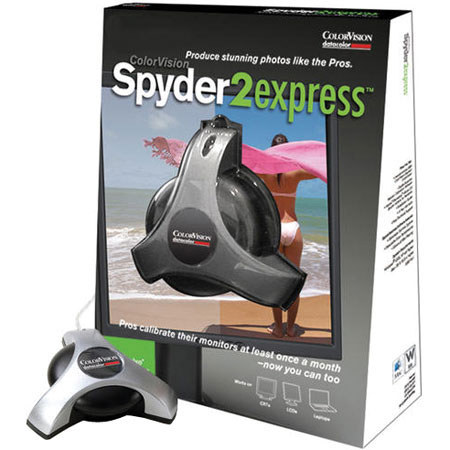
Datacolor Spyder 2 Express, CRT & LCD Monitor Calibration Hardware & Software
SKU: ICVS2E100
This item is no longer available.
Share:
Overview
Compare
Learn
Specs
Protection
Reviews about this item
Review Summary
2009-11-01T19:00:00
Rated 4 out of 5
Cheap help to fix colors
Cheap calibrator to get accurate colors. The actual process was bit confusing first, but after figuring out how adjust lightning etc. it works fine. Takes a bit of time, but as it isn't daily thing, the speed isn't show stopper. The Mac software is really outdated, but makes accurate profiles.
ville
2009-10-15T21:00:00
Rated 3 out of 5
Good, Entry Level.
I use the product every 2 weeks on my macintosh system to keep a check on my color output. It is a simple and straight-forward product. It takes about 15 - 20 minutes to calibrate. zzzz wake me when its done. Overall it is much better than the guess and hope it works consideration of color management. It is actually for the money a good product.
Mark C.
2009-08-08T21:00:00
Rated 4 out of 5
Very easy installation and calibration
Just installed - I had to download a newer version so it would work with my 64 bit computer. Setup was perdirections, reset monitor back to factory default, no light reflection onto the monitor, and it did the rest. It may not be a pro version, however after calibration, I quickly saw where some picture programs autocorrect might overcorrect some pictures. Could not ask for easier setup.
MELVIN S.
2009-07-21T21:00:00
Rated 4 out of 5
More of a difference than I thought!
The thing I like the most about this Calibration System is that I really noticed a difference in my monitors. The blacks are blacker...The Grays are truer.... and the Whites are whiter! I have been waiting for a long time to buy and use one of these but the prices were way too high.... not anymore. If you read the reviews.... this doesn't have a lot of the features the more expensive units do but it will be enough for most people. Glad I bought it.
RICH L.
2009-07-07T21:00:00
Rated 4 out of 5
Does the job for little money
I have been looking at monitor calibrating devices for about a year, but price always kept me from taking the plunge. The Spyder 2 Express was easy to use and did what I expected. For the price, you can't go wrong!
WOLFGANG S.
2009-05-03T21:00:00
Rated 2 out of 5
Does not make much difference.
I don't see it making much of a difference in how photographs look on my monitor. And it does not help them printing more accurately.
Nick321
2009-03-14T21:00:00
Rated 4 out of 5
Good product.
Easy and quick to use. Photos look better.
KEITH K.
2009-03-05T19:00:00
Rated 4 out of 5
Monitor Calibration
This worked as advertised. My intent was to tweak the monitor so that printed pictures would be similar in color to what was on the monitor. The pictures from the lab are much better while my home computer shows only slight improvement.
Dales
2009-03-05T19:00:00
Rated 5 out of 5
Spyder 2 Express->Easy to use !
Needed a calibration device for my growing photography business without breaking the bank... The Spyder 2 Express is simple to setup, simple to run and it works!
Mike P.
2009-03-05T19:00:00
Rated 5 out of 5
A Must Have
Very easy to use & it produces dramatatic results. No matter how close you think that your screen colors are to correct you will see a significant improvement
JEFFREY A.
2009-03-05T19:00:00
Rated 3 out of 5
Inexpensive, but has limited software
The Spyder2express works as advertised, but the software really has no configurable options. You can't even choose the color temperature to use, which is unfortunate if you have less-than-ideal lighting conditions. If price is critical, and all you want to do is calibrate a single monitor to 6500K and gamma 2.2, it will do the job. I got a bit frustrated with its limitations and returned it for the Spyder3 Pro.
RandomS
2009-02-19T19:00:00
Rated 4 out of 5
Does a great job of adjusting color
I use Adobe Lightroom to process RAW images taken using a Nikon D300. The pictures looked bright on the monitor but dark when printed. This issue was 90% resolved by using this product. The only issue is that the monitor has to be recalibrated every three to four weeks. However, that is a function of the monitor not the product.
charlton c.
2009-02-19T19:00:00
Rated 4 out of 5
Lived up to expectations
Once I got the hang of the thing everything fell into place. Good tool for the average photographer looking for color correction of a monitor. Still must adjust picture for final best appearance.
Henry e.
2009-01-22T19:00:00
Rated 4 out of 5
Great Product for the Price
This is an easy-to-use, low cost solution for color management. It is ideal for the beginner or amateur-on-a-budget digital photographer who wants the colors on their computer monitor to correspond with what prints out at the photo lab. This system worked wonders for my laptop. Don't expect a lot of options or features; it is an entry level system, but it does the job.
GBL
2009-01-20T19:00:00
Rated 4 out of 5
Great product
This product was really easy to use and perfect for home use.
kfont
2009-01-13T19:00:00
Rated 5 out of 5
Good [...]
Seems to do a great job - my prints match up with my monitor perfectly. The software does run an annoying popup that sets your color profile when logging into XP, however. It only takes a second, but its still annoying. Other than that, it does everything I needed it to do.
Super_B
2009-01-13T19:00:00
Rated 5 out of 5
Excellent performance per dollar value.
I thought my monitor was good on calibration until i used the Spyder 2 Express. My digital images now have that WOW factor that was missing.
WAYNE K.
2009-01-01T19:00:00
Rated 5 out of 5
Perfect for the amature photographer
Perfect for learning about color profiling your monitor for use with your photo editing program.
Spencer
2008-12-29T19:00:00
Rated 4 out of 5
Works well at min. cost
My monitor needs monthly calibration, and the Spyder does it quickly
HARRY J.
2008-12-28T19:00:00
Rated 4 out of 5
Good value.
After taking a CC photo class with the fancy Mac calibrated monitors, I knew I needed help with my PC monitor. After checking online reviews I got the Spyder Express. My monitor was significantly toward the blue end. No wonder my prints looked bad. Easy to install and use. It's a little slow, but still calibration under ~5 minutes. Its easy to move so now I've done my laptop and the PC at work too. Not top end, but good value.
Wally
2008-12-28T19:00:00
Rated 5 out of 5
Quick and easy to use!
This is the first color calibration product that I've used and it's been a fantastic experience. No problems encountered. Instructions are clear and easy to follow and the color calibration process is automatic and well integrated.
CK
2008-09-26T21:00:00
Rated 5 out of 5
excelent
i'm not a pro but for me works i calibrate a MacBook Pro and the display look awsome
EDWARD R.
2008-09-07T21:00:00
Rated 5 out of 5
I Love My Spyder2Express!!!
I've Used The Spyder2Express On Both My Mom's Laptop, And My Dad's Computer. I Also Plan On Using It On My Macbook That's On It's Way. It Really Couldn't Have Been Simpler. Just Install The Software, Plug The Calibrator In, Adjust It On The Screen, And The Rest Is Fully Automatic. The Difference Is Stunning! On Both The Computer, And Notebook I Had A Pretty Bad Blue Tint On My Screen. My Colors Were Also Very Washed Out. But After Calibrating, Colors Really Pop, And Everything Looks Much More Vibrant, And Sharp. I Was Also Getting A Really Bad Tint On All My Files In Adobe Bridge. After Calibrating, I No Longer Have This Red Tint, And It's Making It Much, Much Easier To Adjust My RAW Files. All In All, I Love This Product. It's At A Great Price, It Was Very Simple To Set Up And Use, And It's Made A Huge Difference In Color Quality, And Accuracy On My Monitors. HIGHLY RECOMMENDED!
twitch77
2008-09-03T21:00:00
Rated 4 out of 5
great Product
At first i really didn't see much difference by just looking at my monitor. After editing some pictures and having them printed, i noticed a big difference in the colors.. I now use the spyder to recalibrate monitor every month.
jim
2008-08-05T21:00:00
Rated 2 out of 5
Not well thought out on Mac
The software for OS X is buggy and confusing. 2 screens doesn't work. I had to mirror my 2 screens, make 2 profiles and apply them separately to the different monitors because the software doesn't work right on OS X 10.5. I did get it to work but it's not smooth.
ncowger
2008-02-22T19:00:00
Rated 4 out of 5
Now my LCD matches my prints!
Although it's the cheapest version of the Spyders it works great. By checking the before and after comparison after the full automatic calibration you can inspect the results. For me it has done small wonders - now my monitor actually conforms to my prints. The UI is relatively basic, yet it's very easy to set up. If you need an elementary way to get your colors right the Spyder2Express is a fine choice. But if you have more than one monitor to sync or if you want to tweak different parameters you want to look into the Pro version.
Jacob
2008-02-20T19:00:00
Rated 4 out of 5
Real Simple, Worth The Price
I calibrated my home computer and laptop and was amazed at the difference it made. Instructions were clear and easy to follow. Start to finish took about 20 minutes. Express is a good value as is, although adding the automated luminance adjustment for blacks and whites would make it a terrific value. Still, if you do any adjusting and printing of photos at all, this is a must have!
Rex99701
2008-01-29T19:00:00
Rated 3 out of 5
just for basic calibration
It could be better for the price, is a very basic calibration tool and it doesn't show any extra features of medium or advance calibration
Don D.
2008-01-20T19:00:00
Rated 4 out of 5
Easy to use
If you don't type well getting updates is slow as you have to enter the serial# for each update. After it's set up repeat usage is extremely simple with good results.
PhotoGrizz
2008-01-20T19:00:00
Rated 4 out of 5
Spyder 2 Express - Affordable Color
The Spyder 2 appeared to be both easy to setup and a good value from all of the reviews I read here. While my case may be different since I run Windows x64 Pro, I had trouble installing and setting it up. After installing the software, I had to manually install the hardware through the Control Panel. The really tough thing about this install was that I had to try different things, each time unplugging the hardware. What made it worse was that each time I unplugged, my computer automatically shutdown. I finally got the hardware recognized and then things started working well. I am now able to easily calibrate my monitor. This tool has made a huge difference in my prints. I use a cheap Canon Pixma 6310D but the pictures before calibration were washed out. The colors didn't pop and well, it just wasn't worth printing pictures. Now I get much better color rendition and I don't feel like I took a bad picture once I see the print. My far-away relatives can now see our family without waiting for processing and mailing. I think this tool is a good value despite my difficulties.
rad64
Datacolor Spyder 2 Exp, CRT & LCD Calibration H/W & S/W Specifications
Related Articles & Videos
About Datacolor Spyder 2 Exp, CRT & LCD Calibration H/W & S/W
• The newest member of the award-winning Spyder2 family, Spyder2express provides quick, easy, and accurate monitor calibration. In three easy steps, it gives you precise and realistic on-screen color, true-to-life flesh tones plus and flawless shadow detail and highlights. • Easy to install and easy-to-use, you don't have to be a color guru to use it. The Spyder2 and its advanced algorithms work behind the scenes to give you the best color experience possible. A must have for photographers, designers, gamers, and anyone who wants accurate color on screen. For Mac and Windows, calibrates all of your CRT, LCD, or laptop monitors for dynamic and consistent color.
System Requirements • CRT, LCD, Notebook Display. • Windows 2000, XP and higher. • Mac OS X 10.3 or higher. • Powered USB Port.
Join VIP PRO
Earn 2X Points + Exclusive Perks!
Request a Callback
Chat one-on-one with an expert
Sell or Trade your Gear
Get started in 3 easy steps
What's in the box:
- Spyder2 Colorimeter
- Spyder2express Monitor Calibration Software (Site License)
- Adobe Album Starter Edition (Free)
- Quick Start Guide
- 2 Year Hardware Warranty
- Free Technical Support
- Free Software Updates.