
This item is no longer available.
Review Summary
2024-10-21T07:14:30
Accurate results
XIAO W.
2024-02-12T01:46:08
Couldn't live without it. All that work and then editing with an uncalibrated monitor is a waste...
Ian W.
2023-02-16T10:39:01
The color meter and calibration work well and definitely helped get my monitors closer to accurate. The USB USB-C adapter that came with the Spyder does not work at all. I tested the adapter with multiple computers and devices.
JP B.
2023-01-24T19:32:21
It is a great product. I had a hiccup in running the software initially, but customer support did a great job in helping me figure out the problem. It's actually very easy to use and the results are awesome.
Karen L.
2022-12-22T07:05:12
Great product at a very good price. Lots of info on the Datacolor website and great technical support as well.
SKIP T.
2022-12-18T08:33:55
Easy to use and good to have a calibrated display.
FRED M.
2022-12-14T19:34:26
Datacolor spider pro is the most if you want to calibrate your monitor and output the true colors on your screen. Simple accurate and easy.
MICHAEL W.
2022-12-11T02:14:07
Very easy to use, and I saw a difference immediately, which translated into a difference in how I edited my photos. Glad I purchased this!
SUE C.
2022-12-11T02:02:06
I was a little on the fence about buying one of these. I had got a few prints back from the shop different than what I expected but assumed my screen couldn't possibly be that bad. I bought one of these on Black Friday and was very surprised how easily it worked and how big of a difference it made. Honestly, looking back I should have bought on earlier even at full price.
Jonathan P.
2022-11-29T06:45:41
Amazing product, fast and reliable
Ilir B.
2022-10-15T13:00:11
Downloading the software was quick and the adjustment process was remarkably fast. Knowing that colors displayed are true is valuable.
Joel M.
2022-10-10T17:23:46
As much as I tried to manually calibrate multiple external displays and my laptop panel, I just could not achieve a match - nor a correlation with printed images. I was skeptical about the SpyderX, but the Adorama bundle was intriguing. Wow, it really works and was extremely easy to use and accurate!
TOM M.
2022-06-28T10:32:17
Easy to install and use
George D.
2022-05-25T10:48:02
I put off getting one of these for a while. I have a sexy BenQ SW271 monitor so I thought I could get away with it. Yeah... Nuh uh... My colors are so much better after taking the time to re-calibrate it with this. I'm very happy I finally got around to it. Well worth it.
SARALYNN N.
2022-04-14T08:43:06
Easy to use and accurate. Good value for the money,
Steven S.
2022-04-04T15:54:32
This software completely solved my problem with my new laptop. The colors on both my laptop and large monitor look great. It was also very easy to use.
KATHERINE I.
2022-03-23T07:37:22
Really like the Calibration it gave to a PC and laptop screen. Gave the colors much more vibrancy in both cases. The only thing I didn't like? The way you really have to pull the cable to extend or retract the wire for hanging over the monitor. This will surely lead to failure over time. I've pulled mine out just enough to fit my monitor screens and will leave it alone.
Richard W.
2022-03-18T10:38:03
If your needs fit within the limitations of Datacolor's software stack, this is a good device: Other than the built-in XDR panel on my M1-based 16" MacBook Pro (which it can't calibrate at all), it's successfully able to get the monitors I own to visually match each other where their gamuts overlap. If you need capabilities that Datacolor's software doesn't offer (like calibrating a monitor attached via a Blackmagic UltraStudio, or generating a LUT instead of an ICC proflie), things are much more hit-and-miss. While ArgyllCMS lists this as a supported instrument, some units (including mine) tend to lock up during use. New versions of ArgyllCMS work around that by trying to reset the USB port when closing the device, but that doesn't work reliably on MacOS (at least, not on 12.2.1 on a M1-based Mac, which is where I'm trying to test it). Until this is fixed so 3rd-party software can reliably drive this hardware, I can't give it an unqualified five stars, and I'm seriously considering switching to the i1Display Pro.
Charles D.
2022-03-10T08:02:36
Great product. Immediately saw the difference in color during the editing process. What o see in the edit is how the end products looks on multiple devices.
ROMAN F.
2022-01-20T08:37:44
Fixed my color issues like a charm!
HALI K.
2021-12-22T09:23:42
Very nice device. Easy to use in MacOS with the DataColor software. I also used in Linux (Debian) with DisplayCAL, but had to use the tips listed in this forum: hub.displaycal.net/forums/topic/calibration-stops-in-whitepoint-0_16-ti3 I like that it also measures the room light level and recommends modifications as needed.
Sebastian F.
2021-12-18T16:24:52
The colors on my computers improved after using the Datacolor SpyderX Pro Color Calibration system.
JUAN H.
2021-12-14T07:28:50
This was really quick and easy to use. I was able to color calibrate my monitor perfectly in minutes. I highly recommend.
Jennifer S.
2021-11-04T10:09:42
If your a serious pro, you absolutely MUST calibrate your display! This works well without having to remortgage the house!
MARK M.
2021-10-12T11:08:31
Simple to set up and use. Made a huge difference in my printing!
PATRICIA B.
2021-10-11T08:13:27
Very easy process. Makes a noticeable difference on colors and brightness/contrast.
JOSEPH F.
2021-07-14T08:19:48
Great product for color correvtion
JEOFFREY S.
2021-07-05T08:57:49
While the Spyder X Pro seems to provide a good color profile for my Retina 5K monitor, is requires the monitor to be far brighter, and the ambient lighting far less bright, than I am accustomed to using. As a result my prints are too dark, even if they are color balanced. This is disappointing, but I hope that experience with the Datacolor software will lead me to better results in future.
Timothy M.
2021-06-26T11:17:57
Works as advertised - never knew how far my monitor colors were off until a calibrated with the SpyderX.
RICHARD S.
2021-05-17T05:57:55
I have an Alienware m17 4K laptop which I use for gaming and photo/video editing. Shortly after receiving it about 2 years ago, I realized that the screen was very saturated. This was a common complaint among owners from the reviews online. I manually tuned down the saturation to my best ability but felt that I couldn't get it right. I finally decided to pick up the basic SpyderX Calibrator . It was literally plug and play...the software walks you through the process step by step only requiring some basic information. My screen is now very close to what I see on other screens, including my DSLR screen, iPhone 11, Macbook and other calibrated monitors. I don't print much but I was looking for consistency, so I could know that what I was seeing on my screen, would appear similarly on other screens. I am very happy with the results.
Jason P.
Accidents happen where life happens. Protect your favorite Adorama products and purchase a protection plan to stay covered from accidental damage, mechanical or electrical failure, and more.
If we can’t fix it, we’ll replace it at no additional cost.
Protect your product from drops, spills, and more.
Enjoy your gear without fear. We have you covered!
When regular use of your product over time results in mechanical or electrical failure.
We will never charge you a deductible after the purchase of a plan.
Our claims process is simple & easy and our customer service team is happy to help.
Adorama Protect powered by Extend is available for purchase to customers in the United States. Not available for purchase Internationally or in U.S. Territories.
Browse our FAQ
Win 7 32/64, Win 8 32/64, Win 10 32/64
Mac OS X 10.10 and higher
Monitor resolution 1280x768 or greater
16-bit video card (24-bit recommended)
1GB of available RAM, 500MB of available hard disk
Internet connection for software download & activation
English, French, Italian, German, Spanish, Russian, Japanese, Simplified Chinese, Traditional Chinese, Korean
17.72 x 15.55 x 2.83" (45 x 39.5 x 7.2cm)
2.34 lbs (1.06kg)
875720002104
Should have invested in this ages ago
By SARALYNN N.
I put off getting one of these for a while. I have a sexy BenQ SW271 monitor so I thought I could get away with it. Yeah... Nuh uh... My colors are so much better after taking the time to re-calibrate it with this. I'm very happy I finally got around to it. Well worth it.
Quick and easy. Nice to use.
By Sebastian F.
Very nice device. Easy to use in MacOS with the DataColor software. I also used in Linux (Debian) with DisplayCAL, but had to use the tips listed in this forum: hub.displaycal.net/forums/topic/calibration-stops-in-whitepoint-0_16-ti3 I like that it also measures the room light level and recommends modifications as needed.
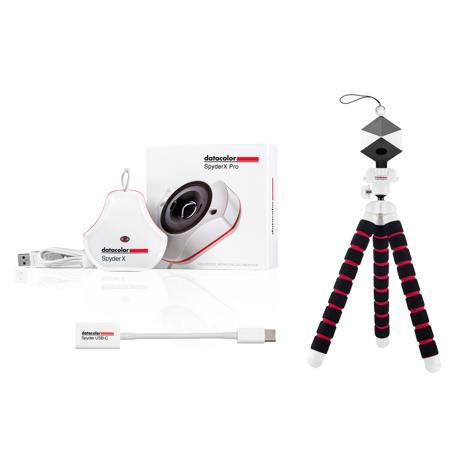
The perfect tool suite for location shoots. Ensure color-accurate images that have crisp, well-defined shadow details with portable tools that go wherever your photography takes you. Calibrate your monitor for true color-consistency, set white balance and RAW conversion for crisp details, use the flexible tripod with GoPro mount, smartphone holder and Bluetooth Universal remote for limitless creative possibilities. Convenient and cost-effective, the Mobile Pro Kit includes:
- SpyderX Pro -
SpyderX is our most accurate, fastest (4X), easiest-to-use monitor calibrator ever.
Features
SpyderX is our most accurate, fastest, easiest-to-use monitor calibrator ever
Calibrating your monitor to achieve color precision now takes less than two minutes - 4 times faster than previous models
Groundbreaking lens-based color engine provides a higher level of color accuracy for multiple monitors. SpyderX Pro features room-light monitoring (with low light capabilities) automatic profile changing and significantly more precise screen color, shadow detail and white balance
SpyderX Pro is so intuitive, you don't have to be a color expert. It features quick and easy single-click calibration and wizard workflow with 12 predefined calibration targets for advanced color accuracy
SpyderProof functionality provides before-and-after evaluation of your display and allows you view differences, using your own images, instantly
Monitor technologies constantly change and improve over time, but with SpyderX Pro, you're assured support for the latest screen types, recent resolutions and gamuts, including 64-bit technologies
- Spyder Cube -
Set white balance and RAW conversion for clear, precise image details.
Features
Portable solution for photographers which provides references to set white balance, exposure, black level, and brightness right from the start
Takes the complexity out of RAW image editing by using common tools found in color managed applications, such as Adobe Photoshop and Adobe Photoshop Lightroom
Easy to use. Simply take a reference shot with the device under the same light conditions as your photos, adjust, save, and apply to entire series of images
Unique design allows you to hang the device during a photography shoot or attach it to a tripod mount
Constructed of ABS Cycoloy, a hybrid resin that is fade-proof, extremely durable, shock-resistant, and spectrally neutral
- Spyder Tripod Pro -
Stabilize your camera for sharp images. Flexible legs, lightweight portability allows for a wide variety of shot angles. Includes GoPro mount, smartphone holder and Bluetooth Universal remote for enhanced creative capabilities.
Features
10.5" Spyder Tripod Pro affords great versatility and comes with a GoPro mount, smartphone holder and Bluetooth Universal Remote for the ultimate in hands-free image capture and video work
Ideal for vlogging and self-portraits as well as auto-bracketing for HDR images, night shots, low-light, landscape and scenic photography
Can be used with Spyder X calibrator for optimal ambient light measuring and monitoring when set up next to a calibrated monitor as well as for projector calibration
Use with the Spyder Cube, Spyder LensCal, and Spyder Checkr as a stabilizer and stand when setting them up in frame for use
Flexible design allows you to mount your camera or phone at the best angle for that perfect shot or video without having to rely on finding a flat surface, standing on a ladder, or laying on the ground. Maximum weight limit 1.76 lbs
- Spyder USB-C -
Adapts USB-A cables to USB-C ports. The USB-C is compatible with Mac, PC, and Android devices and iPad Pro.
Features
Adapts USB-A cables to USB-C ports found on newer Apple products. The USB-C is compatible with Mac, PC, and Android devices and iPad Pro
Benefits
The Mobile Pro Kit ensures your images are color-accurate and consistent, with crisp, defined details along with the flexibility for enhanced creative capabilities. It includes all the photo tools you need for location and on-the-go shoots in one convenient, cost-effective product offering.






