Just Reduced

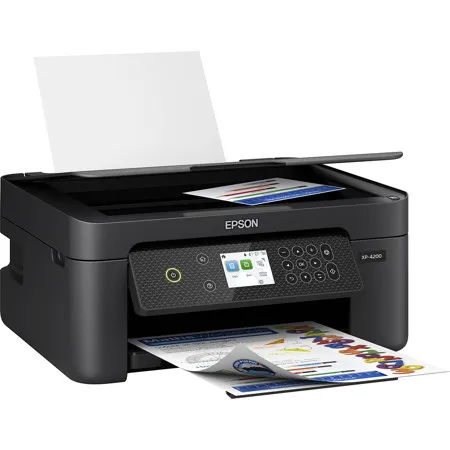
Epson Expression Home XP-4200 Wireless All-In-One Color Inkjet Printer

SKU: IESC11CK6521 MFR: C11CK65201
$59.99
$99.99
Save: $40 (40%)
Earn VIP Reward Points

Key Features

  • Enjoy wireless printing from your devices with this Epson all-in-one inkjet printer.
  • High-quality color prints with a resolution of 5760 x 1440 dpi for vivid documents.
  • Save on ink costs with individual ink cartridges; replace only what runs out.
  • Print documents quickly with speeds up to 10 ppm (black) and 5 ppm (color).
  • Easily manage tasks using the 2.4" color LCD for simple navigation and control.
  • Scan documents to the cloud or your computer with the built-in flatbed scanner.
See More Product Details
Special Order?Estimated to Ship: 03/27/2026
Calculate Shipping

See Options

1

Need help? Ask our experts.

Overview
Compare
Accessories
Specs
Protection
Q&A

Questions & Answers

FAQ

Can the Epson Expression Home XP-4200 print from mobile devices?

Yes, the XP-4200 supports wireless printing from Android and iOS devices using the Epson Smart Panel app, Mopria Print Service, and Mopria Scan.

Does the XP-4200 support automatic two-sided printing?

Yes, the Epson Expression Home XP-4200 features automatic two-sided printing to help you save paper and reduce waste.

Is the Epson Expression Home XP-4200 compatible with voice-activated assistants?

Yes, the XP-4200 offers hands-free, voice-activated printing with Alexa for added convenience.

What type of ink cartridges does the XP-4200 use?

The XP-4200 uses individual Epson Genuine Cartridges, allowing you to replace only the ink you need for efficient color printing.

What software is included with the Epson Expression Home XP-4200?

The XP-4200 comes with Epson ScanSmart scanning software, which allows you to create searchable PDFs and manage your scanning tasks efficiently.

Reviews about this item

Review Summary

2026-02-21T19:00:00

Rated 1 out of 5

Horrible. Hay it two months and tried seven times to scan an

I can't get it do anything Garbage

Philthy O.

2026-02-21T19:00:00

Rated 1 out of 5

Terrible Customer Support

product support sux. they want you to talk to a AI chatbot. But the drivers don't work. I suspect leaving a bad rating they won't even care about. Scammers

Mook

2026-02-17T19:00:00

Rated 5 out of 5

Great Basic Machine

This is a great Printer, Scanner and Copier. This is my 4th Epson Printer. Completely satisfied. I don't understand the negative reviews. I'm 72 years old, and not real tech savvy, but this was a breeze to set-up and run. The quality of printing is perfect for my needs. Well done Epson !

Surfer53

2026-02-13T19:00:00

Rated 1 out of 5

Anti-consumer garbage

Absolutely scummy product. Won't allow you to print B&W if color ink isn't used, ink is consumed crazy fast and cartridges are crazy expensive.

nickname1234

2026-01-30T19:00:00

Rated 4 out of 5

Scan Setup

Set up was challenging, but i figured it out on my own. Appreciated the learning experience. Everything is good except I need assistance setting up the scan function. Will call Customer Svc. for help'; meanwhile, I will attempt to figure it out. We can do more than we even imagine. God has blessed with awesome brains. I like my Epson XP-4200; it prints nicely, copys and scans. Great price!

Vision B.

2026-01-26T19:00:00

Rated 5 out of 5

Epson Stands Behind their products

I have the XP-4100 series and purchased other brands key factor maintain has been brainless. The print quality better than expected, Scanning Connectivity Compatibility with Android Windows Apple devices. Yes I definitely recommend Epson Printer Family and do not third party ink products

lyn386

2026-01-26T19:00:00

Rated 1 out of 5

Don't Buy - Save your Money!

This is the absolute worst printer I have ever used. It jams every time I use it. There's no magic number for the amount of paper you need in the slot for it not to do it. I've wasted more paper than the print is worth.

BrittG

2026-01-17T19:00:00

Rated 5 out of 5

Great new printer

Had to buy a new Epson Printer after my 10 year old Epson printer died. This new one was so much easier to set up. Wireless is wonderful.

Calee

2026-01-13T19:00:00

Rated 4 out of 5

Like the Epson brand.

Replaced our original Epson and are pleased with the Epson brand.

jan420

2025-12-30T19:00:00

Rated 1 out of 5

Horrible printer

Waste of money

Never a.

2025-12-27T19:00:00

Rated 2 out of 5

Disappointed

I'm very disappointed with the quality of the printer. It's very thin plastic. My old printer (also an Epson) was not this cheep quality. It lasted 8 years. It was also hard to set up.

Dedee

2025-12-17T19:00:00

Rated 1 out of 5

save your money

All it does is update firmware, never prints when you want it to and when it finally does print it's out of ink.

tom42

2025-12-13T19:00:00

Rated 2 out of 5

Not good

This printer will not connect to my computer or phone. I'm taking it back.

Jpro

2025-12-10T19:00:00

Rated 5 out of 5

Happy with Epson Printers for years. Don't smear. Great for Home and at Home Business use!!

Ted D.

2025-12-10T19:00:00

Rated 1 out of 5

Pure trash

Agree 1000% with 1-tsar rating comments below, this printer is pure trash!

NotEpsonFan

2025-12-03T19:00:00

Rated 1 out of 5

terrible features

worst printer ever made; printer jam; printer error; printer software update; printer connection issue; printer is busy and cannot update - this is the constant experience EVERY TIME try to use this junk printer. Once you battle through the regular round of disfunction of the printer, you are left with a very very slow printer with very very slow processing of print jobs. And then the ink is exceptionally expensive for the amount of pages you get with a cartridge (if it lets you print any pages at all), usually at least $60 for a refill of black and the three colors. Terrible product, terrible price, terrible quality, terrible compatibility with any computer and wifi; cannot get any return or refund on this pathetic product; highly recommend not buying this printer; only can think of one other purchase in my life that was as great a waste of money and time as this epson xp4200

badprinterrrrrr

2025-12-03T19:00:00

Rated 2 out of 5

Cheap and decent quality, But the setup is horrible!

You would think having a wifi printer would be fast and simple but if you're not tech savey stay far from this. Got it for my parent and the setup and issues that come with it is not worth the price.

Lark88

2025-11-23T19:00:00

Rated 1 out of 5

Waste of money

Over all this Printer is kind of rubbish product. it is super slow, when I print color photo and touch by finger its color fade and come into my finger, ink efficiency is very low. In those regard I will give (one) 1 star for over all performance

Unsatisfiade c.

2025-11-16T19:00:00

Rated 2 out of 5

Try something else

I've only owned this a couple of weeks. I've had to reinstall it twice and it still isn't working correctly on my Wi-Fi network. I have followed, to the letter, the instructions and still have problems. Maybe Epson drivers are not keeping up?? So sorry I bought this. Wouldn't do it again...and should have done more research on the cost of ink.

BeckyMN

2025-11-07T19:00:00

Rated 1 out of 5

Hate this printer so much

If you want a printer that prints, oh I don't know about 12 pages on GRAYSCALE (can't use fast grayscale because even with full ink and a clean printer it's like invisible ink), then this is def the printer for you. I've never in my life had a printer that ate this much ink. Anyone that's ever owned a printer knows that ink isn't cheap. And yes, I've only ever bought legit Epson brand from physical stores, not Amazon or anything where they could be knockoffs. Even the XL one I get MAYBE 20 pages. My mom's Canon was on 30% and I was able to print 16 pages on grayscale and she was at 27% afterwards. Guess that will be my next printer; I'm spending so much $ on ink, it's literally more economical to go buy a new printer than it is to keep buying ink for this trash printer.

Heather87

2025-10-29T20:00:00

Rated 1 out of 5

Worst printer I have ever owned, and I have had HP

Worst printer I have ever owned. I questioned my purchase from the beginning. The interface is obnoxious. The functionality is limited. You can only use epson inks which cost too much. This printer is a waste of time and money. I want to take a bat to it.

AZRedBetty

2025-10-20T20:00:00

Rated 1 out of 5

Do not buy this printer

This printer is so, so frustrating. I purchased it over 2 years ago and I bet I've been able to use it only a handful of times because It. Never. Works. The first error was that ink was out, even though I'd just bought ink. The second error (after buying new ink, again) was that it wouldn't accept anything accept Epson ink. I purchased Epson ink (goodbye 2 wasted generic brand ink purchases), and it took some troubleshooting to get it working but eventually worked. One time. Now, the paper is not feeding correctly so it won't print and I have no idea how to fix it. If you value your sanity and time and money, do not buy this printer.

Shan515

2025-10-16T20:00:00

Rated 4 out of 5

Good printing especially for the price

I am struggling to get this connected to my ChromeBox. The downloads are only for Windows and Mac.

Sgiger99

2025-09-13T20:00:00

Rated 1 out of 5

Too much ink consuming for a print and it drains very fast with few pages ..i was out of ink ..in 1 print ..the new ink catridge came all the way to 50% and also too much of cleaning required.

cp1408

2025-09-08T20:00:00

Rated 2 out of 5

The top feed stopped working after 15 pages and the ink cartridges are expensive and have to be replaced too often. I will be purchasing a new printer from a different maker. So disappointed in this product.

TerryR

2025-09-07T20:00:00

Rated 4 out of 5

Easy Setup

I bought this yesterday and it was quick to set up using the app on my phone, & then connect to my computer. I gave it 4 stars instead of 5 because one part of the setup was a little confusing. (Inputting the password to my wi-fi).

annie63

2025-08-16T20:00:00

Rated 1 out of 5

No. Big No.

By far, the worst printer I've ever owned. Ink is constantly running low. Constant technical issues. Unable to connect to any devices. The list goes on and on.

KChis

2025-08-09T20:00:00

Rated 1 out of 5

Setting up to print from computer was fine. A change was made to scan to computer. Now I can't print from the computer.

Mr J.

2025-07-28T20:00:00

Rated 5 out of 5

Epson wins

Prompt delivery, simple setup and great functionality. Have tried printers from two different large competitors, Epson wins hands-down.

D L.

2025-07-10T20:00:00

Rated 1 out of 5

garbage printer doesn't work. Won't recognize ink cartridge

kurtv

Select a plan in the Add Protection section above and purchase with this product by clicking “Add to Cart”.

image-protection

TRUSTED PROTECTION PLANS, EXCEPTIONAL SERVICE.

Invest In Your Gear and Peace Of Mind!

Accidents happen where life happens. Protect your favorite Adorama products and purchase a protection plan to stay covered from accidental damage, mechanical or electrical failure, and more.

Repair or Replacement

Repair or Replacement

If we can’t fix it, we’ll replace it at no additional cost.

Accidental Damage

Accidental Damage

Protect your product from drops, spills, and more.

Peace of Mind

Peace of Mind

Enjoy your gear without fear. We have you covered!

Malfunction Protection

Malfunction Protection

When regular use of your product over time results in mechanical or electrical failure.

Zero Deductible

Zero Deductible

We will never charge you a deductible after the purchase of a plan.

Customer-Focused Support

Customer-Focused Support

Our claims process is simple & easy and our customer service team is happy to help.

Adorama Protect powered by Extend is available for purchase to customers in the United States. Not available for purchase Internationally or in U.S. Territories.

Epson Expression Home XP-4200 Specifications

Print
  • Printing Technology

    4-Color (CMYK) MicroPiezo inkjet technology

  • Printer Language

    ESC/P-Raster

  • Maximum Print Resolution

    5760 x 1440 dpi

  • Print Speed (1-Sided)

    10.0 ISO ppm (black), 5.0 ISO ppm (color)

  • Auto 2-Sided Print Speed

    6.0 ISO ppm (black), 4.0 ISO ppm (color), Collate Printing, Quiet Mode

Mobile Printing and Scanning

Jump to...
  • Mobile Apps

    Epson Smart Panel (iOS, Android), Epson Creative Print (iOS, Android)

  • Epson Connect Solutions

    Epson Email Print, Epson Remote Print, Scan to Cloud, Hands-Free Voice Activated Printing

  • Other

    Apple AirPrint, Mopria

  • Copy Speed (1-Sided)

    7.7 ISO ppm (black), 3.8 ISO ppm (color)

  • Copy Quality

    Copy Resolution (Input): 300 x 300 dpi, 300 x 600 dpi
    Copy Resolution (Print): 360 x 360 dpi, 720 x 720 dpi

  • Maximum Copy Size

    Letter, A4

  • Maximum Copy Resolution (Input)

    600 x 600 dpi

  • Maximum Number of Copies

    Up to 99 pages

  • Copy Features

    Automatic 1-Sided to 2-Sided Copy, Reduction/Enlargement 25% - 400%, Auto Fit Page

  • Scanner Type

    Flatbed color image scanner

  • Scanner Sensor Type

    CIS

  • Optical Resolution

    1200 dpi

  • Maximum Hardware Scan Resolution

    1200 x 2400 dpi

  • Maximum Scan Resolution

    9600 dpi interpolated

  • Maximum Scan Bed Area

    8.5" x 11.7"

  • Scanner Bit Depth

    Color: 48-bit input, 24-bit output
    Grayscale: 16-bit input, 8-bit output
    Black and White: 16-bit input, 1-bit output

  • Scanner Features

    Scan to Computer Event Manager, Scan to Epson ScanSmart, Scan to Cloud

  • Compatibility

    TWAIN [Output Format: PDF, JPEG, PNG, TIFF, Multi-TIFF, BMP (Windows), PICT (Mac)], WIA, ICA

Connectivity

Jump to...
  • Standard Connectivity

    Hi-Speed USB
    Wi-Fi (802.11b/g/n)
    Wi-Fi Direct

  • Operating System Compatibility

    Windows: Windows 11 (64-bit), Windows 10/8.1/8/7/Windows Vista (32-bit, 64-bit), XP SP3 or later (32-bit), XP Professional x64 Edition SP2 or later
    Mac OS X: 10.9.x - 10.15.x, 11.x, 12.x
    Chrome OS (Print): Ver. 89 or later

Paper Handling

Jump to...
  • Maximum Paper Size (Fixed)

    Legal

  • Maximum Paper Size (User Defined)

    8.5" x 47.2"

  • Paper Sizes

    Letter, A4, Legal, 8" x 10", 5" x 7", 4" x 6",3.5" x 5", Executive, Half Letter, A6; User Defined: 2.2 x 3.4" to 8.5 x 47.2" (54 x 86mm to 215.9 x 1,200 mm)

  • Borderless Sizes

    Letter, A4, 8" x 10", 5" x 7", 4" x 6"

  • Paper Types

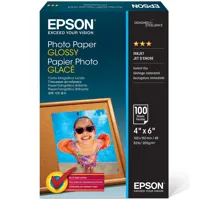
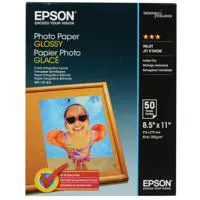
    Supports Plain Paper/Bright White Paper, Ultra Premium Photo Paper Glossy, Premium Photo Paper Glossy, Photo Paper Glossy, Premium Photo Paper Semi-Gloss, Presentation Paper Matte, Premium Presentation Paper Matte

  • Envelope Types

    No. 10

  • Input Paper Capacity

    100 Sheets Plain (20 Sheets Photo)

  • Output Paper Capacity

    30 Sheets Plain (20 Sheets Photo)

  • Ink Type

    Claria 232 Ink Cartridges

  • Ink Cartridges

    4 Individual ink cartridges (Black, Cyan, Yellow, Magenta)

  • Replacement Ink Cartridges

    232 Standard Capacity, Black, Cyan, Magenta, Yellow (Yield, ISO pages - Black: 150, Color: 140)
    232 XL High-Capacity Black (Yield, ISO pages - Black: 380)

Eco Features

Jump to...
  • Features

    ENERGY STAR qualified
    RoHS compliant
    End-of-life options available
    Epson America, Inc. is a SmartWay Transport Partner

General

Jump to...
  • Display

    2.4" color LCD

  • Temperature

    Operating: 50 Degree F to 95 Degree F (10 Degree C to 35 Degree C)
    Storage: -4 Degree F to 104 Degree F (-20 Degree C to 40 Degree C)

  • Relative Humidity

    Operating: 20% - 80%
    Storage: 5% - 85% (no condensation)

  • Sound Power/PC Printing

    (Plain Paper Default)
    Color: 6.1 dB(A)
    Monochrome: 6.4 dB(A)

  • Sound Pressure/PC Printing

    (Plain Paper Default)
    Color: 48 dB(A)
    Monochrome: 52 dB(A)

  • Rated Voltage

    AC 100 V - 240 V

  • Rated Frequency

    50 Hz - 60 Hz

  • Rated Current

    0.2 A - 0.4 A

  • Power Consumption

    Standalone Copy Printing (ISO 24712): 12 W
    Ready Mode: 4.8 W
    Sleep Mode: 0.7 W
    Power Off Mode: 0.2 W

  • Safety/EMC Standards

    UL 62368-1
    CAN/CSA-C22.2 No. 62368-1
    FCC Part 15 Subpart B Class B
    ICES-003 Class B

  • Dimensions

    Printing: 14.8 x 22.7 x 9.5" (375 x 577 x 242mm)
    Storage: 14.8 x 11.8 x 6.7" (375 x 300 x 170mm)

  • Weight

    9.5 lbs (4.30kg)

  • UPC Code

    010343968592

6 Accessories for Epson Expression Home XP-4200 Wireless All-In-One Color Inkjet Printer

  • All Accessories (6)
  • Copy Paper (1)
  • Photo Paper (2)
  • Albums & Frames (1)
  • Cleaning Accessories (2)

About Epson Expression Home XP-4200

FEATURED REVIEWS

Easy for an old man to set up

By RedC

Bought it and set it up today and finished what I was doing when my old printer died. It wasn't difficult to set up using my iPhone and I really like the quality of the print. I have used it as a printer and a copier all within the last hour and I am pleased with both

Looks like good quality print.

By BL1958

Very easy to install.

Just imagine easy, affordable home and photo printing with the Epson Expression Home XP-4200 Wireless All-In-One Color Inkjet Printer. This versatile printer is designed to handle everyday tasks effortlessly, from printing coupons and directions to recipes and homework, ensuring you get the documents you need without any hassle. Powered by Epson's state-of-the-art imaging technology, the XP-4200 delivers exceptional image quality, producing crisp documents and vibrant, borderless photos with rich colors that bring your creative projects to life.

The Epson Expression Home XP-4200 offers a stress-free setup and operation experience, featuring a large 2.4" color display for easy navigation. Installation and operation are simplified through the Epson Smart Panel app, allowing you to manage your printing tasks directly from your smartphone or tablet. With convenient connectivity options, this printer supports seamless wireless connections, enabling you to print and scan effortlessly from Android or iOS devices using the Epson Smart Panel app, Mopria Print Service, and Mopria Scan.

Engineered for reliability, the XP-4200 consistently delivers high-quality prints thanks to its Micro Piezo Heat-Free technology and a permanent printhead designed to last the printer's lifetime. Enjoy easy, affordable color printing with individual ink cartridges that allow you to replace only the ink you need, enhancing efficiency and reducing costs. The printer's economical design includes automatic 2-sided printing, helping you save paper and minimize waste.

Experience hands-free, voice-activated printing with Alexa, making it easier than ever to print on the go. The versatile functionality of the XP-4200 extends to creating searchable PDFs and more with the included Epson ScanSmart scanning software. Designed to work exclusively with Epson Genuine Cartridges, the Epson Printing System ensures optimal performance and longevity, safeguarding your investment. Elevate your home and photo printing experience with the Epson Expression Home XP-4200, where quality meets convenience.

Epson Expression Home XP-4200 Features

  • Remarkable Print Quality for Home and Borderless Photo Printing
  • Stress-Free Setup and Operation with 2.4" Color Display
  • Easy Wireless Printing from Mobile Devices
  • Individual ink cartridges make it easy to only replace the ink you need
  • Replacement Ink Yield ISO pages: 232 - Black: 150, Color: 140; 232 XL - Black: 380

Warranty Information

This product has a limited warranty of 12 months.

Key Features

  • Enjoy wireless printing from your devices with this Epson all-in-one inkjet printer.
  • High-quality color prints with a resolution of 5760 x 1440 dpi for vivid documents.
  • Save on ink costs with individual ink cartridges; replace only what runs out.
  • Print documents quickly with speeds up to 10 ppm (black) and 5 ppm (color).
  • Easily manage tasks using the 2.4" color LCD for simple navigation and control.
  • Scan documents to the cloud or your computer with the built-in flatbed scanner.

What's in the box:

  • Epson Expression Home XP-4200 Wireless All-In-One Color Inkjet Printer
  • 4x Claria 232 Ink Cartridges (Black/Cyan/Magenta/Yellow)
  • Power Cord
  • Quick Start Guide
  • Epson 1 Year Limited Warranty