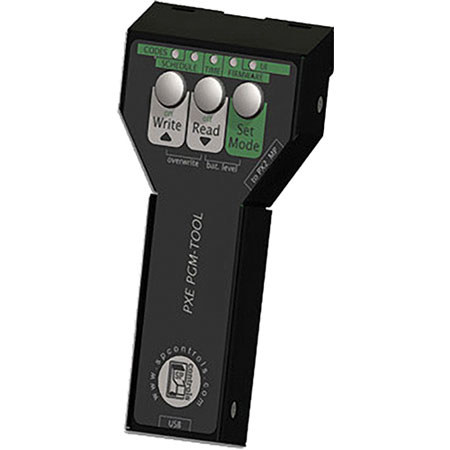
Epson PXE-PGM-Tool Programming Wand

SKU: IESELPSP12

This item is no longer available.

Overview
Compare
Specs
Protection

Reviews about this item

Review Summary

Select a plan in the Add Protection section above and purchase with this product by clicking “Add to Cart”.

image-protection

TRUSTED PROTECTION PLANS, EXCEPTIONAL SERVICE.

Invest In Your Gear and Peace Of Mind!

Accidents happen where life happens. Protect your favorite Adorama products and purchase a protection plan to stay covered from accidental damage, mechanical or electrical failure, and more.

Repair or Replacement

Repair or Replacement

If we can’t fix it, we’ll replace it at no additional cost.

Accidental Damage

Accidental Damage

Protect your product from drops, spills, and more.

Peace of Mind

Peace of Mind

Enjoy your gear without fear. We have you covered!

Malfunction Protection

Malfunction Protection

When regular use of your product over time results in mechanical or electrical failure.

Zero Deductible

Zero Deductible

We will never charge you a deductible after the purchase of a plan.

Customer-Focused Support

Customer-Focused Support

Our claims process is simple & easy and our customer service team is happy to help.

Adorama Protect powered by Extend is available for purchase to customers in the United States. Not available for purchase Internationally or in U.S. Territories.

Epson PXE-PGM-Tool Programming Wand Specifications

  • Compatible for

    Epson Projectors

  • Outboard Current-Limiting Resistor

    150 ohm

  • Recommended Wire

    18- to 22-gauge 3-conductor copper wire

  • Power Supply

    6 VDC, 300 mA

  • Output Type

    IR emitter and unidirectional RS-232

  • Dimensions (W x D x H)

    1.8 x 0.9 x 4.1" (45.7 x 22.9 x 104.1mm)

  • Weight

    With Bezel: 2.5 oz. (70.8 g)

  • UPC Code

    010343880252

About Epson PXE-PGM-Tool Programming Wand

The Epson PXE-PGM-Tool Programming Wand connects to the PixiePlus controller through its IR interface and allows for more sophisticated features, such as RS232 control. There is no need to remove the controller from the wall. The programming wand connects to your PC with a USB connection and contains an application that allows you to perform more complex configurations, including specifying RS232 strings.

The Programming Wand simplifies configuration and cloning. Simply plug the programming wand into your PC and the application will start. Then, specify the codes to be sent for each button. Disconnect the programming wand and take it to any other PixiePlus you wish to configure. Hold the wand up to the PixiePlus, press the trigger and you're done. Repeat for each room with the same configuration, without having to carry your PC around.






