2026-02-19T19:00:00
Rated 2 out of 5
Awful picture qualtiy
Bought to replace hp printer with failed head, never been more disappointed. DO NOT get this to print ANY type of photo, you have been warned. Unless its just my printer that is broken, but epson help told me its the limitations of the printer. Color photos gets the whites reddish colored and the sky is not even close to blue. Prints all colors darker than picture, black and white photos print with a red tint and get very dark. Had high hopes for this printer, very sad epson will not help me and gave up.
Darwinian
Originally posted at

2026-02-06T19:00:00
Rated 1 out of 5
Cannot Scan to Network Folders
I bought this printer for a home office and decided on it because of the duplex scanning feature on the ADF. Unfortunately the software is extremely limiting. This printer only allows you to scan to cloud services through Epson's servers. There is no capability to scan to a network share locally. It is absolutely insane to me that this isn't available on a $400 printer. Epson has intentionally crippled this feature on the ET-3950 to push you toward their enterprise models or their cloud ecosystem. The printer has all the hardware capabilities to do what I want - they just locked it behind software limitations to get access to our data.
AlexL
Originally posted at
2025-12-15T19:00:00
Loses it's IP address almost daily. Printer errors every other print job, have to reboot. That's why the in lasts so long, it's never available to print anything. Not to mention how excruciatingly slow it is.
JoePrint
Originally posted at
2025-11-25T19:00:00
Rated 1 out of 5
Don't buy this printer until reading
I bought this printer a couple weeks ago and nothing but trouble. The printer itself works fine as long as you are willing to reboot it after any period of inactivity that exceeds 10 or 15 minutes. This is not due to the sleep function but wifi connectivity. I followed all trouble shooting advice - re-installed firmware, rebooting my wifi router, and much more. I have an older WF-4740 that works just fine in the same location - connects just fine but this printer reports weak signal and wrong password (sometimes). I suggest avoiding the trouble. Epson makes good products but somehow has missed on this one.
MM01
Originally posted at
2025-11-21T19:00:00
Rated 2 out of 5
I love it if I could use it!
It seemed easy. Great delivery, easy to unpack, instructions got confusing when I did not want to use my phone for set up and wanted to use either my Lenovo ThinkPad Windows laptop. Never got connected. Ink was easy. Test page easy. I now am on my Lenovo Chrome and still am not connected to print and cannot find instructions or help that has allowed me to use this printer at all. I'm devastated because I donated my HP and now have nothing to use and $400 lost. And yes, I have been thru the prompts to set up wifi with Spectrum service and another service. It's still not connected. Connectivity is bad.
CCrowsey
Originally posted at
2025-11-18T19:00:00
Rated 5 out of 5
WHAT AN UPGRADE!!!
I received the ET-3950 as a replacement for my previous model ET-3850 because they were out of stock. Boy! What a huge difference! In addition of being able to print on both sides, The ET-3950 when the user clicks on the PRINT depending on the software being used, The ET-3950 tray emerges out and prints the page. The bad news, you have to press the retract button on the panel to close it, The good news, the chances of bumping into the printer tray (depending where your printer is placed) are at a very low percentage. Last but not least the ink levels are still at 98% full and I've been using the printer for five months now.
Rudy01
Originally posted at
2025-11-17T19:00:00
Rated 3 out of 5
Good printer.
Great printer, except for one big exception. The output tray does not self close. Why on earth they have it so it stays open unless you hit a couple buttons manually is beyond me. Worst case, after X amount of time, it should close automatically.
Steven F.
Originally posted at
2025-10-11T20:00:00
Rated 5 out of 5
Wonderful All in One Printer!
I received the Epson EcoTank ET-3950 Wireless All-in-One Color Supertank Printer free from Epson and Influenster in exchange for my honest review. I have been an Epson printer fan for years. I have 2 Epson Workforce printers in my home and office, so I was excited to try an Epson printer with an EcoTank. The printer is much smaller than my Workforce printers but has the same capabilities, print, scan, copy, and fax. It was super easy to set up. I just scanned the code and downloaded the Epson app. The app walked me through the set up. All together it took about 15 minutes to fill the tanks, set up the printing interface, and connect to my wireless. The ink was easy to pour into the tanks and there was no spillage/mess. Printing seems to use about the same amount of ink as cartridge printers. Loading the paper was easy too. I have used regular paper and labels in it with no issue. The print quality and speed of printing has been outstanding, very crisp and vibrant. Overall, I highly recommend the Epson EcoTank ET-3950 Wireless All-in-One Color Supertank Printer, it is a wonderful all in one printer.
makeupandluxe_4700
Originally posted at
2025-09-19T20:00:00
Rated 5 out of 5
Excellent in Everyu Respect
Purchased about 6 months ago, and this printer has performed exceptionally. Was easy to setup, works on all out laptops and mobile devicesand has never (never) failed to work for us when we needed it. The scanner and other applications all work great. Our last printer, an H* product, failed regurarly (when we needed it the most). I can't say enough about how impressed we are and would reccomend it.
bcanada
Originally posted at
2025-09-14T20:00:00
Rated 5 out of 5
An amazing Eco friendly and easy to use printer!
What a score! The Epson EcoTank ET-3950 Wireless All-in-One Supertank Color Printer takes only minutes to set up. It took about 10 minutes to be ready to print. The ink is included for set up and refills are economically priced. Pages print fast and the colored ink is vibrant and clear. You can use the app to opérate, it is user friendly. I really could not wish for more out of a printer. Even my husband who doesn't have great computer skills is able to operate it without my assistance. I highly recommend it!
bellaf6_3173
Originally posted at
2025-08-24T20:00:00
Rated 5 out of 5
Excellent
Great printer! This printer is great. It was very easy to set up and is a high quality printer. The ink is very vibrant and it prints effectively and quickly. I'm a teacher so I am constantly printing and this is wonderful.
kellyc113_2311
Originally posted at
2025-08-22T20:00:00
Rated 5 out of 5
Reliable and easy to connect
So far it's been reliable! I mainly use it to print out sewing patterns and it works well for that. Setup time was about ~30mins but some of that time is the printer doing things on its own. The rest was pretty straightforward.
andrina_1602
Originally posted at
2025-08-22T20:00:00
Rated 5 out of 5
Great printer
This has been a great addition to my home office! The paper runs through smoothly, the ink is vibrant and uses very little so it will last a very long time. It connected right away to my laptop making it an ease to set up!
sjmarriott_105
Originally posted at
2025-08-16T20:00:00
This is a great at home printer. It is extremely easy to set up and to connect to phone, laptop or other devices. The print quality is phenomenal I love that you do not need to worry about separate ink cartridges. Prints quickly and efficiently
brigetmaureen_608
Originally posted at
2025-08-14T20:00:00
Rated 5 out of 5
Quality printer for whatever you may be printing!
This a good quality printer for all of your printing needs. I have been wanting to print my own stickers, and this printer is perfect for just that!
karleed7_3597
Originally posted at
2025-08-13T20:00:00
The printer is so easy to use. It prints very fast and you can connect with WiFi. You are able to print and scan. The ink can last up to 6000 prints and you can do color printing as well.
sonamm2_2100
Originally posted at
2025-08-03T20:00:00
Rated 5 out of 5
Very user friendly and perfect performance
I am absolutely in love with this printer. I've been using an HP for years but this is a total game changer and Epson has my loyalty now. This Eco Tank is so easy to fill and the colors are incredible and so rich and vibrant. The paper feed is very smooth and seamless. It's is so quiet and yet very fast. It was so easy to connect to my phone and tablet. I love how this printer looks and the display is so user friendly. I cannot recommend this printer enough.
candyg24_8217
Originally posted at
2025-08-02T20:00:00
Rated 5 out of 5
new printer LOVE
I have been looking for a great printer and I have found one! Handled paper well, hooks up to wifi and laptop easily, prints beautifully and works quickly! totally recommend
kendallg36_5251
Originally posted at
2025-07-27T20:00:00
Rated 5 out of 5
Everything you could ask for from a printer
Wow! This is indeed a super tank of a printer. Does everything you could ask of it at a great speed and does it well! Set up was easy and it connected right out of the box. Super excited to get the additional ink usage too! Paper has fed smoothly and it's printed great!
scottm78_387
Originally posted at
2025-07-26T20:00:00
Rated 5 out of 5
Great mutli-use printer!
Easy to set up with your phone through Bluetooth. In the past, it was always a pain logging into wifi with a password through the printer itself, but this was much easier to do on my phone. Took about 11 minutes for it to set up and load updates.
I've had it about a month or two without issues. Prints and scans fine. Buying other brands in the past usually requires installing large manufacturer programs, but I just paired this to my smart phone with a small app. Much nicer without the bulk or push to buy services.
jlsmith20_6524
Originally posted at
2025-07-26T20:00:00
Rated 5 out of 5
Worth Every Penny
The Epson EcoTank ET-3950 has completely changed the way I print at home. It's quiet, fast, and incredibly efficient. The EcoTank system is a total game-changer - I've printed hundreds of pages and the ink levels have barely moved. No more constantly buying expensive cartridges!
Setup was straightforward, the touchscreen is responsive, and the wireless connectivity works seamlessly with my phone and laptop. I especially appreciate the compact design, which fits perfectly on my shelf without feeling bulky. Print quality is sharp, whether it's black-and-white documents or full-color photos.
I was a bit hesitant at first because of the price, but after using it for a few months, I can confidently say: it's worth it. If you're looking for a reliable, cost-effective, and high-quality printer for home or small office use, the ET-3950 won't disappoint.
rjn3_9054
Originally posted at
2025-07-26T20:00:00
The Epson EcoTank ET-3950 has been a fantastic addition to my home office. The EcoTank system is a game-changer-no more pricey cartridges, and the included ink lasts a long time. Refilling is easy and mess-free.
Print quality is sharp for both text and color, and the auto document feeder is great for scanning or copying. Setup was fairly smooth, and wireless printing from my devices works seamlessly.
The only downsides are the slightly bulky design and a somewhat slow initial setup. Otherwise, it's reliable, cost-effective, and perfect for frequent printing.
Highly recommend for anyone looking to cut ink costs without sacrificing quality.
kerrien6_7091
Originally posted at
2025-07-26T20:00:00
Rated 5 out of 5
Easy to use
I feel fortunate to have acquired this printer before it became unavailable, and I'm genuinely pleased with my choice. This printer is incredibly user-friendly, making it easier to operate than any other I've owned. The ink quality is impressive, with no smudging or leakage thru the paper. In my experience, it performs comparably to higher-end models. Additionally, the printing process is efficient, and I was able to set up everything quickly without encountering any issues. Overall, it's been a great for my printing needs.
katieda687_4188
Originally posted at
2025-07-26T20:00:00
Rated 4 out of 5
Great printer but a bigger footprint
I love the fact that it says it comes with 3 years worth of ink. As someone who doesn't print tons of pages a day (I'm a stay at home mom), that should last us a pretty long time. I love how it all folds up into each other when it isn't being used. The speed is ridiculously fast since I'm used to using a tiny HP printer. The only reason I knocked a star off is because it's a tad bit loud and it's not as compact as I'd like for a printer. Other than that, it's really great and I'm sure it'll work well for people who work at home or have an at home business.
kym424_1312
Originally posted at
2025-07-25T20:00:00
Rated 5 out of 5
Easy to use, quiet and awesome for creating printi
I've been using the Epson EcoTank ET-3950 for a while now and I'm really impressed. It's very quiet during operation, no loud whirring or rattling sound like some other printers I've used. The setup was smooth, and the companion app makes it super convenient to print from anywhere in the house. I've mainly been using it to print diagrams and coloring pages for my child, and the quality has been excellent every time. It's automatic for most part and paper handling is smooth. With ton of use, there were no paper jams yet which is nice!
The ink lasts a long time and the refill system is way more efficient than dealing with traditional cartridges where you just need to attach it and it does all the work of filling stuff.
While the speed is something that can be improved upon but overall, it's a great all in one printer that's reliable, low-maintenance, and perfect for both everyday tasks and creative projects.
shilpas11_7240
Originally posted at
2025-07-24T20:00:00
Rated 5 out of 5
Love the EcoTank
Epson you are amazing, thank you for making a great quality printer at an affordable price. The possibilities are endless with the EcoTank. Best part is I've printed a ton and the ink levels are still high! Fast, smart, and beautiful!
lawsonh2_7750
Originally posted at
2025-07-23T20:00:00
Rated 5 out of 5
Epsion 3950 EcoTank AIO Color Inkjet Printer
This home office all-in-one ET-3950 inkjet printer offer me very easy setup (including wireless networking), fast 2-sided Color/BW printing, quiet and smooth operation, and print jobs that look excellent! Tray storage of 250 pages means less refill time...Nice!
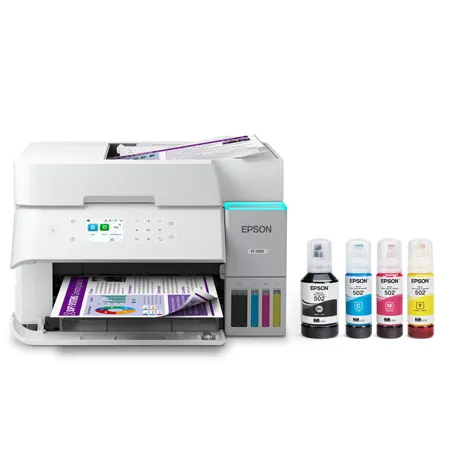
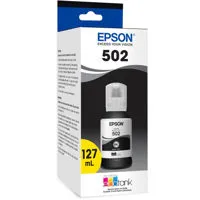
Filling the 4-color ink tanks with the included custom ink bottles couldn't be easier!! Due to "no cartridges", at a 6000 page print count this refillable ink tank cost will be 95% Less than my previous HP color laser jet printer cartridge consumption, AMAZING!!
Theo13
Originally posted at
2025-07-23T20:00:00
Rated 5 out of 5
Finally a working printer
Loveeee this printer. It was easy to set up and I really like this new ink style. Instead of using such small cartridges, this actually has a full tank for ink. It was also way to connect to my phone and computer. No issues on printing or scanning. I have been using it for row months without issues and still plenty of ink.
ssl101_6697
Originally posted at
2025-07-22T20:00:00
Rated 5 out of 5
Huge upgrade from my previous printer
I never thought I'd be excited about a printer but here I am. Epson thought of every detail with this one. Setup was very easy - plug and play type. I was a little nervous filling up the tanks with ink bottles but the system is truly mess proof. Now that my printer is filled up, I can look forward to years of printing (including colors!) and literally forget about ink refills. It will save money in the long run and is more eco friendly. This unit scans paperwork and prints wirelessly from computers and mobile devices. It can print on both sides of the paper. It comes with an optional Epson app that has a lot of interesting functions for printing pictures. The printed images come out looking high quality and vibrant. I was truly amazed at the way the printer was cleverly designed (see in video) and how the panels open up all over the machine for maintenance. The only downsides would be the printing speed and the fact that the screen control isn't a touch screen. Both of those things aren't issues for me but they might be for someone who values high efficiency for large volume printing.
linceyvpepin_3629
Originally posted at
2025-07-22T20:00:00
Rated 5 out of 5
Easy, eco-friendly home printer
This Epson EcoTank 3950 printer is a fairly small size that fits nicely on my desk. I love that it is cartridge-free, and the ink should last a very long time before needing refills. The set-up process was fairly easy and quick. I like that I can customize the print quality so as to determine how much ink I'm using. It's easy to print from my laptop or phone, and I like that I can scan a document to immediately print it from my phone. The printer doesn't print super fast, but that's not an issue for me. I do wish the little screen was touch-screen, but again this detail is insignificant. Lastly, I love how the printing tray tucks inside the machine and automatically pops out when printing something. I recommend this one!
carolinew150_6001
Originally posted at