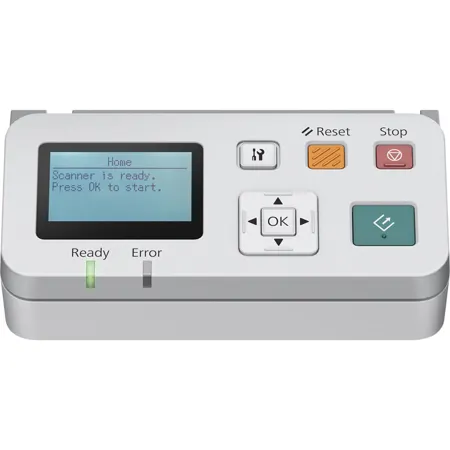
Epson Network Scan Module for DS-6500, DS-7500, DS-50000, DS-60000 and DS-70000 Scanners

SKU: IESNIP

This item is no longer available.

Overview
Compare
Specs
Protection
Q&A

Questions & Answers

FAQ

What scanners is the Epson Network Scan Module compatible with?

The Epson Network Scan Module is designed for use with the WorkForce DS-6500, DS-7500, DS-50000, DS-60000, and DS-70000 scanners.

Does the Epson Network Scan Module come with the necessary software?

Yes, the Epson Network Scan Module comes standard with the Document Capture Pro software.

Does the Epson Network Scan Module allow for batch scanning?

Yes, the Epson Network Scan Module enables efficient scanning of multiple pages in a single batch over a network.

What is required to install the Epson Network Scan Module?

Installation requires removing a few screws to detach the front control panel of your scanner and replace it with the module. A screwdriver is included for convenience.

Can the Epson Network Scan Module be controlled by any PC?

Once installed, your scanner can be controlled by any PC within the same sub-network that has the Document Capture Pro software installed.

Shopper : Why Did You Choose This?Keith F : I wish to add this item to the DS-7500 on hand.

Reviews about this item

Review Summary

2014-01-13T19:00:00

Rated 1 out of 5

Not very useful

Does not really work well with scanner. Network function is not well thought out. Hard to configure and no easy way to reset to factory defaults. Did not accept IP address via DHCP server on our network. Not able to communicate with device and ended up returning it.

Psc

Select a plan in the Add Protection section above and purchase with this product by clicking “Add to Cart”.

image-protection

TRUSTED PROTECTION PLANS, EXCEPTIONAL SERVICE.

Invest In Your Gear and Peace Of Mind!

Accidents happen where life happens. Protect your favorite Adorama products and purchase a protection plan to stay covered from accidental damage, mechanical or electrical failure, and more.

Repair or Replacement

Repair or Replacement

If we can’t fix it, we’ll replace it at no additional cost.

Accidental Damage

Accidental Damage

Protect your product from drops, spills, and more.

Peace of Mind

Peace of Mind

Enjoy your gear without fear. We have you covered!

Malfunction Protection

Malfunction Protection

When regular use of your product over time results in mechanical or electrical failure.

Zero Deductible

Zero Deductible

We will never charge you a deductible after the purchase of a plan.

Customer-Focused Support

Customer-Focused Support

Our claims process is simple & easy and our customer service team is happy to help.

Adorama Protect powered by Extend is available for purchase to customers in the United States. Not available for purchase Internationally or in U.S. Territories.

Epson Network Scan Module Specifications

  • Compatibility

    Epson DS-6500, DS-7500, DS-50000, DS-60000 and DS-70000 document scanners

  • Connectivity

    Ethernet 10 / 100 / 1000

  • System Requirements

    Windows 8, Windows 7, Windows Vista, Windows XP, Windows XP Professional x64 Edition, Mac OS X 10.5.x, 10.6.x, 10.7.x, 10.8.x

  • Dimensions (W x D x H)

    6.25 x 3.25 x 2.75" (15.87 x 8.25 x 6.98cm)

  • Weight

    0.7 lbs (0.31 kg)

  • UPC Code

    010343886490

About Epson Network Scan Module

When you're seeking a high-tech solution to streamline your scanning tasks, look no further than the Epson Network Scan Module. This advanced accessory is specifically engineered to replace the control panel of your scanner, transforming it into a sophisticated, network-enabled device.

Installation is a breeze with the included screwdriver. Simply remove a few screws to detach the front control panel of your scanner, and replace it with this innovative module. Once installed, your scanner gains the ability to scan to, and be controlled by, any PC within the same sub-network that has the Document Capture Pro software installed.

This user-friendly module is designed to work seamlessly with a range of Epson scanners, including the WorkForce DS-6500, DS-7500, DS-50000, DS-60000, and DS-70000. It enhances your scanner's functionality, allowing for the efficient scanning of multiple pages in a single batch over a network.

The Epson Network Scan Module comes standard with the Document Capture Pro software, ensuring you have everything you need to boost your productivity and streamline your scanning tasks. Experience the convenience and efficiency of network scanning with this sophisticated module.

Epson Network Scan Module Features

  • Scan to any PC in your workgroup1 without having to use the PC to control your scanner
  • Scan directly to popular cloud services
  • Select from 30 user-definable scan jobs

Warranty Information

This product has a limited warranty of 12 months.

Key Features

  • Boost your office efficiency with this Epson network scan module for seamless workflows.
  • Enjoy broad compatibility; this scan module works with Epson DS-6500, DS-7500, and more!
  • Share your scanner effortlessly! This network adapter makes it easy for multiple users.
  • Experience fast Ethernet connectivity with speeds of 10/100/1000 for quick data transfers.
  • Simplify document management by easily integrating this module into your existing network.
  • Easy setup with included tools ensures a hassle-free installation of your network scan module.

What's in the box:

  • Epson Network Scan Module
  • Installation Tool
  • Installation Sheet
  • Replacement Screw Covers
  • Epson 1 Year Limited Warranty






