2017-08-10T11:01:17
Rated 4 out of 5
Good printer; broken paper feeder
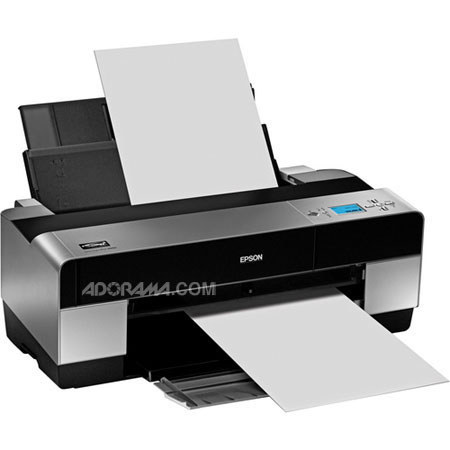
The SP 3880 is a solid, if dated, color printer. Very expensive on cartridges, but produces excellent photo results.
Unfortunately, the refurbished unit was badly packed, so the lip on one side of the furthermost back paper feeder had broken off in transit and so is now attached via adhesive tape. Otherwise, it works as advertised.
David A.
2017-08-02T17:11:08
Rated 5 out of 5
love my Epson printers
I have always loved Epson printers and it is the only brand I have ever used. It has always delivered a quality image and a reasonable price..I am looking forward to many great prints to come..
KENNETH P.
2017-02-07T10:34:05
Rated 5 out of 5
Great Printer
Already had a 3880, but bought a second one for upcoming Piezography Pro system.
JOSEPH S.
2017-01-03T17:32:01
Rated 5 out of 5
GICLEE PRINTS
I am a fine art painter. I nedded to make professional quality reproductions of my work. This was a great choice. But I am only one month in to my purchase. I hope I don;t have any issues.
EDDIE R.
2016-09-20T08:38:20
Rated 3 out of 5
This is my 3rd Epson inkjet printer and the first two did not get anywhere near the 15,000 prints
This is my 3rd Epson inkjet printer and the first two did not get anywhere near the 15,000 prints the item is rated for, The reason for this is that there is no detailed description of proper maintenance. That the pad the print head parks on need to be flushed with windex. I have had to rely on You Tube video's to understand proper maintenance.
Also, there is no description of the error codes in the manual, especially the ones that say "call service"... this does not give you he opportunity to problem solve the situation so that you can get the printer back into service.
JAMES D.
2016-09-13T08:02:23
Rated 3 out of 5
Great printer when they're working...disposable when they break
I reluctantly recommend this printer because there's simply no better option if you want great prints that last a long long time. My objection is to Epson's business model when it comes to inkjet printers. They make the printers so cheap and the inks so expensive that it's virtually never worthwhile repairing these things. A new printer comes with a new set of inks which is worth about half the cost of the printer, so unless the repair is really cheap it's not worthwhile. This purchase is our 8th one. All the others are in the landfill. Rediculous.
GREG M.
2013-05-26T21:00:00
Rated 5 out of 5
great print for pro photographer
great. !! for the pro photographer.
JONGHYUP S.
2011-08-27T21:00:00
Rated 5 out of 5
Excellent choice for 17 inch wide prints
I was plesantly surprised with the [...] ease of setup of my new Epson Stylus Pro 3880. I used the USB setup so that I could print from both my PC and laptop in my home network. Very easy and within an hour of receiving it, I was printing great looking photographs. I was amazed at how easy and great the photo came out using premium luster paper . I am looking forward to trying some of the other papers that are available.
BILLY C.
2011-07-23T21:00:00
Rated 5 out of 5
Very Satisfied
My wife has replaced ~30 ink cartridges in her 3800 she bought for [$] in 11-2008. She has had no clogged heads in all that time.This refurbished 3880 I just bought looks and works like new. For [$] I don't know of a better combination of print quality, cost of operation, and reliability for a home ink jet printer.
PHILLIP C.
2011-07-09T21:00:00
Rated 4 out of 5
Epson 3880 Refurbished
I am a professional photographer and spent the better part of 2 years researching what would be my next printer in the large format and considering price and size and feature set I selected the Epson 3880 and bought one refurbished from Adorama. The printer is al they say about it and more, [...] What more could I say
PASQUALE L.
2011-05-16T21:00:00
Rated 5 out of 5
looks and works like new
altogether a great printer, on a calibrated monitor using epson profiles with epson paper, the printed image came as close to the on screen image as you can get.
john
2011-04-30T21:00:00
Rated 5 out of 5
Great printer for less
No need to spend full price when the refurbished model works perfectly. [...]. Don't forget that you will need a printer cable (USB), it does not ship with one. I had to order one after so it delayed the setup. Color is great. Hoping the cartridges last for a good while.
Design G.
2011-04-25T21:00:00
Rated 5 out of 5
I love Epson products & this is no exce
I purchased the refub unit and it's really a new unit from the factory. First of all I have never been disappointed by an Epson product. My first Epson printer was a dot matrix from about 1982. The color & density of the prints are so good with out of the box profiles that I have not needed to run a custom profile. I also appreciate that I virtually never have to look at the LCD panel..all ops handled from the print driver. Not so with the Canon iPF 5000 owned by a friend (not the newest model). That allows the printer so be stuffed into a corner where the LCD is a reach.
Richard C.