
This item is no longer available.
Review Summary
2024-10-07T20:00:00
I've had this scanner for a number of years now and it's always had issues with the drivers, but ultimately worked and was adequate for my purposes. However I recently purchased a new computer and now the driver won't even download. My computer notices the scanner, but for whatever can't find the driver. I've download, uninstalled and reinstalled the driver and software numerous times and nothing. Contacted support and received minimal help. I only received an initial response from support and without even waiting to see if the solution worked they considered the issues closed. Recommend not purchasing and avoid the headache because clearly the drivers don't work with newer computers.
ma22

2024-07-31T20:00:00
I love this scanner - easy to use (Epson Scan program is simple + effective), light weight, doesn't take up much space and works great. Only gave 4 stars b/c after 6 years of moderate use, the driver belt (is split for some reason) and got caught on the scanner carriage, which caused a kink and now it catches every time. Cannot be fixed (maybe I can get replacement part for whole scanner body in the same unit?), but had to buy a new one. Epson - better design w/ the right belt sturdier like the left and no split (not sure if this is purposeful or glue that came undone) - single layer!
zxcv
2024-03-12T20:00:00
This is my second Epson perfection scanner in 15 years (at least). It is perfect for my needs, i.e. every now and then I have to scan a document. It is relatively slow, maybe 30 seconds per document, but then I don't scan enough that the speed is a problem. It is rugged and only breaks when you drop it from a sufficient height (hence my second). Great scanner for the cost if you don't need speed or automation.
davidw3
2024-01-14T19:00:00
I've copied 716 pictures with this scanner. It took some time to set it up to get good resolution. But, now, it does a very nice job. I think the reason its so good is the time I allowed to play with the settings. I just purchased a Canon RS40 and its first pass copying had a picture that I knew this Epson would do well with. And, I was right. The epson brought out the color where the Canon did not. Now, to be fair, the Canon has many settings and I'll have to play with that but it was good to see the obvious difference. I have probably 5,000 plus photos to copy maybe more so I had to move to something faster than the epson. But, the epson will be used with photos that need some TLC.
DetroitLionsFanDon
2023-11-06T19:00:00
It might help others to know about my experience. Some complain it wouldn't turn on, others said it wouldn't install or function. I had the same difficulty until I saw someone said it doesn't like Google, so I went in under Firefox and it all downloaded and installed perfectly. Also, on the first try, it pulled up the V19ll instead of the V39ll and so I had downloaded that. Both mistakes were corrected and everything is just fine, no need to box it up and take it back to the store. I have yet to use it for scanning photos but I know it will not be worse than the one I am replacing and seems to be more user friendly than the old one.
TerPer
2023-05-19T20:00:00
Great scanner
Crazyschaoticcrafts
2023-04-27T20:00:00
I installed the software. When I get to step 4, nothing happens. How do I get to the screen in #4?
wdaryl93
2023-03-24T20:00:00
While the printer prints nicely, I hate the fact that if you want to print in black and white only - BECAUSE YOU DON'T WANT TO BUY COLOR CARTRIDGES - YOU CAN'T!!! Should be able to have only the black cartridge in and be able to print.
Getyourcraptogetherepson
2023-03-16T20:00:00
I cannot get the scanner to connect. Support is useless.
Janice569
2023-03-14T20:00:00
This photo scanner scans in great quality albeit slowly. I like that several pictures can be placed on the scan surface and they are automatically recognized and saved into separate files. Please be aware that there is limited Windows 11 support. Epson provides a whole software suite with this scanner, such as OCR. I was only able to use one of the software EpsonScan with Windows 11. However this software is sufficient for basic photo scans.
Steve

2023-02-20T19:00:00
Downloaded software has a problem !
Migo
2023-02-19T19:00:00
Product is awesome! As advertised.
Judy J.
2023-02-08T19:00:00
Easy to set up, easy to use, great results!
CindyKL
2023-01-11T19:00:00
Complicated setup and not simple to operate
Dick
2023-01-11T19:00:00
It scans photos better than it scans documents. Documents frequently get auto-cropped of their margins.
GD M.
2023-01-03T19:00:00
It works with the latest Mac OS version! So far I have scanned a photo and a document. Scans quickly. I like it because it has a direct connection and I don't have to rely on my wireless network. I have an HP printer/scanner but it's bulky and slow.
Joe D.
2022-12-08T19:00:00
The software update was needed to operate with MacOS 10.15. It was a bit of challenge to find this and to get this downloaded. I am looking forward to using this with my MacBook again.
Glen52
2022-11-20T19:00:00
It works great. I do wish the software was a bit more user friendly but other than that, it does the job and pictures are good quality.
Tish P.
2022-11-20T19:00:00
Works great but makes lots of mechanical noises. Heres hoping there are no problems.
nicknameme
2022-10-07T20:00:00
This scanner meets my needs perfectly: digitizing family photos. And the price is right!
AlbertT
2022-09-25T20:00:00
Follow the printed URLs, download drivers and install. The kickstand is a space saver.
AllieE
2022-09-11T20:00:00
I purchased my V39 Scanner in order to pack up digital copies of important papers. Thus far it has worked perfectly and the price was very reasonable.
USAF704
2022-07-24T20:00:00
Died suddenly after two years for no reason. Out of warranty, so no support for how to fix or repair. Disappointing.
maria23
2022-07-09T20:00:00
I own a mobile printshop as this is my go to scanner when on the road. Only problem is it does not have WIFI direct or a rechargeable battery. Still works though
Tamden
2022-03-27T20:00:00
Dell had in stock when others did not and shipped quickly.. What more could you ask for.
Mark K.
2022-02-14T19:00:00
Was easy to set up and works well! The lid feels a little flimsy, so watch out that you are gentle with it.
R.C
2022-02-05T19:00:00
This product is not user friendly with MacBook Pro.! I have tried too many times to set up the download with repeated setbacks. I am thinking of returning this scanner to the store. It shouldn't be this difficult.
CH2022
2022-01-26T19:00:00
This scanner worked fine for a few months and then stopped launching. I uninstalled with the Epson Uninstaller and downloaded the correct software from the Epson site when prompted and re-installed. Still will not launch. I am trying to get Epson to help me through their site.
glowplug
2022-01-17T19:00:00
easy to set up and use
ok
2021-10-06T20:00:00
And Epson offers no support.
Nick2

Accidents happen where life happens. Protect your favorite Adorama products and purchase a protection plan to stay covered from accidental damage, mechanical or electrical failure, and more.

If we can’t fix it, we’ll replace it at no additional cost.

Protect your product from drops, spills, and more.

Enjoy your gear without fear. We have you covered!

When regular use of your product over time results in mechanical or electrical failure.

We will never charge you a deductible after the purchase of a plan.

Our claims process is simple & easy and our customer service team is happy to help.
Adorama Protect powered by Extend is available for purchase to customers in the United States. Not available for purchase Internationally or in U.S. Territories.
Browse our FAQ
Flatbed
Contact Image Sensor (CIS)
4800 dpi
4800 x 4800 dpi
40800 x 56160 pixels
48-bit internal / 24-bit external
16-bit internal / 8-bit external
8.5 x 11.7" / 21.59 x 29.72cm
Color, 300 dpi: 10 seconds
Color, 600 dpi: 30 seconds
MCBF: 10,000 cycles
USB 2.0
Windows XP SP2 or later, Vista, 7, 8, 8.1
Mac OS X 10.6, 10.7, 10.8, 10.9, 10.10
Three-color RGB LEDs
4 Buttons: PDF, send, copy, start
RoHS compliant
Recyclable
Epson America, Inc. is a SmartWay Transport Partner
USB bus power (Micro-B connector): 5 VDC, 500 mA
Operating: 2.5W
Ready: 1.1W
Off: 0.0125W
Temperature: 50 to 95deg. F / 10 to 35deg. C
Humidity: 20 to 80%, non-condensing
9.9 x 14.4 x 1.5" / 25.15 x 36.58 x 3.81cm
3.4lbs / 1.54kg
010343916906
Dawn
By ok
easy to set up and use
Good Service
By Mark K.
Dell had in stock when others did not and shipped quickly.. What more could you ask for.
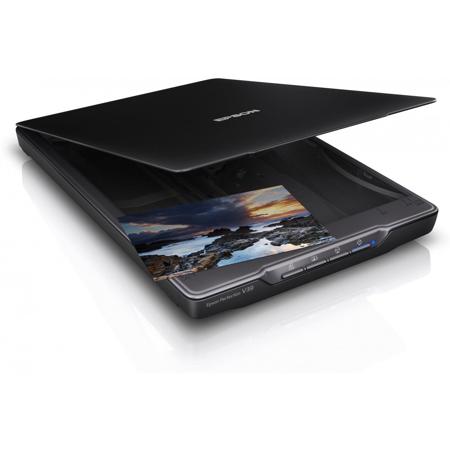
Perfection V39 Color Photo Flatbed Scanner, 8.5 x 11.7" Scan Area, 4800dpi Optical Resolution, USB 2.0, 48-Bit Internal/24-Bit External Color Depth