2025-01-10T19:00:00
10years OLD
STILL GOING STRONG
UNBELIEVABLE PHOTOS ETC;
Gazza
Originally posted at

2024-07-14T20:00:00
good working for ever
NHG1954
Originally posted at
2023-09-22T20:00:00
Rated 1 out of 5
I will never buy another Epson
This printer has been nothing but a series of problems. Print quality is poor and I have to constantly clean the nozzles and realign the print heads. Scanning is another problem. I don't have time to fix this every other time I need to use it.
Marzipan
Originally posted at
2023-08-21T20:00:00
Rated 5 out of 5
Incredibly easy to set up and start printing
Not everyone is technology Savvy and Epson makes it extremely easy for anyone to set up their printer and to start printing via email or by sending it to the app. Either way it's a click of a button!
ChrisHaz
Originally posted at
2023-07-04T20:00:00
Rated 5 out of 5
Good Printer for the Price
I really like my printer, seems to use up ink really fast.
BC65
Originally posted at
2022-12-13T19:00:00
Rated 2 out of 5
excessive ink use
bought this for my sister who does not own a computer but does a lot of copying and printing using the printer screen and keyboard te nozzles often clog , need printhead cleaning and now Black refuses to print despite many cleanings , flushs and new inks ? colours are fine ? very unreliable printer!!!
CLR50
Originally posted at
2022-12-12T19:00:00
Rated 5 out of 5
I love having just one mahine for all-fax-copy-scan all in 1
I bought this over 3years ago and still love it
Fenza
Originally posted at
2022-10-09T20:00:00
Rated 2 out of 5
Limited functions
The auto document feeder does not work as advertised. The website I bought off described double-sided printing which this printer cannot do. If any individual colour cartidge runs out, the printer stops working. You can't even print in black and white (how stupid/annoying!)
Scan speed is very slow, and again, the auto-feeder tray doesn't work.
Menu is non-intuitive.
That said, the print quality is awesome, print speed is adequate and its great being able to print wirelessly from a mobile device.
vetadam
Originally posted at
2022-08-16T20:00:00
Rated 1 out of 5
I'm not Happy With Your Product
Every time I want to scan something, I have to go through a litany of troubleshooting issue to resolve the problem! That does not make for a happy customer!
JoeDoe
Originally posted at
2022-04-09T20:00:00
Rated 4 out of 5
My Second Epson All-In-One
I had an EPSON -WF 2539 that as very pleased with so I purchased this EPSON-WF- 2630, as The 2530 wasn't available for me at the time of this second Epson All in One. The only problem that occurs on a regular basis, is the scanning feature will just quit working. The printer always works wirelessly, however the scanner fails. I am dealing with that right now. So I have "installed this 'All - in - One ' several times
and this is a new computer for me, now. the Printer continues to be quite dependable
however, again the scanning feature does not.. I don't know much about fixing these kinds of issues on my own so I'm at a loss for now. The scanner will work if connected with a USB to the main desk top computer that I have but only from that desk top. Any suggestions to resolve this issue for me would be appreciated.
That said, I am pleased overall with the Epson All-In-Ones. Thank You
Realtor M.
Originally posted at
2022-03-04T19:00:00
Rated 3 out of 5
Sometimes it works but frequently doesn't
I realize this equipment is expensive and some of the prints are detailed. The apartment where I live has two rooms that have to be operated using extension cords to a adjoining hallway. I tried to print but only blank pages come out. The refrigerator stopped working and this printer had to be connected to the computer using a usb last time it failed. I'm really happy with the quality of the prints but can't see what is the problem
nicknameless8
Originally posted at
2022-02-12T19:00:00
Rated 5 out of 5
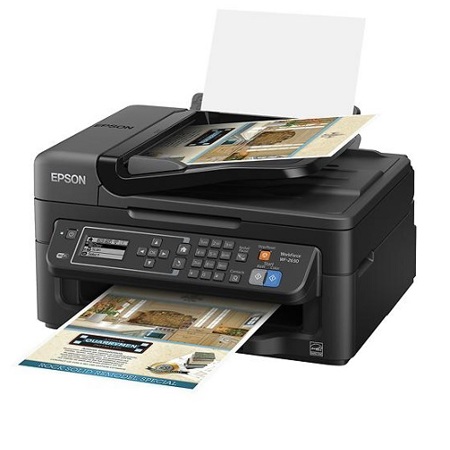
EPSON WF-2630 All-In-One Printer
I have had this All-in-one Printer for many years and I love it!!
dee324
Originally posted at
2022-01-29T19:00:00
Rated 4 out of 5
Home & Office device
Small and handy for the space. Not bulky and very quiet. The ease of printing from my all of devices is golden.
KHENB
Originally posted at
2022-01-23T19:00:00
Rated 5 out of 5
Easy to set up
Easy to set up, compact design, very user friendly.
JayT909
Originally posted at
2022-01-22T19:00:00
Rated 5 out of 5
Absolutely the best printer I've had.
Hands down the best printer I've ever had. I bought it in 2014 and it's now 2022 and it's still just like it was the first day. No joke. Every other printer I purchased was HP and it was made to work for 1 year. And I had 5 HP printers when I purchased this one. After 2 years the HPs went into the dumpster. This one still has easy access to the ink (local Walmart, Staples) works from my phone. Maintenance from the app on my phone. The most I have to do is clean the printer heads and I can do that from another room on my phone. I 100% recommend Epson to anyone looking for a printer they can use for years to come. Best darn printer I've ever had. Worth every dime. Thank you Epson.
333Lorie
Originally posted at
2022-01-12T19:00:00
Rated 5 out of 5
Excellent product
I brought this months ago and absolutely am completely satisficed.
hw05
Originally posted at
2021-12-26T19:00:00
Rated 5 out of 5
All in one printer--works well
The Epson Workforce WF-2630 has been reliable and provides many excellent features. It is easy to setup and install using the Epson software.
SusanKGB
Originally posted at
2021-12-23T19:00:00
The black-and-white do not print when selected.
Williams
Originally posted at
2021-12-13T19:00:00
Rated 5 out of 5
Epson All In One Printer
I have had this printer for many years!! I am very happy with the quality and how easy it is to replace the ink cartridges!! I had bought one later on for my daughter and she loves hers too!!
DeeMarie
Originally posted at
2021-12-09T19:00:00
I've had this printer for 4 years now. It's AMAZING...very durable. It's endured storage conditions in Bend, OR. It keeps up with my military transitions and moving. If you stay on the Epson website the updates and driver are available.
I do not print bigger items on this machine, I will still go in for professional printing when needed. Perfect for college papers, admin memos, making your own cards. It's a cheap workhorse. I highly recommend this machine for entry users.
JPalmer182
Originally posted at
2021-10-20T20:00:00
Rated 2 out of 5
Uses ink refills like crazy
I bought what I thought was an inexpensive printer. The old saying, you get wh you pay for definitely applies. The ink refills cost almost as much as the printer and I'm replacing them once/month.
BevF
Originally posted at
2021-10-19T20:00:00
Rated 5 out of 5
Still works in good conditon, as lthe ink cartreas are full
I bought this 5 years ago from Staples Calgary Canada
Catapilla
Originally posted at
2021-08-07T20:00:00
Rated 2 out of 5
my epson printer 3 in 1
very user friendly
Pons
Originally posted at
2021-07-28T20:00:00
Rated 1 out of 5
Never received customer services responses
Neither e-mail or snail-mail inquiries were responded to. All I wanted to do was scan a document. The printer's tip screen information was worthless.
Solarman
Originally posted at
2021-07-03T20:00:00
Rated 5 out of 5
Most Amazing Printer I've Ever Had
Surprises me with features such as copying to PDF file, saves huge amounts of time and hassle, print quality on any paper like professional printing, even photographs of faces.
Topsy
Originally posted at
2021-05-17T20:00:00
Rated 5 out of 5
excellent
I brought it 2 years ago and it still runs like if its fresh out the box!!!!
dace
Originally posted at
2021-05-09T20:00:00
Rated 5 out of 5
Features easy to use
The printer is a work horse. Very reliable.
Nyong
Originally posted at
2021-05-08T20:00:00
Rated 5 out of 5
Great All In One
I have had this printer for a good number of years, at least 5 years with no problems.
Susan2607
Originally posted at
2021-03-29T20:00:00
Rated 5 out of 5
Great Features
As advertised
Ralph17
Originally posted at
2021-03-17T20:00:00
Rated 5 out of 5
Just reactivated my older Epson wf-2630 Printer
My newer HP printer died and I spent a whole afternoon with online support and still couldn't connect to my wireless network !!! SOOOO, I dusted off my older ( 5 years plus ) Epson WF-2630 and it connected and updated in minutes. I love it. Plan to scan all my old family photos and use this for any printing also. SKIP HP and STAY WITH EPSON.
saltandpeppercook
Originally posted at