2020-06-23T20:00:00
Rated 1 out of 5
Hard to use and poor print quality
This printer has been nothing but trouble since that day we bought it. Manual is very poorly written.
Jxc99
Originally posted at

2020-06-07T20:00:00
Rated 1 out of 5
Useless Junk
Runs through ink way too quickly. Won't print B&W without all the other colors installed. Spent way too much on replacement ink. Yellow cartridge won't recognize. Bought a Brother B&W laser printer and it is so much better. Tried to use the Epson WF2750 to scan and can't even scan because the printer won't recognize the yellow cartridge. I got about 50-100 pages of print out of it before it became this useless hunk of plastic. Should be fun to smash with a b-ball bat though...
kickinstudio
Originally posted at
2020-06-07T20:00:00
Rated 3 out of 5
Uses ink ar a prodigious rate; won’t pair with Windows 10
Purchased to replace an Epson OfficeJet that died. Was in dire straits and bought this without research. It works with older devices and my phone but won’t pair with the new computer so is limited in its use.
Secyatlaw
Originally posted at
2020-06-04T20:00:00
Rated 1 out of 5
Poor quality
I bought this 2 years ago and I finally ran out of the black ink so I had to replace it with a new one but now everytime I want to print a picture it does so without even touching the black ink carriage like it's not even in there and my pictures come out looking demonic! I tried to send it back but my warranty expired last month. I have replace the just black cartridge several times hoping that maybe I just had a bad one but after buying the 3rd one and trying it still prints pictures like the one I have posted of my daughter. I have even reset the settings on it, did the ink replacement settings on it everytime I change it out. I don't want to buy another printer because they are so expensive and Father's Day is coming up soon I wanted to have pictures of my kids to send to my father so he had some.
Sadly m.
Originally posted at
2020-06-04T20:00:00
Rated 5 out of 5
Easy Installation!
Very nice printer for the money and sooooo very easy to set up!
Crawford
Originally posted at
2020-06-01T20:00:00
Rated 4 out of 5
Telephone number for registion
Even though this is used as a United states country that I selected, Im from the USA. I could not input my primary cell number that I use. its based for used out of and in South Korea.
philsgt1
Originally posted at
2020-05-30T20:00:00
Rated 4 out of 5
Awesome Capabilities
I bought this printer about 3 years ago and it was a great investment.
Deborah56
Originally posted at
2020-05-29T20:00:00
Rated 2 out of 5
Sadly Disappointed
I've had this printer for a while and thought it would be a good dependable printer with wifi. It is high maintenance. Every time I go to print, some ink cartridge is low and it won't print until the cartridge is replaced. I've learned to keep spares on hand. The ink replacements cost almost as much as the original printer did. It occationally will support wifi printing, but usually it drops wifi, and I have to reconfigure it prior to printing from my phone. The scanner does not always get recognized, so I have to reinstall the software drivers if I want to scan. After reinstalling, my pc shows multiple printers and I have to scroll to find which on is online for printing. I miss my hp. Will probably replace this printer soon.
Cap10bob
Originally posted at
2020-05-22T20:00:00
Not good
Willie 1.
Originally posted at
2020-05-22T20:00:00
Rated 4 out of 5
very handy
very handy i would give 5 stars but the machine practically stops working when out of black ink while it would be nice if it just continue on the remaining color ink evendo i requested it to print in only color
Dave4
Originally posted at
2020-05-21T20:00:00
Rated 5 out of 5
Best Printer EVER!
I never chose EPSON before now, however, I am so happy I did. After years of frustration with Hewlett-Packard products, I wish I had gone to EPSON sooner! The instructions and setup for this printer are so user-friendly, and so simple. And no problems from start to finish. THANKS EPSON!
My E.
Originally posted at
2019-11-25T19:00:00
Rated 5 out of 5
Consistent, excellent performance
Photos are very well rendered.Recent run of 750 color fliers produced the last copy
identical to the first. The output quality justifies the high ink consumption.
Greengnu
Originally posted at
2019-11-25T19:00:00
Rated 4 out of 5
so far, so good
Really like the quality of the printer. Really love the double sided printing! Set up was a snap. On the down side, controls are a rather awkward. You have to scroll through all the options using arrow keys to find what you want. Manual doesn't provide any real instruction. Touch screen would have been better. Still, good value for the price
simba
Originally posted at
2019-10-22T20:00:00
Rated 5 out of 5
Laser quality at an inkjet price.
Very pleased with this unit. WiFi connect ability is easy peasy and reasonably priced cartridges is a bonus with low cost for an exceptional all in one!
Flipper37
Originally posted at
2019-10-06T20:00:00
Replaced my hp inkjet...too slow and always disconnecting from the wifi
Epson has had no problems ,is very fast and uses less ink....plus the ink is cheaper than hp...hahaha
Gerrbear
Originally posted at
2019-09-25T20:00:00
I bought this last week and I’m wondering if I made a mistake. It’s supposed to turn on when I want to print, but I have to physically go and wake it up for my Apple devices to be able to find it. It’s supposed to do automatic duplex printing, but on some applications it’s impossible to select the “print on both sides” option. It’s quite loud when it’s printing, as well. It was advertised as being able to scan to the cloud, however, that option has yet to be found by me.
Deemor
Originally posted at
2019-08-28T20:00:00
Rated 1 out of 5
not the best
I bought this printer a few mos. ago it seemed to work great, now it will no longer print in color, even trying all the little fixit remidies, none worked, called the company,they were NO help, "your out of warrenty, so off to the trash with another piece of JUNK.
William
Originally posted at

2019-08-27T20:00:00
Rated 1 out of 5
DO NOT BUY
Every time I try to print something I receive several error messages. Every time I try to change the ink it doesn't recognize the cartridge. Whenever I run out of paper when I put it back in it starts from the beginning instead of picking up where it left off. Huge waste of paper and ink. I would never buy this again!
CC1234
Originally posted at
2019-08-25T20:00:00
Rated 1 out of 5
BAD COLOR PRINTS
I HAVE REPLACED INK AND REFORMATTED AND IT STILL WON'T ALIGN FOR COLOR.
formom2
Originally posted at
2019-08-25T20:00:00
Rated 5 out of 5
Great Product!
I bought this printer 2 months ago, and it is working great. Easy installation. Great features!
Jeanpy5
Originally posted at
2019-08-23T20:00:00
Rated 2 out of 5
Difficult to set up and use
The printer was very cheap at Target, and I guess I got my money's worth. The interface to set up the printer is difficult to use, and linking it to scan to a computer by wireless connection took two days and downloading more than one driver and ap. I was ultimately able to use it, and it prints well enough. But next time I think I'll spend more to get a more user-friendly machine.
Elrond
Originally posted at
2019-08-22T20:00:00
Rated 1 out of 5
Doesn’t work
I bought this 3 months ago now it won’t print at all , I’ve done all the requirements to fix the problems but nothing works. It won’t fax at all either, maybe that’s why it’s so cheap, because it is cheap you’re better off spending a little more and less aggravation. Maybe an HP would be a lot better.
Gil P.
Originally posted at
2019-08-18T20:00:00
Rated 4 out of 5
Great all-around printer for home use
Works great for home personal use and light office use.
jimmydt86
Originally posted at
2019-08-14T20:00:00
Rated 5 out of 5
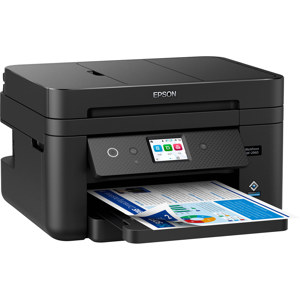
Epson WorkForce WF-2750
We needed a new printer, and this one works great and was reasonable. It does everything we need!
NancyGu
Originally posted at
2019-08-12T20:00:00
Rated 2 out of 5
Not user friendly
I have had this printer for about 4 months now and have found it to be difficult to use. I have it connected to a wireless network at home, which has a good signal, but my computer can not connect to the printer/scanner most of the time. I have also had problems scanning documents to my computer as PDFs because the printer/scanner can't find my computer. I had a printer before this one connected wirelessly and had zero problems with that issue, so I don't believe there's any issue with my wifi network. I had to get this one due to that one had problems with the printer head.
I have also had print quality issues where the pages have lines through them. I did the clean print head maint, which did help that issue. I have tried to download the software again to see if that's an issue, but that wouldn't work either. It just takes too much of my time to make this thing work for me.
A d.
Originally posted at
2019-08-11T20:00:00
Rated 3 out of 5
Sale model basic
The power light on is very bright. It acts as a night light. It illuminates the whole spare room during the night. If I use the copy feature I have to reset the wifi password everytime. That is anoying. I tried scaning a document and the copy quality was very poor. Tried multiple settings.
Vk123
Originally posted at
2019-08-11T20:00:00
Rated 5 out of 5
Good value for the money
Works as both a printer and scanner very well. I bought it because of price and advertised performance. It has measured up to or exceeded my expectations. The only negative is that it has to many plastic components which make me worry as to what its life expectancy will be. I need to remind myself that price was a major selling point.
Chipperlucy
Originally posted at
2019-08-10T20:00:00
Rated 3 out of 5
Sorry for the less than stellar news
Just in general... please re-think "user friendly". Sad to say, I miss my HP.
driftwood27855
Originally posted at
2019-08-09T20:00:00
Rated 2 out of 5
not as good as they use to be
i have had epson printers for the pass 10 years over all they were great very few probles with them until i brought the last one ever few days their are up dates they keep telling me a mad driver one thing after another want be any more after this one
jackie 2.
Originally posted at
2019-08-09T20:00:00
Rated 4 out of 5
Great except ink does not last long enough
Great except ink does not last long enough
tmo1128
Originally posted at