2020-01-23T19:00:00
Rated 5 out of 5
Easy Setup
It's way noisier than my last Epson. This is my 2nd Epson printer. I bought this because the last one wasn't printing so well. It was missing pins. The setup was really easy. I love the touch screen, individual ink cartridges and the WiFi so I can print from any wireless device I have. Epson has always had excellent products. I'm not too crazy about the bottom sheet feeder, but hopefully it will outlast HPs.
Arlene65
Originally posted at

2020-01-23T19:00:00
Rated 3 out of 5
I have had a horrible time with Windows 10
I bought this 3 years ago and really have not used it much. The store went out of businessn where I bought it.
Rhett
Originally posted at
2020-01-23T19:00:00
Rated 3 out of 5
Average Low Cost Printer
Print quality is OK for occasional use. Overall printer has a cheap feel. We have both HP and other Epson printers and they have a much more solid feel. User interface is poor. Does not provide a separate print screen. Most disappointing is that I have been unable to get the printer and my I phone and I Pad to communicate wirelessly.
Jrmag1953
Originally posted at
2020-01-20T19:00:00
Rated 5 out of 5
Works great, paper does not jam, even if not lined up exact.
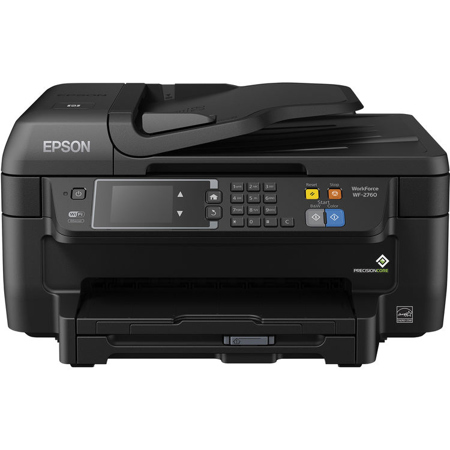
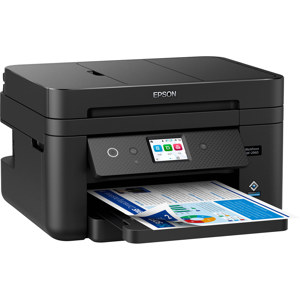
Works great, paper does not jam even if not exactly lined up,compared to my previous brand all in one. I have two, WF-2760, one at home and one in beach home. The one at home works fine every day. The beach one works fine even after weeks of non use. Simple to use. Best, is easy to get and use on line help for my dumb errors.
RR L.
Originally posted at
2020-01-19T19:00:00
Rated 3 out of 5
Good printer. Hope, it works well and usefully.
Bought today. Wish it works as I like for my purposes.
SB1192020
Originally posted at
2020-01-07T19:00:00
Rated 1 out of 5
If I could rate it as zero starts
Sorry - I must have a lemon. I have used other Epson printers without any issues. I upgraded to the WF-2760 and it has been a nightmare. I am an IT person and have never had SOOO much trouble installing a printer in my career. Windows 10 all updated, all Epson drivers and software installed and the printer goes unrecognized. LAN port broke and I've tethered it with a USB cable, and windows does not recognize the printer. Shameful to say the least.
Mjsigns
Originally posted at
2020-01-06T19:00:00
Rated 4 out of 5
Good All-in-one
Does a good job scanning multiple documents. Good resolution. The printer is reliable. Ink cartridges need filling frequently.
Printer111
Originally posted at
2019-12-31T19:00:00
I have two of these and they are ending up in the trash. Print head nozzles clog easily and it empties the cartridges upon cleaning.
Jcshirle
Originally posted at
2019-12-29T19:00:00
Rated 3 out of 5
No Wi fi connexion possible probably due because to update
The wi fi connexion was working very well and for the last 4 weeks approximately, nothing is working well. I've tried to update my drivers, but it works now only with a usb connexion. Not very fun at all.
Claudeb
Originally posted at
2019-12-27T19:00:00
Rated 5 out of 5
Small Powerful Affordable
Acquired this about a month ago replacing a similar but larger 8 year old Epson all-in-one. Could not be happier with its quality and performance.
Penguin18
Originally posted at
2019-12-18T19:00:00
Rated 1 out of 5
Terrible printer. Terrible support. Do not buy
I bought this printer for our home, and it was barely used. The ink would magically go to empty while just sitting idle. After replacing the cartridges with new ones, we noticed those went to empty after 1 or 2 sheets. We contacted epson and they sent replacement ink, only for those to go to empty. I replaced again but now the printer would only print blue, no other colors showed up. I worked through troubleshooting and cleaned the printer heads multiple times, which slightly improved things each time, but still wouldn't properly print a sheet of text. Again I called customer support, which was no help at all. Since I hadn't registered the printer and didn't keep my receipt, they wouldn't help me at all.
I'm dealing with time sensitive legal issues as well as starting a company and I can't print anything. THANKS FOR NOTHING EPSON! Last time I buy any of your products.
The ink levels in the photo are from BRAND NEW cartridges. Once again they magically drained.
Shane78
Originally posted at
2019-12-17T19:00:00
Rated 4 out of 5
Thoughts on possibility of getting to see the printer work
I bought this 8 months ago and I haven't got to use it yet.
Ole 9.
Originally posted at
2019-12-15T19:00:00
Rated 3 out of 5
Mixed review.
Performs well as a scanner. Copying seems slow. I rarely need color printing or copying, so I usually use a different B&W laser printer.
I found the touch screen labeling and alerts to be confusing and easily leading to useless looping.
My main gripe is that, given how infrequently I print in color, the ink cartridges seem to evaporate quickly. If ink was cheap, I'd give this product a "4". But it's not.
This is my first non-HP printer/scanner/etc. in about 15 years. I bought this Epson on sale. Win some, lose some.
CA r.
Originally posted at
2019-12-12T19:00:00
Rated 5 out of 5
EXCELLENT PRINTER
BOUGHT THIS 2 WEEKS AGO,AM VERY PLEASED!!
IRA L.
Originally posted at
2019-12-10T19:00:00
Rated 5 out of 5
Great Printer
It is a great printer---However, if the printer does not have a telephone cable, it simply won't work for fax. That is a GREAT bummer, (BAD). Furthermore, the other features are AWESOME...
Nena
Originally posted at
2019-12-09T19:00:00
Rated 2 out of 5
Lasts less than a year
I suddenly can’t get the scanner to work. I have tried everything including the troubleshooter for the printer and windows. I’ve spent hours trying. I ordered a new printer.
Kkbw82
Originally posted at
2019-11-30T19:00:00
Rated 5 out of 5
Great features in a compact size.
Just purchased & am extremely satisfied. Good quality, compact size, & affordable. Highly recommended.
Sunsportsoc
Originally posted at
2019-11-30T19:00:00
Rated 5 out of 5
very satisfied with performace of printer
I bought mt printer 2 years ago and woking excellent!
Bingo
Originally posted at
2019-11-17T19:00:00
Rated 5 out of 5
Does it All!
I have used this printer for home use and the printer has done everything I have needed it to do for me to complete my projects.
Keith68
Originally posted at
2019-11-15T19:00:00
Rated 5 out of 5
Outstanding Multi-Function Printer
Quality printing, timely updates. An Outstanding Printer and Outstanding Value for PRICE.
NavyFlyBoy
Originally posted at
2019-11-13T19:00:00
I just love this printer user friendly
Ladicamelot
Originally posted at
2019-11-07T19:00:00
Rated 5 out of 5
Great Machine
It is the best copier, scanner and printer I have used. I have an HP in my office and this is better. I do not use the fax.
SnowOwl
Originally posted at
2019-11-02T20:00:00
Rated 5 out of 5
Fast, crisp printing. Works very well.
Had a WF-2540 for 8 years and was quite satisfied. The WF-2760 is significantly faster and the printing is crisper and clearer. Design is improved, with paper drawer at the bottom. Worked great, needed no adjustments (nozzle alignment etc.) right out of the box. Easy install via CD. Have had one glitch with Windows 10, which sometimes recognizes the printer (scanner) and sometimes doesn't; no problem with my Win 7 machine.
Albeau
Originally posted at
2019-11-02T20:00:00
Rated 5 out of 5
Outstanding Product at an Outstanding Purchase Price
My WF-2760 is an amazing piece of equipment and an integral part of the success of my business and my client's acceptance of our performance!
RobotNeal
Originally posted at
2019-10-31T20:00:00
Rated 5 out of 5
great and easy
I have had for 3 weeks. Still getting use to it. Having issues with scanner
rdrr
Originally posted at
2019-10-29T20:00:00
Rated 5 out of 5
Excellent Printer for Home or Office
I have had this printer for a while now, and it has performed beyond my expectations!! Epson is a premier organization and I stand by their products. I have tried other brands but none are as well equipped nor as dependable as Epson!! I trust them and encourage everyone else to do the same. I haven't had any problems with this printer, or the several others I have purchased in the past. The only reason for me to purchase a new product is for some new added feature. These products DO NOT break down. I consider them "money well-spent" and they are extremely sturdy. I have moved three times and my printer has withstood the event. Thanks Epson!! I think you are the best!!!
BluBtrfly
Originally posted at
2019-10-29T20:00:00
Rated 4 out of 5
Easy Installation
The installation and activation of this printer is easy. I also like the inexpensive ink cartridges and the ease with which they can be replace when necessary......
Probey
Originally posted at
2019-10-28T20:00:00
Rated 5 out of 5
Easy and fast
I bought this second hand.
Wink
Originally posted at
2019-10-17T20:00:00
Rated 1 out of 5
Can't recommend
When I first bought this printer I couldn't get the drivers install from a disc because I have not got the drive for that, so I had to try and find the downloadable drives. Epsons web site had the package for all the drivers I needed but they would not download and install properly. So, I had to download separately each driver. The printer finally started to work but now there seems to be some latest updates that have really screwed this printer up. After hours a trying to reconfigure this thing I finally have it barely functioning again, however, I do have to restart the darn thing every day because it goes offline constantly now. Very disappointed and will be looking for another printer soon.
Bartman88
Originally posted at
2019-10-16T20:00:00
Rated 3 out of 5
Functionally getting the job done.
I've had my printer for over a year now and it's still working. My biggest complaint was a driver issue I had with connecting to my laptop for scanning capabilities. I work in IT and have experienced issues like this before with print drivers. The drivers are loaded as separate devices for scanning/fax and printing capabilities. This causes some communication issues when it comes to scanning documents to the laptop. I had to scan to my Dropbox account for about 6-8 months. I finally got it to work about some updates and wiping all my print drivers and starting from scratch. I have an HP (win 10) laptop and experienced the same issue with HP printers at work. So it's possible that's it's an HP driver configuration issue for all-in-one printers. Otherwise, happy with the printer, minus the short periods of time between ink purchases.
jfal22
Originally posted at