This item is no longer available.
Review Summary
2023-08-11T20:00:00
All seems to be fine when our internet connection is working properly. Many times our best option is to remove and readd the printer to engage it to print.
Miss E.

2023-08-04T20:00:00
Have been using printer for awhile. Have had no problems.
MARISCO123

2023-07-08T20:00:00
Some error with "scanner", but troubleshooter doesn't work and ERROR IS LOCKED IN. IF I HAVE TO BUY ANOTHER PRINTER, IT WON'T BE AN EPSON
THINK A.

2023-05-19T20:00:00
I am always trying to fix this Printer.... the cord, the drivers.
perci

2023-04-30T20:00:00
Had for 2 1/2 years then driver failed. Had trouble scanning, thought fixed, then trouble printing, did online Epson support and says fixed. Will have to try.
dont k.

2023-04-18T20:00:00
Was advised to go laser years ago...finally I am totally impressed with my publications and print clarity. I appreciate the two tray design. Keeps papers dust free
Divinely C.

2023-04-02T20:00:00
All I get are issues after having this printer for a while. Warnings that the paper is out and refusing to print when only 1 of 2 drawers are empty. Trying to print only in black if waiting on arrival of color when there is a full black cartridge and it won't print. No warning when I had to replace the maintenance box so it just stopped printing until that arrived. Now, there was an update and although the printer was previously working fine, it no longer recognizes 2 of the 4 ink cartridges even though they are all the same so again I can't print. I work remotely so it is a great inconvenience. I doubt I will ever buy or recommend an Epson printer again!
NoEpsonPrinterAgain

2023-04-01T20:00:00
Epson builds planned obsolescence into their products ... they are not even offering software and driver downloads for folks still running windows 10 ... don't buy an epson ... you'll regret it ... i have two of them ... bought ink and it turns out epson sabotaged the chips in the ink cartidges so they are worhtless ... spent $85.00 on ink and wasted my money ...the all in one printers are nothing but paper weights now ... error codes make the scanner and fax unusable now as well ... its tuck in the out of ink mode and the error will not clear
epson u.

2023-03-26T20:00:00
I bought this printer and couldn't wait to use it, however, after I set everything up I discovered I couldn't use it because it did not have the Magenta ink cartridge with it. What a disappointment. I would rate it better if it would have had the Magenta Ink Cartridge with it. I would rate it better if it would have had the Magenta Ink Cartridge with it. It would be nice if Epson could send me the magenta ink cartridge.
Mitts

2023-02-26T19:00:00
sometimes it works and sometimes it doesn't
zwg l.

2023-01-28T19:00:00
It takes and act of God to get the scanner part to talk to my computer
stupid o.

2023-01-24T19:00:00
Don't buy any of the Workforce products. they are all garbage. We use a Workforce WF-4730 in a sandwich shop for minimal printing. Not used very much at all and t is a piece of crap. In the garbage soon!
Guys

2022-12-23T19:00:00
I bought this printer a few months ago. It's an excellent printer
Nan32

2022-11-28T19:00:00
Have had this printer several years, has handled printer jobs well, downloaded update as the printer will not connect (wireless) to my computer for scanning (but prints from the computer, and copies just fine). Still does not recognize the computer so I cannot scan.
DQ55

2022-11-19T19:00:00
Errors endless
Ruby2shoes

2022-11-09T19:00:00
like this printer, especially the ability to have it hold two different paper choices as the same time.
Just W.

2022-11-04T20:00:00
Purchased this printer about a month ago so still getting used it but really like what I have seen so far. Easy to put in cartridges and paper; but have not used all the functions as yet.
New K.

2022-11-03T20:00:00
Very hard to set p for email scanning an pour ink into the waste container to "Keep nozzles open".
SeaJay

2022-10-27T20:00:00
I get error Code 000044 over and over and over and while that is a scan-related error message I still cannot use the printing functions.
Craig C.

2022-10-22T20:00:00
great so far.
display

2022-09-08T20:00:00
IS SPECTRUM, AFTER MONTHS OF FREZZING UP, THEY REQUESED I EXCHANGE MY ROUTER, HOWEVER THEY HAVE AN AUTO SWICHING BETWEEN 2.4 AND 5G SO WHEN MY COMPUTER IS ON 5G, THE EPSON PRINTER DOES NT WORK. WIL EPSON FIX THIS PROBLEM?
TOM D.

2022-09-02T20:00:00
I have had a WorkForce printer for several years but it was finally worked to death. I expect no less of my new WorkForce 4730 and never even considered any othe brand.
Ladybug65

2022-08-04T20:00:00
THE PRINTER ALWAYS TAKE FOREVER TO COMMUNICATE WIRELESS WITH MY COMPUTER, INK IS VERY EXPENSIVE, IN OTHER WORDS NOT HAPPY NOR SATISFIED.
WF4730

2022-07-13T20:00:00
The photo shows the Printer screen which continues even though there was no scanner issue - and I have completed the recommended steps for a week. I bought 3 new cartridges for this unusable machine and I do not know what to do next.
Cosmo50

2022-06-19T20:00:00
its working out
sam h.

2021-12-21T19:00:00
I bought this printer because it had two trays . Totally pointless . Add this printer for about a year and a half had nothing but issues and never wants to connect you have to restart it restart the computer several times it mean you just has so many issues . Now I bought Brand new ink for it and it is showing used . It also will not recognize one of them and says that is completely empty.
ladybugkell

2021-11-17T19:00:00
I've had this printer for 2 years... 2 days ago Espon software manager prompts me to download new software. I download new software and BOOM... now the printer won't recognize the cartridges it's been using because they are re-manufactured and it won't scan without me re-installing drivers at 11 PM when it's scanned just fine for 2 years. Go to hell Epson.
Goshen

2021-10-13T20:00:00
I only buy Epson printers. Easy to use, excellent print quality and the best value for the price. Once I bought another brand and it was not a good experience. I'll NEVER switch again! Epson for LIFE. <3 <3
ljcarter

2021-10-04T20:00:00
I had this printer for 18 months and decided I had enough of it and smashed it to bits. The best part about owning this printer was the 30 seconds it took me to destroy it. What a pile of trash, a complete embarrassment. I can't believe in 2021 products this poor are still mass produced. Do not buy.
Happyguy124

2021-09-18T20:00:00
Had this printer for many years Great performer. Unfortunately I am unable to install Epson driver up[dates.
Pisgah001

Perfect Small Business All In ONE
By ATIday
This is the best value for a small business all in one printer, it was also the only printer available with a rear paper feeder. You will need a large area to put this so make sure you look at the size as this is no small printer set up. Excellent product, plus Epson shipped to my right to my door.
All in one workhorse!
By analytichead
The connection is seamless and quality is very high. The last time I bought a printer was 10 years ago and I have never used Epson but I was blown away.
A fast, cost-effective multifunction printer for workgroup productivity
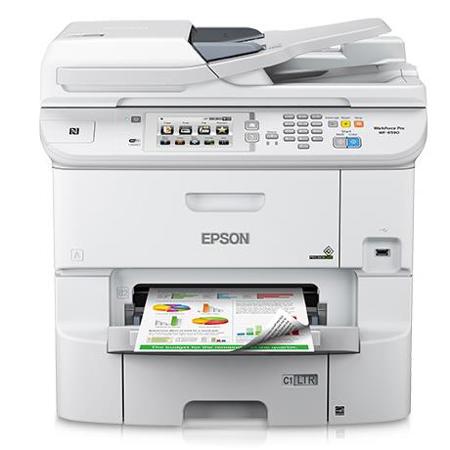
The WorkForce Pro WF-6590 letter/legal-size multifunction printer, powered by PrecisionCore, saves up to 50 percent on printing costs vs. color lasers. Minimize downtime with Epson's highest-yield cartridges, which print up to 7000 black/color pages before replacement and a paper capacity up to 1580 sheets. Epson's fastest office multifunction printer, the WF-6590 delivers pro-quality documents as fast as 24 ISO ppm (black/color).
Cost savings - up to 50 percent lower printing costs vs. color lasers
Low intervention - print or copy up to 7000 black/color pages without changing cartridges
Epson's fastest office multifunction printer - 24 ISO ppm (black), 24 ISO ppm (color)
Versatile media handling - fast auto duplexing (print, copy, scan, fax); up to 1580-sheet total paper capacity
Security features - PIN number certification for job release; user control access, printer and network settings via Web Config with printer's IP address; SSL/TLS security, IPsec
Pro-quality documents - long-lasting results with DURABrite Pro cartridges
Drivers and utilities - remote printing and Cloud access; Universal printer driver; PCL and Adobe PostScript 3 support
Powered by PrecisionCore - the next generation of inkjet printing technology
Enabled for remote printer data collection - compatible with MPS software solutions from Print Fleet, ECi (FMAudit), PrintAudit and others
Duty cycle - up to 75,000 pages monthly
Fast auto-duplex printing, scanning, copying and faxing saves time and improves workflow. IT tools and security features make network integration seamless for shared printing. And, it's enabled with remote data collection compatible with leading third-party MPS software solutions.
ISO Print Speeds
ISO print speeds of 24 ISO ppm (black) and 24 ISO ppm (color)
Fast, High-Quality Printing and Copying
Quickly print or copy documents and photos - get sharp text and vivid, true-to-life color.
Super High Capacity Cartridges
XXL replacement cartridges available to print up to 10,000 black/7,000 color
High-Quality Prints. Smart Value
Save on ink and get professional quality prints at an amazingly affordable price - up to 50% lower printing costs than color laser.
Wireless and Ethernet Network Ready
Share one printer with multiple computers in your home or office, using a wireless or wired network.
Instant-Drying Inks
Print documents that are highlighter friendly as well as smudge, scratch, fade and water resistant.
Eco Features
Uses up to 70% less power than laser printers
Save up to 50% of your paper supply with automatic, 2-sided printing
ENERGY STAR qualified
RoHS compliant
Recyclable product
Epson America, Inc. is a SmartWay Transport Partner