
This item is no longer available.
My Kid LOVES It
We are Overwatch Enthusiasts and the Keyboard is a game changer
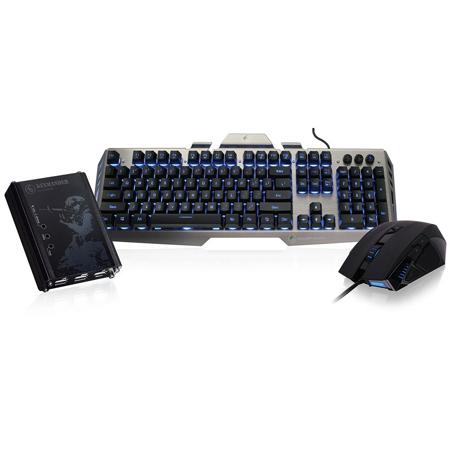
KeyMander - Keyboard & Mouse Adapter for Game Consoles
KeyMander, the breakthrough gaming controller adapter from Iogear, brings the unmatched speed and precision of a keyboard and mouse to console gaming. Now you can use your keyboard and mouse skills to dominate all your favorite FPS (First Person Shooter), RPG (Role Playing Games) and RTS (Real Time Strategy) games.
• Play Xbox One S/Xbox One, Xbox 360, PS4 and PS3 games using a keyboard and mouse instead of the joystick controller for increased speed and accuracy
• Bring the control and accuracy of your Keyboard / Mouse to your game console for the ultimate gaming experience
• Great for FPS (First Person Shooter), RPG (Role Playing Games) and RTS (Real Time Strategy) games
• KeyMander's PC Software provides greater levels of configuration and calibration: Macros, Deadzones, Mouse Sensitivity and Ballistic Curves, Turbo and Custom Key Mapping
• Direct Button Mapping using your PS4, Xbox One, PS3 or Xbox 360 controller for quick and accurate in-game customization
• Stores multiple profiles in groups for different games or gamers for customized advantages
• Create groups for different games or users; up to 8 profiles per group
• Hotkeys allow instant profile switching during live gaming
• Connect a laptop while gaming to make adjustments on the fly- KeyMander also works with the laptop's keyboard if desired
• Plug and Play - Start playing right out of the box using the default settings (although using the KeyMander software for initial setup is highly encouraged)
• Interchange a single KeyMander between multiple game consoles and/or console platforms without changing firmware
Dump The Controller And Upgrade To Keyboard & Mouse
By connecting your keyboard and mouse to the KeyMander, all controller functions can be rapidly and more accurately accessed so you can easily destroy the competition. Spend your money on games and stop worrying about your PC's memory, video card or processor speed. With a game console and KeyMander you can now plug in your keyboard & mouse to enjoy the latest games without emptying your pockets on new PC parts.
Play PS4, Xbox One, PS3 And Xbox 360 Games Using A Keyboard & Mouse For Increased Speed And Accuracy
The KeyMander can be used on Xbox One S / Xbox One and Xbox 360 to play your favorite FPS, RPG or RTS games. Increase your precision and accuracy on FPS franchises such as Halo, Call of Duty and Battlefield. The KeyMander is the perfect accessory for the PS4 Pro / PS4 and PS3. PWN your competition in multiplayer games against players that are still using controllers. Playing FPS, RPG and RTS games on the PlayStation has never been this much fun.
Create Custom Profiles
KeyMander gives you near limitless customization options. Give yourself the advantage you've been looking for with all your favorite FPS (First Person Shooter), RPG (Role Playing Games) and RTS (Real Time Strategy) games:
• Create custom profiles for specific games and scenarios
• Custom key mapping and mouse button assignment
• Custom macro function programming
• On-the-fly tuning of mouse sensitivity and deadzone adjustment
• Create custom mouse response curves for your style of play
• Import, export and share custom game profiles
Kaliber Gaming HVER Aluminum Gaming Keyboard - Black/Gray
Gaming Keyboard with Hover Key Design
Kaliber Gaming by Iogear is proud to announce the newly designed HVER Aluminum Gaming Keyboard. HVER gets its name from the open frame design with elevated keys that appear to "hover" above the brushed aluminum chassis. Packed with gaming features and good looks, HVER is designed to provide everything gamers need at a price that won't break the bank. HVER's plunger key design provides a solid stroke with that positive feel when engaged - similar to that of a mechanical keyboard. The HVER features premium double injected keycaps for durability and delivers a lifetime of performance without the key tops ever wearing off. To deliver an exceptional gaming experience, the HVER features 26 anti-ghosting keys, Windows key lockout and a 3-color LED backlighting. HVER comes in two flavors, Imperial White and Black/Gray.
• Brushed aluminum chassis provides a solid, flex-free platform
• 26 Anti-Ghosting keys so you never miss a keystroke
• 3-Color LED backlight with adjustable brightness
• Double injected keycap characters never fade
• Windows key lockout
• Plunger key design offers a solid tactile feel
• Weighted base for added stability
3-Color LED Backlight
The HVER Aluminum Gaming Keyboard adds a bit of flare with functionality through the dedicated lighting button. The LED key lets you set your choice of LED backlight colors Aqua, Green or Blue or select all three and the backlight will slowly pulse while rotating between them. Multiple dimming levels make it easy to set the proper key illumination when gaming in low light settings.
Plunger Key Design
The HVER features an innovative key structure using low-friction POM plungers that do away with the mushiness, common to membrane designs. The result is a super-smooth, positive keystroke engagement, similar to the feel of a mechanical keyboard.
Double Injected Keycaps
The GKB704L features double injected keycap characters which will last the life of the keyboard, without ever wearing off. The double injection process means that the keycap character material is actually injected into the mold, not printed on the keycap. The key cap color material is then injected around the character to create a keycap that never wears out.
Loaded with Premium Gaming Features
The HVER Gaming Keyboard comes packed with features to take your gaming experience to the next level. HVER features 26 anti-ghosting keys. This means that the keyboard will register all your key presses even when you're mashing multiple keys at the same time, especially in those intense gaming sessions. The GKB704L also has a Windows key lock function that prevents accidentally opening the Windows menu while gaming. The heavy weighted base of the keyboard also increases stability while gaming to prevent sliding.
Kaliber Gaming RETIKAL Pro FPS Gaming Mouse
eSports Pro FPS Optical Gaming Mouse
Kaliber Gaming by Iogear's RETIKAL Pro FPS Gaming Mouse is a pure-bred gaming beast, specifically built to dominate first-person-shooter games. The RETIKAL's tournament-grade optical gaming sensor provides a huge step up in accuracy, allowing much more precise shots, especially when aiming-down-sight. In addition to its tournament-grade sensor, the RETIKAL also features a dedicated sniper button that changes mouse dpi while pressed, making head shots much quicker and easier. RETIKAL's built-in memory stores up to five different mouse profiles and allows you to change every single programmable option from dpi steps to macro functions with a single click. With five programmable steps up to 5000 dpi, RETIKAL is great for low sensitivity FPS gamers and has more than enough resolution for even high sensitivity 4K Ultra HD gaming.
• USB 2.0 eSports professional optical gaming mouse
• 9 programmable buttons with custom programming software
• Non-slip rubber coated click wheel and thumb rest
• Up to 5000dpi with shift-on-the-fly adjustment
• Sniper button- instantly increases aim accuracy
• Instantly switch between 5 profiles
• Adjustable weight system for precision tuning
• Sculptured housing designed for FPS gaming
• LED backlighting with "breathing" effect
• Pixart PMW 3310 "flawless" optical sensor
• 128K built-in memory
• 125/500/1000Hz adjustable report rate
• 6400 fps frame rate
• 130 ips speed
Built-in Sniper Button
The RETIKAL features a thumb-activated sniper button that boosts accuracy when aiming-down-sights in FPS games. The sniper button allows FPS gamers to run-and-gun using a much higher dpi setting for faster side-to-side movement and turning, then hold the sniper button to lower dpi for precision shots. The sniper button is especially deadly while aiming-down-sights as it instantly changes the dpi to an ultra-precise setting for faster and more accurate long range or head shots. The RETIKAL can turn a good FPS player into a great FPS player practically overnight!
5 Custom Mouse Profiles
At the center of RETIKAL's top panel is a profile select button to quickly switch between up to five different mouse profiles. Each profile can be independently configured for different dpi steps, button functions and even background illumination, making it easy to change features as you switch games.
Adjustable Precision Weight System
The 4-piece adjustable weight system built into the RETIKAL allows tuning the feel of the mouse to your style of play. Simply remove weights to increase movement speed or add them to increase movement precision. The tuning weights also adjust the RETIKAL's balance point and ease of lift-off, so tournament gamers can really dial it in to fit their needs.
9 Software Programmable Buttons
The RETIKAL Pro FPS Gaming Mouse buttons are programmable using the Kaliber Gaming software to access numerous user programmable functions. With the Kaliber Gaming user interface you can set mouse buttons for keyboard commands, create macros and execute functions that would normally be much more difficult. In addition to gaming functions, RETIKAL's buttons can be programmed to make desktop functions much easier. Turn buttons into hotkeys to control media