
This item is no longer available.
Ultra Compact USB-C Docking Station Packed with Features
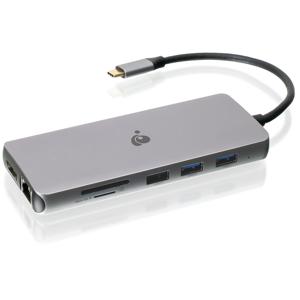
Are you looking for a docking station that is affordable, compact, stylish and packed with features Look no further. The IOGEAR USB-C Docking Station is designed to transform your USB-C laptop into a complete full-featured workstation. This dock will turn your laptop into a peripheral powerhouse that rivals your desktop PC. No longer will you be restricted by the type of ports available on the laptop. Easily add a full-sized keyboard and mouse, external hard drives, printers and webcams by connecting only one USB-C cable to your setup. With its compact design, it will seamlessly fit into your lifestyle whether in the office or on-the-go.
• Full-sized productivity in a compact design
• Affordably connect up to 10 devices
• 4K Ultra HD (UHD)
• SD and Micro SD card reader built-in
• Use your USB-C power supply - Charge your laptop up to 60W
10 Ports of Freedom
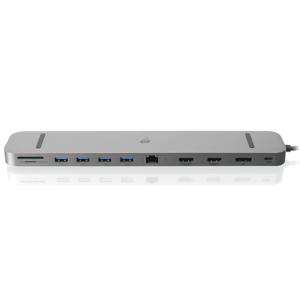
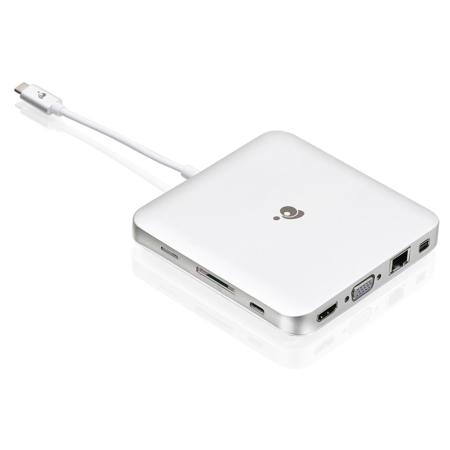
Connect up to 10 devices effortlessly to your laptop with a single USB-C cable. This docking station is equipped with memory card readers for SD/MicroSD memory cards for quick access to your data. With three USB 3.0 (Type-A) ports, you can connect an array of USB Type-A peripherals. With the quick charge USB port, you can charge your phone or tablet at super-fast rates. With the included Gigabit Ethernet power, you can connect to your LAN for robust data bandwidth and increased security. On top of all this connectivity, this docking station also offers the flexibility of 3 video connectivity options: HDMI, Mini DisplayPort and VGA. You can also connect a headset or microphone to complete your multimedia workstation setup.
Stunning 4K or Dual HD Monitor Setup
Unravel the remarkable visual experience of 4K Ultra HD (UHD), at 4 times the resolution of standard HD. The dual video monitor functionality provides astonishing video quality that will please your eyes and provide a higher level of enjoyment from watching videos, playing video games, working and creating from your home office. Further more, you can get full 1080p HD quality video when using a dual monitor setup.
Mirror or Extend Your Monitors
Adding two monitors to your laptop will improve your productivity and allow you to get more done. Mirror or extend your Windows USB-C laptop to two monitors or extend your MacBook or USB-C Apple laptop to one additional monitor. Browse the web on one screen, edit a document on a second. When using a Windows USB-C laptop, write an email or connect to a webinar on a third monitor.
Charge Your Laptop While Docked - Power Delivery Pass Through
Charge your laptop while connected to your docking station without the need to buy an additional power supply. Connect your manufacturer's USB-C AC power adapter directly to the docking station and power your laptop while you work or play. With up to 60W of power delivery pass through, you can keep all your power-hungry devices and peripherals ready to go. When you are on-the-go, this bus-powered docking station does not need a power supply to connect your devices.
Full-sized Productivity in a Compact Design
Built with high-grade aluminum, this stylish docking station will fit beautifully into your minimalistic desktop space, backpack or purse. With all the available ports, this compact docking station will work as hard as you do. With 10 ports of freedom for connectivity in a small form factor, this compact USB-C dock transforms your USB-C laptop into a full-featured 4K workstation empowering your USB-C laptop to take on any challenges that may come its way, regardless of the complexity or the size of the computing tasks.
Requirements
• USB-C compatible laptops with DP Alt-Mode support
• USB-C AC Adapter from your laptop is needed for Power Delivery Pass-Thru charging
• Mac OS X 10.10.5+ (MST is not supported by Mac OS)
• Only one additional video output can be utilized for extended desktop using Mac OS
• For dual screen extended desktop in Windows, you must use HDMI with Mini DisplayPort
• When VGA output is utilized, only one additional extended desktop screen is available
• Compatible with USB-C and Thunderbolt 3 laptops
https://www.iogear.com/support/warranty
866-946-4327