Overview
Compare
Specs
Protection

Reviews about this item

Review Summary

Select a plan in the Add Protection section above and purchase with this product by clicking “Add to Cart”.

image-protection

TRUSTED PROTECTION PLANS, EXCEPTIONAL SERVICE.

Invest In Your Gear and Peace Of Mind!

Accidents happen where life happens. Protect your favorite Adorama products and purchase a protection plan to stay covered from accidental damage, mechanical or electrical failure, and more.

Repair or Replacement

Repair or Replacement

If we can’t fix it, we’ll replace it at no additional cost.

Accidental Damage

Accidental Damage

Protect your product from drops, spills, and more.

Peace of Mind

Peace of Mind

Enjoy your gear without fear. We have you covered!

Malfunction Protection

Malfunction Protection

When regular use of your product over time results in mechanical or electrical failure.

Zero Deductible

Zero Deductible

We will never charge you a deductible after the purchase of a plan.

Customer-Focused Support

Customer-Focused Support

Our claims process is simple & easy and our customer service team is happy to help.

Adorama Protect powered by Extend is available for purchase to customers in the United States. Not available for purchase Internationally or in U.S. Territories.

IOGEAR GUD3C11 Specifications

General

General

Jump to...
  • Requirements

    USB-C (Thunderbolt 3 compatible) device with DP Alt Mode Support
    USB-C with USB mode can only support up to 2 monitors
    Windows 7/8/8.1/10
    Mac OS X 10.10+
    DisplayLink Driver installation
    Host computer USB-C port must support USB Power Delivery 2.0 for charging function

Upstream Port

Jump to...
  • USB-C

    USB 3.1 Gen 1 5Gbps, with Power Delivery up to 60W

Downstream Port

Jump to...
  • Audio In

    1x 3.5mm audio port

  • Audio Out

    1x 3.5mm audio port

  • DisplayPort

    2x DisplayPort with up to 4K@60Hz (3840x2160)

  • Ethernet

    1x Gigabit Ethernet

  • HDMI

    1x HDMI with DP Alt Mode, supports up to 4K@30hz (3840x2160)

  • USB-A

    2x USB 3.0; 2x USB 2.0

  • USB-C

    1x USB 3.1 Gen 1

Power Adapter

Jump to...
  • Power Adapter

    External 120W AC Adapter

Operating System Requirements

Jump to...
  • Mac

    Mac OS X 10.10+ - 10.13.3

  • Windows

    Windows 7 / 8 / 8.1 / 10

  • Power Delivery Pass-Thru

    Power Delivery Pass-through up to 60W

Protocols

Jump to...
  • Protocols

    HDCP 2.2, DisplayPort Alt Mode

Physical

Jump to...
  • Dimensions (H x D x L)

    3.54 x 1.18 x 8.86" (9 x 3 x 22.5cm)

  • Weight

    12.8 oz (362.8g)

  • UPC Code

    881317517364

About IOGEAR GUD3C11

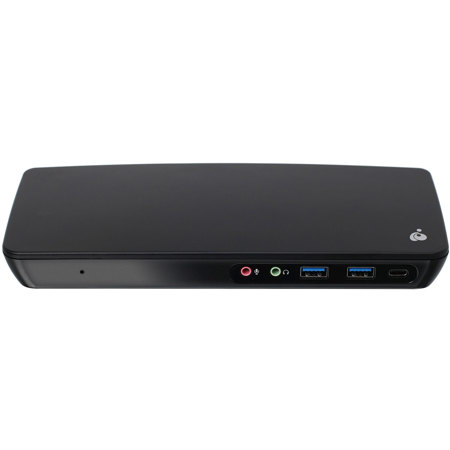
Triple Video USB-C Docking Station Packed With Features
The IOGEAR USB-C Triple Video Docking Station is designed to transform your USB-C laptop into a full-featured workstation that rivals a desktop. The Dock is equipped with 11 port options to add devices like a full-sized keyboard and mouse, an external hard drive, printer, webcam, a speaker set, and more via a single USB-C cable. Connect up to three monitors through the Triple Video Dock to expand your visual workspace.

Triple 4K Ultra-HD Monitor Setup
Enjoy the remarkable visual experience of 4K Ultra HD (UHD), at four times the resolution of standard HD. The Dock supports impressive, Cinema 4K quality on a single DisplayPort monitor to 4096 x 2160 @60Hz for enhanced enjoyment while watching videos, playing games, working and creating. Attach dual 4K UHD DisplayPort screens and add a third 4K UHD HDMI display for crystal clear images and video quality to 3840 x 2160 @60Hz across all three.

Mirror Or Extend Your Monitors
Expand your productivity by connecting additional monitors to your notebook. Mirror or extend your Windows-based USB-C laptop to accommodate up to three displays or mirror your USB-C or Thunderbolt 3 MacBook to one extra monitor. When using a Windows USB-C notebook with three monitors, use your notebook screen as a fourth monitor for separate tasks.

Charge Up While Docked
Charge up your laptop through the Dock via the included power adapter and charge a connected USB-A device that requires more than 0.9A of power through the BC 1.2 port. The Triple Video Docking Station passes a maximum of 60W of power to charge the laptop.

Note: Mac OS does not support monitor extending (MST), and can only operate in mirror mode.

Not all USB-C laptops can charge through their USB-C port.

Requires installation of DisplayLink driver
IOGEAR GUD3C11 Features

  • Dock and expand your USB-C laptop with 11 port options
  • Connect up to 3 HD 4K displays via 2 DisplayPorts, 1 HDMI port
  • Keep your laptop charged with up to 60W Power Delivery
  • 2x DisplayPort++ 1.2 ports support dual displays to 4K @ 60Hz
  • 1x HDMI port with DP Alt Mode supports HD display to 4K @ 30Hz
  • 1x USB-C port offers fast data transfer rates to 5Gbps
  • 2x USB 3.0 ports with one BC1.2 fast charging port
  • 2x USB 2.0 ports; 1x Gigabit Ethernet port
  • 2x 3.5mm audio ports for a headphone and microphone

Key Features

  • Dock and expand your USB-C laptop with 11 port options
  • Connect up to 3 HD 4K displays via 2 DisplayPorts, 1 HDMI port
  • Keep your laptop charged with up to 60W Power Delivery
  • 2x DisplayPort++ 1.2 ports support dual displays to 4K @ 60Hz
  • 1x HDMI port with DP Alt Mode supports HD display to 4K @ 30Hz
  • 1x USB-C port offers fast data transfer rates to 5Gbps

What's in the box:

  • GUD3C11 USB Type-C Triple Video Docking Station with 60W Power Delivery
  • 120W AC Power Adapter
  • 3.3' USB Type-C to Type-C Cable
  • Driver CD
  • Quick Start Guide
  • IOGEAR 1 Year Limited Warranty