New Arrival

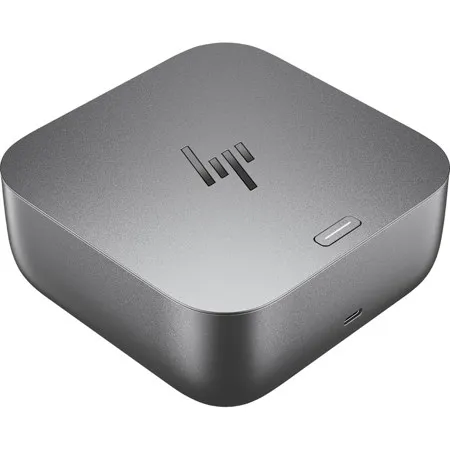
HP Thunderbolt 4 100W G6 Dock

SKU: IH9X472UT MFR: 9X472UT#ABA
Earn VIP Reward Points

Key Features

  • Boost your productivity with versatile Thunderbolt 4 connectivity for rapid data transfer.
  • Effortlessly power your devices with up to 100W USB Power Delivery through a single cable.
  • Expand your workspace by connecting multiple displays for an immersive visual experience.
  • Enjoy seamless compatibility across Windows, macOS, and Linux operating systems.
  • Secure your setup with integrated HP Wolf Security features for enhanced protection.
  • Stay connected with a variety of ports, including HDMI, DisplayPort, and RJ-45 Ethernet.
See More Product Details

Need help? Ask our experts.

Overview
Compare
Specs
Protection

Reviews about this item

Review Summary

2025-12-29T19:00:00

Rated 3 out of 5

Works pretty much as designed but why do they hide the power port?

This hub is working well for me now but I wasted hours trying to get it to work initially. I even spoke to several different HP customer support reps and had gotten as far as having a return authorized before I finally figured out the secret. The hub arrives with zero documentation to explain how to connect the power supply to the hub. It turns out that there is a removable plate on the bottom of the hub that you have to take off in order to expose the port where the power supply is connected. There is zero instructions included with the hub to advise of this secret location. Customer support is utterly unable to explain that you have to look for a secret compartment. QR codes and other linked documentation for the hub do not provide these instructions. After a LOT of searching I was eventually able to find the complete specifications for the hub on HP's website and that document includes the instructions for removing the base plate. (Note there is small button you have to press to make it come off. I had inspected that button hoping it might do something useful but unless you know what it is supposed to do, it appears to do nothing. Its labeled "release" which combined with the fact it didn't do anything made me think it was associated with the laptop locking system--a feature I never use.) After I finally got the thing powered up my only complaint is that I am only able to use it power 3 of my 3 external monitors at a time. I am able to use it to get all 3 connected but I have to have one turned off in order to get any of the others to work. This situation is also poorly documented, although there are fairly easy to find warnings that the number of external monitors may be limited. I believe the limitation is in my HP laptop and not the docking station, but it would have been nice if HP could just provide a chart of how many external monitors would work with each of their laptop models. HP desperately needs to hire some empathetic technical writers to document their products.

deb h.

2025-12-16T19:00:00

Rated 4 out of 5

G6 dock is improving with firmware updates

I purchased the G6 dock in July 2025 and the firmware it arrived had connection issues with my Elitebook x360 1030 G8 with the notebook failing to recognize the dock without a reboot. Firmware package 1.1.11.0 corrected the connection issues. I just installed firmware package 1.3.27.0 and am hopeful there will not be a regression. The G6 dock has a similar form factor to the HP USB-C Dock G5. Unlike the fanless G5 dock, the G6 dock has a fairly quiet fan that usually stays off and occasionally spins up even if a notebook is not connected. My ideal dock would support two external monitors on any of my Mac or HP notebooks but it is difficult to find one configuration that works with the Mac's lack of Displayport MST support (multi-stream transport) and PC notebooks without Thunderbolt capability. On a Macbook Pro M2 Max, I was able to drive two external monitors from the G6 dock by connecting one monitor via DisplayPort and the other monitor via the dock's rear Thunderbolt port. A HP Elitebook 840 G5 with Thunderbolt capability was also able to drive two monitors with the Mac-friendly configuration, while an Elitebook 845 G8 (non-Thunderbolt) was only able to drive one monitor. On the hand, when two external monitors are connected to the G6 dock's DisplayPort outputs (which is a MST configuration), both Elitebooks could drive two monitors, but the Macbook was in a repetitive loop connecting/disconnecting with one monitor (a behavior that is different than the USB-C G5 dock). One other item to note is that the dock has a few internal levels of USB hubs and you may run into the 7-level USB hierarchy limit with additional downstream hubs. When I connected a HP Series 7 Thunderbolt monitor (727pk) to the dock's downstream Thunderbolt port, three of the monitor's six USB ports weren't visible to the PC due to additional USB hierarchy in the monitor itself.

HP u.

Select a plan in the Add Protection section above and purchase with this product by clicking “Add to Cart”.

image-protection

TRUSTED PROTECTION PLANS, EXCEPTIONAL SERVICE.

Invest In Your Gear and Peace Of Mind!

Accidents happen where life happens. Protect your favorite Adorama products and purchase a protection plan to stay covered from accidental damage, mechanical or electrical failure, and more.

Repair or Replacement

Repair or Replacement

If we can’t fix it, we’ll replace it at no additional cost.

Accidental Damage

Accidental Damage

Protect your product from drops, spills, and more.

Peace of Mind

Peace of Mind

Enjoy your gear without fear. We have you covered!

Malfunction Protection

Malfunction Protection

When regular use of your product over time results in mechanical or electrical failure.

Zero Deductible

Zero Deductible

We will never charge you a deductible after the purchase of a plan.

Customer-Focused Support

Customer-Focused Support

Our claims process is simple & easy and our customer service team is happy to help.

Adorama Protect powered by Extend is available for purchase to customers in the United States. Not available for purchase Internationally or in U.S. Territories.

HP Thunderbolt 4 G6 Dock Specifications

  • Color

    Gray

  • Port and connectors

    Front:
    1x USB Type-C 10Gbps signaling rate (up to 15 W USB Power Delivery)

    Right side:
    1x USB Type-A 10Gbps signaling rate (charging)
    1x nano security lock slot
    1x USB Type-C 10Gbps signaling rate (up to 15 W USB Power Delivery)

    Rear:
    1x Thunderbolt 4 with USB Type-C 40Gbps signaling rate
    2x USB Type-A 5Gbps signaling rate (charging)
    1x HDMI 2.1
    2x DisplayPort 1.4
    1x RJ-45 (2.5 GbE)

  • Physical security

    1x nano security lock slot

  • Connection type

    Thunderbolt 4

  • Security management

    HP Wolf Security for Business
    HP Sure Start
    System network manageability in any power state (HP with HP)

  • Certified collaboration software

    Intel Thunderbolt 4

  • Power supply

    120W external power adapter

  • Power to system

    Up to 100W via Thunderbolt 4 (both HP and non-HP host devices)

  • Power delivery (PD) profiles

    12V/5A; 15V/5A; 20V/5A; 5V/3A; 9V/3A

  • Current (max)

    6.15 A

  • Operating voltage

    19.5 V

  • Manageability features

    HPCMSL
    Disconnected Firmware updates
    eTag
    PXE Boot
    Wake on LAN (from the Off, Sleep or Hibernation states)
    MAC address pass-through (from the On, Off, Sleep or Hibernation states)
    LAN/WLAN switching
    Disable LAN
    Event messaging

  • Resolution (maximum)

    360Hz

  • Resolutions supported

    Non-Thunderbolt with multi-function PCs: 4x QHD (2560 x 1440 @ 60Hz), 3x FHD (1920 x 1080 @ 60Hz), 2x QHD (2560 x 1440 @ 60Hz), 1x 5K (5120 x 2880 @ 60Hz), 1x FHD (1920 x 1080 @ 360Hz)

    NonThunderbolt with high-resolution PCs: 4x 4K (3840 x 2160 @ 60Hz), 3x QHD (2560 x 1440 @ 60Hz), 2x 4K (3840 x 2160 @ 60Hz), 1x 5K (5120 x 2880 @ 60Hz), 2x FHD (1920 x 1080 @ 360Hz), 1x QHD (2560 x 1440 @ 360Hz)

  • Resolutions supported (Contd.)

    Thunderbolt with dual DisplayPort streams: 4x 4K (3840 x 2160 @ 60Hz), 3x QHD (2560 x 1440 @ 60Hz), 2x 4K (3840 x 2160 @ 60Hz), 1x 5K (5120 x 2880 @ 60Hz); Thunderbolt with single

    DisplayPort stream: 4x 4K (3840 x 2160 @ 60Hz), 3x QHD (2560 x 1440 @ 60Hz), 2x 4K (3840 x 2160 @ 60Hz),1x 5K (5120 x 2880 @ 60Hz)

  • Refresh rate (maximum)

    Up to 8K

  • Cable length

    3.2' (1m)

  • External monitor support

    Up to 3 external displays and 1 PC display or up to 4 external displays

  • Power button type

    Mechanical power button with RGB LED indicator to power or wake host system

  • LED

    Front LED bar: RGB LED (white, blue, amber, green, red);
    Power button: RGB LED (white, blue, amber, green, red)

  • Cable type

    1 back Thunderbolt 4 cable to connect to host system (up to 100 W USB Power Delivery)

  • Management software

    Poly Lens with automatic firmware updates

  • Software included

    myHP; HP Quick Connect

  • Drivers included

    Intel NIC driver; Realtek NIC driver(ARM); Realtek NIC driver(Windows)

  • Supported operating systems

    Windows 10; Windows 11; macOS; Linux; ThinPro; ChromeOS

  • Sustainable impact specifications

    35% post-consumer recycled plastic

  • Operating temperature range

    32 to 95 Degree F (0 to 35 Degree C)

  • Non-operating temperature

    -4 to 140 Degree F (-20 to 60 Degree C)

  • Operating altitude

    -49.2 to 10,000'

  • Non-operating altitude

    -49.2 to 40,000'

  • Operating humidity range

    10 to 90% non-condensing

  • Non-operating humidity range

    5 to 95% non-condensing

  • Country of Origin

    China

  • Dimensions (W x D x H)

    4.76 x 4.76 x 1.95" (12.09 x 12.09 x 4.9cm)

  • Weight

    1.6 lbs (726g)

  • UPC Code

    198415232991

About HP Thunderbolt 4 G6 Dock

One step ahead
Powering your workday flows naturally with the HP Thunderbolt 4 100W G6 Dock. Focus on what matters with hands-off management, frictionless connections to your devices and power that's ready when you need it. With state-of-the-art security, your devices remain safe.

Power your everyday
This dock starts working before you even take a seat. HP Quick Connect wakes your devices when approaching so you never have to slow your rhythm. Keep the power flowing all day with a high-speed Thunderbolt 4 connection and plenty of ports to connect your devices.

Hands-off manageability
Cloud manageability with Poly Lens unlocks hands-off manageability from anywhere. Administer automatic firmware updates anytime and easily monitor telemetry and analytics to optimize workspaces and support users effectively.

Everything, secured
Prevent potential threats with HP Wolf Security, interlacing HP Sure Start and Zero Trust Framework to provide complete end-to-end security. Work and rest easy knowing everything from the dock to the cloud is protected.

Built to last
Thoughtfully designed with longevity in mind. Durably crafted with replaceable parts to maximize your fleet's lifecycle. Built with a power consumption module to monitor your energy consumption. Consciously wrapped in plastic-free packaging.

More Ports. More Flexibility
More ports means more capabilities. With a TBT4, HDMI, RJ-45, two USB-C, two DisplayPorts, and three USB-A ports, you can connect all your devices.

Intuitive, compact design
Stay in the know about device status updates with intuitive LED lighting and on-screen-display notifications. Easily connect to rear-facing ports and declutter your desk with single cable connectivity, all in a compact design.

A full suite of manageability tools
Empower your IT to manage and track your docks by product name, serial number, and MACAddress from anywhere with the time-saving, easy to-use Electronic Tag (eTag) and HPCMSL management tools.

Compatible with myHP
Enable hardware and software innovations from HP with the myHP application. This single dashboard houses access to settings for your docking station and other devices.

HP Thunderbolt 4 G6 Dock Features

  • High-speed Thunderbolt 4 with 100W power delivery
  • HP Quick Connect wakes devices automatically for seamless workflow
  • Hands-off cloud management with Poly Lens for updates and monitoring
  • End-to-end security with HP Wolf Security and Zero Trust framework
  • Multiple ports: TBT4, HDMI, RJ-45, USB-C, DisplayPort, and USB-A
  • Compact design with intuitive LEDs and single-cable connectivity

Warranty Information

This product has a limited warranty of 36 months.

Key Features

  • Boost your productivity with versatile Thunderbolt 4 connectivity for rapid data transfer.
  • Effortlessly power your devices with up to 100W USB Power Delivery through a single cable.
  • Expand your workspace by connecting multiple displays for an immersive visual experience.
  • Enjoy seamless compatibility across Windows, macOS, and Linux operating systems.
  • Secure your setup with integrated HP Wolf Security features for enhanced protection.
  • Stay connected with a variety of ports, including HDMI, DisplayPort, and RJ-45 Ethernet.

What's in the box:

  • HP Thunderbolt 4 100W G6 Dock
  • 120W Power Adapter
  • Thunderbolt 4 Cable
  • Power Cord
  • User Manual
  • HP 3 Year Limited Warranty






