2020-06-22T20:00:00
Rated 5 out of 5
Great monitor
Perfect for the home office in current Planet Zoom
Kvon
Originally posted at

2020-06-22T20:00:00
Rated 5 out of 5
Perfect WFH Solution
Since the pandemic, I have been working solely from home. My laptop has a camera for video conference calls but the screen is tiny. I used a second screen (a tv) that worked really well until I had to use the camera on my laptop. It was awkward because I would try to look at my 2nd screen but the camera was down low on my laptop. This prompted me to search for a monitor with a camera. There weren?t many but I found this HP model. I almost didn?t buy it because of some of the negative comments on how difficult it was to install but I?m so happy that I did. It was super easy to install and works well with any video conferencing solution - WebEx, Zoom, BlueJeans and Google. The picture is vivid and the sound works great.
bklyntee
Originally posted at
2020-06-16T20:00:00
Rated 5 out of 5
Very nice size and clear picture.
I bought this monitor for my wife so she could participate in Zoom meetings. The original monitor did not have a camera, this one does. So far I have not been able to get the camera to work, due to my lack of computer skills.
sgtjeff
Originally posted at
2020-06-16T20:00:00
Rated 5 out of 5
Great monitor!
I bought this monitor because I wanted a built in webcam for all of my work video calls. It's surprising how few monitors like this are available on the market. I've been using it every day for almost two weeks and love it so far! It's easy to operate and has great video quality for the type of calls I'm doing. I've already recommended the monitor to others.
Nichole G.
Originally posted at
2020-06-15T20:00:00
Rated 4 out of 5
Nice Visuals
This product has a great screen and graphic capabilities. The camera and microphone work well for virtual meetings. Unfortunately, I found the sound bar inadequate for my needs, so I bypassed it and use powered speakers for my PC.
MLHogue57
Originally posted at
2020-06-14T20:00:00
Rated 5 out of 5
Big & Beautiful
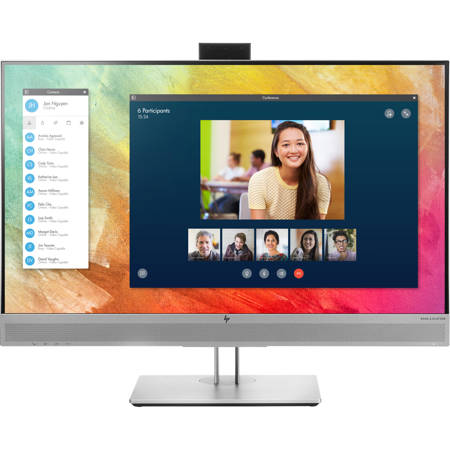
I love my new monitor. I have an awesome high end laptop but a tiny screen so I prefer to use with a docking station and two monitors. The pain was every time I have a zoom meeting I'd have to pull my computer out of it's cubby hole and stack it on books to get the camera high enough. No more! This monitor easily adjusts up or down and I love having a built in camera. When I'm not using the camera I can just push it down into it's cubby hole and can rest easy knowing no one can see me. :)
EmilyLaRue
Originally posted at
2020-06-12T20:00:00
Rated 5 out of 5
Easy to hook up, us the disc
Great price
It is a big screen
Put the glasses away
Larry D.
Originally posted at
2020-06-09T20:00:00
Rated 1 out of 5
no audio cord included
I purchased a monitor with webcam and found no audio cable included. Also computer (HP) didn't recognize the webcam. Very frustrating.
hpng
Originally posted at
2020-06-05T20:00:00
Rated 4 out of 5
Good picture and sound.
Just got it. Comes with cables for every option. Heavy duty sleek stand that makes it easy to raise, tilt and turn.
Buttons on bottom of unit are difficult to use as they are small toggles and hard to control.
Wherzwaldo
Originally posted at
2020-05-04T20:00:00
Rated 3 out of 5
Unboxing and setting it up were hard.
This will probably turn out to be a great purchase, just in time to convert my office into Zoom Central. But I'm still healing from the unboxing experience (at one point, the edge of the carton just flipped on me but I couldn't get out of the way because I was holding the huge monitor) and from the miserable set-up guidance that comes with the monitor. Both the one-page sheet that comes in the carton and the manual that I finally located online are thoroughly confusing. If you do get this monitor, bear in mind that when it's all set up, there need be only 3 cables coming from the back of the monitor--the plug, the connector to your laptop Display Port (DP) and the connector from the webcam to your laptop (or desktop or docking station). They give you more cables than you can use--I think 3 or 4 options for the Display Port, but don't mention in any of the set-up instructions that they are alternatives and you shouldn't try to find slots for all of them. And then, crazily, they DON'T give you a USB C to USB C cable for the webcam connection! Worse, while each cable comes separately packaged and labeled, the labels give no clue as to what the cable is good for. How much more could that cost HP? Where is the UX department?? On the bright side, the monitor has or automatically downloads all needed software (may not be the case if your computer is older than a year or two), and when everything is loaded and plugged, it just springs right into action for you.
DeborahinLA
Originally posted at
2020-05-03T20:00:00
Rated 5 out of 5
It does everything!
I received the monitor about 10 days ago. Everything works as promised. It was ALMOST plug-and-play (it required adding a USB3 connection to the computer to allow the camera to function. I went from one screen to two - that adjustment was more complicated than getting the new monitor up and running. The colors are brilliant, the sharpness is great; the camera stores out of sight, and, more important, inactive. Sound adjustment is simple. I could have used more set-up instruction - all I got was a sheet of cartoon diagrams and a DVD, and finding what I wanted on the DVD was not easy. Two hints for purchasers: 1. the USB connection referred to above. 2. there are TWO on-off switches, one in the back by the power plug, the other under the right lower corner of the monitor.
I hope you like it as much as I do!
RKH4345
Originally posted at
2020-05-02T20:00:00
Works very well. Great for conferences. Skype, zoom and teams.
Tonegaga
Originally posted at
2020-05-02T20:00:00
Rated 5 out of 5
preformed as advertised
The screen is clear and the camera works well. The only drawback is I would have liked the camera to adjust down so it could center my picture.
JBM20
Originally posted at
2020-04-25T20:00:00
Rated 5 out of 5
Great monitor
This monitor is awesome! The USB-C port can make the desk very tidy with only one cable connected to your laptop!
Michw
Originally posted at
2020-04-24T20:00:00
Rated 5 out of 5
The display is terrific
Purchased on April 6, shipped on or about ten days later, received five days from shipping date. I have to say I love the monitor. The bad news is that being very much a pen and pencil person (zero tech skills), what should have been a 'plug and play' took about ten hours over two and a half days to get up and running. The ESSENTIAL cable that I needed was not included. Figuring that out took the first two hours. It was in the small print in the manual (only online). Then, two and a half more hours with numerous support techs. That was the first day. The next day I spent another two hours until getting lucky, and finding the "right" tech person, who decoded my problem, told me what cable I needed, and then advised me that he could not find one available in the HP parts system. Oh, he also said I could use an adapter (DVI to HDMI) instead of a single cable, and supply my own HDMI cable to connect. The adapter was also not available in the HP parts system. Frustration oozed out of me. HP Store sold me this monitor, I am hooking up to an HP desktop, and HP does not sell the necessary cable? What The ?..???? Not giving up I contacted the HP Parts rep, who confirmed all of that. He did say I could check Walmart, Best Buy or 'one of those office supply places. That call probably only lasted for less than an hour. So, off to the 'local office supply place'. $24 and another hour and a half I was back home, hooked in the adapter with an HDMI cable, and viola. Works great! Hence the five star rating. I appreciate the opportunity to blow off some steam.
Stay Safe.
bruspell
Originally posted at
2020-04-22T20:00:00
Rated 5 out of 5
Ideal monitor
Bought this for my 88 yr old mom - so she could Zoom - it has microphone, camera and speakers all built in. Size is great, so she doesn't have to use her readers. Hook up instructions are a selection of images only - so had to study it a bit to get it right - hint...don't hook up both VGA and HDMI, just one or the other.
pcizik
Originally posted at
2020-04-22T20:00:00
Rated 5 out of 5
Easty Set-Up
Great HP customer service. Nice size monitor and easy set-up with the hub I purchased as well. Makes my home office more efficient and no more eye strain!
Fred23
Originally posted at
2020-04-22T20:00:00
Rated 3 out of 5
It's a fine monitor
I needed the monitor w/a camera for zoom meeting and such since we began working from home. There was little to no readable instructions on how to use the monitor settings. No description as to what all the buttons were or what they could do. I had to work with our IT dept for two days to try to get all the settings set up - and i still am having issues - not that it doesn't work, it does, mostly. We just can't figure out how to get sound from the laptop to the monitor. Could that be an issue w/me... yep. But, w/o any instructions - how would i even know.
LKM1
Originally posted at
2020-04-22T20:00:00
I was misled about needing a new monitor. Turns out I needed to upgrade my video card. Still, this is a nice big monitor for this vision impaired old guy.
Crankieboy
Originally posted at
2020-04-20T20:00:00
Rated 2 out of 5
Microphone doesn?t work well
Video and speakers work well but microphone doesn?t. Microphone causes echo and video conference participants ask me to mute when not speaking.
Matt 8.
Originally posted at
2020-04-19T20:00:00
Rated 5 out of 5
This is the zoom conference monitor of my dreams.
The microphone camera and speakers are all built in. It works seamlessly with Zoom. It has a 60 mhz not a 120 mhz output but it is everything I could want or need for video conferencing.
ntshadow
Originally posted at
2020-04-12T20:00:00
Rated 5 out of 5
Great Monitor!
Love the size, swivel and resolution. Wish the monitor would come with native drivers/software for the webcam as my company will not allow non-approved software to be downloaded to my corporate laptop...therefore the webcam cannot be used for work applications (which was the primary reason for purchasing this model of monitor)
wirelessdeb
Originally posted at
2020-04-12T20:00:00
Rated 5 out of 5
Excellent monitor
I had problems at first with the built in camera with digital microphone. This was because I did not connect it properly; I did not use one of the cables included. Luis from HP Technical Support in New Mexico walked me through each step and determined that I needed to utilize an additional cable to the HDMI that I had used. Luis was VERY helpful and patient!!
The monitor with camera and digital microphone work fabulously!!
Libby54
Originally posted at
2019-12-15T19:00:00
Rated 5 out of 5
Great features!
Well designed with lots of varying ports for older connections and newer devices too. Built-in webcam, and built-in speaker reduce footprint, cables, etc. Beautiful display. So far it's working great.
ATBC
Originally posted at
2019-10-08T20:00:00
Rated 5 out of 5
Exceptional Monitor
This is by far the best monitor I've had. I love that you can pop up the camera anytime you want and it's not fixed on you. The stereo system is phenomenal as well. I highly recommend this!
Herbie86
Originally posted at
2019-10-06T20:00:00
Rated 2 out of 5
Nice big screen, camera and mic not so good.
I bought this monitor a month ago and was not able to get the camera and mic to work, so hp had me return the monitor and sent a new one. This new monitor has the same issue, no working camera or microphone. Will call HP and spend another day with their tech support to sort this out.
EllisA
Originally posted at
2019-09-20T20:00:00
Rated 4 out of 5
Excellent display.
Built in speakers minimize space and only a single HDMI cable
Joela
Originally posted at
2018-11-02T20:00:00
Rated 1 out of 5
Blurry image
The image on this monitor was blurry, and despite being on the phone with technical support for an hour and a half, we could not figure out how to fix it. I loved how adjustable it was, and the pop-up web-cam, but we could not get the resolution to work. I was connecting it to a laptop.
B K.
Originally posted at
2018-07-02T20:00:00
Rated 2 out of 5
Too soon to really tell!
Just got this after 2 attempts (due to HP tech support being unwilling to help with set up). As it turned out, it was easy to set up, although the instructions were ambiguous. Several times when using Skype or multimedia , the speakers aren't recognized and I have to plug in external speakers...then miraculously the next day they work automatically. Other than that, for the moment it is good. The menu buttons are difficult to use and I haven't had the time to check out all the features, but I am happy for the parts of it I am using. As I told HP...I have so much difficulty in the last 4-5 years with any HP product I am using (and I have been a loyal HP customer for more than 20 yrs) that I have come to expect that nothing really works well. I will be using someone else for future product needs.
Soon s.
Originally posted at
2018-02-28T19:00:00
Rated 1 out of 5
Very dissapointed
Poor resolution quality and no instructions on how to use the camera or built in mic and speakers
Blaw2544
Originally posted at