
This item is no longer available.
Review Summary
2020-05-24T20:00:00
This is hands down the absolute worst printer I have ever owned. It constantly refuses to feed paper, even after extensive cleaning. It leaves black streaks when it does finally decide to spit something out, despite replacing the cartridges, and the clarity and color of pictures is horrendous. Support is a complete joke, all they can do is read a script with extremely basic suggestions and then suggest you buy a new printer. I've had it with this piece of utter trash, and will be treating it as such. Then I'm going to go spend a little more money on a non-HP brand printer that is able to actually function correctly. Bottom line: do NOT buy this printer.
GarbagePrinter

2020-05-18T20:00:00
I bought this a month or so ago & I absolutely love it. It's really, really easy to set up as well as use. It's surprisingly light, given it's size, but still sturdy enough to simply sit on a box table near my desk. It also offers an auto-order feature for the ink cartridges so the printer ITSELF keeps track of your ink levels and orders replacements before you actually run out. LOVE, LOVE, LOVE THIS FEATURE!!!
Ms T.
2020-05-16T20:00:00
I've been buying HP printers for decades now and have always had good luck with them. The print quality and speed are fine on this DeskJet 2655, but it eats ink like it's a starving animal. I've had this printer for several months and I've already surpassed the cost of the printer itself in ink cartridges. I'll be selling it soon and maybe trying an Epson this time.
Long O.
2020-05-06T20:00:00
I purchased this printer for 1 reason only. the Ink ready Program. After spending 2 days trying to hook the printer up, picking the level of ink, keying in my debit card #, I now find out that I can not use the program because of where I live. Apparently because I live in an extended stay hotel the WIFI is not stable enough to allow me to use the program. I was given 2 months use of the service at no charge as well as a $5 coupon. I feel like it was a waste of my time and money to make this purchase. The way I feel about the printer and the service received in trying to rectify the situation, makes me want to pack it up and send it back for a refund. My feeling is that I could still be on the program with the company sending me the Ink each month to cover the paged I say I would be printing, and if I needed more I then could order it.
Tabithia
2020-05-05T20:00:00
Not too happy I was kind of down sold on this printer. We had a 6448 or something so this was somewhat of a downgrade for sure! It feels really cheap, our old one had a nice heavy lift door, this one is super flimsy. Don’t get me started on the paper tray. Disappointing to say the least. I wanted to make sure it wasn’t a downgrade. All we wanted was a printer that wasn’t color!! Can’t HP make a quality printer that only takes black??
Lesl
2020-04-29T20:00:00
Bought this about a month ago to have at home to print my daughters school work. A little different to get used to a wireless printer but once you figure it out it is a very nice printer
Eolden
2020-04-22T20:00:00
I bought this printer 1 month ago and I’m so satisfied with it. Its a compact printer with the most importants functions.
Milene
2020-04-22T20:00:00
I bought my computer back in December, and the printer like a month ago or a little more. And I really love it. Thank you
Vlizasuain
2020-04-22T20:00:00
Great printer that is affordable and easy to set up.
Plieg003
2020-04-22T20:00:00
Nice quiet printing. Great features. Easy to setup instructions
Missymoo86
2020-04-22T20:00:00
Bad experience very bad printer It takes forever to print as soon as I walk away all of the sudden days after the printer is printing out the paper no good printer what a waste of money shame on HP
Natalie 9.
2020-04-20T20:00:00
I bought this printer a couple of weeks ago and I am so happy I did. It is very simple to use and the print quality is excellent
gulyguly197817
2020-04-17T20:00:00
I bought this 2 weeks ago and it’s amazing. Easy to print.
Kalihomeschool
2020-04-14T20:00:00
It won’t connect to my laptop. I’ve been trying for almost a week
Nate611
2020-04-13T20:00:00
I am delighted with the speed with which I received my printer at home, despite the quarantine. It is a functional printer, highly recommended for use at home. One of the things that I liked the most was the simplicity with which it can be installed on all your home devices. It is totally recommended.
Mery H.
2020-04-13T20:00:00
I bought this printer to work from home. It was delivered within a few days of ordering. The set up was really easy and the wireless printing is fast.
Mandrad
2020-04-13T20:00:00
Purchased to replace a 10 year old Deskjet for my home office. I was surprised how small and light the new unit is (almost everything is plastic), but that should be fine for my light printing needs. Set up was a little glitchy, but worked it out after viewing the videos online. I have noticed that even on the "draft" setting it uses a heavier amount of ink than I would expect. If you want to do two-sided printing, it is not quite bleeding through, but it does show more than I would like. I signed up for Instant Ink since it seems like a good value and convenient.
AimeeNJ
2020-04-12T20:00:00
Expected it to use best selling HP cartridges I am sure I will have to look harder for these Why change?
Rich t.
2020-04-12T20:00:00
Purchased about 2 weeks ago, took me about 15 minutes to set up, great size, not too tall or heavy. set up to my wifi, and used Airprint!
JJGarcia
2020-04-12T20:00:00
I have been an HP printer fan for years. The only kind I would buy. My last one finally died after five and half years. I used it in my home business and home personal use. I went for an smaller unit this time now that I no longer work. I read all kinds of reviews, did my research and realized for my needs this time, all I needed was, copy, scan, print, so that’s what I looked for. Since my budget is much smaller I chose this one. It prints from any of my Mac products I own from anywhere in the house, IPad, IPhone, IMAC, laptop. I haven’t really used the scanning yet, but I did check out the dashboard and it looks fine. I’ve done some copying, it does fine as well. I had read a “Tech review” online about this. That’s what put me over the top to choose it. The only CONS: 1. Has to be the setup process. I am a computer person, and it gave me a fit trying to Connect to the WiFi. The secret to the success is to make sure you have the software downloaded (Smartprint) before you try to attempt anything. The directions are not user-friendly, and then you have to start hunting blogs to find your answers. However, I would not let that deter me to this printer. Just get someone that may know a little more about computers than you do and that should help. 2. My other Con would be I wish it had a USB slot to utilize on the front of the case to pull documents & pics from. Other than that, it is a great little printer for the price!
Blanch
2020-04-12T20:00:00
Happy with my purchase using it for work and school
Denovia
2020-04-12T20:00:00
I bought my laptop a few months ago and it runs great! i recently purchased a matching deskjet printer to go with it!
leahmarie333
2020-04-12T20:00:00
Bought this printer was a bit tricky to set up at first...being the no longer send a disk...you have to get the app...no HDMI cord either...bought one separately
Smithaz05
2020-04-12T20:00:00
The printer will not recognize the ink. It is useless.
Destiny B.
2020-04-09T20:00:00
I bought this printer in December 2019 and now it is printing all smeared and smudged content. My old HP printer lasted forever and now I guess the quality is junk. I have to throw a printer away that I have hardly used being I cannot utilize anything I print. So disappointed.
AG07
2020-04-07T20:00:00
I bought my printer less than a month ago and I just think it's the coolest thing in the world is wireless and I don't have any problem setting it up or using it or wherever I am in the house and put it in my room I love it definitely buy HP
Lorado
2020-04-06T20:00:00
Wouldn't buy any other brand. HP is the best product ever
TomAnn
2020-04-05T20:00:00
I bought this few weeks ago and it works! No damage and free ink! Keep it up!
Elledo
2020-04-05T20:00:00
I bought this printer for my crafting projects and so far it has done a great job. Color looks great and I the fact that it has HP’s Instant Ink program available.
Jennb24
2020-04-01T20:00:00
Had trouble connecting wifi from laptop to printer. Wasn't able to a live person to help me. Now have both my laptop and ipad hooked up, and printing has been working fine. The best spot is that the printer being white, it matches my white desk.
orcas321
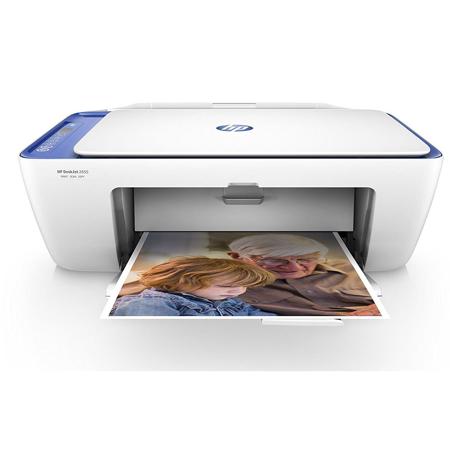
Save time and money with HP's most affordable wireless all-in-one printer to date. With a hassle-free setup and easy printing from your mobile devices, the HP DeskJet 2655 All-in-One removes the complications of your everyday printing needs. Dynamic security enabled printer. Intended to be used with cartridges using only HP original electronic circuitry. Cartridges with modified or non-HP electronic circuitry may not work and those that work today may not work in the future.
Easily print from your mobile device
• Easily print from a variety of smartphones and tablets
• Get connected and start printing fast with easy setup from your smartphone or tablet
• Easily manage printing tasks and scan on the go with the HP All-in-One Printer Remote app
The most affordable way to print
Save up to 50% on ink and never run out with the most affordable way to print.
Wirelessly print, copy and scan
• Print, copy and scan while saving money and space with a wireless all-in-one printer
• Output tray minimizes space when closed, reduces jams and holds 25 sheets when in use
• Put your printer wherever you want with this compact design
• Manage your printer effortlessly thanks to an easy to use control panel