This item is no longer available.
Review Summary
2023-09-04T20:00:00
why do i need a pairing code? a lot of unnecessary BS comes along with this printer. why do we have to sacrifice a level of efficiency every time we gain a level of security(or spyware in this case)? can we not just head in a direction that makes things simpler rather than doing the complete opposite? please?
ClntK

2023-05-24T20:00:00
Bought this three months ago and while I don't like that I had to create an account, once I did I received excellent service from HP. I'm using it in a small business setting with stationary that has full color graphic on the back. I needed help to set the paper stock to heavy to get clear prints. My service person hung in there with me until we figured it out. Its now been three months an d its been GREAT!
SF A.

2023-04-03T20:00:00
Having been a HP fan for my entire career, I purchased this model for my daughter in-law to use in her new home office without doing any research. What a mistake! Originally HP's business model tried to subsidized their printer costs by first chipping their toner cartridges hoping to eliminate or reduce third party toner purchases. It didn't work. When they got sued and lost over a firmware block to stop third party usage, their R&D team came up with an even more sinister scheme.... tracking your every move while retaining full ownership of your printer despite the fact they no longer own it, you do. Now they can disable your printer at will when & if you violate their ownership rules. So I returned it to Staples within three days. The store manager said it was their 12th return that week! Are you listening HP? So here's a tip ... first get rid of the Spyware in these units then competitively reduce the price of your toners, even if that means initially raising the printer cost by 50 bucks or so to offset any losses... problem solved.
CapCom

2022-12-06T19:00:00
Requires HP+
Requires H.

2022-11-28T19:00:00
If you see HP+ advertised as a "feature" on any printer do not buy it. What a pain to setup or I mean Activate now. You have to create an account, then enter a code that is emailed to you, then enter a pairing code the printer displays. All so HP can track everything you do with the printer. You can also forget about using it as a USB only printer.
VoReason

2022-10-17T20:00:00
I've been in I.T. for 30 years. I have always loved HP printers - until now. This will be the last HP printer I ever buy for our organization. Out of the box - will not do *anything* until you create an account and register with HP (so they can spam you to death). Stope printing from a locally connected PC (USB) if you disconnect it from Ethernet. This is "big brother" in every sense of the word. On top of that, you must always use genuine HP cartirdges - I have always leaned that way anyway, but being FORCED is a whole other thing. Good luck to you HP - as a company I hope you wither away to nothingness.
OldTimerITGuy

2022-10-10T20:00:00
I've been a diehard HP person at home and work for decades, but my experience with this printer may have changed all that. Because HP wants to sell you their new ink replenishment program they make setting up the machine very difficult. I couldn't even use as a copier until I went online and completed their very confusing setup procedure. Within a week of finally getting things to work, I received an error message saying that the machine could not recognize the toner cartridge. I worked with multiple HP customer service reps who also could not figure out the issue and finally said that there was a "known software issue" causing the problem. They promised to call me back the next day with a solution, but never did. I lost hours of my life trying to resolve the issue without success and finally returned the unit to Staples and purchased a Brother which has worked great and is much easier to setup and cheaper to operate.
Scott M.

2022-09-29T20:00:00
I do not recommend this printer. Stay as far away from it as possible. This was purchased as an office printer (in an enterprise setting) and it is meant to be a local USB printer. However you cannot install the printer without having a connection to the internet (which it doesn't). So you cannot go any further, you can't even get into the "settings" on the display. It's basically a brick until you get it connected to the internet.
ITsupportstaff

2022-09-27T20:00:00
There are now two professional lines, this one ends in "e" and is not able to network well. I was told in a chat to purchase a USB cable to connect, but the "e" version cannot connect with a USB cable, and has alot of network set up to make it work. The website needs far more information telling the difference between the "e" versions and the non "e" versions.
Donna7

Accidents happen where life happens. Protect your favorite Adorama products and purchase a protection plan to stay covered from accidental damage, mechanical or electrical failure, and more.
If we can’t fix it, we’ll replace it at no additional cost.
Protect your product from drops, spills, and more.
Enjoy your gear without fear. We have you covered!
When regular use of your product over time results in mechanical or electrical failure.
We will never charge you a deductible after the purchase of a plan.
Our claims process is simple & easy and our customer service team is happy to help.
Adorama Protect powered by Extend is available for purchase to customers in the United States. Not available for purchase Internationally or in U.S. Territories.
Browse our FAQ
Print, copy, scan, fax
First page out Letter: As fast as 6.1 sec Black; First page out A4: As fast as 6.3 sec Black; Letter: Up to 42 ppm Black; A4: Up to 40 ppm Black; Print speed (Landscape, A5): Up to 63 ppm Black
Black (best) Fine Lines (1200 x 1200 dpi); Black (normal) Normal (native 600 x 600 dpi; enhanced up to 4800 x 600 dpi); Black (fine lines) Fine Lines (1200 x 1200 dpi)
Laser; Print resolution technology: HP FastRes 1200, HP ProRes1200, Economode
1 (black)
HP PCL 6, HP PCL 5e, HP postscript level 3 emulation, PDF, URF, Native Office, PWG Raster
Auto duplex and booklet printing, N-up printing, collation, watermarks, install printer driver only, Economode for toner savings, accepts a variety of paper sizes and types
HP Printer Assistant; HP Web JetAdmin Software; HP JetAdvantage Security Manager; HP SNMP Proxy; Agent (Part of HP WebJetAdmin); HP WS Pro Proxy Agent (Part of HP WebJetAdmin); Printer Administrator Resource Kit for HP Universal Print Driver (Driver Configuration Utility - Driver Deployment Utility - Managed Printing Administrator)
Type: Flatbed, ADF; Technology: Contact Image Sensor (CIS); Twain version: Version 2.3
Hardware: Flatbed (Up to 1200 x 1200 dpi); ADF (Up to 300 x 300 dpi); Optical: Up to 1200 x 1200 dpi
PDF, JPG, TIFF
Front-panel scan, copy, email, or file buttons; HP Scan software; and user application via TWAIN or WIA
ADF: 8.5 x 14" Maximum; 4 x 6" Minimum; Flatbed: 8.5 x 11.7"
Up to 31 ppm/49 ipm (b&w), up to 21 ppm/36 ipm (color) Letter; Up to 29 ppm/46 ipm (b&w), up to 20 ppm/34 ipm (color) A4; Duplex: Up to 31 ppm/49 ipm (b&w), up to 21 ppm/36 ipm (color) Letter; Up to 29 ppm/46 ipm (b&w), up to 20 ppm/34 ipm (color) A4
Single-pass 2-sided scanning ADF, Scan to email with LDAP email address lookup, Scan to network folder, Scan to USB, Scan to Microsoft SharePoint, Scan to computer with software, Faxarchive to network folder, Fax archive to email, Fax to computer, Enable/disable fax, Quick Sets; PDF; JPG; Windows HP Scan SW supports PDF, searchable PDF, JPG, RTF, TXT, BMP, PNG, TIFF.
Mac HP Easy Scan SW supports PDF, searchable PDF, JPG, RTF, TXT, JPG-2000, PNG, TIFF; PDF; JPG; Windows HP Scan SW supports PDF, searchable PDF, JPG, RTF, TXT, BMP, PNG, TIFF. Mac HP Easy Scan SW supports PDF, searchable PDF, JPG, RTF, TXT, JPG-2000, PNG, TIFF
24-bit/256
Letter: Up to 42 cpm Black; A4: Up to 40 cpm Black; First copy out Letter: As fast as 6.8 sec Black; First copy out A4: As fast as 7.2 sec Black; 2-sided Letter: Up to 36 cpm Black; 2-sided A4: Up to 34 cpm Black
Color (text and graphics): Up to 600 x 600 dpi
Up to 999 copies
25 to 400%
ID Copy; Number of copies; Resize (including 2-Up); Lighter/Darker; Enhancements; Original Size; Binding Margin; Collation; Tray Selection; Two-Sided; Quality (Draft/Normal/Best); Save Current Settings; Restore Factory Defaults
Up to:33.6 kbps/Letter:6 sec per page
Black (best): Up to 300 x 300 dpi; Black (standard): 203 x 98 dpi
Auto fax reduction; Auto redialing; Delayed sending; Fax forwarding; TAM interface; Junk barrier; Distinctive ring detection; Cover page; Block fax; Billing codes; Save and load; Fax activity reports; Dial prefix setting; Print fax log; HP Digital Fax
Fax memory: Up to 400 pages; Auto fax reduction supported: Yes; Auto-redialing: Yes; Fax delayed sending: No; Distinctive ring detection supported: Yes; Fax forwarding supported: Yes; Fax phone TAM interface supported: Yes; Fax polling supported: No; Fax telephone mode supported: No; Junk barrier supported: Yes, as blocked fax numbers; Maximum speed dialing numbers: Up to 200 numbers
PC interface supported: Yes, software not included; Remote retrieval capability supported: Yes (receive only); Telephone handset supported: No
1 Hi-Speed USB 2.0; 1 rear host USB; 1 Front USB port; Gigabit Ethernet 10/100/1000BASE-T network; 802.3az(EEE)
Yes, via built-in 10/100/1000Base-TX Ethernet, Gigabit; Auto-crossover Ethernet; Authentication via 802.1X
Standard: 512 MB; Maximum: 512 MB
1200 MHz/Storage: Optional Job Storage via external rear host USB port (minimum 16 GB)/Hard disk: No
Letter: Up to 80,000 pages; A4: Up to 80,000 pages; Recommended monthly page volume: 750 to 4,000
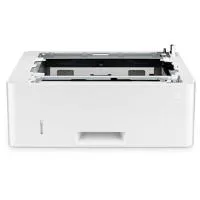
100-sheet tray 1, 250-sheet input tray 2; 50-sheet Automatic Document Feeder (ADF); Up to 350 sheets (Tray 1: up to 100 sheets; Tray 2: up to 250 sheets) Standard; Up to 10 envelopes
Standard: 150-sheet output bin; Up to 150 sheets Standard
Automatic (default)
Standard, 50 sheets; Duplex ADF scanning: Yes
No
2
Paper (plain, EcoEFFICIENT, light, heavy, bond, colored, letterhead, preprinted, prepunched, recycled, rough); envelopes; labels
Tray 1: 16 to 53 lbs; tray 2
Tray 1: Letter; Legal; Executive; Oficio (8.5 x 13"); 16K; Japanese Postcard; Double Japan Postcard Rotated; Envelope #10; Envelope Monarch; Envelope B5; Envelope C5; Envelope DL; Custom Size; 4 x 6"; 5 x 8 "; Statement; Tray 2 & Tray 3: Letter; Legal; Executive; Oficio (8.5 x 13"); Custom Size; 5 x 8"; Statement
Tray 1: 3 x 5 to 8.5 x 14", Tray 2, 3: 4.12 x 5.83 to 8.5 x 14"
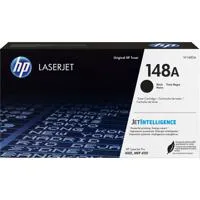
HP 148A Black Original LaserJet Toner Cartridge (-2,900 pages), W1480A; HP 148X Black Original LaserJet Toner Cartridge (-9,500 pages), W1480X
Yes
ENERGY STAR qualified; IT ECO Declaration
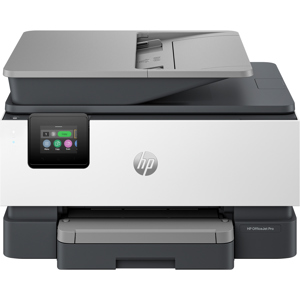
2.7" Color Touchscreen
2.7" (6.86cm) intuitive color touchscreen (CGD)
No
84 scalable TrueType fonts
Windows 11; Windows 10; Windows 7; Windows Client OS; Android; iOS; Mobile OS; macOS 10.15 Catalina; macOS 11 Big Sur; macOS 12 Monterey
Windows 8; Windows Server; Linux; Citrix; Novell
PC:2GB available hard disk space; Internet connection or USB port; Internet browser.
Mac: 2GB available hard drive space; Internet connection or USB port; Internet browser.
Power supply type: Internal (Built-in) power supply; Power supply required: 110-volt input voltage: 110 to 127 VAC (+/- 10%), 50/60 Hz (+/- 2 Hz); 220-volt input voltage: 220 to 240 VAC (+/- 10%), 50/60 Hz (+/- 2 Hz) (Not dual voltage, product varies by part number with # Option code identifier); Power consumption: 510 watts (active printing), 7.5 watts (ready), 0.9 watts (sleep), 0.9 watts (Auto Off/Wake on LAN, enabled at shipment)
0.06 watts (Auto off/Manual-on), 0.06 (Manual Off); Typical electricity consumption (TEC) number: 0.40 kWh/Week (Blue Angel); 0.44 kWh/Week (Energy Star 3.0)
Acoustic power emissions: 6.7 B(A)
Operating temperature range: 50 to 90.5 Degree F (10 to 32.5 Degree C); Recommended operating temperature: 59 to 80.6 Degree F (15 to 27 Degree C); Storage temperature range: -4 to 104 Degree F (-20 to 40 Degree C); Operating humidity range: 10 to 80% RH (non-condensing) ; Recommended operating humidity range: 30 to 70% RH
16.54 x 15.35 x 12.72" (420 x 390 x 323mm)
Maximum: 16.93 x 25 x 12.8" (430 x 634 x 325mm)
27.78 lbs (12.6kg)


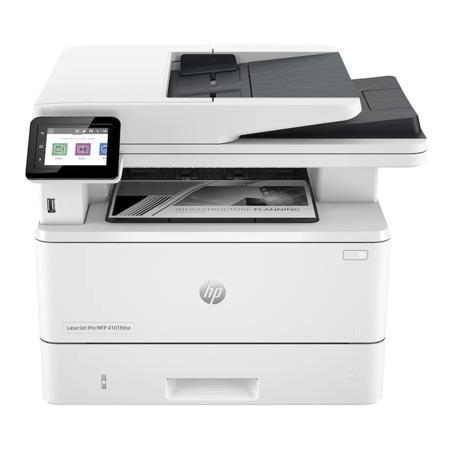
Find the perfect balance of speed, efficiency, and security with the LaserJet Pro MFP 4101fdne Duplex Monochrome Multifunction Laser Printer with HP+. This advanced laser printer is engineered to boost productivity for small to medium-sized businesses and workgroups within larger organizations.
Experience superior performance with high-speed printing of up to 42 pages per minute, dual-sided printing and scanning, and an automatic document feeder. This printer is designed to support dynamic work teams of up to 10 users, making it an ideal solution for high-demand environments.
Enhance your workflow with the HP Smart app, which allows you to print, scan, and access time-saving shortcuts right from your mobile device. Simplify common tasks with intuitive shortcuts, enabling your team to accomplish more in fewer steps.
Setting up and managing your printer is a breeze with our guided, cloud-based setup. The Smart Admin Dashboard allows you to monitor usage and control settings across multiple printers in various locations. With seamless connectivity, you can print from any device, anywhere, on any network.
Security is a top priority with the LaserJet Pro MFP 4101fdne. It comes with preconfigured settings and HP Wolf Pro security, ensuring your printer and information are secure right out of the box. The printer also offers a PIN/pull option for authenticated print jobs, adding an extra layer of security.
Never worry about running out of toner with our Instant Ink for lasers. This service delivers Original HP Toner cartridges automatically, only when you need them. Manage your subscription to have cartridges delivered to multiple locations on a single consolidated bill. Choose the right plans for each of your printers and change or cancel at any time.
The LaserJet Pro MFP 4101fdne Duplex Monochrome Multifunction Laser Printer with HP+ is more than just a printer; it's a comprehensive solution for your business's printing needs. Experience the difference in speed, efficiency, and security with this advanced laser printer.